
시작하기
yarn create react-app 프로젝트이름	  // 프로젝트 만들기
yarn add styled-components		  // 스타일 컴포넌트 패키지 설치
yarn add redux react-redux		  // 리덕스 패키지 설치
yarn add react-router-dom 		  // 라우터 패키지 설치
redux와 router를 함께 사용 할 때, 폴더 및 파일 구성
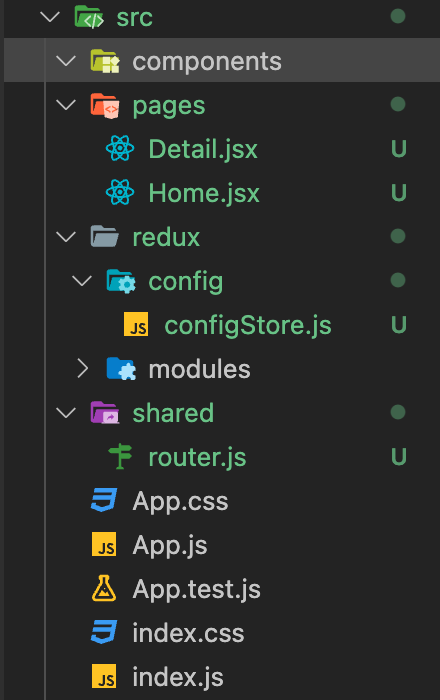
-
redux: 리덕스와 관련된 코드를 모두 모아 놓을 폴더 -
config: 리덕스 설정과 관련된 파일들을 놓을 폴더 -
configStore: “중앙 state 관리소" 인 Store를 만드는 설정 코드들이 있는 파일 -
modules: 만들 State들의 그룹. (ex. todo.js) -
router: pages 폴더 내의 jsx파일들의 경로를 설정해줄 파일임..
configStore.js 템플릿
import { createStore } from "redux";
import { combineReducers } from "redux";

/*
1. createStore()
리덕스의 가장 핵심이 되는 스토어를 만드는 메소드(함수) 입니다.
리덕스는 단일 스토어로 모든 상태 트리를 관리한다고 설명해 드렸죠?
리덕스를 사용할 시 creatorStore를 호출할 일은 한 번밖에 없을 거예요.
*/

/*
2. combineReducers()
리덕스는 action —> dispatch —> reducer 순으로 동작한다고 말씀드렸죠?
이때 애플리케이션이 복잡해지게 되면 reducer 부분을 여러 개로 나눠야 하는 경우가 발생합니다.
combineReducers은 여러 개의 독립적인 reducer의 반환 값을 하나의 상태 객체로 만들어줍니다.
*/

const rootReducer = combineReducers({
		// 이 안에 만들어둔 리듀서의 이름이 들어가면 됩니다..
});
const store = createStore(rootReducer);

export default store;
index.js 변경
// 원래부터 있던 코드
import React from "react";
import ReactDOM from "react-dom/client";
import App from "./App";
import reportWebVitals from "./reportWebVitals";

// 우리가 추가할 코드
import store from "./redux/config/configStore";
import { Provider } from "react-redux";
// 이 때, 꼭 react-redux 패키지 내의 Provider 인지 확인할 것.

const root = ReactDOM.createRoot(document.getElementById("root"));
root.render(

	//App을 Provider로 감싸주고, configStore에서 export default 한 store를 넣어줍니다.
  <Provider store={store}>
    <App />
  </Provider>
);

// If you want to start measuring performance in your app, pass a function
// to log results (for example: reportWebVitals(console.log))
// or send to an analytics endpoint. Learn more: https://bit.ly/CRA-vitals
reportWebVitals();
리듀서 예시 코드
redux/modules/todos.js
// Action value
const ADD_TODO = "ADD_TODO";
const GET_TODO_BY_ID = "GET_TODO_BY_ID";
const DELETE_TODO = "DELETE_TODO";
const TOGGLE_STATUS_TODO = "TOGGLE_STATUS_TODO";

// Action Creator => payload로 값을 받아올 수 있어짐 ? ? ?
// Todo를 추가하는 action creator
export const addTodo = (payload) => {
  return {
    type: ADD_TODO,
    payload,
  };
};

// Todo를 지우는 action creator
export const deleteTodo = (payload) => {
  return {
    type: DELETE_TODO,
    payload,
    //여기 들어온 payload는 todo의 id값
  };
};

// Todo를 isDone를 변경하는 action creator
export const toggleStatusTodo = (payload) => {
  return {
    type: TOGGLE_STATUS_TODO,
    payload,
  };
};

// 상세 페이지에서 특정 Todo만 조회하는 action creator
export const getTodoByID = (payload) => {
  return {
    type: GET_TODO_BY_ID,
    payload,
  };
};

// initial state
const initialState = {
  todos: [
    {
      id: "1",
      title: "리액트",
      body: "리액트를 배워봅시다",
      isDone: false,
    },
  ],
  todo: {
    id: "0",
    title: "",
    body: "",
    isDone: false,
  },
};

const todos = (state = initialState, action) => {
  switch (action.type) {
    case ADD_TODO:
      alert("추가완료!")
      return {
        ...state,
        todos: [...state.todos,action.payload],
      };

      case DELETE_TODO:
        const newList = state.todos.filter((item)=>item.id!==action.payload)
        alert("삭제완료!")
        return {...state, todos: newList}

    case TOGGLE_STATUS_TODO:
      return {
        ...state,
        todos: state.todos.map((todo) => {
          if (todo.id === action.payload) {
            return {
              ...todo,
              isDone: !todo.isDone,
            };
          } else {
            return todo;
          }
        }),
      };

    case GET_TODO_BY_ID:
      return {
        ...state,
        todo: state.todos.find((todo) => {
          return String(todo.id) === String(action.payload.id);
        }),
      };
    default:
      return state;
  }
};

export default todos;

항상 피곤한 인서의 개발블로그