https://poiemaweb.com/angular-service
서비스란?
컴포넌트는 화면을 구성하는 뷰(View)와 데이터바인딩하는 클래스로 구성된다.
일반적으로 뷰에 보여질 데이터는 서버로부터 받던가 아니면 별도의 데이터파일로 구성될것이다.
이러한 데이터를 가져오는 기능을 컴포넌트 클래스 내부에 구현할수도 있지만 별도의 기능클래스로 만들어 관리하는 것이 재사용가능하고 유연성이 높아진다.
컴포넌트와 분리된 부가적 기능을 하는 클래스를 서비스라고 한다.
의존성 주입
> ng generate service greeting
greeting이라는 서비스를 생성하면 아래와 같은 코드로 만들어진다.
import { Injectable } from '@angular/core';

@Injectable({
  providedIn: 'root'
})
export class GreetingService {
  constructor() { }
}
@Injectable 데코레이터는 클래스를 주입가능하게 확장하고
providedIn:'root'는 루트인젝터에게 서비스를 제공하도록 지시하여 어플리케이션의 모든 컴포넌트가 GreetingService를 의존성주입으로 사용가하도록 한다.
의존성주입이 아닌 서비스 인스턴스를 직접 생성하는 방법을 먼저 알아보자.
export class GreetingService {
  sayHi() { return 'Hi!'; }
}
의존성주입이 아니기때문에 클래스만 있으면 된다.
import { Component } from '@angular/core';
import { GreetingService } from '../greeting.service';

@Component({
  selector: 'app-root',
  templateUrl: './app.component.html',
  styleUrls: ['./app.component.css']
})
export class AppComponent {
  title = 't1';
  greeting: string='';
  greetingService: GreetingService;

  constructor(){
    this.greetingService = new GreetingService();
  }
  sayHi(){
    this.greeting = this.greetingService.say();
  }
}
생성자함수에서 new GreetingService();으로 적접 객체를 생성해서 프로퍼티에 할당하면 잘 작동함을 알 수 있다.
단점 : 필요한 곳마다 객체를 생성해야 하기 때문에 같은 기능을 하는 인스턴스 갯수가 많아지고 메모리낭비가 생길 수 있다.
의존성주입에대해 알아보자.
컴포넌트는 외부에서 만들어진 GreetingService 인스턴스가 필요하기 때문에 컴포넌트는 GreetingService에 의존하고 있다고 한다.
의존성있는 서비스 인스턴스 생성을 프레임워크에 위임하고 인스턴스를 전달받는 방법을 의존성주입이라 한다.
// greeting.service.ts
import { Injectable } from '@angular/core';

@Injectable({
  providedIn: 'root' /* @Injectable 프로바이더 */
})
export class GreetingService {
  sayHi() { return 'Hi!'; }
}
import { Component } from '@angular/core';
import { GreetingService } from '../greeting.service';
@Component({
selector: 'app-root',
templateUrl: './app.component.html',
styleUrls: ['./app.component.css']
})
export class AppComponent {
title = 't1';
greeting: string='';
constructor(private greetingService: GreetingService) {}
sayHi(){
this.greeting = this.greetingService.say();
}
}의존성주입을 사용하려면 2가지가 필요하다.
- 컴포넌트 클래스 생성자함수 인자에 프로퍼티 매개변수로 서비스 인스턴스를 요청한다.
- 서비스 프로바이더 정보를 서비스클래스 또는 컴포넌트 클래스에 제공해야 한다.
위 코드는 루트모듈에 서비스 인스턴스가 생성되고 컴포넌트에 주입된다.
이후 서비스인스턴스 의존성주입을 요청하는 컴포넌트가 있다면 서비스인스턴스를 새로 생성하지 않고 생성되어있는 인스턴스가 주입되므로 메모리가 효율적으로 유지된다.
만약 providedIn:'root' 삭제하고 실행하면 앵귤러는 서비스 인스턴스를 어디에 생성할지 모르기 때문에 생성하지 못해 에러가 발생한다.
providedIn: 'root'정보가 없는 상태에서 컴포넌트가 서비스를 사용하려면 컴포넌트에 서비스정보를 제공하면 된다.
import { Injectable } from '@angular/core';

@Injectable()
export class GreetingService {
  say(){
    return 'Hi';
  }
}


import { Component } from '@angular/core';
import { GreetingService } from '../greeting.service';

@Component({
  selector: 'app-root',
  templateUrl: './app.component.html',
  styleUrls: ['./app.component.css'],
  providers:[GreetingService] // 서비스 프로바이더 정보
})
export class AppComponent {
  title = 't1';
  greeting: string='';
  constructor(private greetingService: GreetingService) {}

  sayHi(){
    this.greeting = this.greetingService.say();
  }
}
클래스 데코레이터 메타데이터로 providers:[GreetingService]가 있으면 프레임워크는 의존성주입되었을때 인스턴스를 루트모듈에 생성하지 않고 컴포넌트에 생성한다.
// 단축표현
providers: [GreetingService]

// 정식표현
providers: [{
    // 의존성 인스턴스의 타입(토큰, Token)
    provide: GreetingService,
    // 의존성 인스턴스를 생성할 클래스
    useClass: GreetingService
  }]
단축표현을 주로 사용하지만 정식표현을 사용해야 할 경우가 있다.
constructor(private greetingService: GreetingService) {}앵귤러는 의존성주입되면 서비스 메타데이터에 providedIn정보가 있는지 확인한다.
없다면 클래스 데코레이터 메타데이터에 providers프로퍼티가 있는지 확인한다.
providers프로퍼티가 있다면 GreetingService있는지 검사하고 userClass 값을 사용하여 컴포넌트에 서비스 인스턴스를 생성하고 greetingService프로퍼티에 참조할당한다.
인젝터
의존성주입이 요청되면 앵귤러는 인스턴스주입을 인젝터에게 요청한다.
인젝터는 의존성주입을 실제로 담당하는 객체로 컴포넌트와 모듈에 존재한다.
인젝터는 프로바이더를 검색하고 인스턴스를 생성하여 인스턴스를 주입하는 역활을 한다.
인젝터는 의존성주입요청이 있을때마다 인스턴스를 생성하지 않는다. 인젝터는 인스턴스 풀(pool)인 컨테이너를 관리한다.
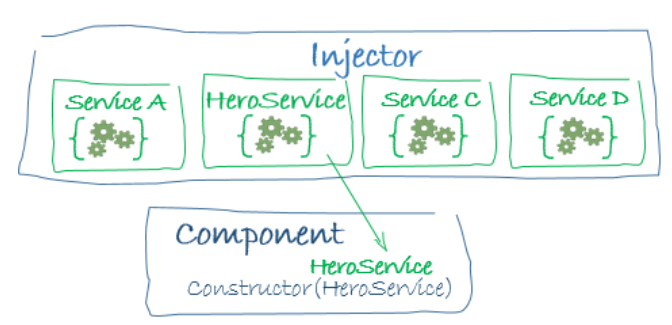
인젝터내에 인스턴스풀이 있다.
기존에 생성된 인스턴스는 프로바이더의 토큰을 키로 컨테이너에 저장되어 있다.
인젝터는 의존성주입요청을 받으면 요청받은 서비스의 타입을 키로 컨테이너에서 검색한다.
providers: [{
  // 의존성 인스턴스의 타입(토큰, Token)
  provide: GreetingService,
  // 의존성 인스턴스를 생성할 클래스
  useClass: GreetingService
}]
만약 주입요청된 인스턴스가 컨테이너에 존재하면 인스턴스를 주입하고, 존재하지 않으면 프로바이더의 useClass프로퍼티를 참조하여 인스턴스를 생성하고 토큰을 키로 컨테이너에 추가한 후, 이 인스턴스를 constructor에 주입한다.
인젝터 트리(Injector tree)
컴포넌트들은 모듈내에서 트리구조를 형성한다. 모든 컴포넌트는 각각 하나의 인젝터를 가지고 있기때문에 컴포넌트 트리구조와 같은 인젝터트리도 만들어진다.
constructor(private user: UserService) {}주입요청을 받은 인젝터는 주입 대상의 프로바이더가 컴포넌트 클래스 데코레이터 메타데이터 providers에 있는지 검색한다.
providers에 있으면 인젝터풀에 인스턴스가 있는지 확인하고 있으면 참조를 주입한다.
없을때는 상위컴포넌트의 인젝터에게 주입요청하고 상위컴포넌트는 인스턴스풀을 검색한다. 이러한 반복 과정으로 최상위 컴포넌트까지 인스턴스풀을 검색한다.
최상위 컴포넌트까지 인스턴스를 찾지못하면 모듈에서 찾는다.
여기서도 인스턴스를 찾지못하면 에러를 발생시킨다.
이말은 의존성주입이 요청되었는데 어디에도 데코레이터의 프로바이더 정보가 없다는 것이고 문법을 어긴것이므로 에러를 발생시킨다.
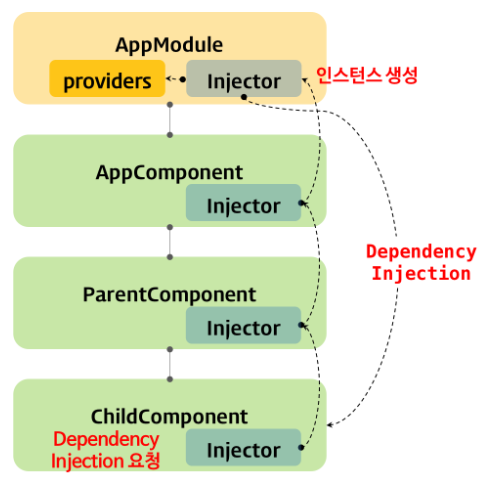
AppModule 프로바이더에 provide프로퍼티에 타입정보가 있다면 그림과 같이 ChildComponent에서부터 상위컴포넌트를 거쳐 AppModule에서 인스턴스가 생성되고 ChildComponent에 주입된다.
루트 모듈의 프로바이더에 등록되어 있는 서비스는 애플리케이션 전역에 주입할 수 있는 전역 서비스이다.
루트 인젝터는 단일 인스턴스를 생성하고 인스턴스를 요청하는 모든 구성요소에게 동일한 싱글턴 인스턴스를 주입한다.
프로바이더(Provider)
@NgModule({
  ...
  providers: [GreetingService]
})

// @Component 프로바이더
@Component({
  ...
  providers: [GreetingService]
})
인젝터는 모듈이나 컴포넌트 데코레이터 메타데이터에 프로바이더가 없다면 상위 컴포넌트에 주입을 위임하고 프로바이더가 있다면 인젝터 인스트스풀에 서비스 인스터스가 있다면 주입하고 없다면 인스턴스를 생성한후 주입한다.
@Injectable({
  providedIn: 'root'
})
@Injectable 메타데이터에 providedIn 프로퍼티의 값으로 ‘root’를 설정하면 루트모듈 인젝터에게 의존성주입을 요청하는 것으로 생성되어있는 인스턴스가 있다면 주입하고 없다면 생성해서 주입할 것이다.
@Injectable({
  providedIn: 'UserModule'
})
특정 모듈에 프로바이더를 지정할 수 있다.
모듈에 프로바이더를 등록한 서비스는 해당 모듈의 모든 구성요소(루트 모듈인 경우, 애플리케이션 전역)에 주입할 수 있고, 컴포넌트에 프로바이더를 등록한 서비스는 해당 컴포넌트와 하위 컴포넌트에 주입할 수 있다.
클래스 프로바이더(Class Provideer)
providers: [{
  // 의존성 인스턴스의 타입(토큰, Token)
  provide: GreetingService,
  // 의존성 인스턴스를 생성할 클래스
  useClass: AnotherGreetingService
}]
프로바이더와 인스턴스를 생성할 클래스를 다르게 할 수 있다.
import { Component } from '@angular/core';
import { GreetingService } from './greeting.service';
import { AnotherGreetingService } from './another-greeting.service';

@Component({
  selector: 'app-root',
  template: `
    <button (click)="sayHi()">Say Hi</button>
    <p>{{ greeting }}</p>
  `,
  providers: [{
    // 의존성 인스턴스의 타입(토큰, Token)
    provide: GreetingService,
    // 의존성 인스턴스를 생성할 클래스
    useClass: AnotherGreetingService
  }]
})
export class AppComponent {
  greeting: string;

  constructor(private greetingService: GreetingService) {
    console.log(greetingService instanceof AnotherGreetingService); // true
  }

  sayHi() {
    this.greeting = this.greetingService.sayHi();
  }
}
타입스크립트는 타입이 다르더라도 구조적으로 맞으면 호환되기때문에 위와같은 프로바이더가 가능하다.
providers: [{
  provide: AnotherGreetingService,
  useClass: AnotherGreetingService
}]
컴포넌트에 위와같이 서비스 주입요청을 하면 앵귤러는 인스턴스를 생성해서 전달하기때문에 실제로는 AnotherGreetingService 인스턴스 2개가 생성되는 것이므로 싱글턴을 유지하기위해 루트모듈에 하는것이 좋다.
값 프로바이더(Value Provider)
클래스의 인스턴스가 아닌 문자열이나 리터럴객체와 같은 값도 의존성주입이 가능하다.
export class AppConfig {
  url: string;
  port: string;
}

// 주입 대상의 값
export const MY_APP_CONFIG: AppConfig = {
  url: 'http://somewhere.io',
  port: '5000'
};
import { Component } from '@angular/core';
import { AppConfig, MY_APP_CONFIG } from './app.config';
@Component({
selector: 'app-root',
template: '{{ appConfig | json }}',
providers: [
{ provide: AppConfig, useValue: MY_APP_CONFIG }// useValue임을 확인하자
]
})
export class AppComponent {
constructor(public appConfig: AppConfig) {
console.log(appConfig);
// {url: "http://somewhere.io", port: "5000"}
}
}리터럴객체도 의존성주입이 가능하다.
원시값도 의존성주입이 가능할까?
문자열을 의존성주입하려면 string타입으로 앵귤러가 provider프로퍼티로 타입을 추론하지 못하기때문에 아래와 같이 해야 한다.
providers: [
  { provide: 'API_URL', useValue: 'http://somewhere.io' },
  { provide: 'API_PORT', useValue: 5000 },
  { provide: 'API_PROD', useValue: false }
]
import { Component, Inject } from '@angular/core';
@Component({
selector: 'app-root',
template: `
<p>api server : {{ apiUrl }}:{{ apiPort }}</p>
<p>api mode : {{ apiProd ? 'Production' : 'Developement' }}</p>
`,
providers: [
{ provide: 'API_URL', useValue: 'http://somewhere.io' },
{ provide: 'API_PORT', useValue: 5000 },
{ provide: 'API_PROD', useValue: false }
]
})
export class AppComponent {
constructor(
@Inject('API_URL') public apiUrl: string,
@Inject('API_PORT') public apiPort: number,
@Inject('API_PROD') public apiProd: boolean
) {
console.log(apiUrl); // 'http://somewhere.io'
console.log(apiPort); // 5000
console.log(apiProd); // false
}
}@Inject('API_URL') public apiUrl: string, 와 같이 사용해야 한다.
하지만 문자열을 토큰으로 사용하는 것은 토큰이 중복될 위험이 있으므로 피해야 한다.
선택적 의존성 주입(Optional Dependency)
import { Component, Optional } from '@angular/core';
import { GreetingService } from './greeting.service';

@Component({
  selector: 'app-root',
  template: '',
  // providers: [GreetingService]
})
export class AppComponent {
  greeting: string;

  // 선택적 의존성 주입
  constructor(@Optional() public greetingService: GreetingService) {
    this.greeting
      = this.greetingService ? this.greetingService.sayHi() : 'Hi...';
  }
}
프로바이더에 등록되어있을때와 등록되지 않을때를 구분해서 처리한다.
서비스 중재자 패턴(Service Mediator Pattern)
컴포넌트는 독립적인 존재이지만 다른 컴포넌트와 결합도를 낮게 유지하면서 상태정보를 교환할 수 있어야 한다.
@Input, @Output을 사용하여 하위컴포넌트와 데이터를 교환할 수 있지만 원거리 컴포넌트간의 상태공유를 위해서 상태공유가 필요없는 컴포넌트를 경유해야 하고 일관된 자료구조가 존재하지 않기때문에 개별적인 프로퍼티만을 교환할 수 밖에없는 한계가 있다.
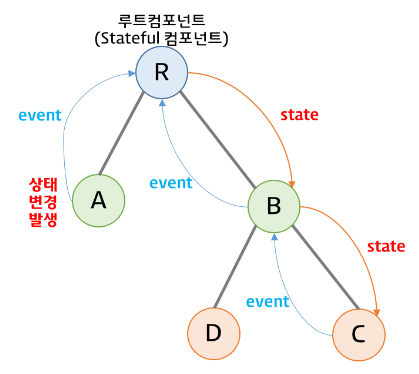
서비스를 컴포넌트간 중재자로 사용하면 일정한 형식의 자료구조를 사용하여 컴포넌트간 상태공유가 가능하다.
import { Injectable } from '@angular/core';

@Injectable({
  providedIn: 'root'
})
export class GreetingService {
  message: string='';
}
import { Component } from '@angular/core';
import { GreetingService } from '../../greeting.service';
@Component({
selector: 'app-sibling1',
template: `
<h2>Sibling-1</h2>
<p>message: {{ message }}</p>
<input type="text" (input)="show($event)" placeholder="message">
`,
styles: [`
:host {
display: block;
padding: 10px;
background-color: antiquewhite;
}
`]
})
export class Sibling1Component {
constructor(private greetingService: GreetingService) {}
get message(): string {
return this.greetingService.message;
}
show(ev:Event){
let inp = ev.currentTarget as HTMLInputElement;
this.greetingService.message = inp.value;
}
}message에 get message() get this.greetingService.message;으로 연동되어있다.
import { Component } from '@angular/core';
import { GreetingService } from '../../greeting.service';

@Component({
  selector: 'app-sibling2',
  template: `
    <h2>Sibling-2</h2>
    <p>message: {{ message }}</p>
    <input type="text"
    (input)="show($event)"
      placeholder="message">
  `,
  styles: [`
    :host {
      display: block;
      padding: 10px;
      background-color: aliceblue;
    }
  `]
})
export class Sibling2Component  {

  constructor(private greetingService: GreetingService) {}

  get message(): string {
    return this.greetingService.message;
  }

  show(ev:Event){
    let inp = ev.currentTarget as HTMLInputElement;
    this.greetingService.message = inp.value;
  }

}
{{title}}
<app-sibling1></app-sibling1>
<app-sibling2></app-sibling2>
greetingService를 루트모듈에서 생성시킨후 의존성주입받는다.
2개의 sibling컴포넌트는 greetingService를 공유하게 된다.
(input)="show($event)" input태그의 값변경 이벤트가 발생하면 show함수를 실행시키고 greetingService.message 값을 변경시킨다.
템플릿에 {{message}}로 문자열 데이터바인딩이 되어있는데 getter 메소드로 되어있다.
message 데이터바인딩된 getter함수는 컴포넌트에 상태변화가 발생하면 호출된다.
위의 경우 입력박스의 값이 변경되면 2개 컴포넌트의 getter함수가 호출되기때문에 message값이 변경된다.
입력박스와 관계없는 컴포넌트에 버튼이 있을때 버튼클릭시에도 getter함수가 호출된다.
그렇다면 많은 바인딩변수가 있을때 getter, setter함수가 있으면 컴포넌트 상태가 변할때마다 getter, setter함수가 호출된다. 이거 정상인가?????
