[php 8.1]
xampp-windows-x64-8.1.0-0-VS16-installer.exe
php_imagick-3.7.0-8.1-ts-vs16-x64.zip
ImageMagick-7.1.0-18-vc15-x64.zip
[php 7.4.5]
xampp-portable-windows-x64-7.4.5-0-VC15-installer.exe
php_imagick-3.7.0-7.4-ts-vc15-x64.zip
ImageMagick-7.1.0-18-vc15-x64.zip
php_xdebug-3.0.4-7.4-vc15-x86_64.dll
[설치방법]
http://jichiduo.com/2022/03/16/Install-Imagick-Xampp-PHP8-1-Windows/
mv php_imagick-3.7.0-8.1-ts-vs16-x64 folder to c:\ and add this folder to enviroument path , move up it on the top of php8.1 path
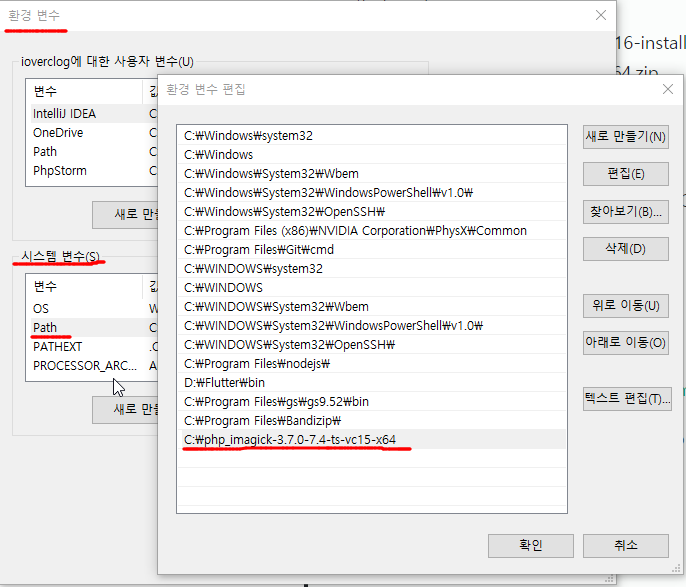
참고자료
https://mlocati.github.io/articles/php-windows-imagick.html
https://imagemagick.org/script/download.php#windows
http://jichiduo.com/2022/03/16/Install-Imagick-Xampp-PHP8-1-Windows/
https://windows.php.net/downloads/pecl/deps/
https://blog.naver.com/korea4777/10181033090
https://88240.tistory.com/17
https://xdebug.org/download/historical
이미지 관련 라이브러리 설치 이유
- 워드프레스는 이미지를 업로드하면, 여러 크기의 이미지를 자동 생성해서 저장하는데, 그때 해당 라이브러리 기능이 필요하다. cafe24 같은 곳에서는 이미 설치되어 있지만, 로컬에서 테스트할 때도 해당 기능 사용하기 위해 필요.

유익한 자료 감사합니다.