
5.0 Introduction
Error
⇒ 에러 내용1
npm ERR! code ENOENT
npm ERR! syscall open
npm ERR! path C:\Users\AI\Desktop\js chrome clone app/package.json
npm ERR! errno -4058
npm ERR! enoent ENOENT: no such file or directory, open 'C:\Users\AI\Desktop\js chrome clone app\package.json'
npm ERR! enoent This is related to npm not being able to find a file.
npm ERR! enoent

npm ERR! A complete log of this run can be found in:
npm ERR! C:\Users\AI\AppData\Local\npm-cache\_logs\2022-10-25T08_01_43_377Z-debug-0.log- 터미널로 다음과 같은 에러가 발생하면 아래 방식대로 해결
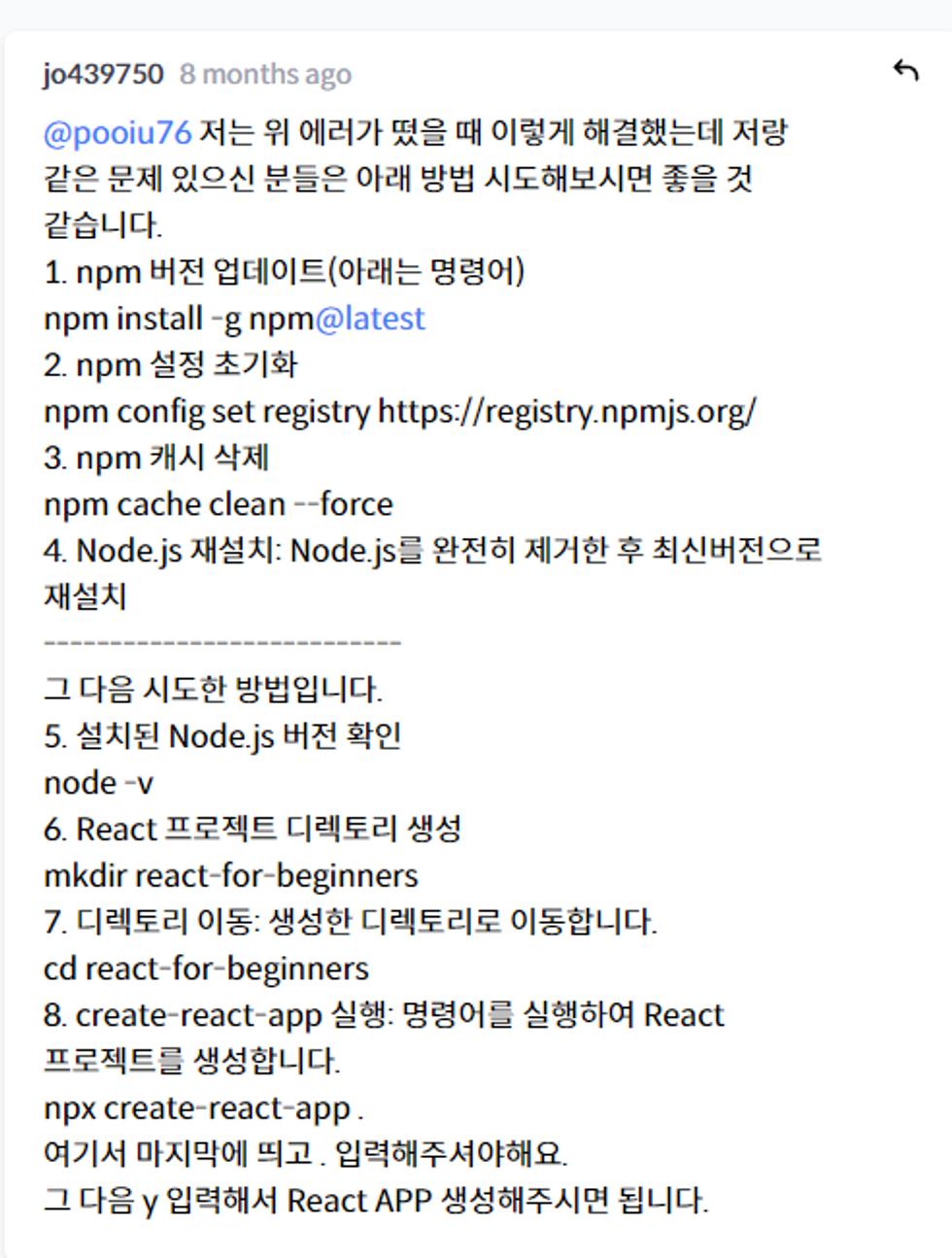
- 위 이미지 순서대로 간다.
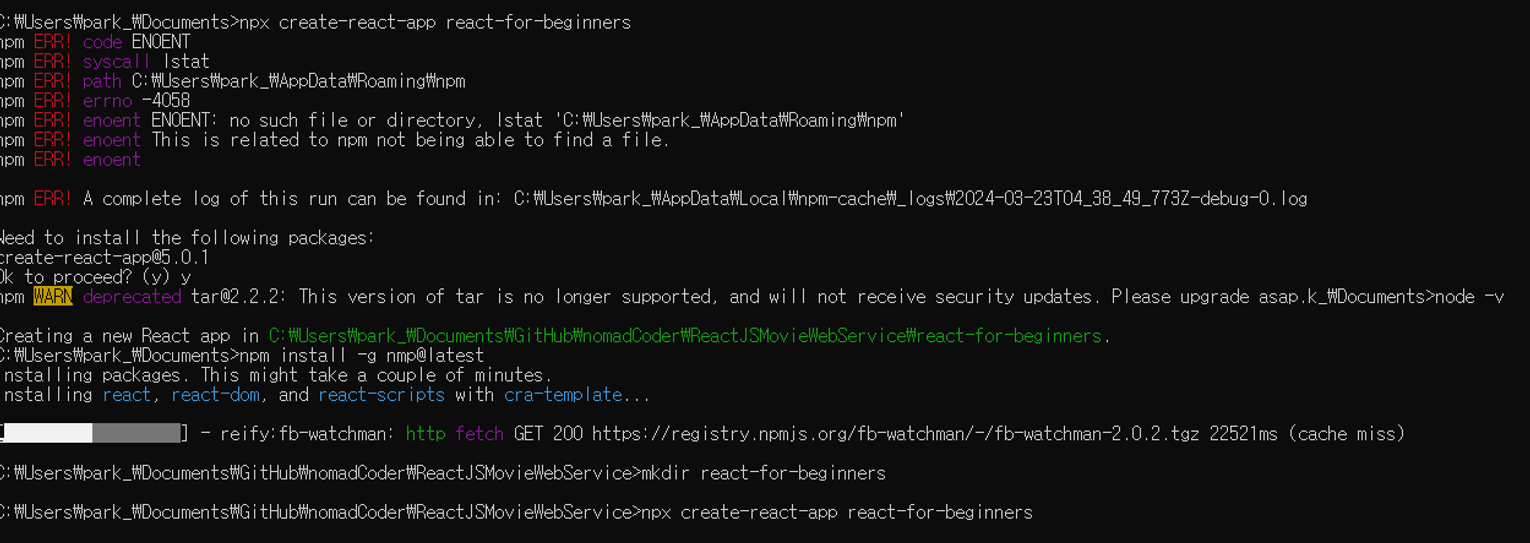
- 그리고 터미널 창에서 해야하는 코드 라인을 입력한다.
⇒ 에러 내용2
- cmd에서 나는 문제 해결하고, create-react-app까지 설치하고 난 다음 VS 코드를 실행시키고 난 상태. VS Code의 터미널 창에서 “npm run”을 입력했는데 다음과 같은 에러가 뜬다면?
npm ERR! code ENOENT
npm ERR! syscall open
npm ERR! path C:\Users\AI\Desktop\js chrome clone app/package.json
npm ERR! errno -4058
npm ERR! enoent ENOENT: no such file or directory, open 'C:\Users\AI\Desktop\js chrome clone app\package.json'
npm ERR! enoent This is related to npm not being able to find a file.
npm ERR! enoent

npm ERR! A complete log of this run can be found in:
npm ERR! C:\Users\AI\AppData\Local\npm-cache\_logs\2022-10-25T08_01_43_377Z-debug-0.log- 이거는 터미널 창의 실행 경로가 잘 안된 것!
- React라는 폴더에 react-for-begineers라는 React APP을 만들고, react-for-begineers폴더에서 터미널을열고 npm start를 안하고 상위폴더인 React에서 실행시키니까 나는 error더라구요..
- 즉, 현재 터미널의 최종 경로가 react-for-begineers인지 그 상위 폴더인지 봐야 함.
- 최종 경로로 터미널 경로를 맞춰 줘야 함!
- 즉, 현재 터미널의 최종 경로가 react-for-begineers인지 그 상위 폴더인지 봐야 함.
- React라는 폴더에 react-for-begineers라는 React APP을 만들고, react-for-begineers폴더에서 터미널을열고 npm start를 안하고 상위폴더인 React에서 실행시키니까 나는 error더라구요..
⇒ 참고
- npm ERR! path C:\Users\LG\AppData\Roaming\npm
- npm install 할 때 tar ENOENT: no such file or directory, lstat ~ 에러날 경우
Code
- 해당 코드는 직접 작성한 것이 아니라, node.js를 통해 create-react-app을 하고 나서 자동적으로 생성된 코드들이다.
- 설치를 하면 설치 폴더 안에 node.js와 관련된 폴더랑 파일들이 몇 개 설치됨
- 그러고 나서 니꼬T는 수업에 상관 없는 파일들은 지움
- 아래 있는 파일들은 남긴 파일들 중 핵심적인 파일임
⇒ package.json
{
  "name": "react-for-beginners",
  "version": "0.1.0",
  "private": true,
  "dependencies": {
    "@testing-library/jest-dom": "^5.17.0",
    "@testing-library/react": "^13.4.0",
    "@testing-library/user-event": "^13.5.0",
    "react": "^18.2.0",
    "react-dom": "^18.2.0",
    "react-scripts": "5.0.1",
    "web-vitals": "^2.1.4"
  },
  "scripts": {
    "start": "react-scripts start",
    "build": "react-scripts build",
    "test": "react-scripts test",
    "eject": "react-scripts eject"
  },
  "eslintConfig": {
    "extends": [
      "react-app",
      "react-app/jest"
    ]
  },
  "browserslist": {
    "production": [
      ">0.2%",
      "not dead",
      "not op_mini all"
    ],
    "development": [
      "last 1 chrome version",
      "last 1 firefox version",
      "last 1 safari version"
    ]
  }
}
- npm과 package.json의 역할
⇒ App.js
function App() {
  return (
    <div>
      <h1>Welcome back!!!!</h1>
    </div>
  );
}

export default App;
⇒ index.js
import React from "react";
import ReactDOM from "react-dom/client";
import App from "./App";

const root = ReactDOM.createRoot(document.getElementById("root"));
root.render(
  <React.StrictMode>
    <App />
  </React.StrictMode>
);
⇒ indx.html
<!DOCTYPE html>
<html lang="en">
  <head>
    <meta charset="utf-8" />
    <link rel="icon" href="%PUBLIC_URL%/favicon.ico" />
    <meta name="viewport" content="width=device-width, initial-scale=1" />
    <meta name="theme-color" content="#000000" />
    <meta
      name="description"
      content="Web site created using create-react-app"
    />
    <link rel="apple-touch-icon" href="%PUBLIC_URL%/logo192.png" />
    <!--
      manifest.json provides metadata used when your web app is installed on a
      user's mobile device or desktop. See https://developers.google.com/web/fundamentals/web-app-manifest/
    -->
    <link rel="manifest" href="%PUBLIC_URL%/manifest.json" />
    <!--
      Notice the use of %PUBLIC_URL% in the tags above.
      It will be replaced with the URL of the `public` folder during the build.
      Only files inside the `public` folder can be referenced from the HTML.

      Unlike "/favicon.ico" or "favicon.ico", "%PUBLIC_URL%/favicon.ico" will
      work correctly both with client-side routing and a non-root public URL.
      Learn how to configure a non-root public URL by running `npm run build`.
    -->
    <title>React App</title>
  </head>
  <body>
    <noscript>You need to enable JavaScript to run this app.</noscript>
    <div id="root"></div>
    <!--
      This HTML file is a template.
      If you open it directly in the browser, you will see an empty page.

      You can add webfonts, meta tags, or analytics to this file.
      The build step will place the bundled scripts into the <body> tag.

      To begin the development, run `npm start` or `yarn start`.
      To create a production bundle, use `npm run build` or `yarn build`.
    -->
  </body>
</html>
5.1 Tour of CRA
코드
- 1 컴포넌트 당 1개의 .js 파일을 가질 수 있어서 모듈화가 가능하다.
⇒ termianl 창에서 [ “npm i prop-types ”]하여 설치
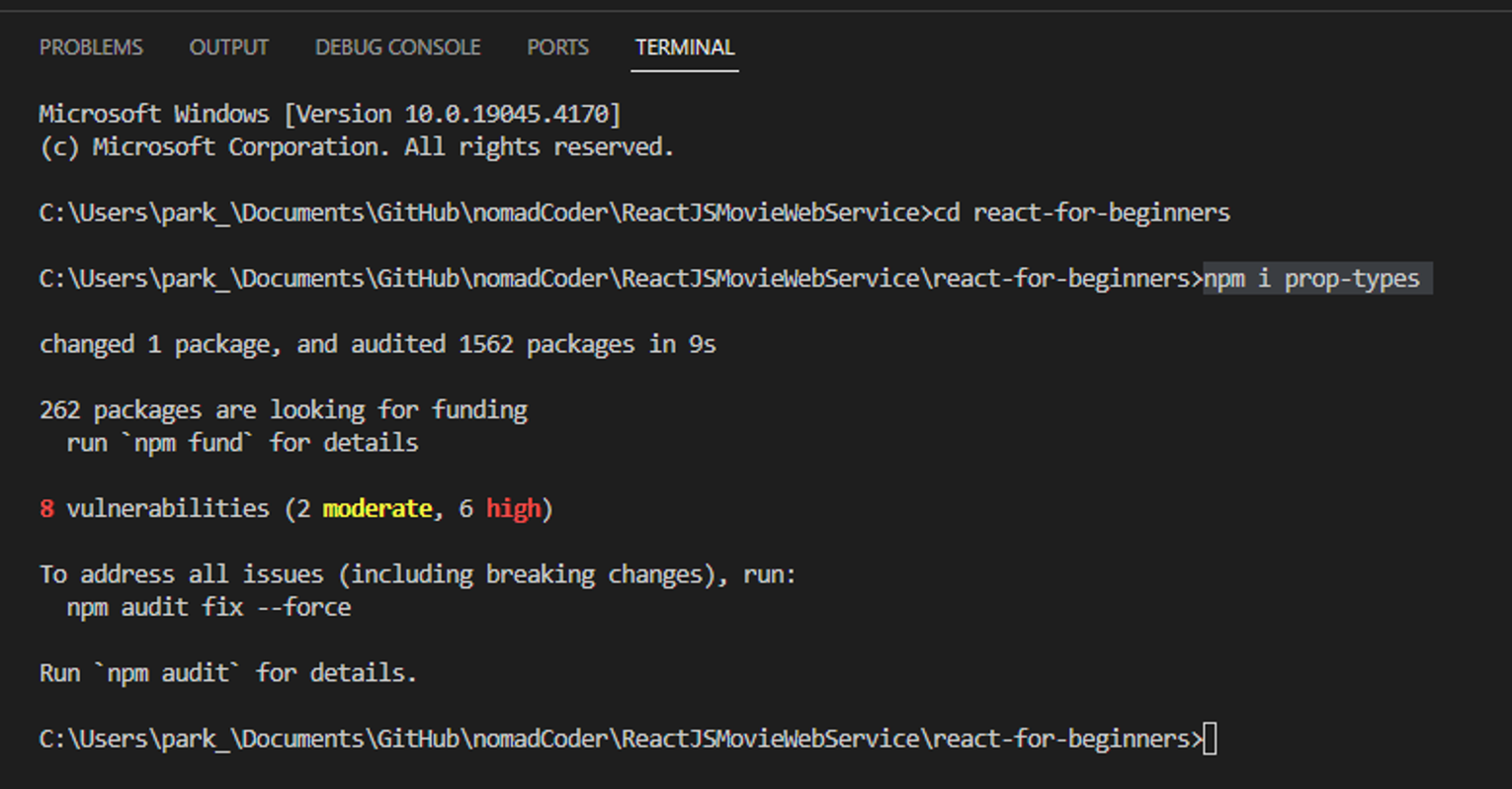
⇒ Button.module.css
.btn {
  color: white;
  background-color: tomato;
}
- 컴포넌트별 스타일은 .module.css 파일을 생성
- 사용하고자 하는 js 파일에 import 하여 사용
- 여기서 스타일은 className이나 id로 import한 스타일 객체의 property를 전달하여 적용된다는 것!
- 이는 기존의 "어떤 class나 id에 적용할 스타일"이 아닌 "특정 jsx element에 적용할 스타일"로 생각할 수 있다.
- react 컴파일 과정 중 random class나 id가 생성되기 때문에 .css 파일의 class, id 이름을 굳이 외울 필요 없다.
⇒ Button.js
// terminal 창에서 npm i prop-types 를 실행한 후 import 하였음
import Proptypes from "prop-types";
import styles from "./Button.module.css";

function Button({ text }) {
  return <button className={styles.btn}>{text}</button>;
}

Button.propTypes = {
  text: Proptypes.string.isRequired,
};

export default Button;
- Button.module.css를 사용하기 위해 import styles from "./Button.module.css"; 를 진행
- proptypes
- 규칙 생성
⇒ App.module.css
.title {
  font-family: system-ui, -apple-system, BlinkMacSystemFont, "Segoe UI", Roboto,
    Oxygen, Ubuntu, Cantarell, "Open Sans", "Helvetica Neue", sans-serif;
  font-size: 18px;
}
- 원리는 Button.module.css 와 동일
⇒ App.js
import Button from "./Button";
import styles from "./App.module.css";

function App() {
  return (
    <div>
      <h1 className={styles.title}>Welcome back!!!!</h1>
      <Button text={"Continue"} />
    </div>
  );
}

export default App;
- App.module.css의 title 스타일을 사용하고자 import styles from "./App.module.css"; 진행
⇒ index.js
import React from "react";
import ReactDOM from "react-dom";
import App from "./App";

ReactDOM.render(
  <React.StrictMode>
    <App />
  </React.StrictMode>,
  document.getElementById("root")
);
결과
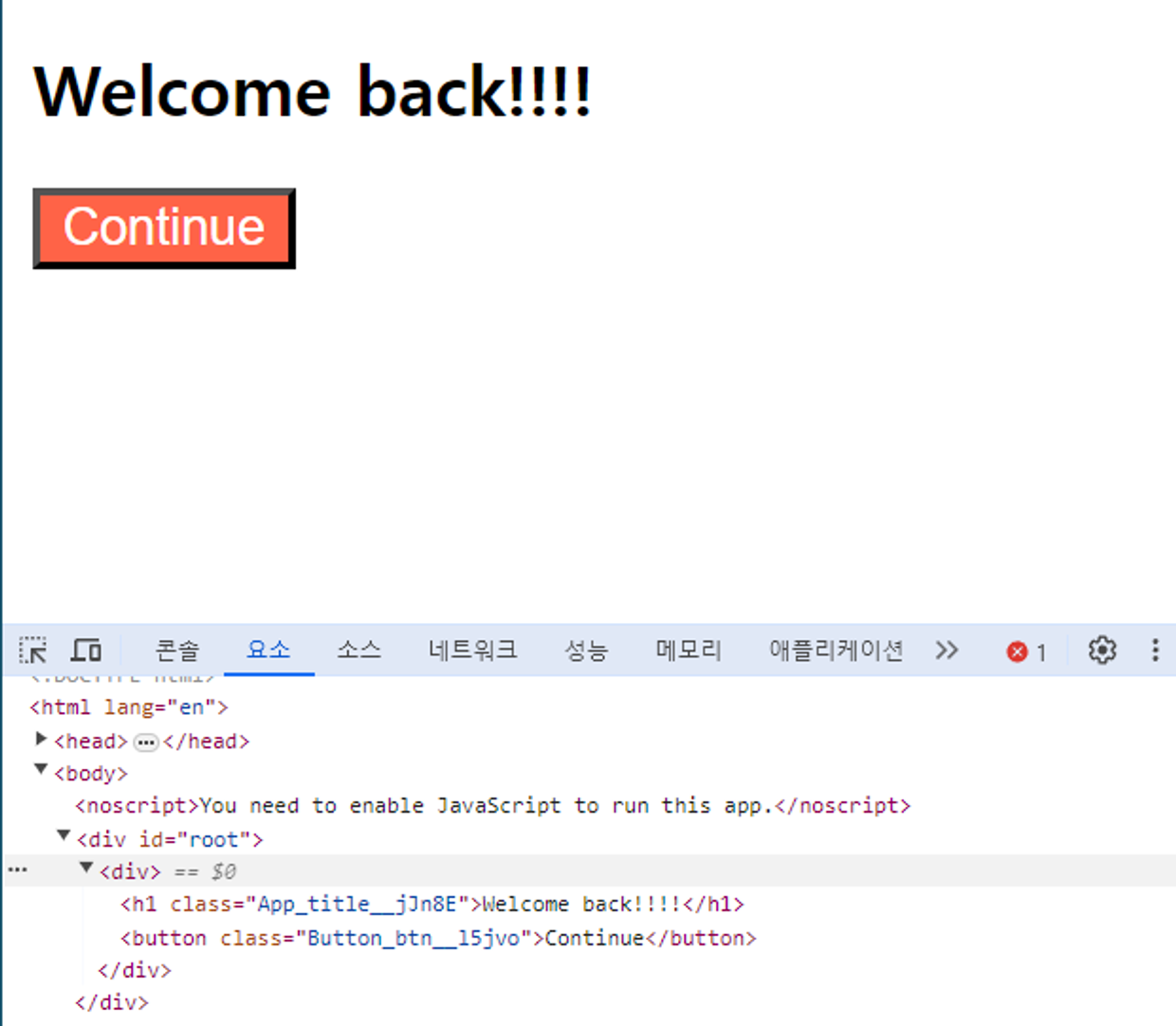
- 요소 창
- h1과 button 의 class 명을 보면 각각 title 과 btn 뒤에 난수 비슷하게 생성되는 것을 볼 수 있다.
- 이것은 react를 실행할 때마다 자동으로 생성되는 것이다.

#Software Engineer #IRISH