[ReactJS로 영화 웹 서비스 만들기 실습] Component Modularization(컴포넌트 모듈화) & PropTypes
ReactJS-Movie-Web-Service
목록 보기
12/23

- 실습일자 : 20240416
컴포넌트 모듈화 개념
- 1 컴포넌트 당 1개의 .js 파일을 가질 수 있어서 모듈화가 가능하다.
Proptypes
- PropTypes는 부모로부터 전달받은 prop의 데이터 type을 검사한다. 자식 컴포넌트에서 명시해 놓은 데이터 타입과 부모로부터 넘겨받은 데이터 타입이 일치하지 않으면 콘솔에 에러 경고문이 띄워진다.
터미널 : npm i prop-types
⇒ 나는 이미 다른 프로젝트에서 설치를 했으므로 여기서는 설치 미진행
- 하지만, 다른 컴퓨터에서 할 때에는 진행 필요

.module.css
- 컴포넌트별 스타일은 .module.css 파일을 생성
- 사용하고자 하는 js 파일에 import 하여 사용
소스 코드
⇒ Button.module.css
.btn {
  color: white;
  background-color: tomato;
}
⇒ Button.js
import Proptypes from "prop-types";
import styles from "./Button.module.css";

function Button({ text }) {
  return (
    <button className={styles.btn} onClick={isClick}>
      {text}
    </button>
  );
}

// Button onclick 이벤트
function isClick() {
  alert("You Clicked the Button!");
}

// 프롭타입스 설정
Button.propTypes = {
  text: Proptypes.string.isRequired,
};

export default Button;
- Proptypes 임포트
- Proptypes 설정
- onclick시 발생하는 이벤트 관련 사용자 정의 함수 isClick() 생성
⇒ App.module.css
.title {
  font-family: system-ui, -apple-system, BlinkMacSystemFont, "Segoe UI", Roboto,
    Oxygen, Ubuntu, Cantarell, "Open Sans", "Helvetica Neue", sans-serif;
  font-size: 18px;
}
⇒ App.js
import Button from "./Button";
import styles from "./App.module.css";

function App() {
  return (
    <div>
      <h1 className={styles.title}>Welcome back!!!!</h1>

      {/*
          - text에 값을 아무것도 안넣을 경우, 에러가 발생함
            - Button.js에서 propTypes을 필수(isRequired)로 설정했기 때문이다.
      */}
      <Button text={"Touch Button"} />
    </div>
  );
}

export default App;
⇒ index.js
import React from "react";
import ReactDOM from "react-dom";
import App from "./App";

ReactDOM.render(
  <React.StrictMode>
    <App />
  </React.StrictMode>,
  document.getElementById("root")
);
화면
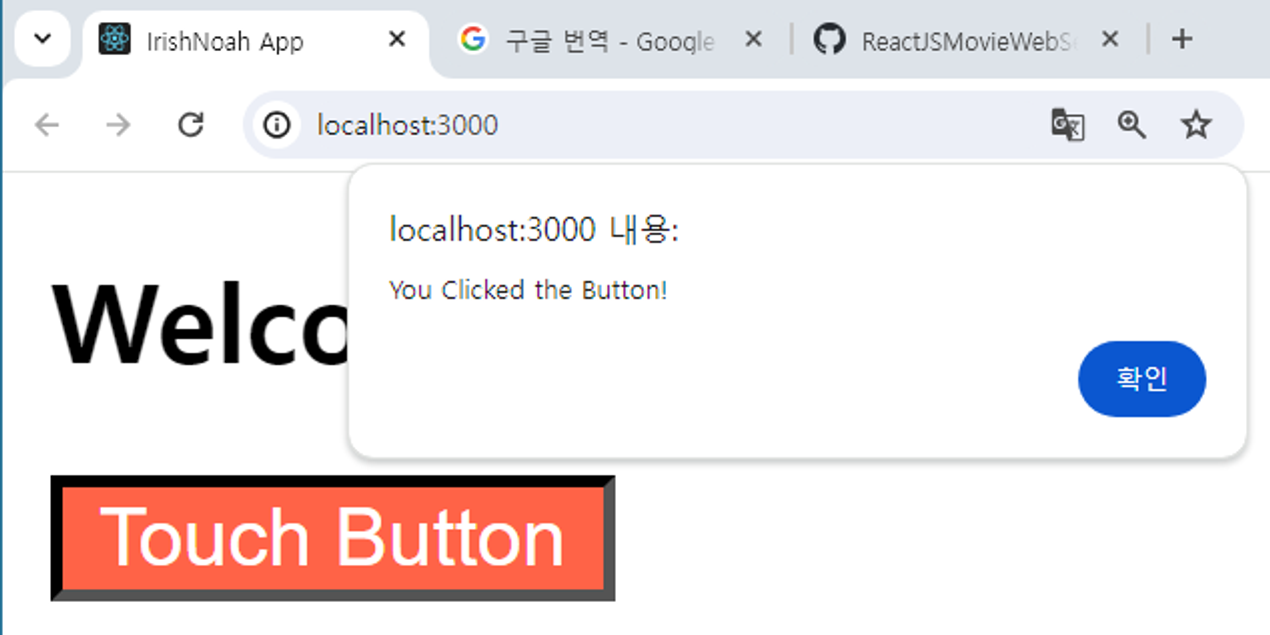
느낀점
한 컴포넌트 당 하나의 파일을 가질 수 있는 편리함을 제공하는 React에 놀랐다.
그리고, PropTypes를 통해 TypeScript가 없는 JavaScirpt에서 타입 및 유효성 검사를 할 수 있는 방법에 대해서 배워서 좋았다.
또한, 수강한 코드와 똑같이 진행한 것이 아니라 Button 컴포넌트에서 onclick 이벤트 발생 시 alert() 함수를 띄워보는 테스트를 진행해 봄으로써 개발자로써 한 단계 더 성장한 것 같다.
참고
- PropTypes
- React 공식
- [React] PropTypes 쓰는 이유, 방법
- https://velog.io/@eunjin/React-PropTypes-쓰는-이유-방법
- PropTypes 정의 / 종류[기본 제공 및 커스텀 타입 함수]
- https://velog.io/@eunjin/React-PropTypes-쓰는-이유-방법

#Software Engineer #IRISH