프로세스
보조기억장치에 저장된 프로그램을 메모리에 적재하고 실행하는 순간 프로그램은 프로세스가 됨. 이 과정을 프로세스를 생성한다
- 포그라운드 프로세스 foreground process
사용자가 볼 수 있는 공간에서 실행 - 백그라운드 프로세스 background process (= 데몬demon, 서비스service)
사용자가 보지 못하는 뒷편에서 실행. 상호작용이 가능한 백그라운드 프로세스도 존재
CPU 자원은 한정되어 있기 때문에 프로세스들은 돌아가며 한정된 시간 만큼만 CPU이용. 타이머(타임 아웃) 인터럽트가 발생하면 멈추고 다음 차례까지 기다림까지 기다림
프로세스 제어 블록
PCB; process control block. 프로세스와 관련한 (식별) 정보 저장하는 자료 구조.
커널 영역에 생성. 프로세스 생성시 만들어지고, 실행이 끝나면 폐기
- 프로세스ID(PID)
특정 프로세스를 식별하기 위해 부여하는 고유 번호. 같은 프로그램이어도 두번 실행하면 PID가 다름(서로 다른 프로세스가 됨) - 레지스터 값
프로세스는 자신의 실행 차례가 돌아오면 이전까지 사용했던 레지스터의 값들을 모두 복원해야하기 때문에 PC를 비롯한 레지스터 값들이 담김 - 프로세스 상태
현재 프로세스 상태.
입출력장치 사용 위해 기다림/CPU 사용 위해 기다림/CPU 이용하는 중 - CPU 스케줄링 정보
프로세스가 언제, 어떤 순서로 CPU를 할당받을지 - 메모리 관리 정보
프로세스 메모리 주소 관련 정보(베이스/한계 레지스터 값). 페이지 테이블 정보 - 사용한 파일과 입출력장치 목록
프로세스 실행 과정에서 특정 입출력장치/파일 사용하면 해당 내용 명시
문맥 교환
- 문맥context
하나의 프로세스 수행을 재개하기 위해 기억해야 할 정보(중간 정보)
하나의 프로세스 문맥은 해당 프로세스 PCB에 기록됨. (PC, SP, 레지스터 값...) - 문맥 교환context switching
새 프로세스를 실행하기 위해 문맥을 PCB로부터 복구해 새 프로세스를 실행하는 것
프로세스 메모리 영역
- 코드 영역code segment(텍스트 영역text segment)
실행할 수 있는 코드(기계어)로 이루어진 명령어 저장. 정적 할당 영역
읽기전용read-only공간(데이터가 아닌 CPU가 실행할 명령어 담겼기 때문) - 데이터 영역data segment
프로그램이 실행되는 동안 유지할 데이터가 저장되는 공간(ex.전역변수global value). 잠깐 썼다가 없앨 데이터X. 정적 할당 영역 - 힙 영역heap segment
동적 할당 영역. 프로그래머가 직접 할당할 수 있는 저장 공간.
메모리 공간을 할당했다면 반환해야함 → 반환하지 않으면 메모리 누수memory leak - 스택 영역stack segment
동적 할당 영역
🐥 정적 할당 영역 VS 동적 할당 영역
- 정적 할당 영역 : 크키가 고정된 영역
- 동적 할당 영역 : 크기가 변할 수 있는 영역
프로세스 상태와 계층 구조
프로세스 상태
- 생성 상태new
프로세스를 생성 중인 상태, 막 메모리에 적재되어 PCB를 받은 상태.
준비 되면 준비 상태로 넘어감 - 준비 상태ready
차례가 되면 CPU 할당받아 실행 상태가 됨 - 실행 상태running
CPU를 할당받아 실행 중인 상태. 할당된 일정 시간동안만 CPU사용 가능
타이머 인터럽트 발생시 준비 상태, 실행 도중 입출력장치 사용하여 작업이 끝날 때까지 기다려야하면 대기 상태가 됨 - 대기 상태blocked
입출력장치의 작업이 끝나고 입출력 완료 인터럽트를 받을 때까지 기다리는 상태 또는 특정 이벤트가 일어나길 기다리는 상태
완료되면 해당 프로세스는 준비 상태로 CPU할당 기다림 - 종료 상태terminated
운영체제가 PCB와 프로세스가 사용한 메모리 정리
프로세스 상태 다이어그램process state diagram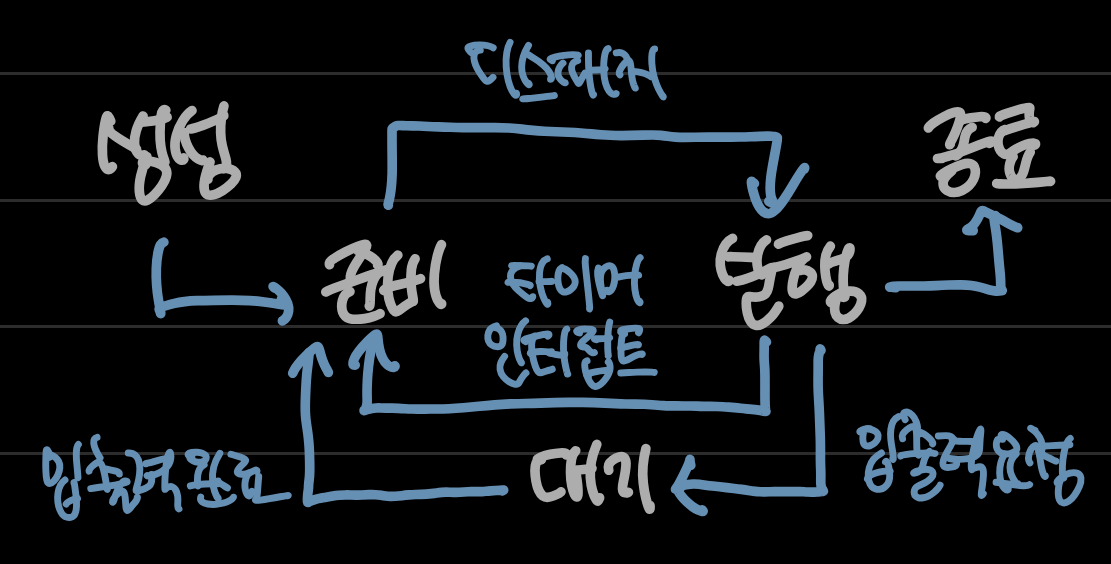
프로세스 계층 구조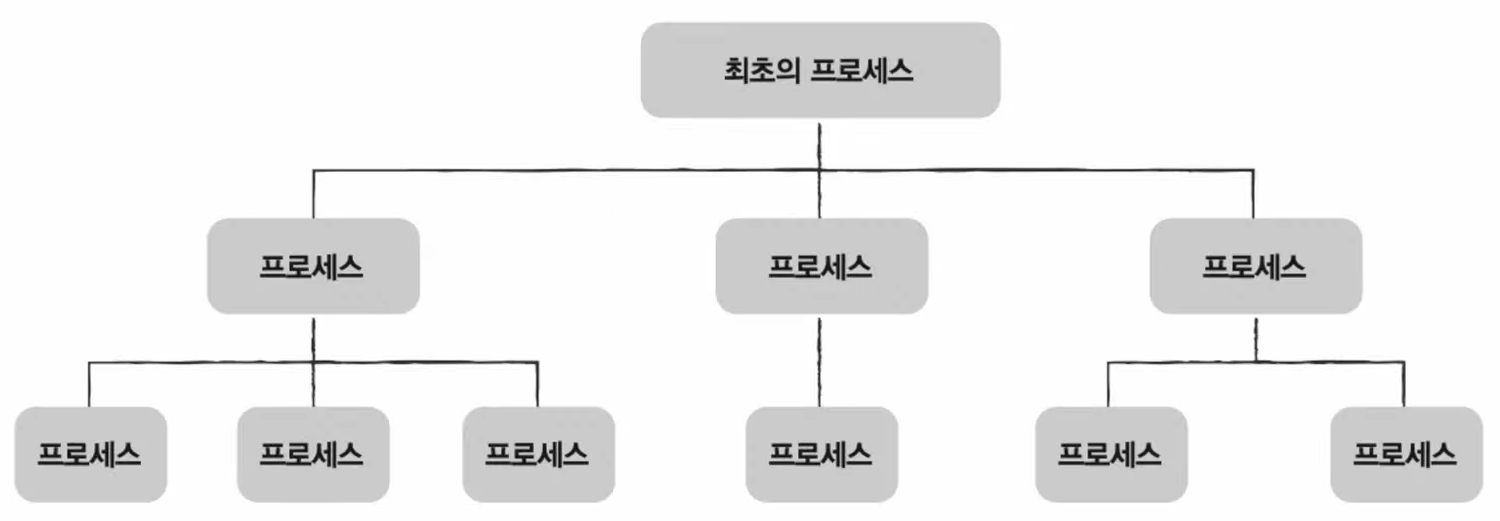
- 부모 프로세스parent process
새 프로세스를 생성한 프로세스 - 자식 프로세스child process
부모 프로세스에 의해 생성된 프로세스. 일부 운영체제에서는 자식 프로세스의 PCB에 부모프로세스PID(PPID)가 기록됨
💡 윈도우 예시
💡 최초의 프로세스 확인
유닉스는 init, 리눅스는 systemd, macOS는 launchd라고 칭함
pstree로 최초의 프로세스 확인 가능
프로세스 생성 기법
fork(): 복제
부모 프로세스가 fork통해 자신의 복사본 자식 프로세스로 생성
부모 프로세스의 자원들도 똑같이 상속, PID/저장된 메모리 위치는 다름exec(): 옷갈아입기
자식 프로세스가 자신의 메모리 공간을 다른 프로그램으로 덮어씀. 새 프로그램으로 전환. 코드영역과 데이터영역의 내용이 실행할 프로그램의 내용으로 바뀜, 나머지 영역은 초기화
💡 누구도 exec를 호출하지 않는 경우 부모&자식 프로세스는 같은 코드를 병행하여 실행하는 프로세스가 됨
#include <stdio.h>
#include <unistd.h>
int main(){
   printf("parent pid is %d\n", getpid());
   if (fork() == 0) {
       printf("child pid is %d\n", getpid());
   }
   printf("executed!\n");
   return 0;
}
fork()의 결과값이0이면 자식 프로세스. 부모 프로세스는 결과값이자식 프로세서의 PID이다.[Output] parent pid is 53796 executed! child pid is 53797 executed!부모/자식 프로세스가 (동시에) 둘다 실행되기 때문에 자식 프로세스 생성 이후 코드가 각각 1회씩 총 2회 출력
#include <stdio.h> //각기 다른 작업을 하는 프로세스 생성
#include <unistd.h>
void foo() {
  printf("execute foo\n");
}
void bar() {
  printf("execute bar\n");
}
void baz() {
  printf("execute baz\n");
}
int main()
{
   if (fork() == 0) {
      if (fork() == 0) {
        foo();
      }
      else {
        bar();
      }
   }
   else {
     baz();
   }
   return 0;
}
from multiprocessing import Process
import os
def foo():
    print('child process', os.getpid())
    print('my parent is', os.getppid())
if __name__ == '__main__':
    print('parent process', os.getpid())
    child = Process(target=foo).start()
파이썬 프로세스 구현
from multiprocessing import Process
import os
def foo():
    print('This is foo')
def bar():
    print('This is bar')
def baz():
    print('This is baz')
if __name__ == '__main__':
    child1 = Process(target=foo).start() #This is foo
    child2 = Process(target=bar).start() #This is bar
    child3 = Process(target=baz).start() #This is baz
파이썬 다른 기능 프로세스 구현
스레드
thread. 프로세스를 구성하는 실행(의 흐름) 단위
하나의 프로세스는 여러개의 스레드 가질 수 있음. 프로세스가 살아있는 동안만 존재
- 단일(싱글) 스레드 프로세스
모든 프로세스가 하나의 실행흐름을 가지고 한번에 하나의 부분만 실행되는 프로세스 - 멀티 스레드 프로세스
프로세스를 구성하는 여러 명령어를 동시에 실행
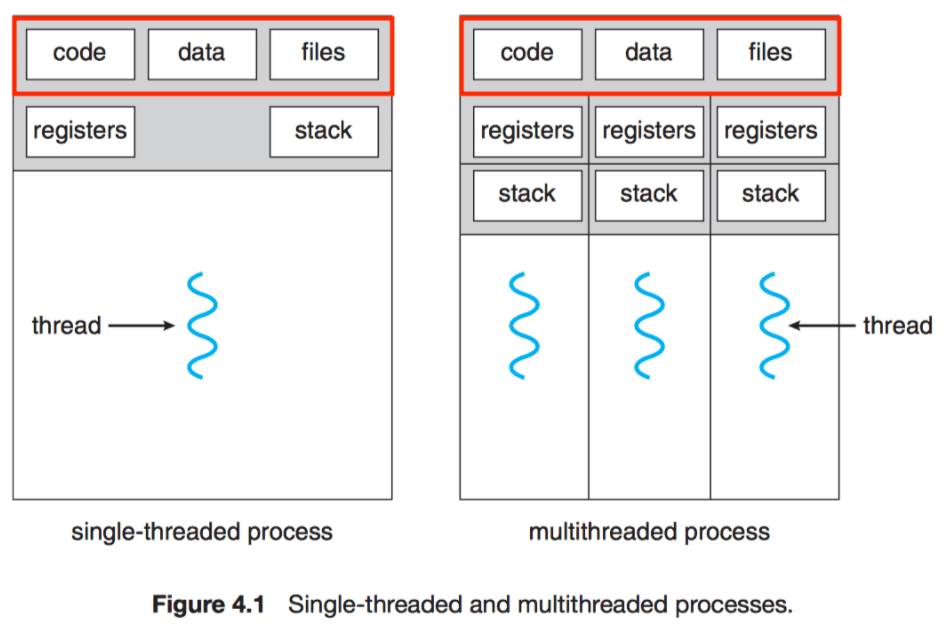
구성
- 각기 다른 스레드ID
- 프로그램 카운터 값을 비롯한 레지스터 값
- 스택
실행에 필요한 최소한의 정보(프로그램카운터 포함한 레지스터 값/스택)만 가진 채 프로세스 자원(힙/데이터/코드영역) 공유하며 실행
💡 리눅스는 프로세스와 스레드를 구분하지 않음
둘 다 실행의 문맥context of execution으로 간주하고 태스크task로 통일하여 지칭
멀티 프로세스와 멀티 스레드
멀티 프로세스multiprocess : fork 관계인 여러 프로세스를 동시에 실행하는 것
멀티 스레드multithread : 여러 스레드로 하나의 프로세스를 동시에 실행하는 것
🐥 싱글 스레드 프로세스 여러개 VS 하나의 프로세스 여러개의 스레드 실행
→ 프로그램을 3번 fork하여 실행하면 프로세스끼리 자원 공유가 없기 때문에 모든 자원이 메모리에 적재됨
→ 반면 스레드는 프로세스 자원을 공유하기 떄문에 메모리 효율적으로 사용 가능💡 fork직후 같은 프로세스 통째로 메모리에 중복 저장 하지 않으면서 프로세스 끼리 자원은 공유하지 않는 '쓰기 시 복사copy on write' 기법도 있다.
멀티프로세스 환경에서는 한 프로세스에 문제가 생겨도 다른 프로세스에는 지장이 없지만 멀티스레드 환경에서는 한 스레드에 문제가 생기면 프로세스 전체에 문제가 생길 수 있다. 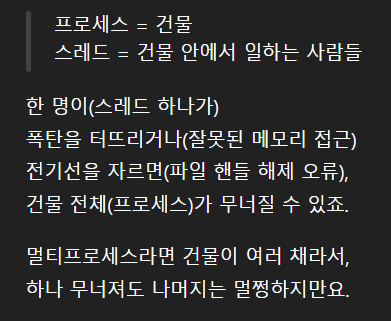
💡 한 스레드가 공유 메모리를 잘못 건드리거나, 잘못된 포인터로 접근하거나, 세그멘테이션 오류(segmentation fault)가 일어난 경우 등을 스레드에 문제가 생겼다고 한다.
💡 프로세스에 문제가 생긴 경우(종료...)는 프로세스 안의 모든 스레드가 종료됨

💡 프로세스 간 통신IPC; Inter-Process Communication
기본적으로 프로세스끼리는 자원을 공유하지 않지만 자원을 공유하고 데이터를 주고받을 수 있음. 까다로울 뿐 못하는게 아님
- 공유메모리shared memory : 프로세스들이 공유할 수 있는 메모리 영역
- 소켓, 파이프를 이용해서도 통신 가능
- 같은 컴퓨터 내의 서로 다른 프로세스나 스레드끼리 데이터를 주고받는 것도 통신
ex) 프로세스A가 test.txt에 값 쓰고 프로세스B가 text.txt값 읽음
#include <stdio.h>
#include <unistd.h>
#include <pthread.h>
void * foo() {
  long thread_id = (long int) pthread_self();
  printf("process id is %d\n", getpid());
  printf("this is thread %ld\n", thread_id);
  return NULL;
}
int main() {
    pthread_t thread1; //thread1이름으로 pthread_t형 변수 선언
    pthread_create(&thread1, NULL, foo, NULL); //thread1은 foo를 실행하도록 thread 생성
    pthread_join(thread1, NULL); //thread1 실행
    return 0;
}
01 #include <stdio.h> 02 #include <unistd.h> 03 #include <pthread.h> 04 05 void * foo() { 06 long thread_id = (long int) pthread_self(); 07 printf("process id is %d\n", getpid()); 08 printf("this is thread %ld\n", thread_id); 09 return NULL; 10 } 11 12 int main() 13 { 14 pthread_t thread1; 15 pthread_t thread2; 16 pthread_t thread3; 17 18 pthread_create(&thread1, NULL, foo, NULL); 19 pthread_create(&thread2, NULL, foo, NULL); 20 pthread_create(&thread3, NULL, foo, NULL); 21 22 pthread_join(thread1, NULL); 23 pthread_join(thread2, NULL); 24 pthread_join(thread3, NULL); 25 26 return 0; 27 }같은 일 처리하는 멀티 스레드. 프로세스 아이디는 동일하게 출력됨
01 #include <stdio.h>
02 #include <unistd.h>
03 #include <pthread.h>
04
05 void * foo() {
06   printf("foo executed\n");
07   return NULL;
08 }
09
10 void * bar() {
11   printf("bar executed\n");
12   return NULL;
13 }
14
15 void * baz() {
16   printf("baz executed\n");
17   return NULL;
18 }
19
20 int main()
21 {
22     pthread_t thread1;
23     pthread_t thread2;
24     pthread_t thread3;
25
26     pthread_create(&thread1, NULL, foo, NULL);
27     pthread_create(&thread2, NULL, bar, NULL);
28     pthread_create(&thread3, NULL, baz, NULL);
29
30     pthread_join(thread1, NULL);
31     pthread_join(thread2, NULL);
32     pthread_join(thread3, NULL);
33
34     return 0;
35 }
다른 일 하는 멀티 스레드 만들기
01 import threading
02 import os
03
04 def foo():
05     print('thread id', threading.get_native_id()) #스레드 아이디 출력
06     print('process id', os.getpid())
07
08 if __name__ == '__main__':
09     print('process id', os.getpid())
10     thread = threading.Thread(target=foo).start() #스레드 만들기
스레드 생성 python 코드
01 import threading
02 import os
03
04 def foo():
05     print('thread id', threading.get_native_id())
06     print('process id', os.getpid())
07
08 if __name__ == '__main__':
09     print('process id', os.getpid())
10     thread1 = threading.Thread(target=foo).start()
11     thread2 = threading.Thread(target=foo).start()
12     thread3 = threading.Thread(target=foo).start()
동일 작업하는 스레드 python 코드