요소를 어떻게 위치 시킬지를 정의
| Position | |
|---|---|
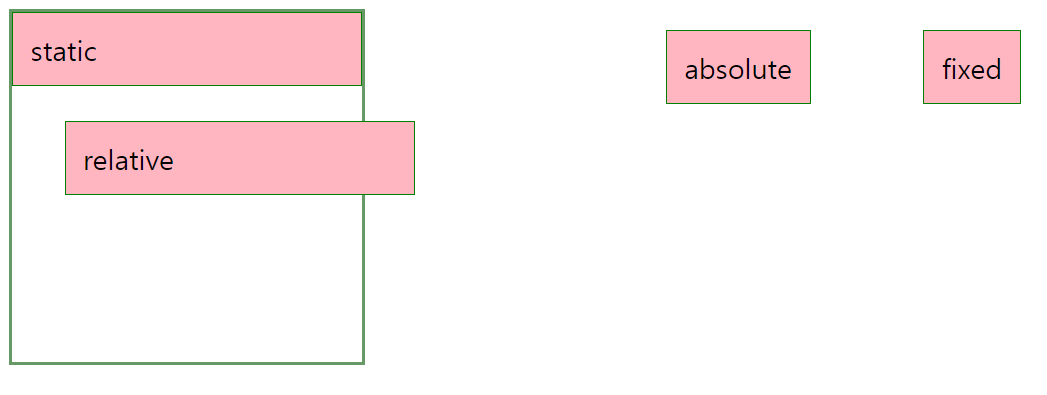
| static | 기본값 |
| relative | 요소 자기 자신을 기준으로 배치 |
| absolute | 부모 요소를 기준으로 배치(절대 좌표와 함께 위치를 지정 가능) |
| 부모 요소에 position: static이 아닌 것이 있으면 그것을 기준으로 배치 But position: static이 아닌 것이 없다면 body 기준으로 배치 | |
| fixed | 스크롤과 상관없이 항상 문서 최 좌측 상단을 기준으로 좌표를 고정 |
| sticky | 스크롤 영역 기준으로 배치 |
<!DOCTYPE html>
<html lang="en">
  <head>
    <title>Document</title>
    <style>
      .container {
        width: 200px;
        height: 200px;
        border: 2px solid #669966;
      }
      .container div {
        padding: 10px;
        border: 1px solid green;
        background-color: lightpink;
      }
      #static {
        position: static;
        top: 20px;
        left: 30px;
      }
      #relative {
        position: relative;
        top: 20px;
        left: 30px;
      }
      #absolute {
        position: absolute;
        top: 20px;
        right: 150px;
      }
      #fixed {
        position: fixed;
        top: 20px;
        right: 30px;
      }
    </style>
  </head>
  <body>
    <div class="container">
      <div id="static">static</div>
      <div id="relative">relative</div>
      <div id="absolute">absolute</div>
      <div id="fixed">fixed</div>
    </div>
  </body>
</html>
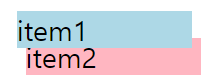
Z-index
앞과 뒤에 나타나는 요소 결정
<!DOCTYPE html>
<html lang="en">
  <head>
    <title>Document</title>
    <style>
      div {
        width: 100px;
      }
      div:nth-child(1) {
        position: absolute;
        background-color: lightblue;
        top: 15px;
        left: 45px;
        z-index: 1;
      }
      div:nth-child(2) {
        position: absolute;
        background-color: lightpink;
        top: 30px;
        left: 50px;
      }
    </style>
  </head>
  <body>
    <div>item1</div>
    <div>item2</div>
  </body>
</html>