
자바스크립트는 싱글스레드 이다.
그래서 하나의 일을 할 때 하나의 작업밖에 못하는데 만약 그 하나의 일이 오래 걸리면 다른 작업들이 그 하나의 일이 끝날 때까지 기다려야 한다(동기)
⇒ 이 문제를 해결하기 위해 비동기로 작업을 수행하게 된다.
비동기: 작업 수행 중 시간이 걸리는 작업이 발생하면 이전 작업은 계속 수행하고
시간이 걸리는 작업을 같이 진행한 후 완료된 결과를 이전 작업 도중 반환
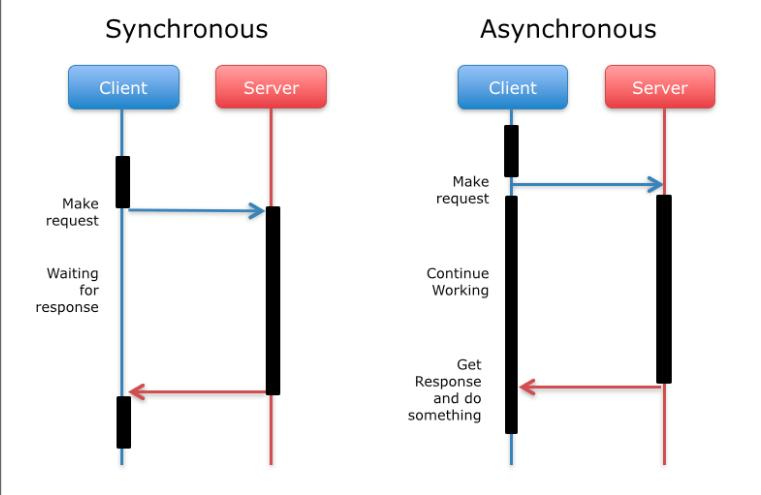
출처: https://velog.io/@hareguu/동기-비동기
callback 함수
콜백 함수는 특정 함수에 매개변수로 전달된 함수를 의미, 그리고 그 콜백 함수는 함수를 전달받은 함수 안에서 호출됨
function first(num, callback) {
  const result = num;
  console.log("result", result);
  callback(result);
}

function second(result, callback) {
  const result2 = result + 1;
  console.log("result2", result2);
  callback(result2);
}

function third(result2) {
  const result3 = result2 + 1;
  console.log("result3", result3);
}

first(0, function (result) {
  second(result, function (result) {
    third(result);
  });
});
/*
result 0
result2 1
result3 2
*/
콜백 함수 단점 (callback Hell)
- 소스 코드를 보는데 가독성이 떨어짐
- 에러 처리를 한다면 모든 콜백에서 각각 에러 핸들링을 해야
위 callback의 단점을 개선하기 위해 Promise 사용
Promise
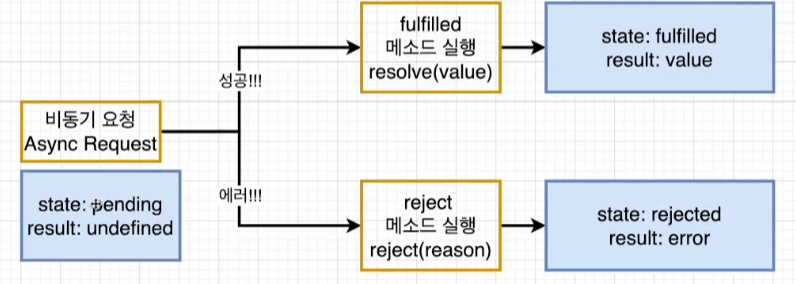
promise 객체는 new 키워드와 생성자를 사용해 만든다. 생성자는 매개변수로 실행 함수를 받고 이 함수는 매개 변수로 두 가지 함수를 받아야 한다. 첫 번째 함수(resolve)는 비동기 작업을 성공적으로 완료해 결과를 값으로 반환할 때 호출, 두 번째 함수(reject)는 작업이 실패하여 오류의 원인을 반환할 때 호출
Promise는 다음 중 하나의 상태를 가진다.
대기(pending):비동기 처리 로직이 아직 완료되지 않은 상태
이행(fulfilled): 비동기 처리가 완료되어 프로미스가 결과 값을 반환해준 상태
거부(rejected): 비동기 처리가 실패하거나 오류가 발생한 상태
function myPromise() {
  return new Promise((resolve, reject) => {
    setTimeout(() => {
      const success = false; // 데이터 가져오기 성공 여부

      if (success) {
        resolve("Data fetched successfully!");
      } else {
        reject("Failed to fetch data.");
      }
    }, 2000);
  });
}

myPromise()
  .then((data) => {
    console.log("success " + data); // "Data fetched successfully!" 출력
  })
  .catch((error) => {
    console.error("failed " + error); // 실패 시 오류 메시지 출력
  })
  .finally(() => {
    console.log("Fetch operation completed.");//promise 완
  });

/*
success=true일때
success Data fetched successfully!
Fetch operation completed.
-----------------------------
success=false일때
failed Failed to fetch data.
Fetch operation completed.
*/
실제 통신
fetch("http://jsonplaceholder.typicode.com/todos/1")
  .then((res) => res.json())//받아온 데이터를 json형식으로 변환
  .then((json) => console.log(json))//데이터 확인
  /*
  { userId: 1, id: 1, title: 'delectus aut autem', completed: false }
  */
  .then(() => fetch("http://jsonplaceholder.typicode.com/todos/2"))// 첫번째 작업 완료 후 두 번째 작업 시작
  .then((res2) => res2.json())
  .then((json2) => console.log(json2))
  /*
  {
	  userId: 1,
	  id: 2,
	  title: 'quis ut nam facilis et officia qui',
	  completed: false
	}
  */
  .catch((err) => console.log("err " + err))//작업 실패시 에러 메세지
  .finally(() => {//작업 완료
    console.log("작업 끝");
  });
Async, Await
자바스크립트의 비동기 처리 패턴 중 가장 최근에 나온 문법
기존의 비동기 처리 방식인 callback함수와 Promise의 단점을 보완
- 비동기 코드를 마치 동기 코드처럼 보이게 함
- Promise에 then메서드를 체인 형식으로 호출하는 것보다 가독성 좋음
- awit는 async내부 함수에서만 사용 가능
- 동기식 코드에서 쓰는 try…catch 구문을 사용 가능
실습
async function makeRequests() {
  try {
    const res1 = await fetch("http://jsonplaceholder.typicode.com/todos/1");
    const jsonres1 = await res1.json();
    console.log("jsonres1", jsonres1);
  } catch (error) {
    console.error(error);
  } finally {
    console.log("모든 작업 끝");
  }
}

makeRequests();
/*
jsonres1 {
	userId: 1, id: 1, title: 'delectus aut autem', completed: false }
모든 작업 끝
*/