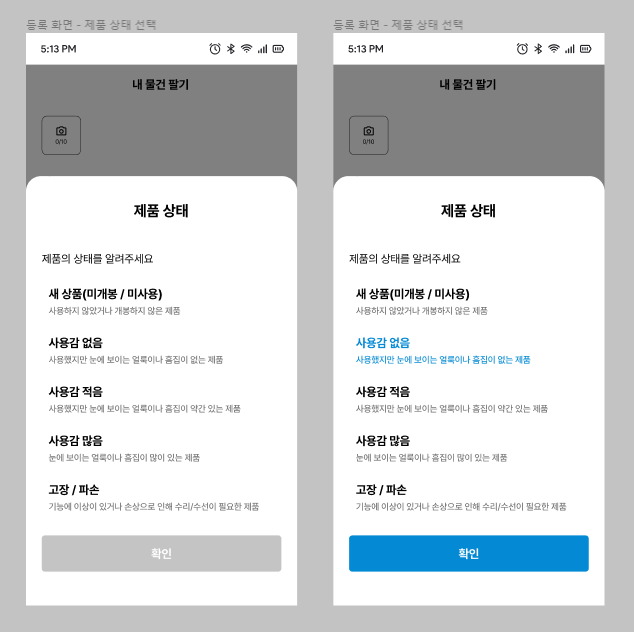
리액트 네이티브에서 radio 형태의 컴포넌트를 구현하여야 하는 상황이 발행하였다.
따로 지원되는 라이브러리가 없으니 직접 구현하도록 하자!
구현목표

구성 나누기
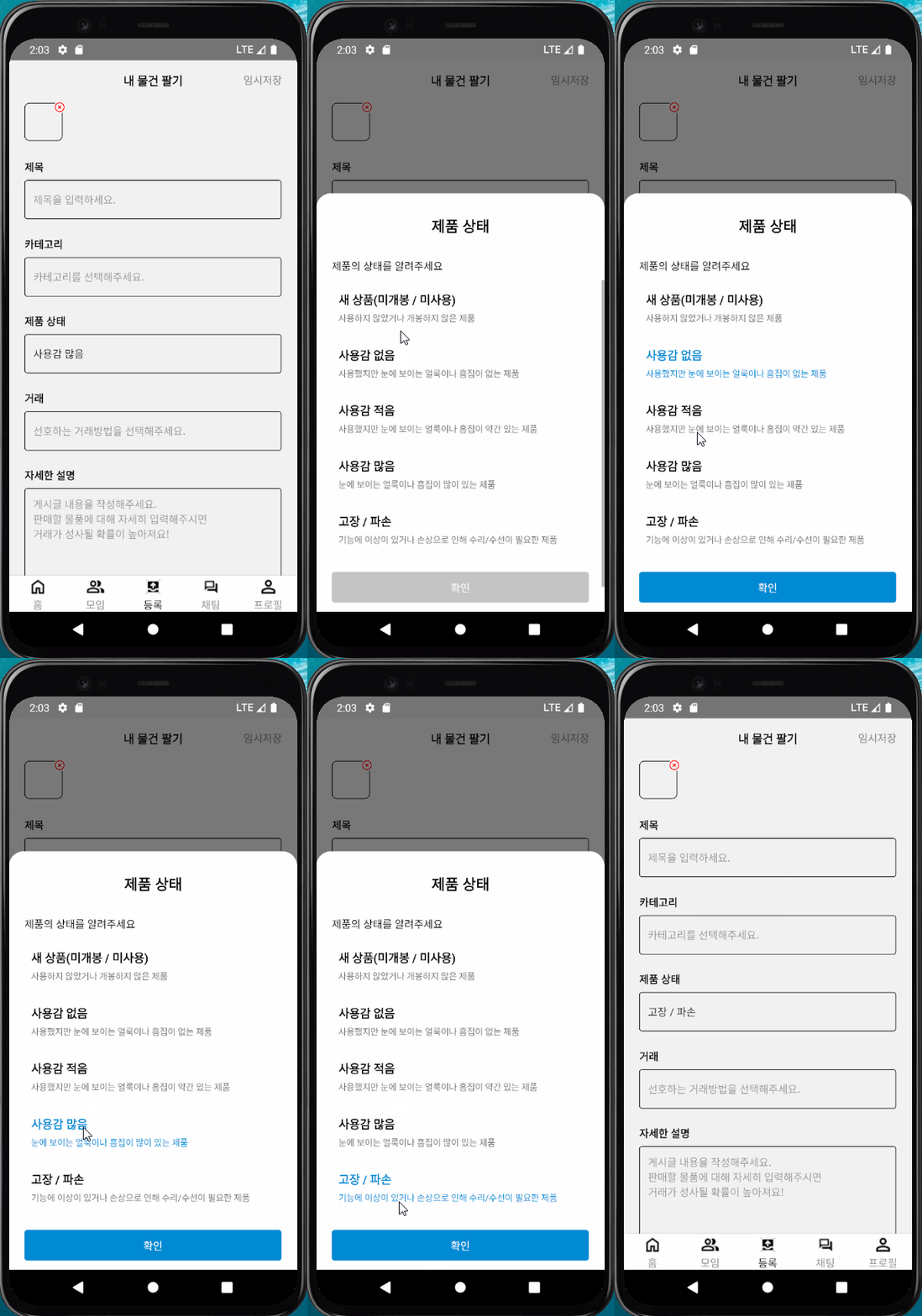
- 제품 상태의 TextInput 컴포넌트를 클릭
- 화면 하단에서 리스트가 있는 모달창이 올라옴
- 리스트는 radio button형태로 1개만 선택가능
- 선택한 리스트가 있다면 버튼 활성화 없다면 비활성화
- 모달창 밖을 클릭 시 선택없이 모달창 바뀌기
- 선택 리스트가 있는 상태에서 확인을 누르면 TextInput에 값 전달
TextInput 구현
제품상태 컴포넌트는 거래 컴포넌트와 유사한 구성을 가지므로 재사용이 가능하게 TextInput에 값을 여러가지 전달하기로 하였다.
세부적으로 구현해야 하는 기능은
- 직접 입력 막기
- TextInput 클릭 시 모달창 열리기
- 모달에서 선택 된 값 넣어주기
<TextInput
  multiline={isArea}
  style={isArea ? styles.inputArea : styles.inputText}
  value={value}
  placeholder={placeholder}
  onFocus={onPressHandler}
  inputMode={inputType ? undefined : 'none'}
onChangeText={inputType ? onChangeHandler : () => {}} />- 직접입력은 inputMode={'none'}을 이용해서 막아주었다.
- TextInput에 클릭이벤트가 적용되지 않아 onFocus를 이용해서 이벤트를 적용하였다.
-> 이 부분은 포커스가 유지 될 때 적용되지 않아서 수정이 필요하다. - 모달창에 선택 된 값은 상태관리 라이브러리
zustand를 이용하여 저장하고 value를 통해서 전달했다.
// store.ts

interface MyProduct {
  ...
  status: string;
}
interface ProductRegist {
  product: MyProduct;
  setProduct: (product: MyProduct) => void;
}
const useProductStore = create<ProductRegist>()(set => ({
  product: {} as MyProduct,
  setProduct: product => set(state => ({...state, product})),
}));
Modal 구현
Modal 열기, 닫기
모달창은 하단에서 슬라이드로 올라오는 형태로 선택리스트를 보여주는 형태를 가진다. 다른 컴포넌트도 모달창을 사용하고 있어서 공통컴포넌트로 묶고자 하지만 내부 디자인이 달라서 우선적으로 제품상태에 대한 항목만 작성하였다.
세부적으로 구현해야 하는 기능은
- 슬라이드 형태로 나타나는 모달창 구현
- 길이는 전체화면을 덮지 않고 뒷 배경은 투명하며 하단부터 이동하도록 한다.
- 모달창 외부를 클릭 시 모달창이 닫히도록 설정한다.
- 데이터 받아와서 내부 리스트 구성하기(axios사용)
// 데이터 받아오기
  const [data, setData] = useState([]);
  const {modalState, setModalState} = useProductModal();

  let axiosUrl = '';

  useLayoutEffect(() => {
    axios
      .get(axiosUrl)
      .then(response => {
        let newArray = response.data.map((d: productListData) => {
          return {key: d.codeId, value: d.codeNm};
        });
        setData(newArray);
      })
      .catch(e => {
        console.log(e);
      });
  }, []);
// modal구현
<Modal animationType={'slide'} visible={modalState} transparent={true}>
<Pressable
onPress={() => {
setModalState(false);
}}
style={styles.modalBackground}></Pressable>
<View style={styles.modal}>
<View style={styles.title}>
<Text style={styles.titleText}>제품 상태</Text>
</View>
<View style={styles.breadcrumb}>
<Text style={styles.breadcrumbText}>제품의 상태를 알려주세요</Text>
</View>
<MakeList data={data} />
</View>
</Modal>- 모달창 슬라이드는 animationType={'slide'}를 사용한다.
- 모달창의 visible상태를
modalState라는 boolean 타입의 useState로 구성하여 활용한다. - 모달창 외부의 Pressable 버튼을 만들어서
modalState를 false로 바꿔준다. 이를 통해 모달창 닫기를 구현한다. - 내부의 리스트의 값은 axios를 이용해서 값을 전달받아서 response.data를 mapping해서
codeId와codeNm로 구성된 array로 리스트를 구성하였다. - 리스트는 MakeList 의 data로 전달하여 각 항목의 컴포넌트를 구성 후 리턴받는다.
- 모달을 하단에 붙이기 위해 style은 높이를 주고 마진값을 설정하였다.
//StyleSheet
  modal: {
    marginBottom: 0,
    marginTop: 'auto',
    height: 570,
  }
radio button 구현
제품의 상태는 한 가지 항목을 필수로 선택하도록 하고 있다. 체크박스의 형태는 별도로 필요없으니 구현하지 않는다. 제품상태는 형태가 같은 컴포넌트이므로 FlatList를 활용하여서 구성하였다.
세부적으로 구현해야 하는 기능은
- 제품의 상태는 한 가지 항목만 선택가능
- 선택한 항목을 명시적으로 나타내기
- 선택을 취소할 수 있도록 함
- 선택항목이 있는 경우 하단의 버튼을 활성화
- 하단의 버튼을 누르면 모달이 닫히고 InputText에 값이 전달
  const [checkedNum, setCheckedNum] = useState<number>(-1);
const [checked, setChecked] = useState<string>(''); <FlatList
data={data}
ListFooterComponent={<ConfirmButton checked={checked} />}
renderItem={({item, index}) => {
let key = item.key ?? item.value ?? item;
return (
<Pressable
onPress={() => {
if (matchSelected(index)) deSelected();
else selected(index, key);
}}>
<View style={styles.list}>
<Text
style={
matchSelected(index)
? [styles.listText, styles.textActive]
: styles.listText
}>
{productStatusName(key)}
</Text>
<Text
style={
matchSelected(index)
? [styles.listTextDesc, styles.textActive]
: styles.listTextDesc
}>
{productStatusDesc(key)}
</Text>
</View>
</Pressable>
);
}}
/>
);
};- 선택 된 순번과 선택 된 값을 저장하기 위해 useState를 활용하였다.
- onPress속성에 선택 일치여부로 selected(선택)와 deSelected(선택해제)를 분기하였다.
- index에는 한 가지 값만 들어가므로 radio button의 형태로 선택이 된다.
- style도 선택 일치여부로 분기하여 선택항목을 명시적으로 보여주었다.
- FlatList에 반복되지 않는 하단 버튼을 구현하기 위해
ListFooterComponent속성에<ConfirmButton />컴포넌트를 리턴하였다.
//ConfirmButton Component

const {setProduct, product} = useProductStore();
const {setModalState} = useProductModal();

  return (
    <TouchableOpacity
      disabled={checked ? false : true}
      style={checked ? [styles.button, styles.buttonActive] : styles.button}
      onPress={() => {
        if (checked) {
          setProduct({...product, status: checked});
          setModalState(false);
        }
      }}>
      <Text style={styles.buttonText}>확인</Text>
    </TouchableOpacity>
  );
// store.ts

const useProductStore = create<ProductRegist>()(set => ({
  product: {} as MyProduct,
  setProduct: product => set(state => ({...state, product})),
}));- 확인버튼을 누르면
zustand로 설정한 Product의 status에 선택 된 항목을 전달한다. - 확인버튼을 누르면
zustand로 설정한 ModalState의 값에 false를 전달하여 모달을 닫는다.
개선사항
모달창이 닫힌 후 포커스가 그대로 남아 있어서 onFocus가 동작하지 않는다.
그래서 동일한 동작에도 반복 될 수 있도록 onPressIn으로 변경하였다.
    <View style={styles.inputContainer}>
      <Text style={styles.inputTitle}>{label}</Text>
      <TextInput
        multiline={isArea}
        style={isArea ? styles.inputArea : styles.inputText}
        value={value}
        placeholder={placeholder}
        onPressIn={onPressHandler}
        inputMode={inputType ? undefined: 'none'}
        onChangeText={inputType ? onChangeHandler : () => {}}></TextInput>
    </View>
모달창이 닫힌 후에 커서가 그대로 남아있지만 값은 value에 저장되어 수정되지 않는다.
구현완료!

frontend developer