다시 한 번 정리해보는 구조분해할당
Destructuring Assignment
객체와 배열 모두 쓸 수 있다
const { name, level } = student;
const [first, second] = animals;
객체
const studnet = {
    name : 'Danbi',
    level : 1,
}
const { name, level } = student;
console.log(name, level);
//Danbi 1object의 key의 이름을 괄호안에 써주면 해당 value가 각각 return 된다
먼저 객체형식을 보자면,
즉, student.name, student.level 의 value값이 return
object안에 정의된 key이름을 동일한 괄호안에 작성해야 하는데, 다른 이름으로 선언하고 싶다면 객체의 key값도 바꿔줄 수 있다
const { name : studentName, level : studentLevel } = student;
console.log(studentName, studentLevel}
//Danbi 1
함수 인자자리에서 바로 구조분해할당
color : ${props => props.color ? props.theme.white : #333}color : ${({color, theme}) => (color ? theme.white : #333)}color 와 theme이 props로 받고 있고, props.color 와 props.theme으로 중복되는 부분을 key 값을 객체 안에 선언해줌으로써 함수 인자자리에서도 바로 구조분해 할당이 가능하다.
배열
배열에서도 동일하게 적용
const animals = ['dog','cat']animals다음에 각 요소에 접근하려면 숫자 인덱스로 접근했어야했다
const first = animals[0]'
const second = animals[1]
console.log(first ,second) // dog cat
const [first, second] = animals
console.log(first, second) // dog catReact Hooks에 적용하기
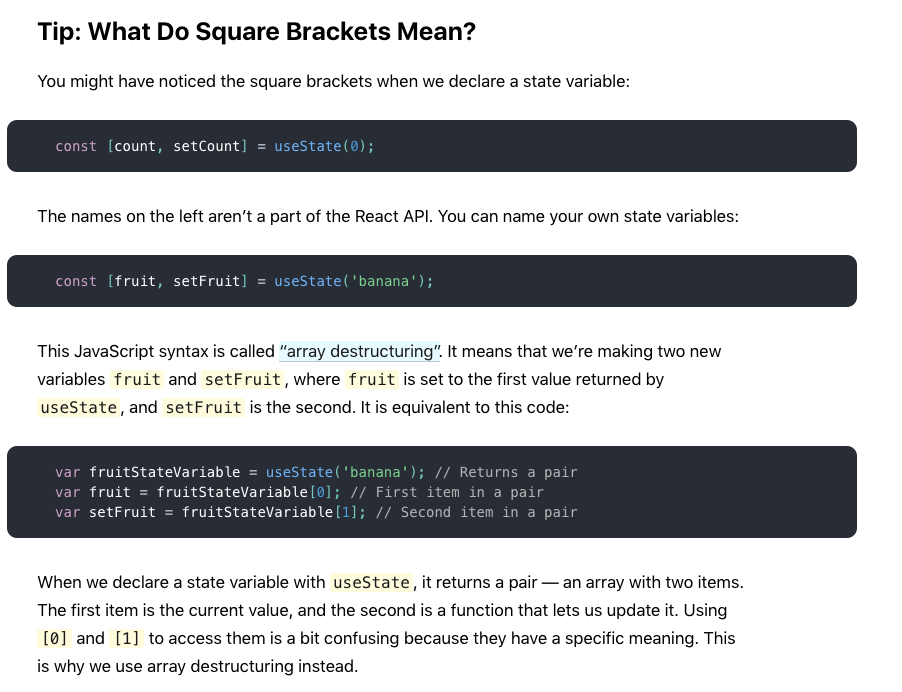
Hook을 이용한 state값과 setState 는 배열로 선언해주는데 똑같은 원리가 적용된다
const [value, setValue] = useState(0)이 말은 곧,
const value = useState(0)[0]
const setValue = useState(0)[1]
useState(0)는 실행 후 배열을 반환하는 함수이다
Hook 은 React features에 특별한 기능을 추가해주는 함수라고 생각하면 된다. 결국엔 Hook도 함수라는 말!
예를 들어 useState는 React state값을 컴포넌트에 추가해주는 Hooks 중 하나인 함수이다.
공식문서에 아주 친절하게 설명되어 있다.
Object와 Array
프로젝트 때 작성한 시작날짜와 끝날짜를 구하는 state 값이다.
const [date, setDate] = useState({start : null, end :null})이 구조는 어떻게 설명할 수 있을까?
date라는 state 값에 {start:null, end : null} 이라는 객체가 할당된 것
const date = { start : null, end : null }그래서 각각의 value를 쓰고 싶다면, key값을 이용하면 된다
이렇게 값을 꺼내서 원하는 곳에 쓰면 된다.
 <Calendar
    start={date.start}
    end={date.end}/>
원래는 이렇게 두개로 나눴던 것을 하나로 합친 것
const [startDate, setStartDate] = useState(null)
const [endDate, setEndDate] =  useState(null)
하나의 state에서 관리할 수 있는 것은 묶어서 관리하자