Use Apex to Automate Business Processes
In this project, you'll:
- Install a package in your Trailhead Playground.
- Create an Apex class and method.
- Create a trigger.
- Automate the process of creating a new sObject.
Introduction to BOTanicals
BOTanicals is a company that makes robotic flowers, the environmental and hypoallergenic alternative to traditional flowers. These flowers change color to suit your mood, glow in the dark, and never die. They're controlled by a state-of-the-art Salesforce org that's connected to the Internet of Things. You're just in time for the BOTanical Bonus Bouquet promotion.
In this project, we automate a business process to support the promotion. Specifically, we code our app to add a bonus bouquet every time an order is activated.
🎯 이번 실습 목표: 회사의 마케팅 프로모션 중 "Bonus Bouquet Promotion" (보너스 꽃다발 증정 이벤트) 를 지원하는 시스템을 만들기
The BOTanical Object Model
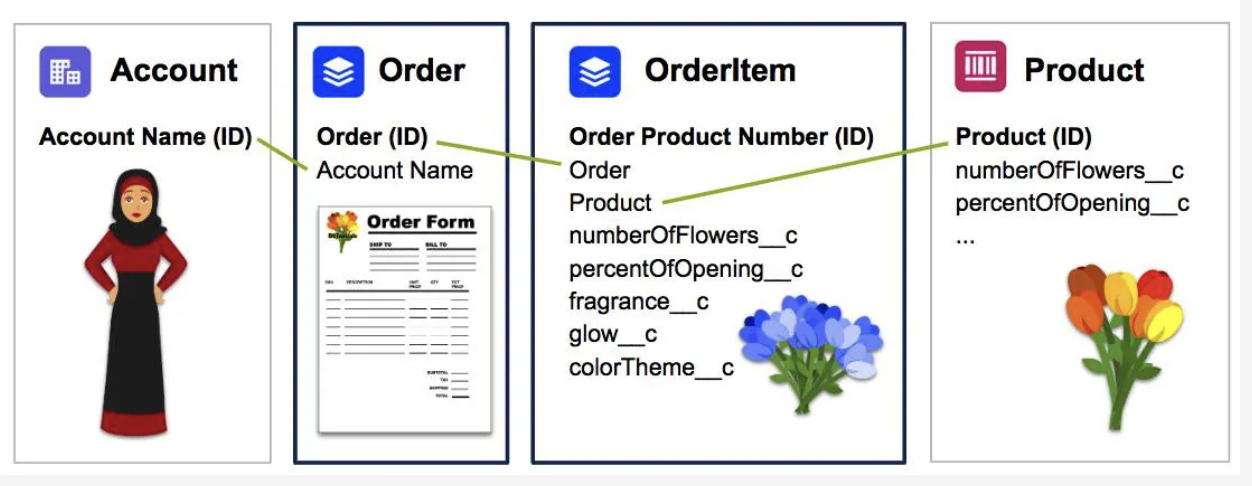
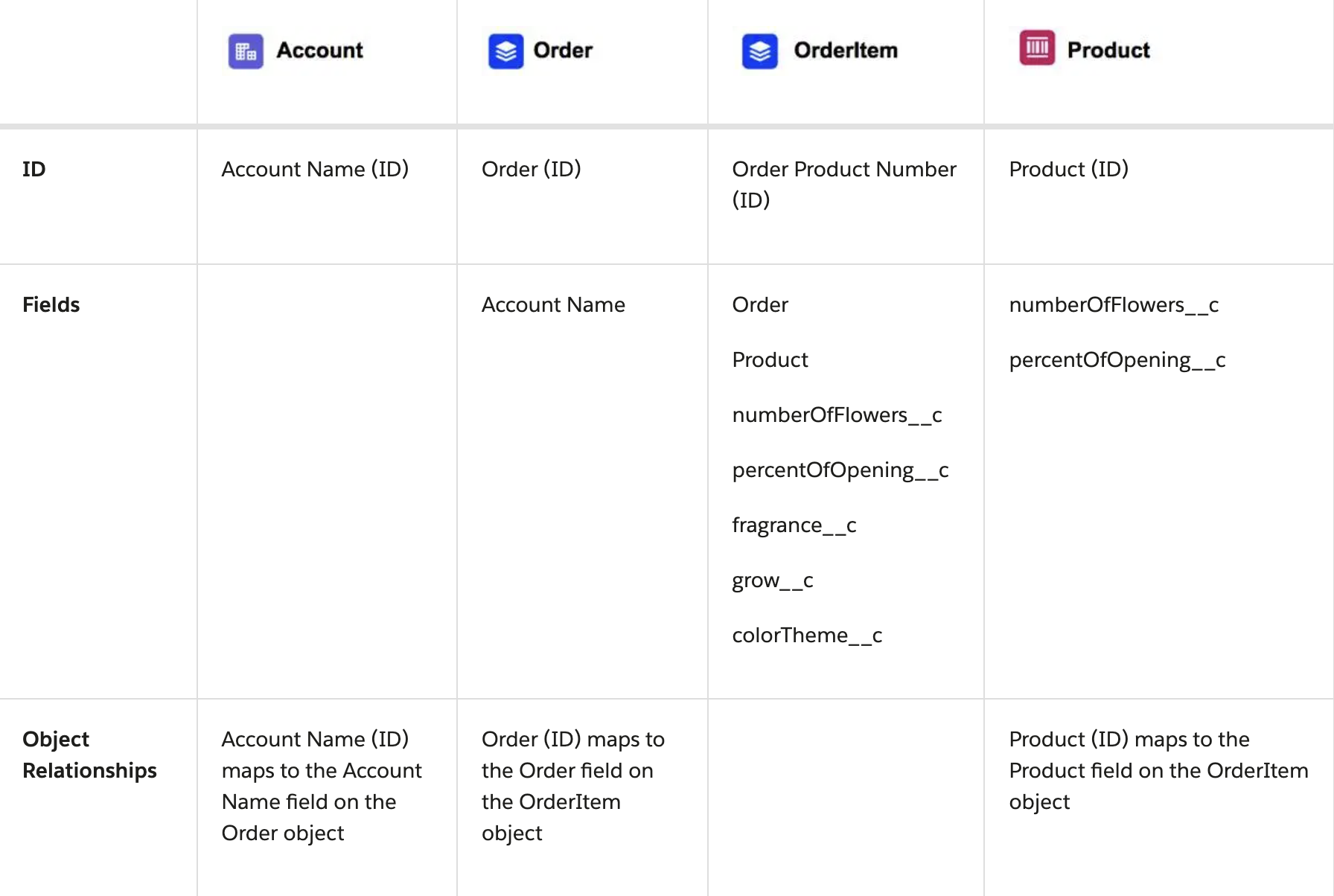
You probably notice a few familiar standard objects: Account, Order, OrderItem, and Product. There are also some custom fields in the OrderItem and Product objects. Each Order belongs to a single Account. Each OrderItem belongs to a single Order and a single Product.
Most of our coding revolves around the Order and OrderItem standard objects.
Setting
Follow the instructions in the link below to set up playground
Create a New Class and a New Method
In this step we create a new class and a new method, in which we check the status of all orders. If an order is activated, then we automatically add a bonus bouquet to the order.
- Open Developer Console.
- Click File | New | Apex Class.
- Name the class OrderItemUtility and click OK.
- Replace the existing code with this code:
//Create the class
public class OrderItemUtility {
    //Create the method that will add free bonus bouquet when order is activated
    public static void addBonusBouquet(List<Order> ordersFromTrigger) {
        //TO DO 3.1: Determine if we have a bonus product and get its ID to add to the order
            //TO DO 2.1: Create a list to store any new bouquets we'll insert later
            //TO DO 2.2: Loop over orders in ordersFromTrigger, for each order (called currentOrder) do something
                //TO DO 2.3: Verify the order status is 'Activated'
                    //TO DO 2.4: Create a new bouquet and set values
                    //TO DO 2.5: Add the freeBouquet sObject to your list
                //TO DO 2.6: Close the "if" and "for loop" sections
            //TO DO 3.2: Use DML to add the new list of newBouquets
        //TO DO 3.3: Close the if section
    } //end method
} //end class- Click File | Save to save the class.
Add Automation to Create a New Bouquet
주석 ➡️ 코드로 채우기
//Create the class
public class OrderItemUtility {
    //Create the method that will add free bonus bouquet when order is activated
    public static void addBonusBouquet(List<Order> ordersFromTrigger) {
        //TO DO 3.1: Determine if we have a bonus product and get its ID to add to the order
            //TO DO 2.1: Create a list to store any new bouquets we'll insert later
            List<OrderItem> newBouquets = new List<OrderItem>();
            //TO DO 2.2: Loop over orders in ordersFromTrigger, for each order (called currentOrder) do something
        	for(Order currentOrder : ordersFromTrigger) {
                //TO DO 2.3: Verify the order status is 'Activated'
       			if(currentOrder.Status == 'Activated') {
                    //TO DO 2.4: Create a new bouquet and set values
                    OrderItem freeBouquet = new OrderItem(
                    	OrderId = currentOrder.id,
                    	numberOfFlowers__c = 3,
                    	description = 'FREE Bouquet',
                    	Quantity = 1,
                    	colorTheme__c = 'Spectacular Sunset',
                    	percentOfOpening__c = 0,
                    	UnitPrice = 0.00
                    );
                    //TO DO 2.5: Add the freeBouquet sObject to your list
                    newBouquets.add(freeBouquet);
                //TO DO 2.6: Close the "if" and "for loop" sections
               } // end if
            } // end for loop
            //TO DO 3.2: Use DML to add the new list of newBouquets
        //TO DO 3.3: Close the if section
    } //end method
} //end class
Use Salesforce Data in Apex Code
(= Salesforce 데이터를 Apex에서 사용하기)
- Apex는 Salesforce의 프로그래밍 언어 → 결국 Salesforce 데이터베이스 안의 데이터를 다룰 수 있어야 함
- Salesforce의 데이터는 sObject 형태 (예: Order, Account, Contact 등)
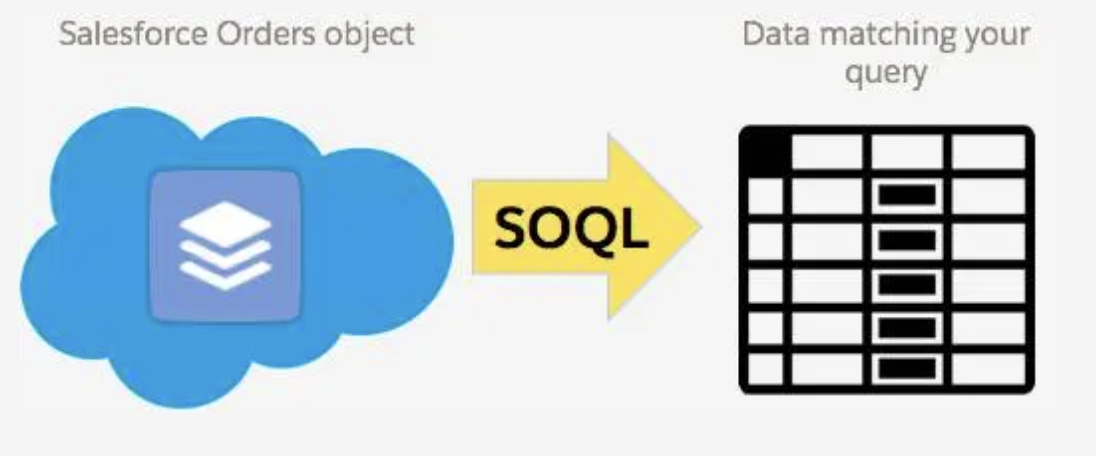
Add SOQL to Get Data from Salesforce
(= Salesforce에서 데이터를 가져오기: SOQL 사용)
Salesforce DB 안의 Orders 오브젝트 ➡️ SOQL (Salesforce Object Query Language) 사용해서 필요한 데이터를 조회 ➡️ 내가 원하는 데이터 레코드 리스트가 반환됨
예시:
List<Order> activatedOrders = [SELECT Id, Status FROM Order WHERE Status = 'Activated'];👉🏻 이렇게 쿼리해서 Order 데이터 중에서 Activated 상태인 주문만 골라옴
실습 코드
//TO DO 3.1
// Use SOQL to get the ID of the bonus bouquet and store it in an sObject variable called bonusProduct
List<Product2> bonusProductList = [SELECT Id, ProductCode FROM Product2 WHERE ProductCode = 'BOT-BB-12'];
Product2 bonusProduct = new Product2();
if(bonusProductList.size() > 0) {
    bonusProduct = bonusProductList[0];
    // Use SOQL to get the price book entry ID associated with the bonusProduct and store it in an sObject variable called entry
    // Every Product has an assosiated PricebookEntry
    List<PricebookEntry> entryList = [SELECT Id, Product2Id FROM PricebookEntry WHERE Product2Id = :bonusProduct.Id];
    PricebookEntry entry = new PricebookEntry();
    if(entryList.size() > 0) {
        entry = entryList[0];
    }
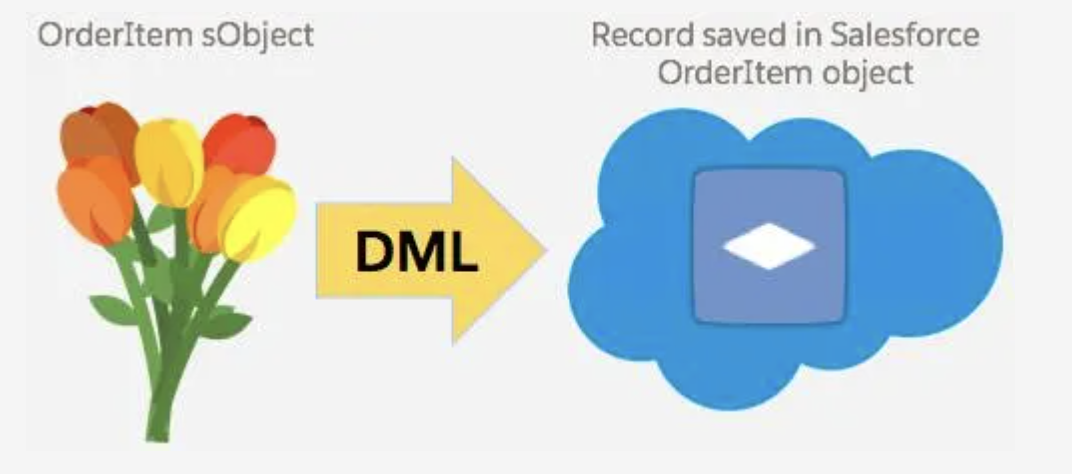
Use DML to Send Data to Salesforce
(= Salesforce에 데이터 저장하기: DML 사용)
- 이제 내가 새로 만든 데이터를 Salesforce에 저장해야 함
- 예를 들어 새 OrderItem (꽃다발)을 생성한 후 Salesforce DB에 넣음
🔧 이때 사용하는 게 DML (Data Manipulation Language)
insert newBouquets;👉 이 한 줄이 Salesforce 데이터베이스에 실제로 저장시키는 명령임
실습 코드
//TO DO 3.2
insert newBouquets;🔑 로직 작성 단계 요약 (SOQL → Apex → DML)
SOQL로 읽고(SELECT문)
→ Apex에서 가공하고(for,if문)
→ DML로 다시 저장한다(insert, update, delete 등)
최종 코드
//Create the class
  public class OrderItemUtility {

      //Create the method that will add free bonus bouquet when order is activated
      public static void addBonusBouquet(List<Order> ordersFromTrigger) {

          //TO DO 3.1: Determine if we have a bonus product and get its ID to add to the order
          // Use SOQL to get the ID of the bonus bouquet and store it in an sObject variable called bonusProduct
          List<Product2> bonusProductList = [SELECT Id, ProductCode FROM Product2 WHERE ProductCode = 'BOT-BB-12'];
          Product2 bonusProduct = new Product2();
          if(bonusProductList.size() > 0) {
              bonusProduct = bonusProductList[0];

              // Use SOQL to get the price book entry ID associated with the bonusProduct and store it in an sObject variable called entry
              // Every Product has an assosiated PricebookEntry
              List<PricebookEntry> entryList = [SELECT Id, Product2Id FROM PricebookEntry WHERE Product2Id = :bonusProduct.Id];
              PricebookEntry entry = new PricebookEntry();
              if(entryList.size() > 0) {
                  entry = entryList[0];
              }

              //TO DO 2.1: Create a list to store any new bouquets we'll insert later
              List<OrderItem> newBouquets = new List<OrderItem>();

              //TO DO 2.2: Loop over orders in ordersFromTrigger, for each order (called currentOrder) do something
              for(Order currentOrder : ordersFromTrigger) {

                  //TO DO 2.3: Verify the order status is 'Activated'
                  if(currentOrder.Status == 'Activated') {

                      //TO DO 2.4: Create a new bouquet and set values
                      OrderItem freeBouquet = new OrderItem(
                          OrderId = currentOrder.id, //this is the order we're linking the bouquet to
                          PricebookEntryId = entry.id,
                          numberOfFlowers__c = 3,
                          description = 'FREE Bouquet',
                          Quantity = 1,
                          colorTheme__c = 'Spectacular Sunset',
                          percentOfOpening__c = 0,
                          UnitPrice = 0.00
                      );

                      //TO DO 2.5: Add the freeBouquet sObject to your list
                      newBouquets.add(freeBouquet);

                  //TO DO 2.6: Close the "if" and "for loop" sections
                  } //end if
              } //end for loop

              //TO DO 3.2: Use DML to add the new bouquet to the Order
              insert newBouquets;

          //TO DO 3.3: Close the if section
          } //end if
      } //end method
  } //end class
🔨 자동 실행을 위한 Trigger 만들기
왜 Trigger가 필요하지?
내가 코드를 직접 실행하지 않아도
👉🏻 Salesforce 안에서 Order가 수정될 때마다 자동으로 이 로직이 실행되도록 만들고 싶음
👉🏻 그래서 트리거가 필요함
🔨 Trigger 만들기 흐름
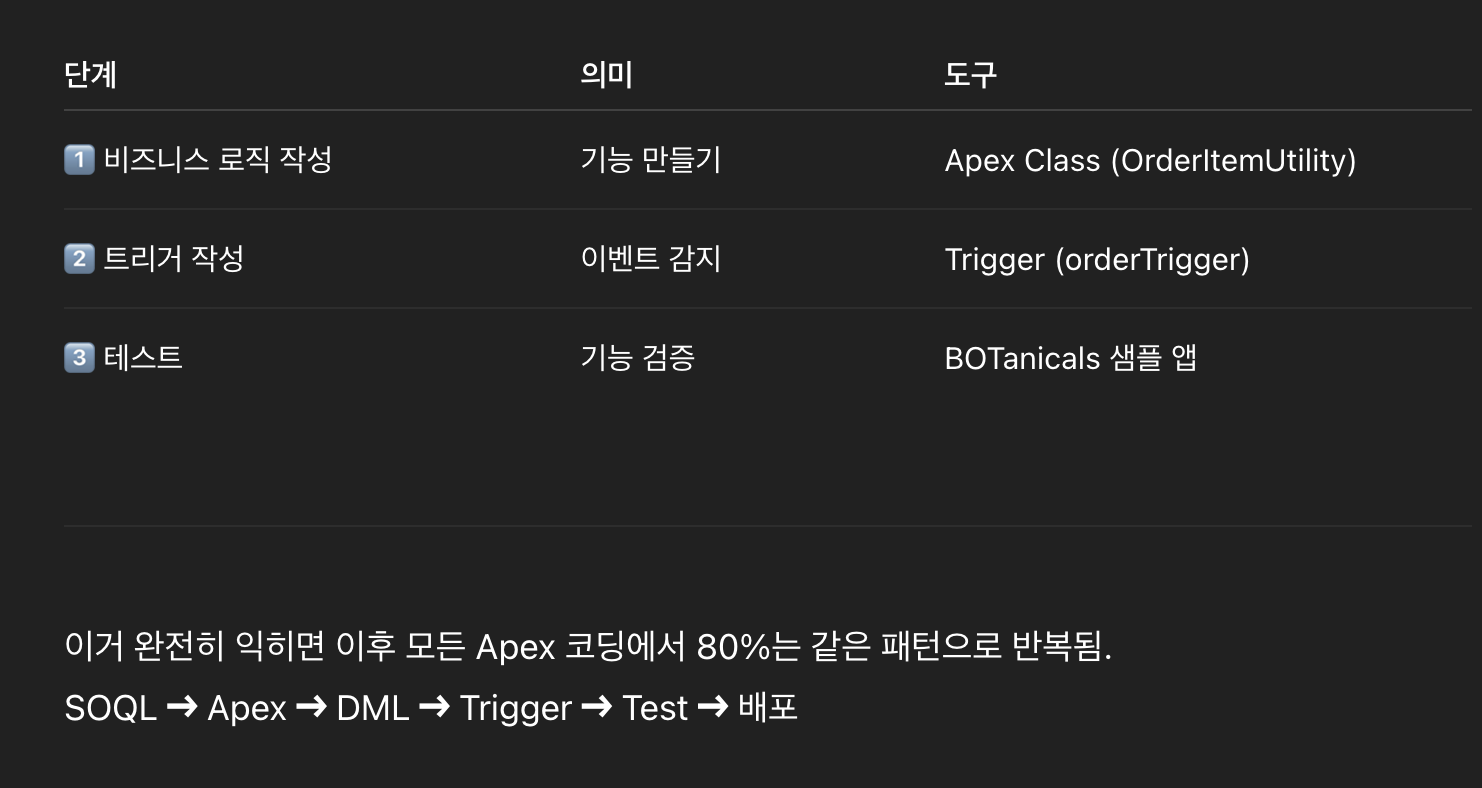
1️⃣ 먼저 Salesforce Playground에서 설정 변경 (이건 Trailhead 특유의 테스트 환경용 준비 작업)
- 새 버전의 Order Save Behavior가 자동으로 일부 프로세스를 미리 막아버림 → 이걸 꺼야 테스트 통과 가능
- Setup > Release Updates > Enable New Order Save Behavior > Disable Test Run
- 이건 그냥 환경 설정 맞춰주는거. (현실 프로젝트에선 거의 신경 안 써도 됨)
2️⃣ Trigger 작성
Developer Console에서 새 Apex Trigger 생성
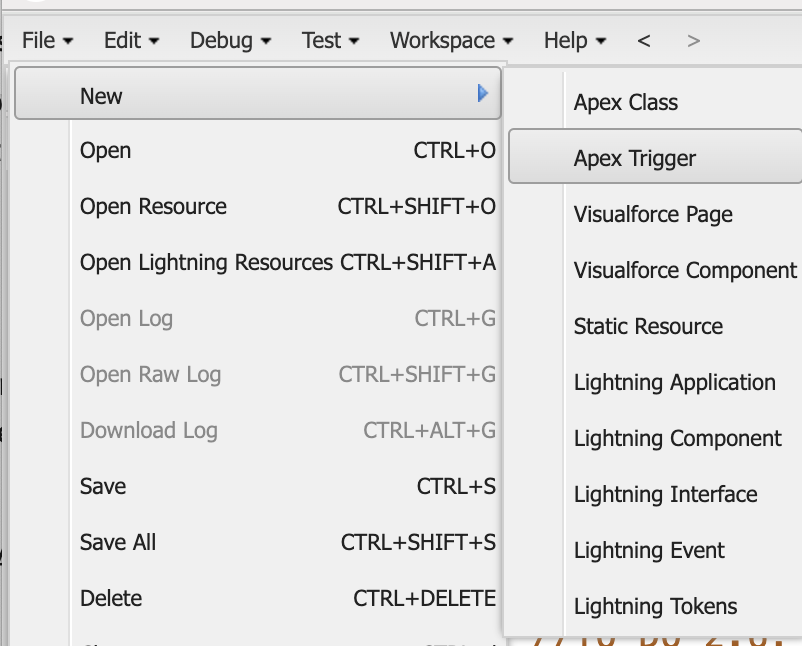
이름: orderTrigger
대상 sObject: Order
코드 작성:
trigger orderTrigger on Order (before update) {
    OrderItemUtility.addBonusBouquet(Trigger.new);
}
👉 이 트리거는:
- Order 객체가 수정(update) 될 때마다 자동으로 실행됨
- Trigger.new → 이번에 수정된 Order 레코드들을 리스트로 넘겨줌
- 이걸 OrderItemUtility.addBonusBouquet() 메소드에 그대로 넘겨줌
- 그리고 우리가 앞서 작성한 로직이 실행됨 → 보너스 꽃다발 자동 추가
✅ 테스트 진행
1️⃣ BOTanicals App에서 실제 주문 생성
2️⃣ 주문 활성화 (Activated로 변경)
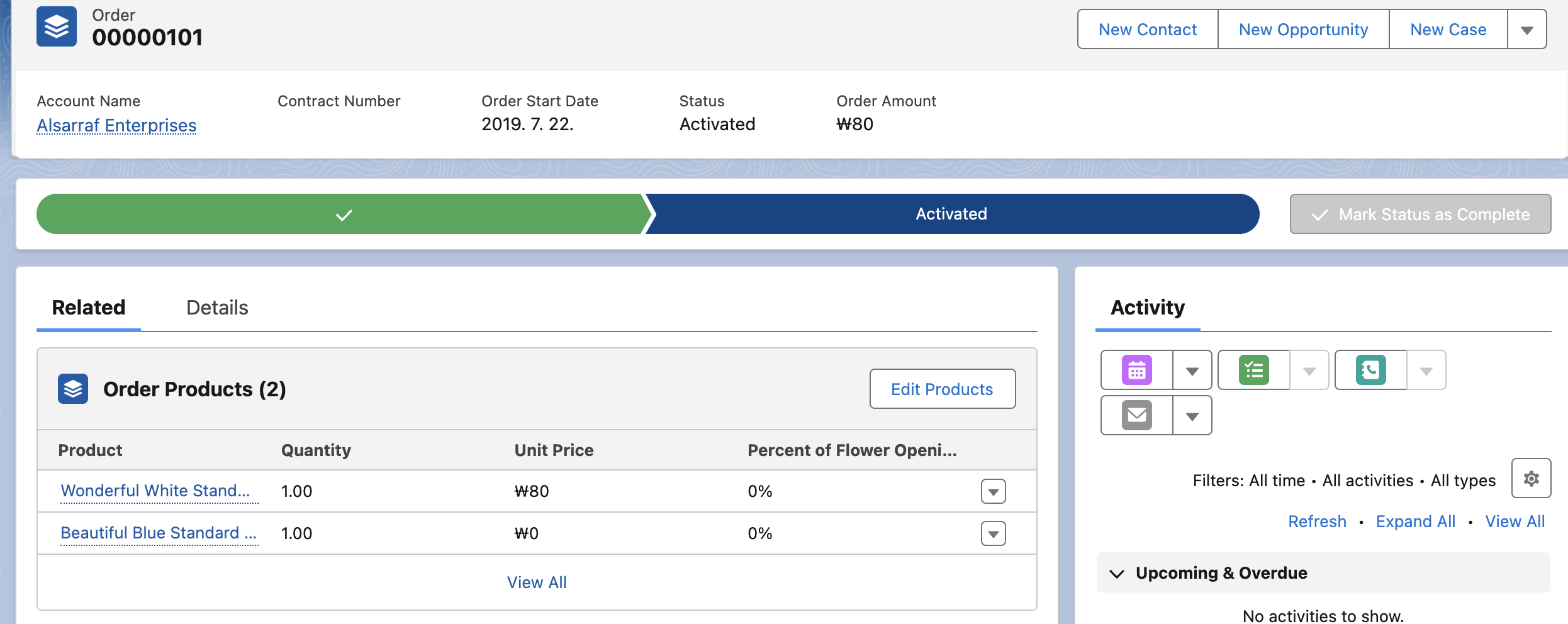
3️⃣ 자동으로 보너스 제품 (UnitPrice = $0) 추가됨 확인 ✨

🔑 이 전체 흐름은 Salesforce Apex 자동화의 '완전 기본 패턴'