
오늘의집 쇼핑 카테고리 상품 크롤링
국취제 끝나기 직전 마지막 스프링 프로젝트로 오늘의집을 클론코딩하는데, 이때 쓰일 쇼핑 카테고리별 상품을 크롤링하는 코드를 작성했다.
보완할 점
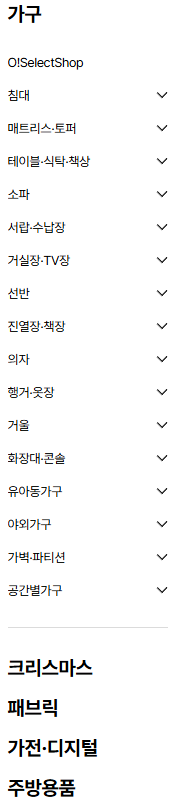
오늘의 집 카테고리는 이렇게 생겼는데, 여기서 메인 카테고리와 하위 카테고리, 구분선 밑의 다른 메인 카테고리의 아이디를 한번에 가져오고 싶었다. 하지만 첫 크롤링인데다가 크롤링 문법에 익숙하지 않아 뭔가 알 것 같은데 해결이 되지 않았다. 그래서 결국은 큰 카테고리의 아이디는 수동으로 입력하고 하위 카테고리는 크롤링으로 가져와서 db에 저장하였다. 큰 카테고리 아이디를 가져오는 방법을 다시 알아봐야겠다.
import re
import time
import mysql.connector
from mysql.connector import Error
from selenium import webdriver
from selenium.webdriver.chrome.options import Options
from selenium.webdriver.chrome.service import Service
from selenium.webdriver.common.keys import Keys
from selenium.webdriver.common.by import By
from webdriver_manager.chrome import ChromeDriverManager
from bs4 import BeautifulSoup

# MySQL에 카테고리 데이터를 삽입하는 함수
def insertCategory(category_id, majorCategory=None, subCategory=None):
    try:
        # MySQL 데이터베이스 연결
        connection = mysql.connector.connect(
            host='localhost',      # MySQL 서버 주소
            user='',      # MySQL 사용자명
            password='', # MySQL 비밀번호
            database=''   # 사용할 데이터베이스 이름
        )
        if connection.is_connected():
            cursor = connection.cursor()
            # 데이터 삽입 쿼리
            insert_query = """
                INSERT INTO category (categoryNum, majorCategory, subCategory)
                VALUES (%s, %s, %s)
            """

            # 쿼리 실행
            cursor.execute(insert_query, (int(category_id), majorCategory, subCategory))
            connection.commit()  # 커밋하여 데이터베이스에 반영
            print(f'카테고리 [{category_id}]가 DB에 저장되었습니다.')

    except Error as e:
        print(f'오류 발생: {e}')
    finally:
        if connection.is_connected():
            cursor.close()
            connection.close()  # 데이터베이스 연결 종료

# 판매자정보 삽입 함수
def insertStore(store):
    try:
        # MySQL 데이터베이스 연결
        connection = mysql.connector.connect(
            host='localhost',      # MySQL 서버 주소
            user='root',           # MySQL 사용자명
            password='1234',       # MySQL 비밀번호
            database='myhouse'     # 사용할 데이터베이스 이름
        )
        if connection.is_connected():
            cursor = connection.cursor()
            # 스토어 중복 여부 확인
            check_query = "SELECT COUNT(*) FROM store WHERE storeName = %s"
            cursor.execute(check_query, (store,))
            count = cursor.fetchone()[0]

            # 중복이 없는 경우에만 삽입
            if count == 0:
                insert_query_store = "INSERT INTO store (storeName) VALUES (%s)"
                cursor.execute(insert_query_store, (store,))
                connection.commit()
                print(f'스토어 [{store}]가 DB에 저장되었습니다.')
            else:
                print(f'스토어 [{store}]는 이미 DB에 존재합니다.')
    except Error as e:
        print(f'오류 발생: {e}')
    finally:
        if connection.is_connected():
            cursor.close()
            connection.close()  # 데이터베이스 연결 종료

# 판매자 번호 가져오기
def get_store_id(store_name):
    try:
        # MySQL 데이터베이스 연결
        connection = mysql.connector.connect(
            host='localhost',      # MySQL 서버 주소
            user='root',           # MySQL 사용자명
            password='1234',       # MySQL 비밀번호
            database='myhouse'     # 사용할 데이터베이스 이름
        )
        if connection.is_connected():
            cursor = connection.cursor()
            # store_name이 이미 존재하는지 확인
            select_query = "SELECT storeNum FROM store WHERE storeName = %s"
            cursor.execute(select_query, (store_name,))
            result = cursor.fetchone()

            if result:
                # store_name이 이미 존재하면 해당 store_id 반환
                return result[0]
    except Error as e:
        print(f'오류 발생: {e}')
        return None
    finally:
        if connection.is_connected():
            cursor.close()
            connection.close()  # 데이터베이스 연결 종료

# 상품 삽입 함수
def insertProduct(product_num, product_name, category_id, store_name):
    try:
        # MySQL 데이터베이스 연결
        connection = mysql.connector.connect(
            host='localhost',      # MySQL 서버 주소
            user='root',           # MySQL 사용자명
            password='1234',       # MySQL 비밀번호
            database='myhouse'     # 사용할 데이터베이스 이름
        )

        store_num = get_store_id(store_name)

        if connection.is_connected():
            cursor = connection.cursor()
            # 상품 중복 여부 확인
            check_query = "SELECT COUNT(*) FROM product WHERE productNum = %s"
            cursor.execute(check_query, (product_num,))
            count = cursor.fetchone()[0]

            # 중복이 없는 경우에만 삽입
            if count == 0:
                # 데이터 삽입 쿼리
                insert_query_product = "INSERT INTO product (productNum, productName, categoryNum, storeNum) VALUES (%s,%s,%s,%s)"
                # 쿼리 실행
                cursor.execute(insert_query_product, (int(product_num), product_name, int(category_id), store_num))
                connection.commit()  # 커밋하여 데이터베이스에 반영
                print(f'상품코드 [{product_num}], 상품명 [{product_name}], 카테고리 [{category_id}], 판매자 [({store_num}), {store}]가 DB에 저장되었습니다.')
            else:
                print(f'상품명 [{product_name}]는 이미 DB에 존재합니다.')
    except Error as e:
        print(f'오류 발생: {e}')
    finally:
        if connection.is_connected():
            cursor.close()
            connection.close()  # 데이터베이스 연결 종료

# 크롬 드라이버 설정
options = Options()
service = Service(ChromeDriverManager().install())
driver = webdriver.Chrome(service=service, options=options)

# 카테고리 ID가 포함된 URL
base_url = 'https://ohou.se/store/category?category_id='

# 페이지 URL
url = 'https://ohou.se/store/category?category_id=34000000'  # 초기 페이지 URL
driver.get(url)
time.sleep(3)  # 페이지 로드 대기

# 페이지 소스를 BeautifulSoup으로 파싱
soup = BeautifulSoup(driver.page_source, 'html.parser')

# 특정 div나 h2 태그 내에서만 a 태그를 찾고 싶다면
h2_elements = soup.find_all('h2', class_='commerce-category-list__title')
tree_div_elements = soup.find_all('div', class_='commerce-category-tree__entry__header')

# 각 요소 내에서 a 태그를 찾기
category_links = []
for element in h2_elements + tree_div_elements:
    category_links.extend(element.find_all('a', href=True))  # 해당 요소 내에서 모든 a 태그 추가

# 이후 category_id, category_names 추출
category_ids = []
category_names = []

for link in category_links:
    href = link['href']
    match = re.search(r'category_id=(\d+)', href)
    category_name = link.get_text().strip()

    if match:
        category_id = match.group(1)
        if "O!" not in category_name and "렌탈" not in category_name and "수입주방관" not in category_name and category_id not in category_ids:
            category_ids.append(category_id)
            category_names.append(category_name)

# 카테고리 아이디와 이름을 묶어서 딕셔너리로 변환
category_dict = dict(zip(category_ids, category_names))
print(category_dict)

previous_major_category = None

for category_id, category_name in category_dict.items():
    # 세 번째, 네 번째 자리가 '0'이면 majorCategory로 설정
    if (len(category_id) >= 3 and category_id[2] == '0') and (len(category_id) >= 4 and category_id[2] == '0' and category_id[3] == '0'):
        majorCategory = category_name
        subCategory = None
        previous_major_category = majorCategory
    else:  # 세 번째, 네 번째 자리가 '0'이 아니면 subCategory로 설정
        majorCategory = previous_major_category  # 이전 majorCategory를 그대로 사용
        subCategory = category_name

    # MySQL 데이터베이스에 카테고리 저장
    insertCategory(category_id, majorCategory, subCategory)

# 각 카테고리 ID에 대해 상품 크롤링
for category_id, category_name in category_dict.items():
    # 세 번째 자리가 '0'이 아닌 경우만 크롤링
    if (len(category_id) >= 3 and category_id[2] != '0') or (len(category_id) >= 4 and category_id[2] == '0' and category_id[3] != '0'):
        target_product_count = 10
        print(f"\n카테고리 {category_id}에서 크롤링 시작")

        driver.get(base_url + category_id)
        time.sleep(1)

        product_list = []
        product_nums = []

        # 상품 정보 수집
        while len(product_list) < target_product_count:
            soup = BeautifulSoup(driver.page_source, 'html.parser')
            articles = soup.find_all('article', class_='css-fy16k5')

            for article in articles:
                link = article.find('a', href=True)
                if link:
                    href = link['href']
                    match = re.search(r'/productions/(\d+)', href)
                    if match:
                        product_id = match.group(1)
                        if product_id not in product_nums:
                            product_nums.append(product_id)
                            store = article.select_one('div.product-brand').get_text().strip()
                            product_name = article.select_one('span.product-name').get_text().strip()

                            if "쿠폰" not in product_name:
                                product_list.append({
                                    'productNum': product_id,
                                    'store': store,
                                    'product': product_name
                                })
                                insertStore(store)
                                insertProduct(product_id, product_name, category_id, store)

                            if len(product_list) >= target_product_count:
                                break

            driver.find_element(By.TAG_NAME, 'body').send_keys(Keys.END)
            time.sleep(1)
        print(f"상품: {product_list}")

# 드라이버 종료
driver.quit()