🖥️ Vue.js란?
사용자 인터페이스를 구축하기 위한 JavaScript 프레임워크
표준 HTML, CSS 및 JavaScript를 기반으로 구축되며, 단순한 것 부터 복잡한 것 까지 사용자 인터페이스를 효율적으로 개발할 수 있는 컴포넌트 기반 프로그래밍 모델을 제공
https://ko.vuejs.org/
Count 버튼 클릭 시 1씩 증가 예시
<!DOCTYPE html>
<html lang="en">
<head>
    <meta charset="UTF-8">
    <meta name="viewport" content="width=device-width, initial-scale=1.0">
    <script src="https://unpkg.com/vue@3/dist/vue.global.js"></script>
    <title>Vue3</title>
</head>
<body>
    <div id="app">
        <button type="button" v-on:click="counter++">
            Counter : {{counter}}
        </button>
    </div>
    <script>
        const app = Vue.createApp({
            data(){
                return {
                    counter: 0,
                };
            },
        });
        app.mount("#app");
    </script>
</body>
</html>
예시에서 알 수 있는 Vue의 핵심 기능
- 선언적 렌더링(Declarative Rendering) : Vue는 템플릿 구문
{{데이터}}을 활용하여 데이터를 선언적으로 출력(렌더링) 할 수 있도록 함. (자동 렌더링) - 반응성(Reactivity) : Vue는 JavaScript 상태 변경을 자동으로 추적하고 변경이 발생하면 DOM을 효율적으로 업데이트함. ->
counter++로 상태 변경 시{{counter}}에서 자동 변경
<!DOCTYPE html>
<html lang="en">
<head>
    <meta charset="UTF-8">
    <meta name="viewport" content="width=device-width, initial-scale=1.0">
    <script src="https://unpkg.com/vue@3/dist/vue.global.js"></script>
    <title>Document</title>
</head>
<body>
    <div id="app">
        <input type="text" v-bind:placeholder="message">
        <hr>
        <button v-on:click="reverseMessage">
            click
        </button>
        <hr>
        {{username}} <br>
        <input type="text" v-model="username">
        <hr>
        <p v-if="visible">보임</p>
        <button type="button" v-on:click="visible = true">visible</button>
        <hr>
        <ul>
            <li v-for="item in items">{{item}}</li>
        </ul>
    </div>
    <script>
        const app = Vue.createApp({
            data(){
                return{
                    message: "값을 입력해주세요.",
                    username: "홍길동",
                    visible: false,
                    items: ['사과', '포도', '딸기'],
                };
            },
            methods:{
                hello(){
                    alert('Hello World!');
                },
                reverseMessage(){
                    this.message = this.message.split('').reverse().join("");
                }
            },
        });
        app.mount('#app')
    </script>
</body>
</html>
※ v- 접두어가 붙은 특수 속성을 디렉티브(directive) 라고 함.
바인딩(v-bind)
v-bind 속성은 데이터(상태) 속성에 바인딩할 때 사용하는 특수 속성으로, 바인딩 된 DOM은 placeholder 속성을 Vue 인스턴스의 message 속성으로 최신 상태 유지
하지만 단방향으로 바인딩 되어 input 태그에서 value를 변경 했을 때 상태 값은 변경되지 않음.
<input type="text" v-bind:placeholder="message">

<script>
        const app = Vue.createApp({
            data(){
                return{
                    message: "값을 입력해주세요.",
                };
            },
        });
        app.mount('#app')
</script>
이벤트 핸들링(v-on)
사용자가 앱과 상호 작용할 수 있게 하기 위해 v-on 디렉티브를 사용하여 Vue 인스턴스의 메소드(methods)를 호출
<input type="text" v-bind:placeholder="message">
<hr>
<button v-on:click="reverseMessage">click</button>

<script>
        const app = Vue.createApp({
            methods:{
                reverseMessage(){
                    this.message = this.message.split('').reverse().join('');
                }
            },
        });
        app.mount('#app')
</script>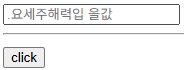
버튼을 누르면 message 값이 reverse 되어 나온다.
양방향 바인딩(v-model)
value 변경 시 상태값도 변경하고 싶을 때 v-model로 상태값도 변경 가능
<p>{{username}}</p>
<input type="text" v-model="username">

<script>
        const app = Vue.createApp({
            data(){
                return{
                    username: "홍길동",
                };
            },
        });
        app.mount('#app')
</script>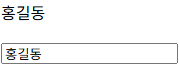
조건문(v-if)
<p v-if="visible">보임</p>
<button type="button" v-on:click="visible = true">visible</button>

<script>
        const app = Vue.createApp({
            data(){
                return{
                    visible: false,
                };
            },
        });
        app.mount('#app')
</script>
버튼을 누르면 '보임'이라는 글자가 화면에 나타남
반복문(v-for)
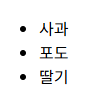
v-for는 배열에서 데이터를 가져와 아이템 목록을 표시
<ul>
	<li v-for="item in items">{{item}}</li>
</ul>

<script>
        const app = Vue.createApp({
            data(){
                return{
                    items: ['사과', '포도', '딸기'],
                };
            },
        });
        app.mount('#app')
</script>