
구글 간편 로그인 Google Cloud 세팅
-
구글 간편인증을 이용하려면 Google Cloud에 가입해야 한다.
링크 : https://cloud.google.com/apis?hl=ko -
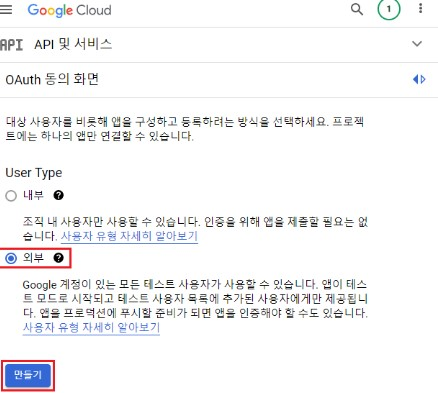
먼저 프로젝트를 하나 생성해주신 후 OAuth 동의 화면에 들어가 준다. 그후 User Type을 외부로 한 후 만들기를 눌려준다.
-
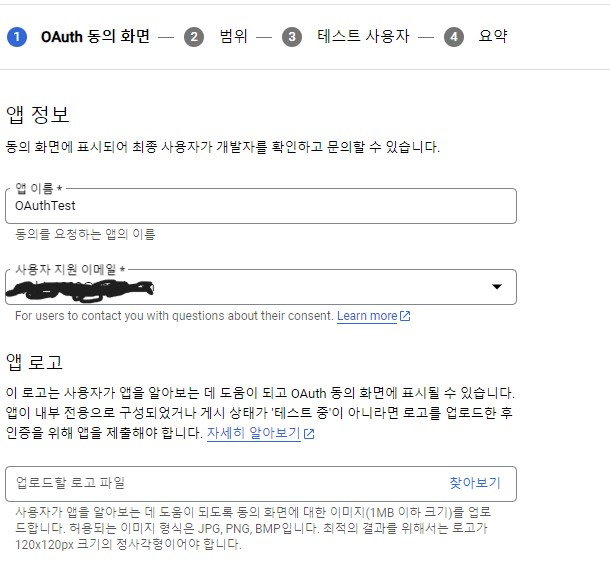
앱이름과 이메일을 작성해준다.
-
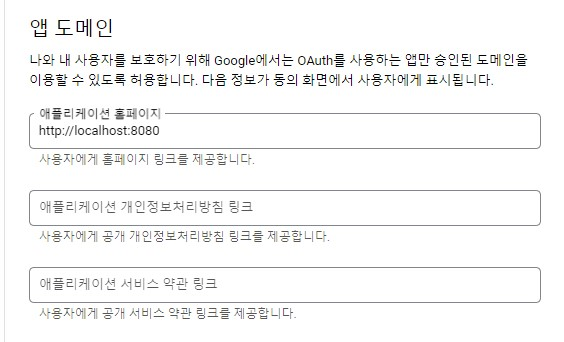
도매인을 작성해 준다.
-
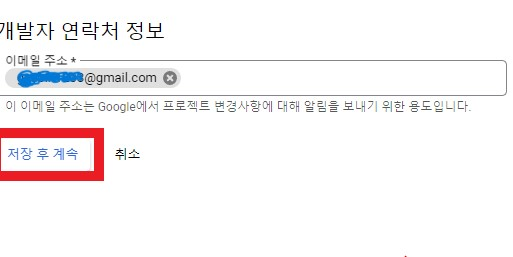
연락처를 입력해준후 저장후 계속을 누른다.
-
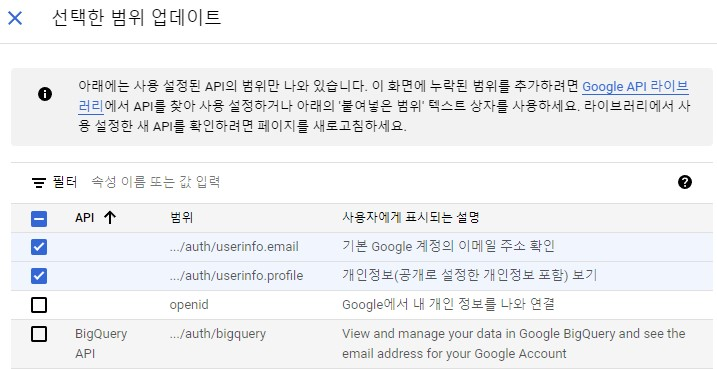
범위를 추가 해준다.
-
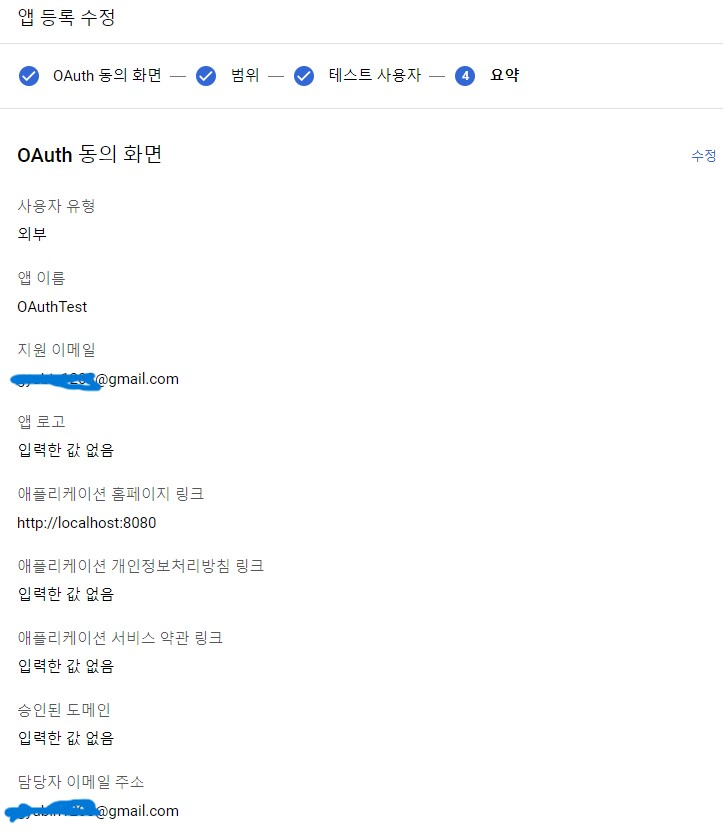
테스트사용자를 입력해준 후 동의 화면을 완성해준다.
-
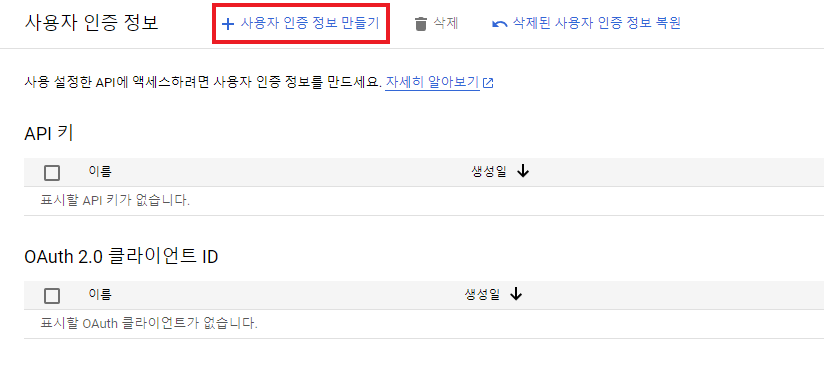
OAuth 클라이언트 아이디를 만들어 준다.
-
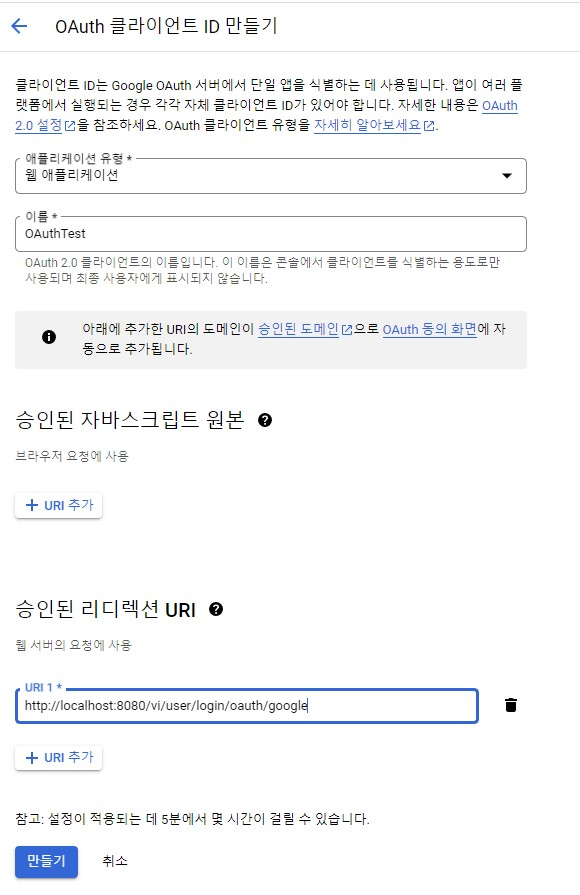
리디렉션 URL을 입력후 만들기를 해주면 세팅은 끝난다.
-
아래 코드로 테스트를 진행해준다(CLIENT_ID와 REDIRECT_URI 직접입력 )
https://accounts.google.com/o/oauth2/auth?client_id=CLIENT_ID&redirect_uri=REDIRECT_URI&response_type=code&scope=https://www.googleapis.com/auth/userinfo.email https://www.googleapis.com/auth/userinfo.profile
코드 구현
application.yml파일에 먼저 설정파일을 넣어준다.
spring:
  security:
    oauth2:
      google:
        client-id: *************.apps.googleusercontent.com
        client-secret: ****************
        redirect-uri: https://localhost:8080/v1/user/login/oauth/google
        token-uri: https://oauth2.googleapis.com/token
        resource-uri: https://www.googleapis.com/oauth2/v2/userinfo
그후 리디렉션 URL을 컨트롤러와 서비스에 구현시켜준다.
@RestController
@RequiredArgsConstructor
@RequestMapping("/v1")
public class UserController {

    private final UserService userService;

    @GetMapping("/user/login/oauth/{registrationId}")
    public RestResponse<SampleRes> googleLogin(@RequestParam String code,
        @PathVariable String registrationId,
        HttpServletResponse response) {
        String socialLogin = userService.socialLogin(code, registrationId, response);
        return RestResponse.success(
            SampleRes.builder().name("googleLogin").text(socialLogin).build());
    }
}
.....
@Slf4j
@Service
@RequiredArgsConstructor
public class UserService {

    private final UserRepository userRepository;
    private final PasswordEncoder passwordEncoder;
    private final Environment env;
    private final JwtUtil jwtUtil;
    private final RestTemplate restTemplate = new RestTemplate();

    public String socialLogin(String code, String registrationId, HttpServletResponse response) {
        String accessToken = getAccessToken(code, registrationId);
        JsonNode userResourceNode = getUserResource(accessToken, registrationId);
        String email = userResourceNode.get("email").asText();

        if (userRepository.findByEmail(email).isEmpty()) {
            UserEntity user = UserEntity.builder()
                .email(email)
                .social(UserSocialEnum.GOOGLE)
                .build();
            log.info(user.getEmail());
            userRepository.save(user);
            String token = jwtUtil.createToken(email);
            response.addHeader(JwtUtil.AUTHORIZATION_HEADER, token);
            return "회원가입 성공 입니다.";
        }
        String token = jwtUtil.createToken(email);
        response.addHeader(JwtUtil.AUTHORIZATION_HEADER, token);
        return "로그인 성공 입니다.";
    }

    private String getAccessToken(String authorizationCode, String registrationId) {
        String clientId = env.getProperty(
            "spring.security.oauth2." + registrationId + ".client-id");
        String clientSecret = env.getProperty(
            "spring.security.oauth2." + registrationId + ".client-secret");
        String redirectUri = env.getProperty(
            "spring.security.oauth2." + registrationId + ".redirect-uri");
        String tokenUri = env.getProperty(
            "spring.security.oauth2." + registrationId + ".token-uri");

        MultiValueMap<String, String> params = new LinkedMultiValueMap<>();
        params.add("code", authorizationCode);
        params.add("client_id", clientId);
        params.add("client_secret", clientSecret);
        params.add("redirect_uri", redirectUri);
        params.add("grant_type", "authorization_code");

        HttpHeaders headers = new HttpHeaders();
        headers.setContentType(MediaType.APPLICATION_FORM_URLENCODED);

        HttpEntity entity = new HttpEntity(params, headers);

        ResponseEntity<JsonNode> responseNode = restTemplate.exchange(tokenUri, HttpMethod.POST,
            entity,
            JsonNode.class);
        JsonNode accessTokenNode = responseNode.getBody();
        return accessTokenNode.get("access_token").asText();
    }

    private JsonNode getUserResource(String accessToken, String registrationId) {
        String resourceUri = env.getProperty(
            "spring.security.oauth2." + registrationId + ".resource-uri");

        HttpHeaders headers = new HttpHeaders();
        headers.set("Authorization", "Bearer " + accessToken);
        HttpEntity entity = new HttpEntity(headers);

        return restTemplate.exchange(resourceUri, HttpMethod.GET, entity, JsonNode.class).getBody();
    }

}
...
public interface UserRepository extends JpaRepository<UserEntity,Long> {

  Optional<UserEntity> findByEmail(String email);
}
현재 로컬 로그인을 jwt을 이용한 인증인가를 사용함으로 헤더에 jwt토큰을 반환할수 있도록 설정해두었다.
참고 클라우드 설정 : https://darrenlog.tistory.com/38#google_vignette
참고 코드 설정 : https://darrenlog.tistory.com/40