구현중인 화면
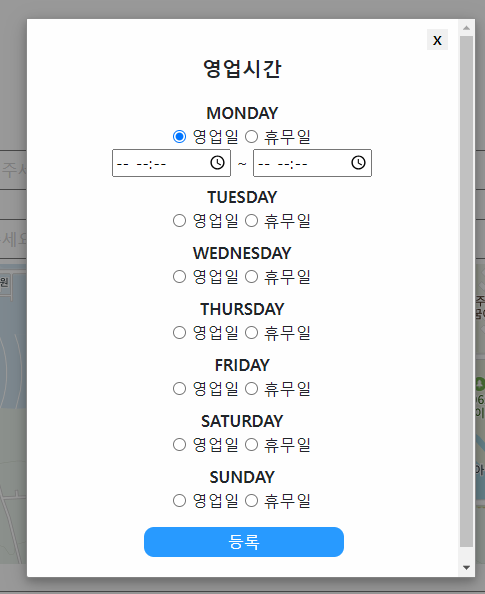
for문을 하기 전에는 아래의 코드를 7번을 반복했었다. for문을 만들면 좋겠는데 어떻게 해야할지 몰라 챗GPT한테 질문했다.
  <span type="text"  value="monday" style="font-size : 16px; font-weight : bold;">MON</span>
  	<div style="margin-bottom : 8px;">
        <input type="radio" name ="mon" onclick="open_1()"/>
        <span>영업일</span>
        <input type="radio" name ="mon" onclick="close_1()"/>
        <span>휴무일</span>
        <div class="time_click" id="timeClickContainer_1" style="display : none;" >
            <input class="time" id="monday_str_time" type="time">
            ~
            <input class="time" id="monday_end_time" type="time">
        </div>
</div> <div style="margin-top: 17px;">
<script>
var daysOfWeek = ["monday", "tuesday", "wednesday", "thursday", "friday", "saturday", "sunday"];
</script>
<script>
for (var i = 0; i < daysOfWeek.length; i++) {
document.write(`
<div>
<span type="text" data-value="${daysOfWeek[i]}" id="${daysOfWeek[i]}"style="font-size: 16px; font-weight: bold;">${daysOfWeek[i].toUpperCase()}</span>
<div style="margin-bottom: 8px;">
<input type="radio" name="${daysOfWeek[i]}" onclick="open_${i + 1}()"/>
<span>영업일</span>
<input type="radio" name="${daysOfWeek[i]}" onclick="close_${i + 1}()"/>
<span>휴무일</span>
<div class="time_click" id="timeClickContainer_${i + 1}" style="display: none;">
<input class="time" id="${daysOfWeek[i]}_str_time" type="time">
~
<input class="time" id="${daysOfWeek[i]}_end_time" type="time">
</div>
</div>
</div>
`);
}
</script>
</div>for문을 작성하니 깔끔해졌다. 다음에는 for문 작성법을 찾지말고 직접 작성해볼 수 있도록 반복학습을 해야겠다.