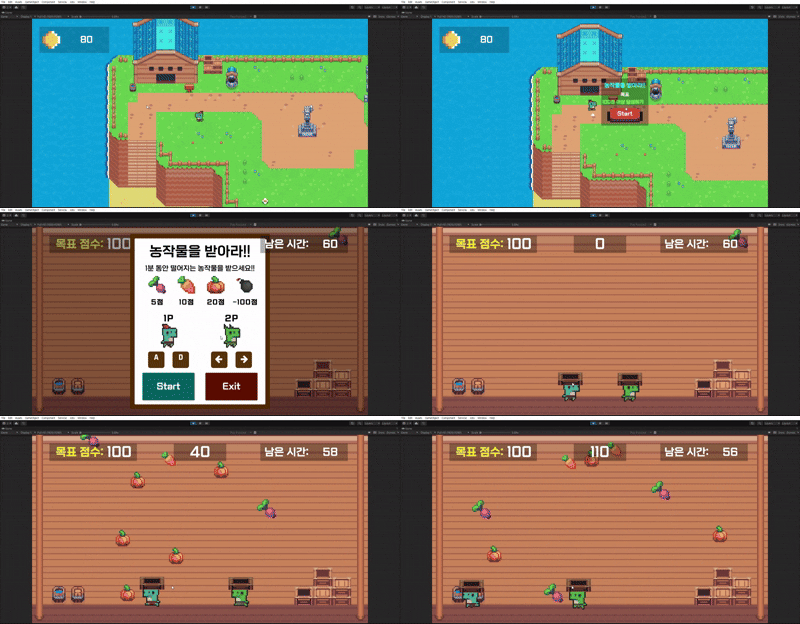
🥕 농작물을 받아라 !! - 점수와 UI 구현하기
하늘에서 떨어지는 랜덤한 농작물들과 그걸 받아서 점수로 올리는 내용을 구현하였다.
🍉 농작물 만들기 - Crop.cs
빈 게임 오브젝트에 SpriteRendere와, Rigidbody2D, BoxCollider2D (IsTrigger = true) 추가를 해주고
농작물이 랜덤으로 초기화 될 수 있는 Crop.cs 스크립트를 작성해준다.
using UnityEngine;

public class Crop : MonoBehaviour
{
    SpriteRenderer spriteRenderer;
    [SerializeField] Sprite[] cropSprites;
    int[] scores = { 5, 10, 20, -100 };
    int score;
    int num;

    void Awake()
    {
        spriteRenderer = GetComponent<SpriteRenderer>();
    }

    // 오브젝트가 활성화 되면 농작물 랜덤 설정
    void OnEnable()
    {
        int num = Random.Range(0, 4);
        SetRandomCrop(num);
    }

    /// <summary>
    /// 랜덤한 농작물 설정
    /// </summary>
    /// <param name="num"></param>
    public void SetRandomCrop(int num)
    {
        this.num = num;

        float x = Random.Range(-7.5f, 7.5f);
        float y = Random.Range(5f, 4f);

        transform.position = new Vector3(x, y, 0);

        score = scores[num];
        spriteRenderer.sprite = cropSprites[num];
    }

    void OnTriggerEnter2D(Collider2D collision)
    {
        // 바구니와 충돌하면 점수 변화
        if (collision.gameObject.CompareTag("Basket"))
        {
            GameManager.Instance.AddScoreMiniGame(score);
            Destroy(gameObejct);
        }

        // 바닥과 충돌하면 비활성화
        else if (collision.gameObject.CompareTag("Ground"))
        {
            Destroy(gameObject);
        }
    }
}
SetRandomCrop() 메서드를 통해 랜덤한 인덱스를 통해 랜덤한 농작물을 세팅
OnTriggerEnter2D() 에서 바구니 또는 바닥에 충돌했을 때의 처리를 작성한다.
🔁 농작물을 반복 소환하는 CropsGenerator.cs
위에 만들어둔 Crop 프리팹을 사용하여 일정한 주기로 반복하며 농작물을 소환하는 CropsGenrator.cs 를 작성해준다.
using System.Collections;
using System.Collections.Generic;
using UnityEngine;

public class CropsGenerator : MonoBehaviour
{
    [SerializeField] int gerateCount = 20;
    [SerializeField] float interval = 1;
    Queue<Crop> cropsPool = new Queue<Crop>(); // 농작물을 담을
    [SerializeField] Crop cropPrefab;
    public bool isGameOver = false;

    public void Init()
    {
        for (int i = 0; i < 20; i++)
        {
            Crop crop = Instantiate(cropPrefab);
            crop.cropsGenerator = this;
            crop.gameObject.SetActive(false);
            cropsPool.Enqueue(crop);
        }

        StartCoroutine(GenerateCrop());
    }

    // crop 큐에서 꺼내서 사용
    public void GetCrop()
    {
        if (cropsPool.Count > 0)
        {
            Crop crop = cropsPool.Dequeue();
            crop.gameObject.SetActive(true);
        }
        // 부족하면 새로 생성
        else
        {
            Crop newCrop = Instantiate(cropPrefab, transform);
            newCrop.cropsGenerator = this;
        }
    }

    // 사용된 crop 다시 큐로 반환
    public void ReturnCrop(Crop crop)
    {
        crop.gameObject.SetActive(false);
        cropsPool.Enqueue(crop);
    }

    // 일정한 주기로 농작물 생성
    IEnumerator GenerateCrop()
    {
        while (!isGameOver)
        {
            GetCrop();

            yield return new WaitForSeconds(interval);
        }
    }
}Queue를 사용해서 간단하게 ObjectPooling을 구현하고,
코루틴을 활용하여 일정 주기마다 농작물을 생성하도록 구현하였다.
🥕 Crop.cs 수정
ObjectPooling을 위해 CropsGenerator 를 받을 변수를 추가하고,
Destroy() 대신 ReturnCrop()을 통해 다시 큐(풀)로 반환을 해주면 완성!
using UnityEngine;

public class Crop : MonoBehaviour
{
    public CropsGenerator cropsGenerator;
	... 생략

    void OnTriggerEnter2D(Collider2D collision)
    {
        // 바구니와 충돌하면 점수 변화
        if (collision.gameObject.CompareTag("Basket"))
        {
            GameManager.Instance.AddScoreMiniGame(score);
            cropsGenerator.ReturnCrop(this);
        }

        // 바닥과 충돌하면 비활성화
        else if (collision.gameObject.CompareTag("Ground"))
        {
            cropsGenerator.ReturnCrop(this);
        }
    }
}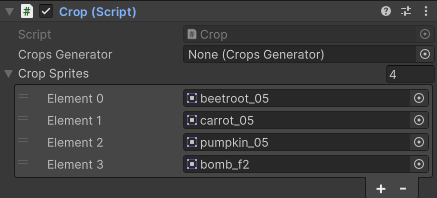
이제 만들어둔 Crop 오브젝트에 스크립트를 적용 후 사용할 농작물 Sprite를 추가하고,
UI와 사운드 작업을 뚝딱뚝딱 해준다면 완성이다.
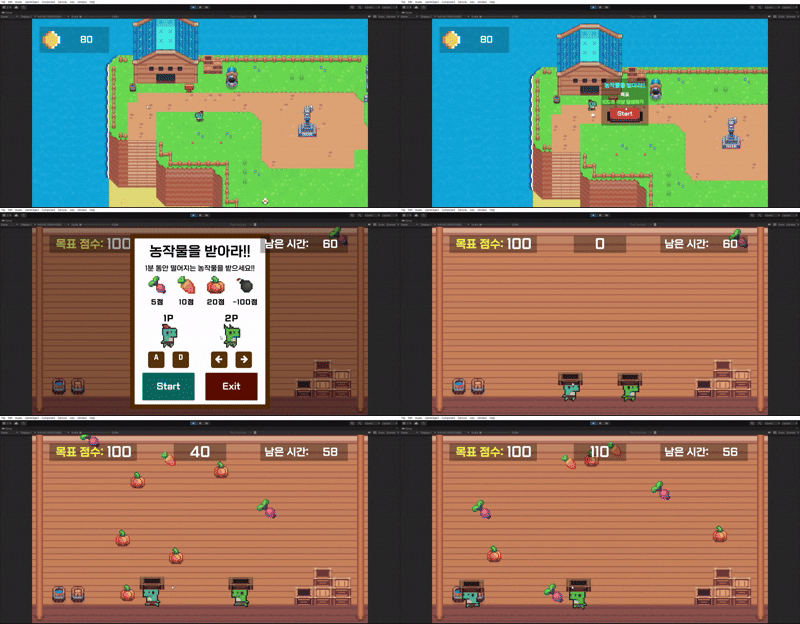
💻 완성 !

Unity, C#