Font
font-family
https://www.w3schools.com/css/tryit.asp?filename=trycss_font-family
1. 개발자가 적용한 폰트, 2. (없는 폰트의 경우) 대체되는 글자체 지정, 3. 아예 없다면 대비책 이ㄹㄴ 식으로 적용한다.
font-style : 기울기. normal
italic, oblique : 적용방식의 차이. 보통은 italic을 더 선호한다.
-weight : 글자의 굵기
https://www.w3schools.com/css/tryit.asp?filename=trycss_font-weight
-varirant : 글자를 대문자로 바꾸고 소문자 사이즈로
https://www.w3schools.com/css/tryit.asp?filename=trycss_font-variant
-size: 절대 / 상대 사이즈(부모 노드에 대해 얼마 정도냐).px과 em, %로 글자크기를 적용할 수 있다.
em : (M의 가로 넓이를 기준으로 크기를 정한다.1em=16px)
% : 부모노드에 따라서 크기가 결정된다.
폰트 역시 font: property 내에서 한 줄 정리가 가능하다.
Link

상태 정보를 가지고 있음. -> css로 조정
- a:link – a normal, unvisited link
- a:visited – a link the user has visited
- a:hover – a link when the user mouses over it
- a:active – a link the moment it is clicked
-> 선택자 정의하는 법 참고. 여기서 a는 <a>이다.
규칙) When setting the style for several link states, there are some order rules
◼ a:hover MUST come after a:link and a:visited
◼ a:active MUST come after a:hover
데코레이션 적용 가능. 라인을 지울 수 있으나 권장하지 않음.
https://www.w3schools.com/css/tryit.asp?filename=trycss_link_decoration
백그라운드 컬러 -https://www.w3schools.com/css/tryit.asp?filename=trycss_link_background
링크 버튼 -
https://www.w3schools.com/css/tryit.asp?filename=trycss_link_advanced
CSS LIST
마커의 표현을 그림이나 다른 아이콘으로 가능하다.
REMIND
마커??
- 이런 동그란 점을 마커라고 한다.
글자 위치도 조정가능하다.
Property+ (ShortHand : list-style )
-
list-style-type: 마커의 타입을 변경할 수 있다.- https://www.w3schools.com/css/tryit.asp?filename=trycss_list-style-type_ex
- cicle, square, upper-roman, lower-alpha etc...
- None을 지정하여 없앨 수 있다.
-
list-style-image: 이미지 마커는 (: url('image.jpg)으로 불러올 수 있다. -
`list-style-position:
-
:outside:
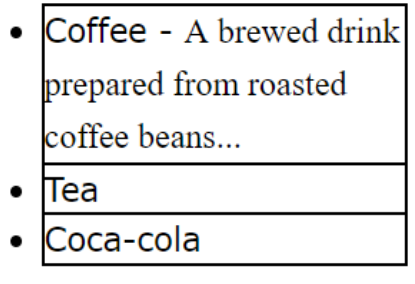
-
:inside:
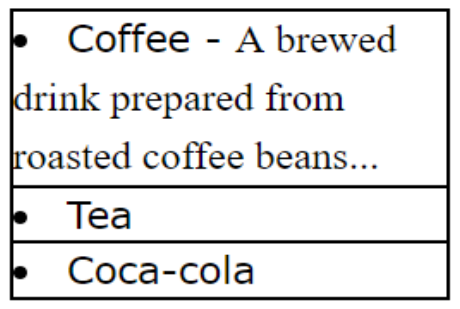
-
https://www.w3schools.com/css/tryit.asp?filename=trycss_list-style-position
-
CSS TABLE
box모델에 적힌 property를 참고하면 된다.
property+
vertical-align: http://www.w3schools.com/css/tryit.asp?filename=trycss_table_vertical-align
padding: http://www.w3schools.com/css/tryit.asp?filename=trycss_table_padding
https://www.w3schools.com/css/tryit.asp?filename=trycss_table_border_divider
selector+
:hover: 마우스를 갖다대면(hover) 색이 변하는 동적인 애니메이션.tr:hover {background-color: coral;}
:nth-child(even or odd): 홀수 혹은 짝수 칸에 색 지정tr:nth-child(even) {background-color: #f2f2f2;}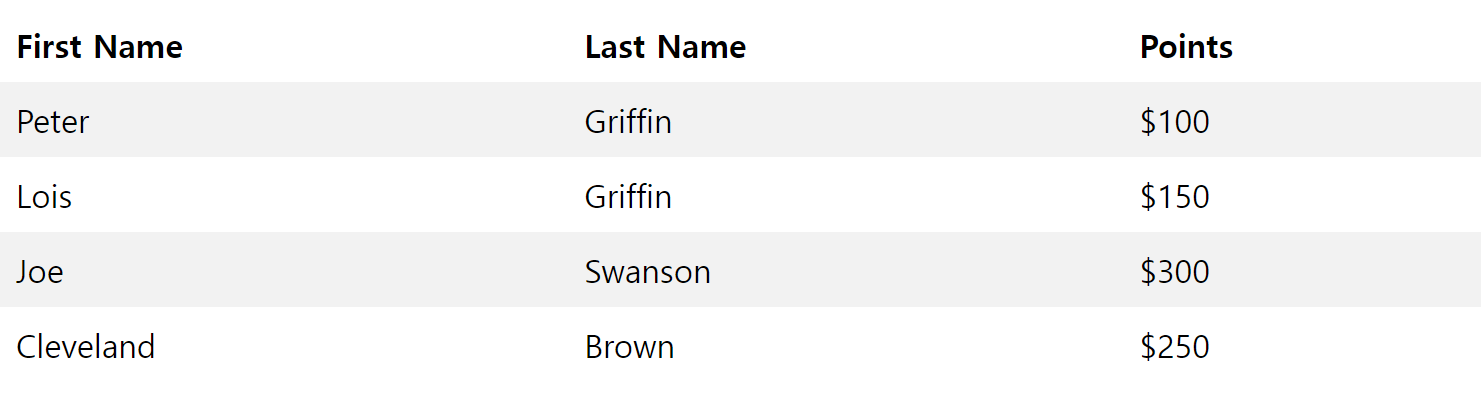
- https://www.w3schools.com/css/tryit.asp?filename=trycss_table_striped
그 외...
CSS Outline
CSS Text Alignment
Text Align Last, Text Direction, Vertical Alignment
CSS Text Decoration
Add a Decoration Line to Text, Specify a Color for the Decoration Line,
Specify a Style for the Decoration Line, Specify the Thickness for the
Decoration Line
CSS Fonts – Font Web Safe, Font Fallbacks, Font Google, Font
Pairings
CSS Font Size
Responsive Font Size
CSS Icons
CSS Tables – Responsive Table
