HTML Forms
id,패스워드 입력하는 것과, 회원가입등 사용자가 정보를 입력할 수 있도록 하는 양식이다.
->서버로 넘어가서 php, jsp로 데이터베이스가 저장된다.
<form> : 다양한 정보들의 입력을 받는 태그이다.
ex.
<form>
  안녕하세요
 </form>
-input-
<input> :type을 받고자 하는 내용을 입력받는다.
<input type="text">
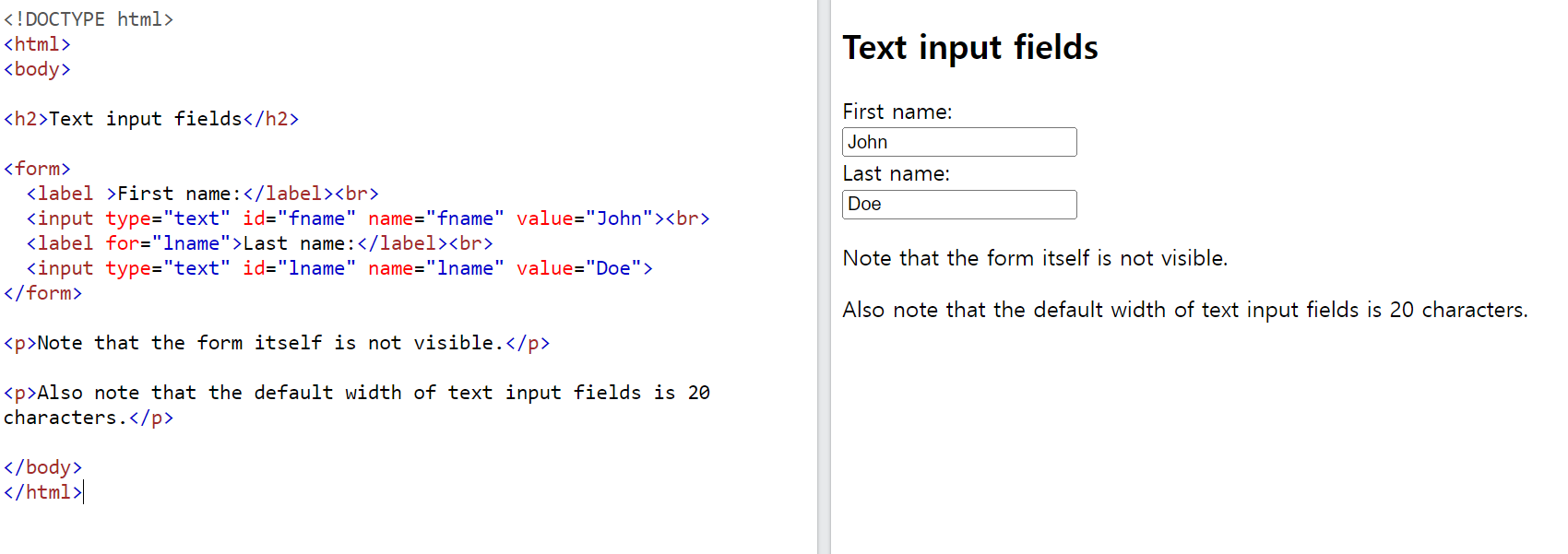
name: 사용자가 입력한 값을 서버로 보내기 위해 각각의 값을 구분하는 역할을 한다.
value: 사용자가 입력한 값이다. / 화면에 표시하고 싶다면 작성해도 되는것 같기도 한데? 또 입력란의 회색 글씨 띄우는 것하고는 다른 인거 같다.
이 값들은 서버로 보내질때 name = value 형식으로 보내진다.
그림을 예로 들면은 fname = John & lname = Doe이다.
type : resrt, submit, text, radio(둥근 원),checkbox
input etc)
- inputbox의 사이즈 :
size요소
최대 글자의 개수 :maxlength요소 - inputbox에서 enter를 누르면 submit이 바로 된다.
뒤에 작성할 textArea하고는 다른 부분이다.
input과 기능이 비슷하지만 다른 이름의 태그를 사용하는 것들?
<select>: 드랍다운 방식의 값을 받는 input이라 생각하면 된다. value에 해당되는 값은ㅇ <option>에 들어간다 보면 된다.
select etc)
multiple: 복수 선택size: select에서 보여지는 value의 개수
<form action="/action_page.php">
  <label for="cars">Choose a car:</label>
  <select id="cars" name="cars">
    <option value="volvo">Volvo</option>
    <option value="saab">Saab</option>
    <option value="fiat">Fiat</option>
    <option value="audi">Audi</option>
  </select>
  <input type="submit">
</form>
https://www.w3schools.com/html/tryit.asp?filename=tryhtml_elem_select
<textArea>: 텍스트 문장을 작성하는데 사용된다. 엔터가능하며 row 와 column으로 크기를 조절할 수 있다.
<h2>Textarea</h2>
<p>The textarea element defines a multi-line input field.</p>

<form action="/action_page.php">
  <textarea name="message" rows="10" cols="30">The cat was playing in the garden.</textarea>
  <br><br>
  <input type="submit">
</form>
https://www.w3schools.com/html/tryit.asp?filename=tryhtml_elem_textarea
-label-
<label>은 inputbox를 부가적으로 설명해주는 란이다.
for와 id를 매칭시켜준다.
why? 매칭을 하였을 때, 브라우저에서 label란을 클릭하여도 inputbox로 안내해주기 때문이다.
<form>
  <input type="radio" id ="radio_button" name="button" value="Radio Button" checked>
  <!--체크된 값으로 설정하려면 checked 요소를 사용하면 된다.-->

  <label for = "radio_button">radio button</label>
  <input type="checkbox" id ="checkbox_button" name="button" value="Checkbox Button">
  <label for = "checkbox_button">Checkbox</label>
 </form>
action: 액션은 form에서 서버의 어느 곳으로 넘겨줘야하는지 알려주는 부분이다. 넘기는 방식을 method요소를 사용할 수 있으며
서버에 보내지는 url에 넘어가는 값(name="value")을 표현하는get방식과(ex. 구글 검색하였을 때의 url)
(비밀 보장x, url글자 수 제한 -> 굉장히 큰 정보는 못넘김)
HTTP 통신의 body 부분에 넘겨지는
post방식으로 나뉜다.(파일 제한x)
<!DOCTYPE html>
<html>
<body>

<h2>Checkboxes</h2>
<p>The <strong>input type="checkbox"</strong> defines a checkbox:</p>

<form action="/action_page.php" method = "get">
<!-- 액션은 서버의 어느 곳으로 넘겨줘야하는지 알려주는 부분이다.-->
  <input type="checkbox" id="vehicle1" name="vehicle1" value="Bike">
  <label for="vehicle1"> I have a bike</label><br>
  <input type="checkbox" id="vehicle2" name="vehicle2" value="Car">
  <label for="vehicle2"> I have a car</label><br>
  <input type="checkbox" id="vehicle3" name="vehicle3" value="Boat">
  <label for="vehicle3"> I have a boat</label><br><br>
  <input type="submit" value="Submit">
  <!-- 사용자에게 form을 받으려면 input 타입의 submit을 사용하면 된다.-->
</form>

</body>
</html>
https://www.w3schools.com/html/tryit.asp?filename=tryhtml_input_checkbox
-form Target Attribute-
a에서는 링크에서 어떻게 보여줄 지를 나타냈는데,
form에서도 마찬가지이다.
<form action="/action_page.php" target="_blank">target에서는 iframe의 name을 적을 수도 있다.
-Button-
submit기능도 할 수도 있지만 그냥 모양같은 버튼 기능을 할 수도.
이는 type으로 설정할 수 있다. (submit-제출, reset- 값 초기화, button-단순 버튼)
-field set-
그룹핑
https://www.w3schools.com/html/tryit.asp?filename=tryhtml_form_legend
-datalist-
select처럼 선택을 할 수 있지만 약간 추천 검색어 느낌?이라 다른 값을 줄 수 있다. 검색기록에 사용되는 부분인 것 같다.
