목표

방향
OAuth2의 개념과 동작 흐름에 대한 자료는 구글링을 통해 이해할 수 있으므로 간단하게 사진만 첨부
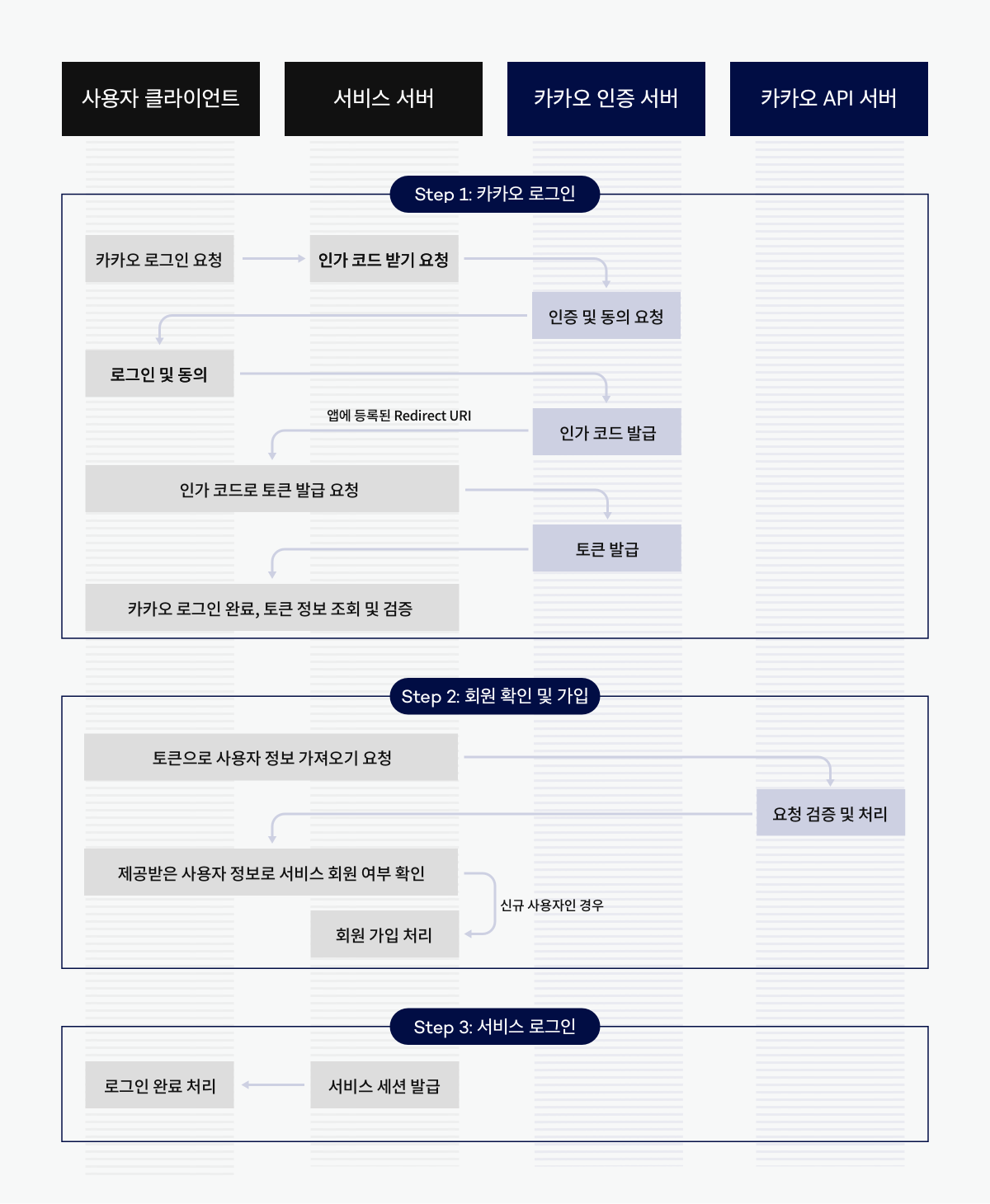
대신 스프링에서 spring-boot-starter-oauth2-client를 사용했을 때 인증 과정이 구체적으로 어떻게 동작하는지 알아보았다. 이 라이브러리를 사용하면 인증과정을 적은 코드로 진행할 수 있다는 점이 좋았다. 그리고 요즘엔 그냥 다 이거 사용하는듯?
JWT 사용하지 않음. 리액트 사용하지 않음.
Configuration
스프링에서 OAuth2 설정은 아래 코드처럼 4가지 영역으로 구분된다. 그럼 각 설정의 역할을 간단히 알아보자.
@Configuration
@EnableWebSecurity
public class OAuth2LoginSecurityConfig {

	@Bean
	public SecurityFilterChain filterChain(HttpSecurity http) throws Exception {
		http
			.oauth2Login(oauth2 -> oauth2
			    .authorizationEndpoint(authorization -> authorization
			            ...
			    )
			    .redirectionEndpoint(redirection -> redirection
			            ...
			    )
			    .tokenEndpoint(token -> token
			            ...
			    )
			    .userInfoEndpoint(userInfo -> userInfo
			            ...
			    )
			);
		return http.build();
	}
}-
Authorization Endpoint : 사용자가 호출하는 클라이언트의 인증 시작 API에 대한 설정입니다. 사용자가 이 API를 호출하면 소셜로그인 페이지로 사용자를 리다이렉트합니다.
-
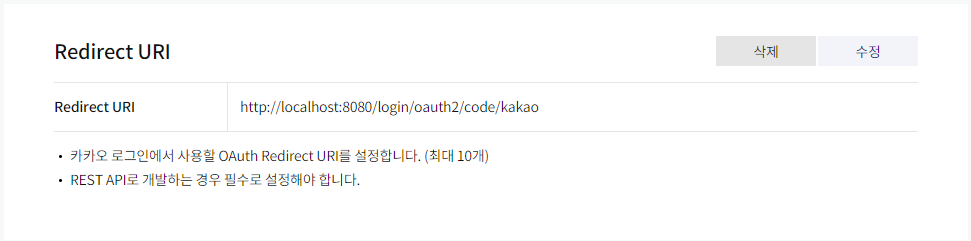
Redirection Endpoint : 인증 서버가 응답을 반환하는 클라이언트의 URI에 대한 설정입니다. /login/oauth2/code/kakao처럼 매칭됩니다. 네이버나 카카오에 등록한 앱에서 설정한 값과 스프링에서 설정한 값이 매칭돼야 합니다.
spring:
    ...(생략)...
    security:
        oauth2:
            client:
                registration:
                    kakao:
                        ...(생략)...
                        redirect-uri: "{baseUrl}/{action}/oauth2/code/{registrationId}"
                        client-authentication-method: POST
                        ...(생략)...
-
Token Endpoint : 인증 서버(카카오)로부터 받은 클라이언트의 인증 코드를 사용하여 액세스 토큰에 대한 권한 부여를 얻기 위해 클라이언트에서 사용합니다.
-
UserInfo Endpoint : OAuth2 로그인 성공 후 사용자 정보를 가져올 때 설정을 담당합니다.
.userService에 소셜 로그인 성공 시 진행할 OAuth2UserService 인터페이스의 구현체를 등록합니다. 리소스 서버(카카오) 에서 사용자 정보를 가져온 상태에서 추가 진행하고자 하는 기능을 구현합니다.
application.yml 파일에서 필요한 설정을 입력하면 간단하게 작성할 수 있음
@Configuration
@EnableWebSecurity
public class OAuth2LoginSecurityConfig {
	@Bean
	public SecurityFilterChain filterChain(HttpSecurity http) throws Exception {
		http
			.oauth2Login(withDefaults());
		return http.build();
	}
}
참고자료 - 스프링 공식 문서 Advanced Configuration
OAuth 2.0 Login Page (Authorization Endpoint)
프론트는 진짜 간단
<button id="kakao_login_btn">카카오 로그인</button>const kakao_login_btn = document.getElementById("kakao_login_btn");
kakao_login_btn.addEventListener('click', function () {
location.href = "/oauth2/authorization/kakao";
});버튼을 눌러서 /oauth2/authorization/kakao URI를 호출하게 되면 스프링 서버에서는 Authorization Endpoint에서 설정한 인증 서버 URI로 사용자를 리다이렉트 보냅니다. 그리고 사용자는 카카오 계정 정보를 입력합니다.
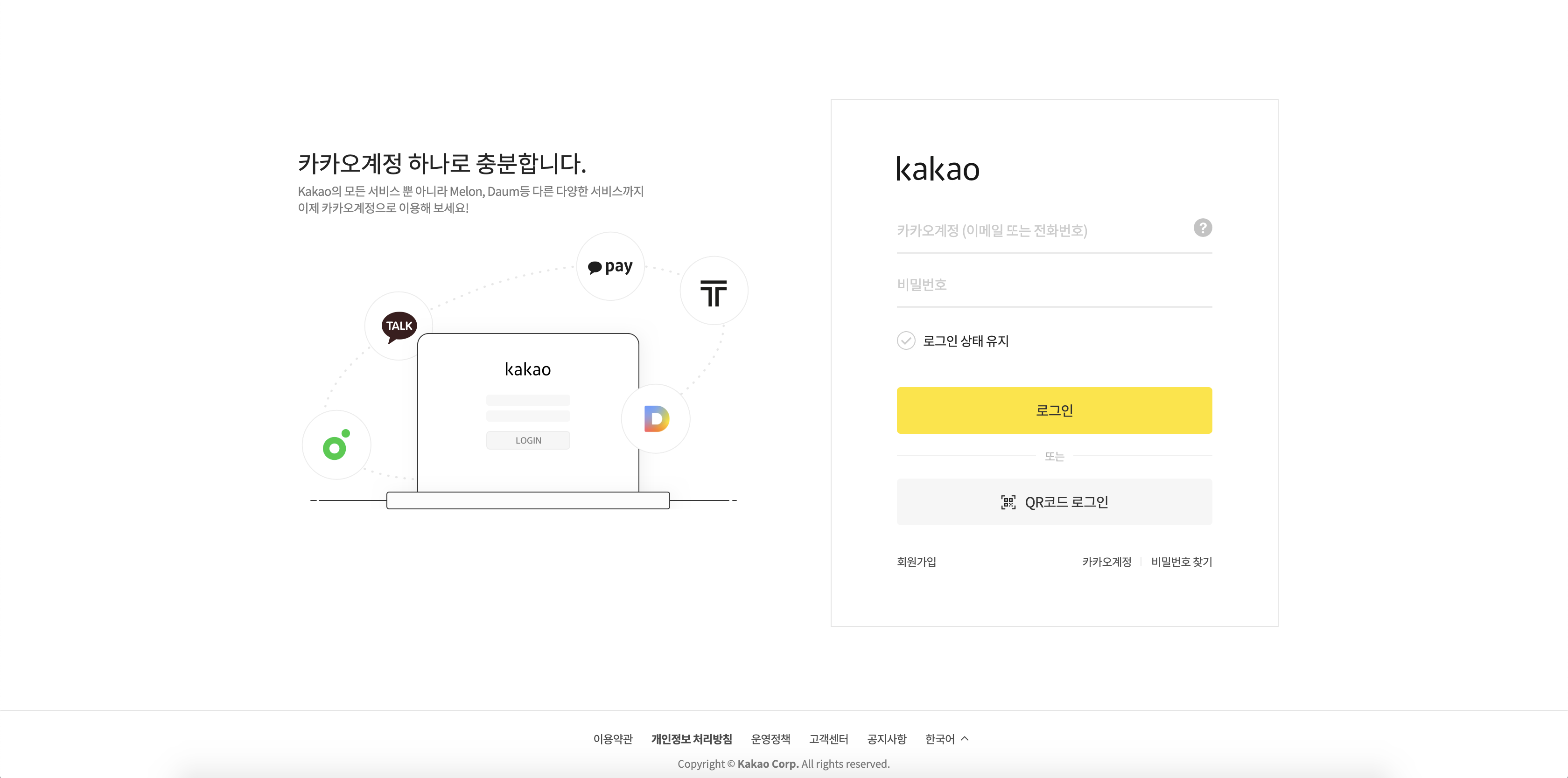
/oauth2/authorization/kakao URI은 내가 컨트롤러 메소드로 매핑하지 않았지만 OAuth2 라이브러리가 기본적으로 DefaultLoginPageGeneratingFilter를 통해 해당 URI를 매핑해서 yml 파일에서 설정한 경로로 리다이렉트 시켜준다고 합니다.
- 라이브러리가 대신 매핑해주는 경로 (registrationId = kakao, google 등)
OAuth2AuthorizationRequestRedirectFilter.DEFAULT_AUTHORIZATION_REQUEST_BASE_URI + "/{registrationId}"
ex)/oauth2/authorization/kakao/oauth2/authorization/google등
- 로그인 페이지 링크 설정 (yml 파일)
spring:
	security:
    	oauth2:
        	client:
            	provider:
                	kakao:
                    	authorization-uri: https://kauth.kakao.com/oauth/authorize
커스텀 로그인 페이지를 사용하고 싶을 경우 설정 (쓸 일이 있을까?)
ex)/oauth2/authorization-->/login/oauth2/authorization@Configuration @EnableWebSecurity public class OAuth2LoginSecurityConfig { @Bean public SecurityFilterChain filterChain(HttpSecurity http) throws Exception { http .oauth2Login(oauth2 -> oauth2 .loginPage("/login/oauth2") ... .authorizationEndpoint(authorization -> authorization .baseUri("/login/oauth2/authorization") ... ) ); return http.build(); } }또한 사용자 정의 로그인 페이지를 렌더링할 수 있는 @Controller를 제공해야 합니다
@RequestMapping("/login/oauth2")
참고자료 - 스프링 공식 문서 OAuth 2.0 Login Page
Redirection Endpoint
전체적인 그림은 사용자가 올바른 계정을 입력하게 되면 인증 서버에서는 인증 코드를 우리 스프링에게 발급해줍니다. 이 인증 코드는 우리가 설정해준 리다이렉트 경로 {baseUrl}/{action}/oauth2/code/{registrationId}로 넘어오게 됩니다.
이제 좀 더 디테일하게 생각해 봅시다. 사용자는 카카오 로그인 페이지로 넘어갔습니다. 그리고 본인의 계정 정보를 입력하고 로그인 버튼을 누르면 계정 정보를 카카오 인증 서버로 넘깁니다. 카카오 인증 서버는 올바른 계정인지 확인하고 인증 코드를 발급할 것입니다. 그렇다면 이 인증 코드는 어디로 가야할까? 당연히 우리의 스프링 서버로 넘어와야 합니다. 그러므로 카카오 인증 서버는 코드를 넘겨주어야 할 대상을 알아야 합니다.
그렇기 때문에 카카오 로그인 버튼을 클릭하면 아래와 같은 URI로 계정 정보가 넘어가게 됩니다. 이제 카카오 인증 서버는 인증 코드를 어디로 넘겨줘야 할지 알 수 있습니다.
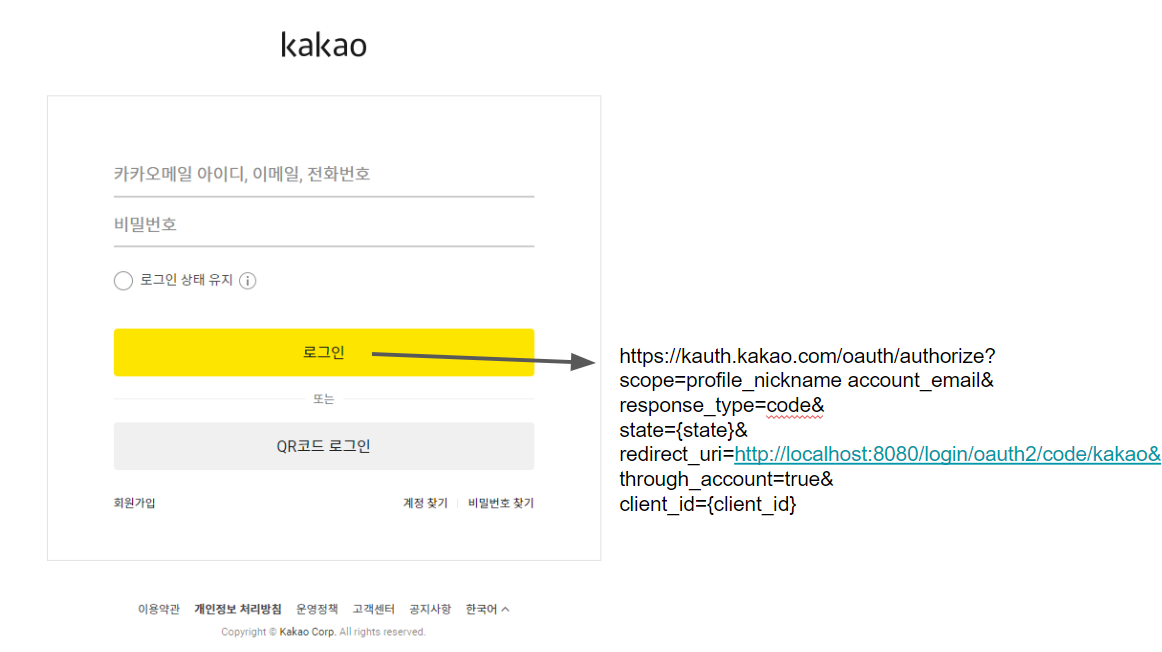
참고 자료 - 스프링 공식 문서 Redirection Endpoint / OAuth2 동작 원리
UserInfo Endpoint
이제 인증 코드를 받았으니 토큰을 발급 받고 사용자 정보를 받아와야 합니다. 인증 코드를 카카오 인증 서버로 부터 넘겨받고 토큰을 발급 받는 과정은 OAuth2 라이브러리가 알아서 하는듯 합니다?
차차 공부해봐야지 허허 ... 스프링 공식 문서 UserInfo Endpoint
어쨌든 토큰까지 발급 받음! 드디어 사용자 정보 가져올 수 있습니다.
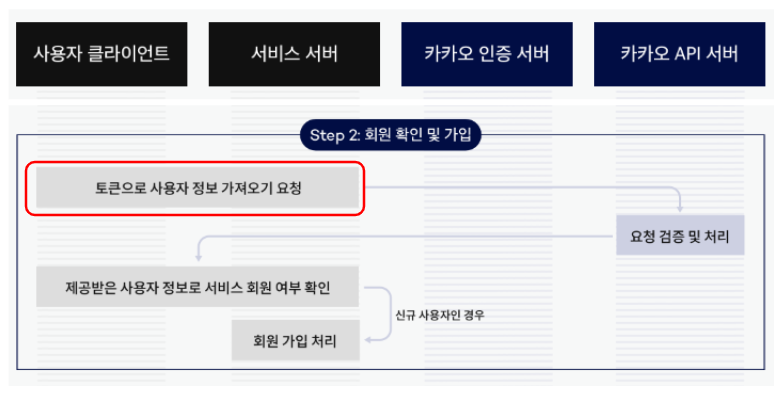
요청하는 방법도 사실 이미 DefaultOAuth2UserService에 구현되어 있어서 메서드를 호출하기만 하면 유저 데이터(OAuth2User)를 받아올 수 있다. 그리고 받아온 유저 데이터를 바탕으로 신규 회원일 경우 회원가입 시키고 스프링 시큐리티 세션에 저장하는 내용은 로직으로 해결하면 된다.
진짜 설정
위 사전 지식을 얻었으니 이제 아래 설정 파일을 이해할 수 있습니다.
spring:
	...(생략)...
    security:
        oauth2:
            client:
                registration:
                    kakao:
                        client-id: ...(생략)...
                        client-secret: ...(생략)...
                        redirect-uri: "{baseUrl}/{action}/oauth2/code/{registrationId}"
                        client-authentication-method: POST
                        authorization-grant-type: authorization_code
                        scope: profile_nickname, account_email
                        client-name: Kakao
                provider:
                    kakao:
                        authorization-uri: https://kauth.kakao.com/oauth/authorize
                        token-uri: https://kauth.kakao.com/oauth/token
                        user-info-uri: https://kapi.kakao.com/v2/user/me
user-name-attribute: id- {registrationId} : ex) kakao, naver, google ...
- authorization-uri : 인증 코드 발급 받을 수 있는 곳
- token-uri : 토큰 발급 받을 수 있는 곳
- user-info-uri : 찐 유저 정보 가지고 있는 곳
- user-name-attribute
- 로그인 진행 시 키가되는 필드값입니다. 구글의 경우 기본적으로 코드를 제공합니다. 구글의 기본 코드는 sub 입니다. 반면 네이버는 이 코드를 기본적으로 제공하지 않으므로 이 코드가 필요합니다. 네이버의 기본코드는 response 입니다. 카카오는 id.
- 걍 회사마다 유저를 식별할 수 있는 필드값이 달라서 이렇게 설정해주는 것.
- 나중에 로직에서 신규 회원가입을 진행할 때 해당 필드값을 꺼내서? JSON 파싱해서? 아무튼 username으로 사용함.
@RequiredArgsConstructor
@Configuration
@EnableWebSecurity
@EnableMethodSecurity(prePostEnabled = true)
public class SecurityConfig {

    private final CustomOAuth2UserService customOAuth2UserService;

    /**
     * @param http
     * @return
     * @throws Exception
     */
    @Bean
    SecurityFilterChain filterChain(HttpSecurity http) throws Exception {
        http.
        	...(생략)...
            .and()
            .oauth2Login()
            .defaultSuccessUrl("/")
            .userInfoEndpoint()
            .userService(customOAuth2UserService);
        return http.build();
    }

    ...(생략)...
}
로직 구현
사실 많은 부분을 라이브러리에서 도와주기 때문에 로직 구현은 그렇게 어렵지 않습니다. 블로그 글을 참고해서 로직을 구현하면 됩니다.
package com.mysite.sbb.user;

import java.util.ArrayList;
import java.util.List;
import java.util.Map;
import org.springframework.security.core.GrantedAuthority;
import org.springframework.security.core.authority.SimpleGrantedAuthority;
import org.springframework.security.core.userdetails.UserDetails;
import org.springframework.security.oauth2.core.user.OAuth2User;

public class PrincipalDetails implements UserDetails, OAuth2User {
    private SiteUser siteUser;
    private Map<String, Object> attributes;

    // 일반 유저 로그인 시 사용하는 생성자
    public PrincipalDetails(SiteUser siteUser) {
        this.siteUser = siteUser;
    }

    // OAuth2User 를 사용한 SNS 유저 로그인 시 사용하는 생성자
    public PrincipalDetails(SiteUser siteUser, Map<String, Object> attributes) {
        this.siteUser = siteUser;
        this.attributes = attributes;
    }

    // 해당 유저의 권한을 리턴하는 곳
    @Override
    public List<GrantedAuthority> getAuthorities() {
        List<GrantedAuthority> authorities = new ArrayList<>();
        if ("admin".equals(siteUser.getUsername())) {
            authorities
                .add(new SimpleGrantedAuthority(UserRole.ADMIN.getValue()));
        } else {
            authorities
                .add(new SimpleGrantedAuthority(UserRole.USER.getValue()));
        }
        return authorities;
    }

    // 해당 유저의 패스워드 리턴
    @Override
    public String getPassword() {
        return siteUser.getPassword();
    }

    // 해당 유저의 mid 리턴
    @Override
    public String getUsername() {
        return siteUser.getUsername();
    }

    // 계정 만료가 아니니?
    @Override
    public boolean isAccountNonExpired() {
        return true;
    }

    // 계정 잠긴게 아니니?
    @Override
    public boolean isAccountNonLocked() {
        return true;
    }

    // 계정 정보 변경해야하는거 아니니?
    @Override
    public boolean isCredentialsNonExpired() {
        return true;
    }

    // 계정 활성화 되어있니?
    @Override
    public boolean isEnabled() {
        // 예를 들어서 사이트에서 1년동안 회원이 로그인 안하면
        // 해당 계정 휴면 계정으로 전환하는 규정같은 것들이 있을때 사용!!
        // 현재시간 - 로긴시간 => 1년 초과시 return false
        return true;
    }

    // OAuth2User 즉 sns 로그인 유저의 oauth2user 의 Attributes 정보를 확인하기 위한 메서드
    @Override
    public Map<String, Object> getAttributes() {
        return attributes;
    }


    @Override
    public String getName() {
        return siteUser.getUsername();
    }
}
package com.mysite.sbb.user;
import java.util.Optional;
import org.springframework.security.oauth2.client.userinfo.DefaultOAuth2UserService;
import org.springframework.security.oauth2.client.userinfo.OAuth2UserRequest;
import org.springframework.security.oauth2.core.OAuth2AuthenticationException;
import org.springframework.security.oauth2.core.user.OAuth2User;
import org.springframework.stereotype.Service;
import jakarta.transaction.Transactional;
import lombok.RequiredArgsConstructor;
import lombok.extern.slf4j.Slf4j;
@Slf4j
@Service
@Transactional
@RequiredArgsConstructor
public class CustomOAuth2UserService extends DefaultOAuth2UserService {
private final UserRepository userRepository;
@Override
public OAuth2User loadUser(OAuth2UserRequest userRequest)
throws OAuth2AuthenticationException {
DefaultOAuth2UserService delegate = new DefaultOAuth2UserService();
OAuth2User oAuth2User = delegate.loadUser(userRequest);
String registrationId =
userRequest.getClientRegistration().getRegistrationId();
String userNameAttributeName =
userRequest.getClientRegistration().getProviderDetails()
.getUserInfoEndpoint().getUserNameAttributeName();
String accessToken = userRequest.getAccessToken().getTokenValue();
log.info("ClientRegistration : " + registrationId);
log.info("AccessToken : " + accessToken);
OAuthAttributes attributes = OAuthAttributes.of(registrationId,
userNameAttributeName,
oAuth2User.getAttributes());
SiteUser oAuthAccount = saveOrUpdate(attributes);
return new PrincipalDetails(oAuthAccount, attributes.getAttributes());
}
private SiteUser saveOrUpdate(OAuthAttributes attributes) {
SiteUser oAuthAccount =
userRepository.findByEmail(attributes.getEmail())
.map(entity -> entity.update(attributes.getUsername(),
attributes.getPicture()))
.orElse(attributes.toEntity());
return userRepository.save(oAuthAccount);
}
}package com.mysite.sbb.user;
import java.util.Map;
import lombok.Builder;
import lombok.Getter;
@Getter
public class OAuthAttributes {
private Map<String, Object> attributes;
private String nameAttributeKey;
private String username;
private String email;
private String picture;
private String sns;
@Builder
public OAuthAttributes(Map<String, Object> attributes,
String nameAttributeKey, String username, String email, String picture,
String sns) {
this.attributes = attributes;
this.nameAttributeKey = nameAttributeKey;
this.username = username;
this.email = email;
this.picture = picture;
this.sns = sns;
}
public static OAuthAttributes of(String registrationId,
String userNameAttributeName,
Map<String, Object> attributes) {
if (registrationId.equals("kakao")) {
return ofKakao(userNameAttributeName, attributes);
}
return ofNaver(userNameAttributeName, attributes);
}
private static OAuthAttributes ofKakao(String userNameAttributeName,
Map<String, Object> attributes) {
return OAuthAttributes.builder()
.username((String) attributes.get("name"))
.email((String) attributes.get("email"))
.picture((String) attributes.get("picture"))
.sns("kakao")
.attributes(attributes)
.nameAttributeKey(userNameAttributeName)
.build();
}
private static OAuthAttributes ofNaver(String userNameAttributeName,
Map<String, Object> attributes) {
return OAuthAttributes.builder()
.username((String) attributes.get("name"))
.email((String) attributes.get("email"))
.picture((String) attributes.get("picture"))
.sns("naver")
.attributes(attributes)
.nameAttributeKey(userNameAttributeName)
.build();
}
public SiteUser toEntity() {
return SiteUser.builder()
.username(username)
.email(email)
.picture(picture)
.sns(sns)
.build();
}
}
}배운점
- 스프링 OAuth2 인증 흐름
- 스프링 OAuth2 설정