Django 최종 팀 프로젝트
redis 관련
redis 저장 공간 오류
redis-cli로 저장하고 불러왔을 때 잘 작동하던 것이 코드에서는 작동하지 않는 오류 발생 → 해당 오류의 경우settings.py에서CACHES의 설정을로컬호스트/1로 지정해주어서 생김
- 해결: 주소에서/1을 지워줌./뒤에 숫자를 붙이는 경우는 저장 공간을 분리해 주는 의미라고 보면 된다. 즉 기본 주소의 경우 0번 공간,/1의 경우 1번 공간 등등.. 으로 분리하는 것.
redis GUI 활용
- 위의 오류를 처리하면서 실제 저장이 어떻게 되고 있는지 알 수 없어 redis 웹사이트에서 Redis Insight 를 설치해 활용
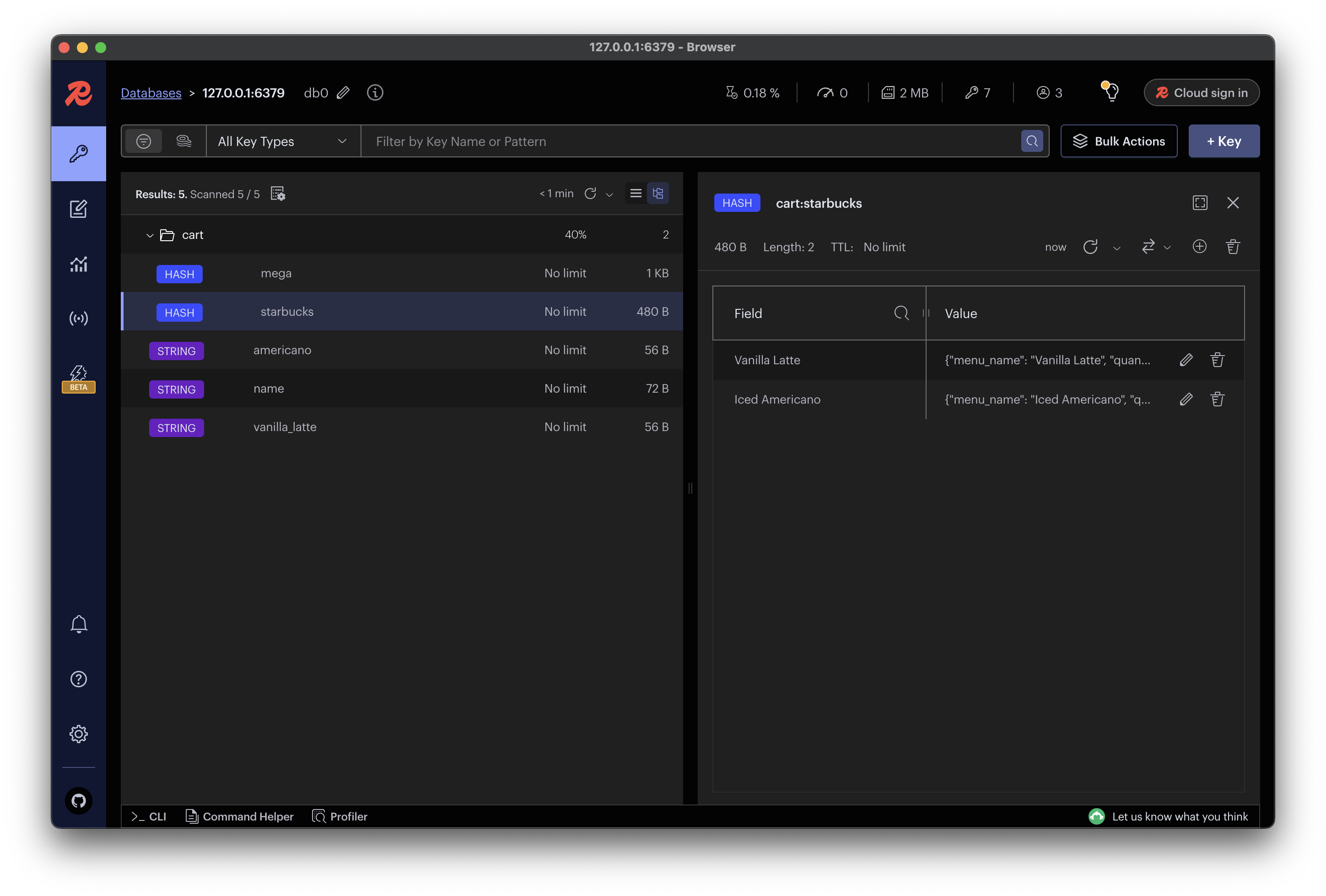
redis data type
TypeError: keys must be str, int, float, bool or None, not bytes: 데이터는 잘 받아와지는데 key 값으로 value를 가져올 수 없음- 원인: redis 는 데이터를 byte-string으로 반환하는 데 반해, json으로 value 값을 불러오려면 key가 str, int, float, bool, None 중 하나의 형태로 되어 있어야 하기 때문
- 해결: return 으로 넘겨주는 데이터를 json에 맞는 형태로 수정해줌
* 수정 전 *
 def get_cart(self):
        redis_conn = get_redis_connection("default")
        return redis_conn.hgetall(self.cart_key) ## byte-string 형태

# 해당 데이터 print문
{'cart_items': {b'americano': b'2', b'Vanilla Ice Blended': b'2'}}

* 수정 후 *

def get_cart(self):
        redis_conn = get_redis_connection("default")
        cart_data = redis_conn.hgetall(self.cart_key)
        return {k.decode('utf-8'): v.decode('utf-8') for k, v in cart_data.items()} ## json decode

# 해당 데이터 print 문
{"context":{"cart_items":{"americano":"2","Vanilla Ice Blended":"2"}}}
redis 저장 형태 변경
- 기존:
key:value를메뉴명:수량으로 저장 - 변경 후:
key:value를메뉴명:{menu_name: 메뉴명, quantity: 수량, price: 가격, img: 이미지주소}로 저장 - 이렇게 변경하면 메뉴명으로 다시 db에 접근하지 않고 redis에서 전달한 데이터를 그대로 장바구니에 보일 수 있음
- 기존에 사용하던 hincrby 대신 value에서 quantity에 접근해 quantity 값을 새로 넣어주는 방식으로 변경
* 수정 전 *
    def update_quantity(self, menu_name, quantity):
        redis_conn = get_redis_connection("default")
        redis_conn.hincrby(self.cart_key, menu_name, quantity) # key 값에 대해 value 값을 변경

* 수정 후 *
	 def update_quantity(self, item_data):
        redis_conn = get_redis_connection("default") # dict 형식으로 받는다 : item_data {} # "name"으로 해당 데이터 불러오고 "quantity"로 해당 value를 수정
        name = item_data["name"]
        update_data = json.dumps(item_data) # json으로 불러올 수 있도록 변환
        redis_conn.hset(self.cart_key, name, update_data)
장바구니에서 메뉴 삭제, 전체 삭제 구현
    path("cart/remove/<str:menu_name>/", views.remove_from_cart, name="remove_from_cart"),
path("cart/clear/", views.clear_cart, name="clear_cart"),- <str:menu_name> 에서 메뉴 이름에 띄어쓰기가 있을 경우 띄어쓰기 그대로 써주어야 함 : Hot Chocolate ⭕️ Hot_Chocolate ❌
** views.py **
# 장바구니 항목 제거 뷰
@csrf_exempt
@api_view(['POST'])
def remove_from_cart(request, menu_name):
    # username = request.user.username
    username = request.POST.get("username")
    cart = Cart(username)
    cart.remove(menu_name)
    return Response({"message": "해당 메뉴 삭제"})

# 장바구니 전체 삭제 뷰
@csrf_exempt
@api_view(['POST'])
def clear_cart(request):
    # user_id = request.user.id
    username = request.POST.get("username")
    cart = Cart(username)
    cart.clear()
    return Response({"message": "장바구니 전체 삭제"})
** cart.py **
## **Removing an Item**:
def remove(self, menu_name):
print("\n\n menu_name: ", menu_name)
redis_conn = get_redis_connection("default")
redis_conn.hdel(self.cart_key, menu_name)
## Clear the cart
def clear(self):
redis_conn = get_redis_connection("default")
redis_conn.delete(self.cart_key)백엔드 수정
WSGI Request & rest_framework Request
- 장바구니에 대해 axios 요청을 하는데, add_to_cart()는 잘 작동하는 반면 view_cart()는 response 받는 과정에서 오류 발생 : 각 요청이 views.py 에서 어떻게 받아지는지
print()를 통해 확인
- add_to_cart()는 WSGI Request POST- view_cart()는 rest_framework.request.Request GET
- 각 요청의 방식이 달라서 생긴 문제: 따라서 user와 관련된 정보를 꺼내올 때 명령어가 다름
- add_to_cart()는request.user.username:request.user오브젝트- view_cart()는
request.data.get("username"):request.data오브젝트
- view_cart()는

발전 중...