제로베이스 데이터 분석 취업 스쿨 GIT Part 강의정리
- Remote Repository
git remote add
git remote add origin
git remote set-url repoName url
git remote set-url origin url
git remote rename oldName newName

git remote remove repoName
git remote remove origin

git remote -v

git remote show repoName
git remote show origin
- Pull & push
git pull remoteRepoName branchName
git pull origin main

git push remoteRepoName branchName
git push origin main- Checkout & Branch
git checkout commitId

git branch 		#local조회
git branch -r 	#remote
git branch -a	#all

git branch branchName		#branch생성
git push origin branchName	#branch배포

git branch --delete branchName		#branch삭제
git push origin --delete branchName	#branch삭제배포

git checkout branchName
git checkout -b branchName
- Merge
git merge branchName	#Head위치로 merge

git push origin main
git push origin dev
#remote branch:dev2 생성 후
git branch -a
git fetch
git merge origin/dev2
ls #확인- Conflict
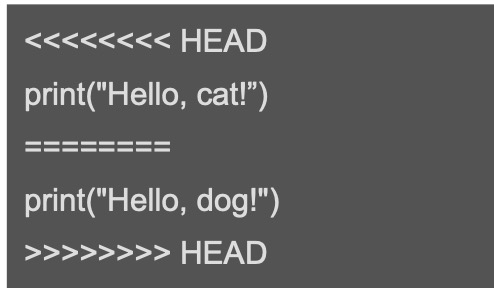
git status
cat > conflicted.py
resolve conflict
git commit -a -m 'resolved conflict'
git log --oneline- Git Tag
git tag tagName
git tag			#list
git tag tagName commitId

git push origin tagName		#tag로 배포
git show tabName
= git log -p

git tag --delete tagName
git push origin --delete tagName
README.rd 용 Markdown
-
제목 : #1개 부터 # 6개
-
인용문 : >
인용문
인용문 안에서 또 인용문
-
목록 :
- 숫자
- 두번째
- 세번째
- 목록 : 순서 없는 목록 *
-
코드블록 : '''a=1''' 또는
'''
a=1
''' -
수평선 : *** 또는 ---
- 링크
1) [링크이름] (링크주소)
2) <링크주소>
3) 메일 : <메일주소>
- 기울임 & 강조
*기울임*
_기울임_
**강조**
__강조__
~~취소선~~

I like to movie movie