Grafana Loki + Alloy로 멀티 서버 Django 로그 통합하기
추가 인스턴스 없이 기존 서버 2대에 Loki와 Grafana Alloy를 올려 Django/Gunicorn 로그를 단일 관제 체계로 통합한 과정을 정리합니다.
배경
운영 중인 Smart Silver Center 프로젝트는 두 개의 Django 서비스가 서로 다른 서버에 올라가 있다.
| 구분 | Server A | Server B |
|---|---|---|
| hostname | ICSC-platform | icsc-integrated-control |
| 서비스 | ssc-api | ssc-msg |
| 로그 경로 (access) | /var/log/ssc_api/gunicorn_access.log | /var/log/gunicorn/access.log |
| 로그 경로 (error) | /var/log/ssc_api/gunicorn_error.log | /var/log/gunicorn/error.log |
| OS | Ubuntu 22.04 LTS | Ubuntu 22.04 LTS |
각 서버 로그가 분산되어 있어 장애 추적이 번거로웠고, 인스턴스를 추가로 빌릴 수 없는 상황이었다.
트래픽이 거의 없는 Server B에 Loki를 올리고, 두 서버 모두 Alloy로 중앙 수집하는 구조로 결정했다.
개념 정리
Prometheus vs Loki
| Prometheus | Loki | |
|---|---|---|
| 수집 대상 | 메트릭 (숫자) | 로그 (텍스트) |
| 수집 방식 | PULL (Prometheus가 scrape) | PUSH (Agent가 밀어넣음) |
| 쿼리 언어 | PromQL | LogQL |
| 인덱싱 | 전체 인덱싱 | 레이블만 인덱싱 (로그 내용은 압축 저장) |
| 시각화 | Grafana | Grafana (동일) |
Loki가 로그 내용을 인덱싱하지 않는 덕분에 Elasticsearch 대비 스토리지 비용이 낮다.
대신 로그 내용으로 필터링할 때는 LogQL의 |=, | regex 등을 사용한다.
수집 에이전트 비교
Prometheus 스택:  node_exporter(/metrics 노출) ← Prometheus(scrape, PULL)
Loki 스택:        Alloy(tail 후 push, PUSH)    → Loki
node_exporter : Promtail = Prometheus : Loki 구조로 이해하면 쉽다.
단, 결정적인 차이는 수집 주체다.
- Prometheus: Prometheus 자신이 각 서버에 접속해 데이터를 가져간다 (PULL)
- Loki: 각 서버에 설치된 Agent가 Loki로 데이터를 밀어넣는다 (PUSH)
Grafana Alloy (구 Promtail)
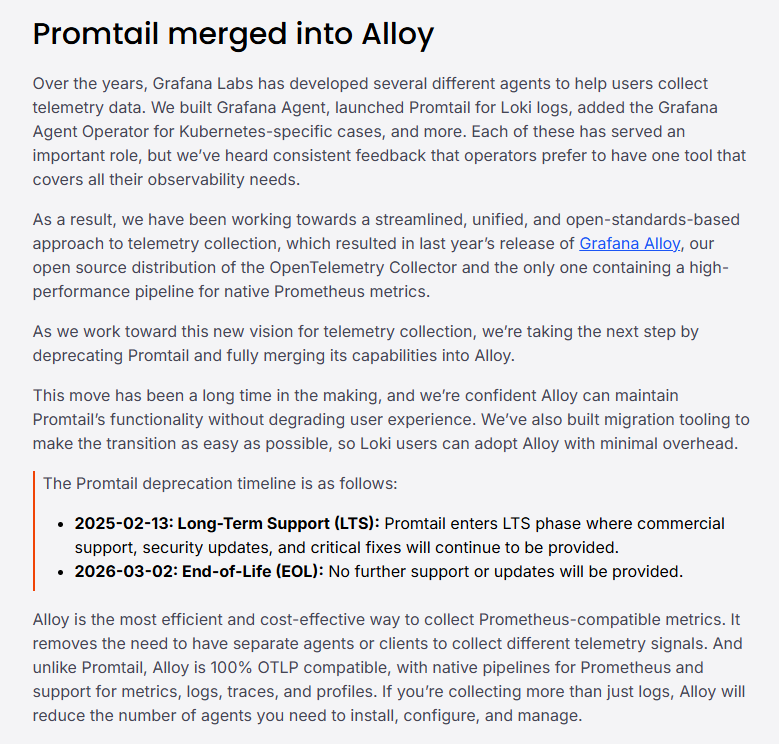
Promtail은 2026년 3월 2일 EOL이 됐다. Grafana Labs는 logs / metrics / traces / profiles를 하나의 바이너리로 처리하는 Grafana Alloy로 통합했다. 링크
- Promtail: YAML 설정, Loki 전용
- Alloy: 컴포넌트 기반 파이프라인 문법(
.alloy), OpenTelemetry 호환, Loki/Prometheus/Tempo 모두 지원
Promtail config는
alloy convert --source-format=promtail명령으로 자동 변환 가능하다.
최종 아키텍처
[Server A]  Alloy ──┐
                     ├──(push)──→ [Server B] Loki :3100 ←── [Server C] Grafana
[Server B]  Alloy ──┘
Step 1 — Loki 설치 (Server B)
바이너리 설치
cd ~
wget https://github.com/grafana/loki/releases/download/v3.7.2/loki-linux-amd64.zip
unzip loki-linux-amd64.zip
chmod +x loki-linux-amd64
sudo mv loki-linux-amd64 /usr/local/bin/loki
rm loki-linux-amd64.zip

# 데이터 디렉토리 생성
sudo mkdir -p /etc/loki /var/lib/loki/{chunks,rules,wal}주의:
/etc디렉토리에서 wget을 실행하면Permission denied가 난다. 홈(~)이나/tmp에서 다운로드 후sudo mv로 옮겨야 한다.
config.yaml 작성
# /etc/loki/config.yaml
auth_enabled: false

server:
  http_listen_port: 3100
  grpc_listen_port: 9096
  log_level: warn

common:
  instance_addr: 127.0.0.1
  path_prefix: /var/lib/loki
  storage:
    filesystem:
      chunks_directory: /var/lib/loki/chunks
      rules_directory: /var/lib/loki/rules
  replication_factor: 1
  ring:
    kvstore:
      store: inmemory

schema_config:
  configs:
    - from: 2024-01-01
      store: tsdb
      object_store: filesystem
      schema: v13
      index:
        prefix: index_
        period: 24h

limits_config:
  allow_structured_metadata: false
  retention_period: 168h   # 7일

compactor:
  working_directory: /var/lib/loki/compactor
  retention_enabled: true
  delete_request_store: filesystem   # ← Loki 3.x 필수
systemd 서비스 등록
sudo tee /etc/systemd/system/loki.service > /dev/null <<EOF
[Unit]
Description=Loki log aggregation system
After=network.target

[Service]
Type=simple
User=root
ExecStart=/usr/local/bin/loki -config.file=/etc/loki/config.yaml
Restart=on-failure
RestartSec=5

[Install]
WantedBy=multi-user.target
EOF

sudo systemctl daemon-reload
sudo systemctl enable --now loki

# 정상 확인
curl -s http://localhost:3100/ready
# 출력: ready
Step 2 — Grafana Alloy 설치 (공통)
Server A, B 양쪽에 동일하게 설치한다.
sudo mkdir -p /etc/apt/keyrings/
wget -q -O - https://apt.grafana.com/gpg.key | gpg --dearmor | \
  sudo tee /etc/apt/keyrings/grafana.gpg > /dev/null

echo "deb [signed-by=/etc/apt/keyrings/grafana.gpg] https://apt.grafana.com stable main" | \
  sudo tee /etc/apt/sources.list.d/grafana.list

sudo apt-get update
sudo apt-get install alloy

alloy --version
systemd 서비스는 apt 설치 시 자동 등록된다.
Step 3 — Alloy config (Server B)
Alloy는 YAML이 아닌 컴포넌트 기반 파이프라인 문법을 사용한다.
loki.source.file  →  loki.process  →  loki.write
(파일 tail)          (레이블 추출)      (Loki push)
# /etc/alloy/config.alloy (Server B: ssc-msg)
loki.write "default" {
endpoint {
url = "http://localhost:3100/loki/api/v1/push"
}
}
loki.source.file "gunicorn_access" {
targets = [{
__path__ = "/var/log/gunicorn/access.log",
job = "gunicorn_access",
host = "server-b",
service = "ssc-msg",
env = "production",
}]
forward_to = [loki.process.gunicorn_access.receiver]
}
loki.process "gunicorn_access" {
stage.regex {
expression = `\[(?P<timestamp>[^\]]+)\] "(?P<method>[A-Z]+) (?P<path>\S+)[^"]*" (?P<status>\d{3})`
}
stage.labels {
values = {
method = "",
status = "",
}
}
forward_to = [loki.write.default.receiver]
}
loki.source.file "gunicorn_error" {
targets = [{
__path__ = "/var/log/gunicorn/error.log",
job = "gunicorn_error",
host = "server-b",
service = "ssc-msg",
env = "production",
}]
forward_to = [loki.process.gunicorn_error.receiver]
}
loki.process "gunicorn_error" {
stage.regex {
expression = `\[.*?\] \[\d+\] \[(?P<level>[A-Z]+)\]`
}
stage.labels {
values = {
level = "",
}
}
forward_to = [loki.write.default.receiver]
}Step 4 — Alloy config (Server A)
Server B와 동일한 구조, loki.write URL과 레이블만 다르다.
# /etc/alloy/config.alloy  (Server A: ssc-api)

loki.write "default" {
  endpoint {
    url = "http://<SERVER_B_IP>:3100/loki/api/v1/push"
  }
}

loki.source.file "gunicorn_access" {
  targets = [{
    __path__ = "/var/log/ssc_api/gunicorn_access.log",
    job      = "gunicorn_access",
    host     = "server-a",
    service  = "ssc-api",
    env      = "production",
  }]
  forward_to = [loki.process.gunicorn_access.receiver]
}

loki.process "gunicorn_access" {
  stage.regex {
    expression = `\[(?P<timestamp>[^\]]+)\] "(?P<method>[A-Z]+) (?P<path>\S+)[^"]*" (?P<status>\d{3})`
  }
  stage.labels {
    values = {
      method = "",
      status = "",
    }
  }
  forward_to = [loki.write.default.receiver]
}

loki.source.file "gunicorn_error" {
  targets = [{
    __path__ = "/var/log/ssc_api/gunicorn_error.log",
    job      = "gunicorn_error",
    host     = "server-a",
    service  = "ssc-api",
    env      = "production",
  }]
  forward_to = [loki.write.default.receiver]
}
Alloy 시작
# config 문법 검사 (실행 전 필수)
alloy fmt /etc/alloy/config.alloy

sudo systemctl enable --now alloy
sudo journalctl -u alloy -f
정상 기동 시 로그:
{^_^} Alloy is running
start tailing file ... path=/var/log/.../access.log
failed to register collector with remote server ... err="noop client"에러는 Grafana Cloud remotecfg 기능 관련 메시지로, 자체 호스팅 환경에서는 정상적으로 출력된다. 무시해도 된다.
Step 5 — Grafana 데이터소스 추가 (Server C)
Connections → Data sources → Add → Loki
Name : Loki
URL  : http://<SERVER_B_IP>:3100
저장 후 Data source connected and labels found 메시지 확인.
Grafana가 Server B에 직접 접근하므로 필요 시 방화벽 추가:
# Server B에서 Grafana 서버 IP 허용
sudo ufw allow from <GRAFANA_IP> to any port 3100 proto tcp
유용한 LogQL 쿼리
-- 두 서버 통합 조회
{job="gunicorn_access"}

-- 서버별 필터
{job="gunicorn_access", host="server-a"}
{job="gunicorn_access", host="server-b"}

-- 서비스별 필터
{job="gunicorn_access", service="ssc-api"}

-- HTTP 5xx 에러
{job="gunicorn_access", status=~"5.."}

-- HTTP 4xx (404 스캐닝 탐지 등)
{job="gunicorn_access", status="404"} |= "phpinfo"

-- Gunicorn worker 재시작 추적
{job="gunicorn_error"} |= "Booting worker"

-- 에러 레벨 필터
{job="gunicorn_error", level="ERROR"}

-- Server A polling 엔드포인트
{job="gunicorn_access", host="server-a"} |= "/api/center/polling/"
트러블슈팅
1. wget Permission denied
loki-linux-amd64.zip: Permission denied원인: /etc 등 시스템 디렉토리에서 wget 실행
해결: cd ~ 후 홈 디렉토리에서 다운로드
2. Loki 기동 실패 — delete-request-store 에러
CONFIG ERROR: invalid compactor config:
compactor.delete-request-store should be configured when retention is enabled원인: Loki 3.x에서 retention_enabled: true 시 delete_request_store 필수
해결: config.yaml의 compactor 섹션에 추가
compactor:
  working_directory: /var/lib/loki/compactor
  retention_enabled: true
  delete_request_store: filesystem   # ← 추가
3. allow_structured_metadata 불일치
Loki 3.x + Alloy 3.x 조합에서 Alloy가 structured metadata를 자동으로 붙여 보내는데,
Loki 설정과 불일치 시 push가 실패할 수 있다.
해결: limits_config에 명시
limits_config:
  allow_structured_metadata: false
레이블 설계 원칙
Loki는 레이블만 인덱싱하므로 카디널리티 관리가 핵심이다.
| 레이블 | 권장 여부 | 이유 |
|---|---|---|
job | ✅ | 고정값 (gunicorn_access 등) |
host | ✅ | 서버 수 = 레이블 수, 카디널리티 낮음 |
service | ✅ | 서비스 수 = 레이블 수 |
method | ✅ | GET/POST/PUT/DELETE 한정 |
status | ✅ | 200/404/500 등 한정 |
path | ❌ | URL 파라미터 포함 시 카디널리티 폭발 |
user_id | ❌ | 사용자 수만큼 레이블 생성 → 성능 저하 |
URL 경로로 필터링하려면 레이블 대신 LogQL 필터를 사용한다:
{job="gunicorn_access"} |= "/api/center/polling/"다음 단계
- Grafana Explore에서 LogQL 쿼리 검증
- Django
settings.py에 파일 핸들러 추가 (애플리케이션 레벨 로그 분리) - Loki 기반 알람 설정 (5xx 급증, 특정 에러 패턴)
- Alloy로 Prometheus metrics scraping 통합 (node_exporter 대체 고려)