정규표현식
java.util.regexpattern: 정규표현식 패턴 객체를 생성static compile: Pattern 객체 생성static compile(정규표현식, 플래그)- 플래그
Pattern.CASE_INCENSITIVE: 대소문자구분 X
Pattern.MULTILINE: 여러줄에 걸쳐 패턴 체크
- 플래그
Matcher matcher(CharSeqence str): 패턴을 체크
Matcher: 패턴의 일치 여부 체크, 일치하는 문자열 추출boolean find(): 패턴에 일치 여부 체크, 다음 패턴으로 이동String group(): 패턴에 일치하는 문자열 추출, 특정 그룹의 문자열 추출, 다음 패턴으로 이동하지않음boolean matches(): 패턴의 일치여부 체크 - 해당 패턴이 문자열 처음부터 등장
생성자가 정의되어있지않은 클래스는 반환을 클래스로 정의하여 하여금 사용. 또한 정적인 메서드를 제공.
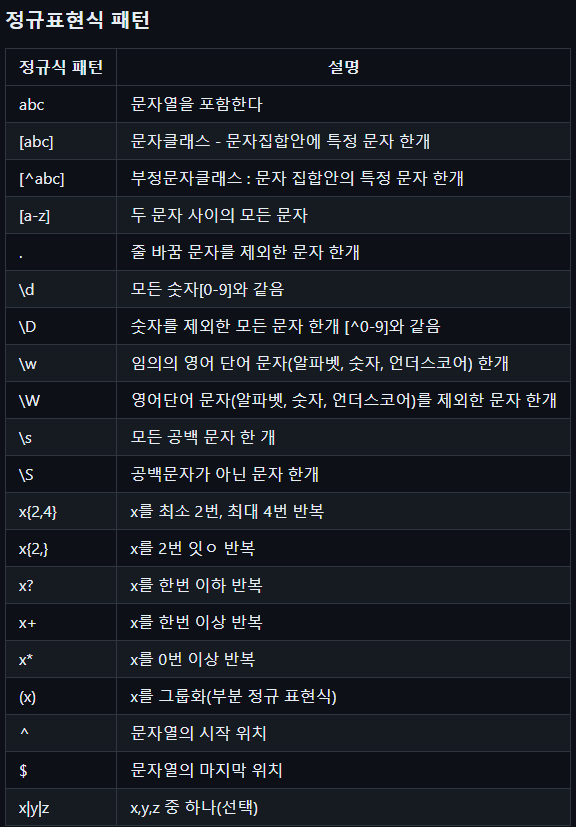
\w: [a-zA-Z0-9]\W: [^a-zA-Z0-9]\b: 문자 클래스 → 백스페이스키
문자 클래스 외부 → 단어와 단어 사이 공백\B: 단어 단어 사이 공백이 없는 패턴^- 문자클래스 : 부정문자클래스
- 문자클래스외부 : 시작하는패턴 ^java → java로 시작하는 패턴
$: 끝나는 패턴 → java$ → java로 끝나는 패턴패턴.{반복횟수}: 반복횟수만큼 반복.패턴.{반복횟수,}: 패턴의 반복횟수 이상패턴.{시작,종료}: 패턴의 이하 이상 만큼패턴+: 패턴을 1번 이상 반복 / 최대매치패턴*: 패턴을 0번 이상 반복 / 최소매치패턴?: 패턴이 있어도 되고 없어도 되는 패턴 / 패턴{0,1}단어1|단어2|단어3: 단어1, 단어2, 단어3 중 하나라도 있으면 되는 패턴(패턴):그룹핑(ABC){3}: ABC그룹을 3번 반복
- 전방탐색 (?=패턴) → 패턴 앞의 있는 패턴
예) \w*(?=:) : 문자 앞에 있는 단어 여러개 패턴 - 전방 부정 탐색(?!=패턴)
예) \w*(?!=:) : 문자가 아닌 앞에 있는 패턴
/패턴/: 자바스크립트 정규표현식 객체- 플래그
/패턴/i: 대소문자 구분 X/패턴/m: 여러줄에 걸쳐 패턴 체크/패턴/g: global : 전역에 걸쳐 패턴 체크/패턴/igm: 연결해서도 사용이 가능
test(문자열): 패턴이 일치하는지 체크exec(문자열): 패턴에 일치하는 문자열을 추출- 커서 이동하면서 다음 패턴 문자열 추출
- 더이상 찾을 패턴이 없으면
null반환
- 플래그
1. boolean find(), boolean matches()
import java.util.regex.Matcher;
import java.util.regex.Pattern;

public class Ex01 {
    public static void main(String[] args) {
        String str = "I like java and javascript";

        Pattern p1 = Pattern.compile("java"); //생성자가 없음 (new())
        Matcher m1 = p1.matcher(str); //패턴 일치 여부 체크

        System.out.println(m1.find()); // java
        System.out.println(m1.group()); // 패턴에 일치하는 문자열

        System.out.println(m1.find()); // javascript
        System.out.println(m1.group()); // 패턴에 일치하는 문자열

        System.out.println(m1.find()); // false
        System.out.println(m1.group()); // 패턴에 일치하는 문자열
    }
}
2) boolean matches()
import java.util.regex.Matcher;
import java.util.regex.Pattern;

public class Ex02 {
    public static void main(String[] args) {
        String str = "I like java and javascript";

        Pattern p1 = Pattern.compile("java"); //정확한 패턴이 없으면 true가 나오지않는다.
        Pattern p2 = Pattern.compile(".*java.*"); //.*을 사용해서 포함만 되면 true반환을 할수있도록 적용
        Matcher m1 = p1.matcher(str); //패턴 일치 여부 체크
        Matcher m2 = p2.matcher(str); //패턴 일치 여부 체크
        boolean match1 = m1.matches();
        boolean match2 = m2.matches();
        System.out.println(match1);
        System.out.println(match2);

    }
}
3. [...]
import java.util.regex.Matcher;
import java.util.regex.Pattern;

public class Ex03 {
    public static void main(String[] args) {
        String str = "123 a123 efg 12b";
        Pattern p1 = Pattern.compile("[abc]");
        Matcher m1 = p1.matcher(str);
        if(m1.find()){
            System.out.println(m1.group()); //a
        }
        if(m1.find()){
            System.out.println(m1.group()); //b
        }

    }
}
4. [a-zA-Z]
import java.util.Scanner;
import java.util.regex.Matcher;
import java.util.regex.Pattern;

public class Ex04 {
    public static void main(String[] args) {
        Scanner sc = new Scanner(System.in);
        System.out.println("문장을 입력하세요 : ");
        String str = sc.nextLine();

        Pattern p1 = Pattern.compile("[a-zA-Z]");
        Matcher m1 = p1.matcher(str);
        if(!m1.find()){
            System.out.println("알파벳이 포함되지않았습니다");
        }
    }
}
5. flag
매개변수로 flag를 사용할수있다.
Pattern.CASE_INSENSITIVE : 대소문자 구분 X
public class Ex04 {
    public static void main(String[] args) {
        Scanner sc = new Scanner(System.in);
        System.out.println("문장을 입력하세요 : ");
        String str = sc.nextLine();

        Pattern p1 = Pattern.compile("[a-z]", Pattern.CASE_INSENSITIVE); //flag
        Matcher m1 = p1.matcher(str);
        if(!m1.find()){
            System.out.println("알파벳이 포함되지않았습니다");
        }
    }
}
6. [^abc]
public class Ex05 {
    public static void main(String[] args) {
        Scanner sc = new Scanner(System.in);
        System.out.println("숫자만 입력 :  ");
        String str = sc.nextLine();

        Pattern p1 = Pattern.compile("[^0-9]");
        Matcher m1 = p1.matcher(str);

        if(m1.find()){
            System.out.println("숫자만 입력해");
        }
    }
}
7. \d,\D
public class Ex05 {
    public static void main(String[] args) {
        Scanner sc = new Scanner(System.in);
        System.out.println("숫자만 입력 :  ");
        String str = sc.nextLine();

        Pattern p1 = Pattern.compile("[\\d]");
        Pattern p2 = Pattern.compile("[\\D]");
        Matcher m1 = p1.matcher(str);
        Matcher m2 = p2.matcher(str);
        if(!m1.find()){
            System.out.println("숫자가 포함되어있지않습니다.");
        }
        if(m2.find()){
            System.out.println("숫자만 입력해");
        }
    }
}
8. .

안녕하세요!