프로세스와 쓰레드
1. 개념
- 실행 중인 프로그램(program)
- 프로그램을 수행하는 데 필요한 데이터와 메모리등의 자원 그리고 쓰레드로 구성
- 프로세스의 자원을 이용해서 실제로 작업을 수행하는 것이 쓰레드이다
- 모든 프로세스에는 최소한 하나 이상의 쓰레드가 존재하며, 둘 이상의 쓰레드를 가진 프로세스를 멀티쓰레드 프로세스(multi-threaded process)라고 한다.
- 프로세스의 메모리 한계에 따라 생성할 수 있는 쓰레드의 수가 결정
- 쓰레드 : 작업 메서드 + 호출 스택 / 작업 메서드 main - main 쓰레드
2. 멀티쓰레딩
하나의 프로세스내에서 여러 쓰레드가 동시에 작업을 수행하는 것
3. 멀티쓰테딩의 장점
1) CPU의 사용률을 향상시킨다.
2) 자원을 보다 효율적으로 사용할 수 있다.
3) 사용자에 대한 응답성이 향상된다.
4) 작업이 분리되어 코드가 간결해진다.
4. 멀티쓰레딩의 단점
여러 쓰레드가 같은 프로세스 내에서 자원을 공유하면서 작업을 하기 때문에 발생할 수 있는 동기화(synchronization), 교착상태(deadlock)와 같은 문제를 고려해서 신중하게 프로그래밍해야 한다.
5. 쓰레드의 구현과 실행
쓰레드를 구현하는 방법은 Threa클래스 상속과Runnable인터페이스 구현 두가지가 존재.
1) Thread 클래스 상속. run 메서드를 재정의
- 유연성에서 불리, 상속은 1개만 받기 때문에 실무에서 사용❌
3) Runnable 인터페이스 구현
- Thread 객체 생성시 생성자 매개변수로 결정
- Runnable 인터페이스 자체로 Thread의 기능 X
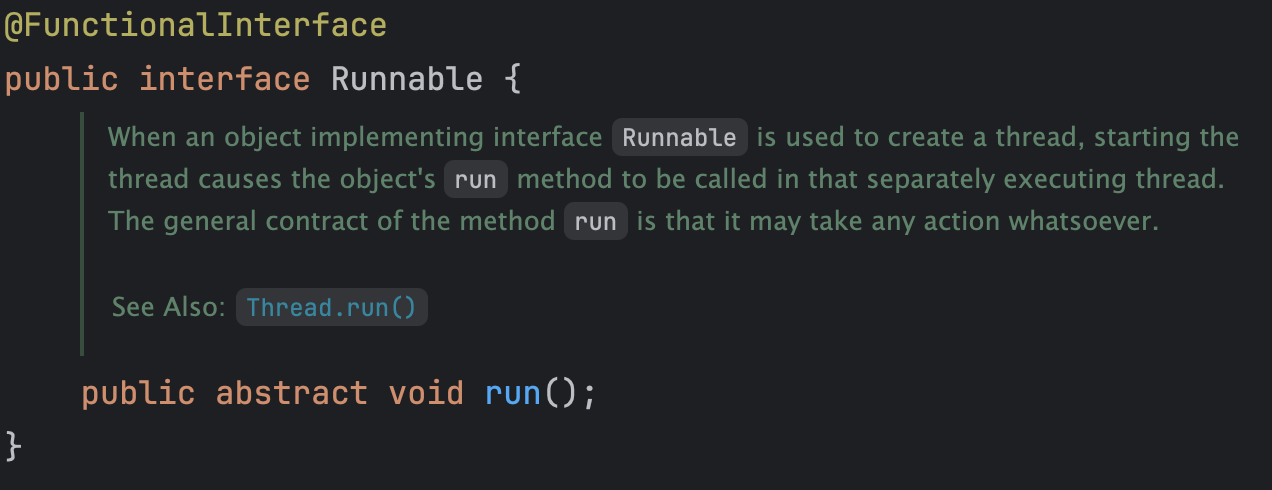
Runnable인터페이스는start메서드가 존재 하지 않기 때문에 Thread에 매개변수로Runnable를 넣어서 Thread의 start()를 통해 Runnable에 run()을 수행가능.
public class Ex02 {
    public static void main(String[] args) {
        Thread th1 = new Thread(new Ex02_1());
        th1.start();
    }
}

class Ex02_1 implements Runnable {
    public void run(){
        //실행중인 쓰레드 객체?
        Thread th = Thread.currentThread();
        for(int i = 0 ; i < 5; i++){
            System.out.println(th.getName() + i);
        }
    }
}
Runnable 인터페이스는 FunctionalInterfaced이기 때문에 함수형메서드이다. 👉 람다식
public class Ex03 {
    public static void main(String[] args) {
        Thread th = new Thread(new Runnable() {
            @Override
            public void run() {
            }
        });
        Thread th1 = new Thread(() -> System.out.println("실행부분")); //람다식
    }
}
public class Ex01 {
    public static void main(String[] args) {
        Runnable r = () -> {
            for(int i = 0; i < 5; i ++){
                System.out.println("쓰레드2 - " + i);
            }
        };
        Ex01_1 th1 = new Ex01_1();
        Thread th2 = new Thread(r);
        //th1.run();
        //th2.run();
        th1.start(); //호출 스택 생성 + run()메서드 실행
        th2.start(); //호출 스택 생성 + run()메서드 실행
        System.out.println("작업종료!");
    }
}
class Ex01_1 extends Thread{ //Thread클래스 상속
    public void run(){
        for(int i = 0; i < 5; i++){
            System.out.println("쓰레드1-"+i);
        }
    }
}
2) 쓰레드의 실행 - start()
start()와 run()
start() : 독립적인 호출스택 + run() 실행 / 병렬적인 작업이 가능
run()만 호출하면 👉 main 쓰레드에서 순차적으로 실행(병렬❌)
실행중인 사용자 쓰레드가 하나도 없을 때 프로그램은 종료된다.
main(): 메인쓰레드run(): 사용자 정의 쓰레드 : 실행시에 호출 스택이 필요하므로 별도 메서드 start() 실행
👉 호출 스택 + run() 메서드 실행
6. 싱글쓰레드와 멀티쓰레드
- 하나의 쓰레드로 두 작업을 처리하는 경우 한 작업을 마친 후에 다른 작업을 시작한다.
- 두 개의 쓰레드로 작업하는 경우에는 짧은 시간동안 2개의 쓰레드가 번갈아 가면서 작업을 수행해서 동시에 두 작업이 처리되는 것과 같이 느끼게 한다.
- 하나의 쓰레드로 두개의 작업을 수행한 시간과 두개의 쓰레드로 두 개의 작업을 수행한 시간은 거의 같다.
- 오히려 두 개의 쓰레드로 작업한 시안이 싱글쓰레드로 작업한 시간보다 더 걸리게 되는데, 쓰레드간의 작업 전환(context switching)에 시간이 걸리기 때문이다.
7. 쓰레드의 우선순위
1) 쓰레드 우선순위 지정하기
- 우선순위가 높은 경우 - 시간 분할을 더 많이 해서 실행을 더 많이 확보
setPriority(1~10)👉 쓰레드 우선순위는 1 ~ 10 : 10에 가까울수록 우선순위 높다.
public class Ex04 {
    public static void main(String[] args) {
        Runnable r1 = () -> {
            for(int i = 0; i < 300; i++){
                System.out.print("-");
                for(long j = 0; j < 100000000L; j++);
            }
        };

        Runnable r2 = () -> {
            for(int i = 0; i < 300; i++){
                System.out.print("=");
                for(long j = 0; j < 100000000L; j++);
            }
        };

        Thread th1 = new Thread(r1);
        Thread th2 = new Thread(r2);
        th1.setPriority(Thread.MAX_PRIORITY);
        th2.setPriority(Thread.MIN_PRIORITY);
        System.out.printf("th1 : %d, th2 : %d",th1.getPriority(), th2.getPriority());
        th1.start();
        th2.start();

    }
}
8. 쓰레드 그룹(thread group)
쓰레드 그룹을 설정하지 않으면 모두 Main 그룹
우선순위 등, 그룹별로 설정, 하위 그룹도 일광적용
9. 데몬 쓰레드(daemon thread)
현재 작업중인 쓰레드의 작업이 종료가 되면 함께 종료되는 쓰레드
setDaemon(true) : 데몬쓰레드 설정
isDaemon : 데몬쓰레드인지 확인
public class Ex07 {
    private static boolean autoSave = false;
    public static void main(String[] args) throws InterruptedException  {
        Thread th = new Thread(()->{
            while(true){
                try {
                    Thread.sleep(3000);
                }catch(InterruptedException e){}
                System.out.println("저장!");
            }
        });
        th.setDaemon(true); // 현재 작업 중인 쓰레드가 종료 -> 함께 종료
        th.start();
        for(int i = 0; i <= 10; i++){
            Thread.sleep(1000);
            System.out.println(i);
            if(i == 3){
                autoSave = true;
            }
        }
    }
}
10. 쓰레드의 실행제어
쓰레드의 상태
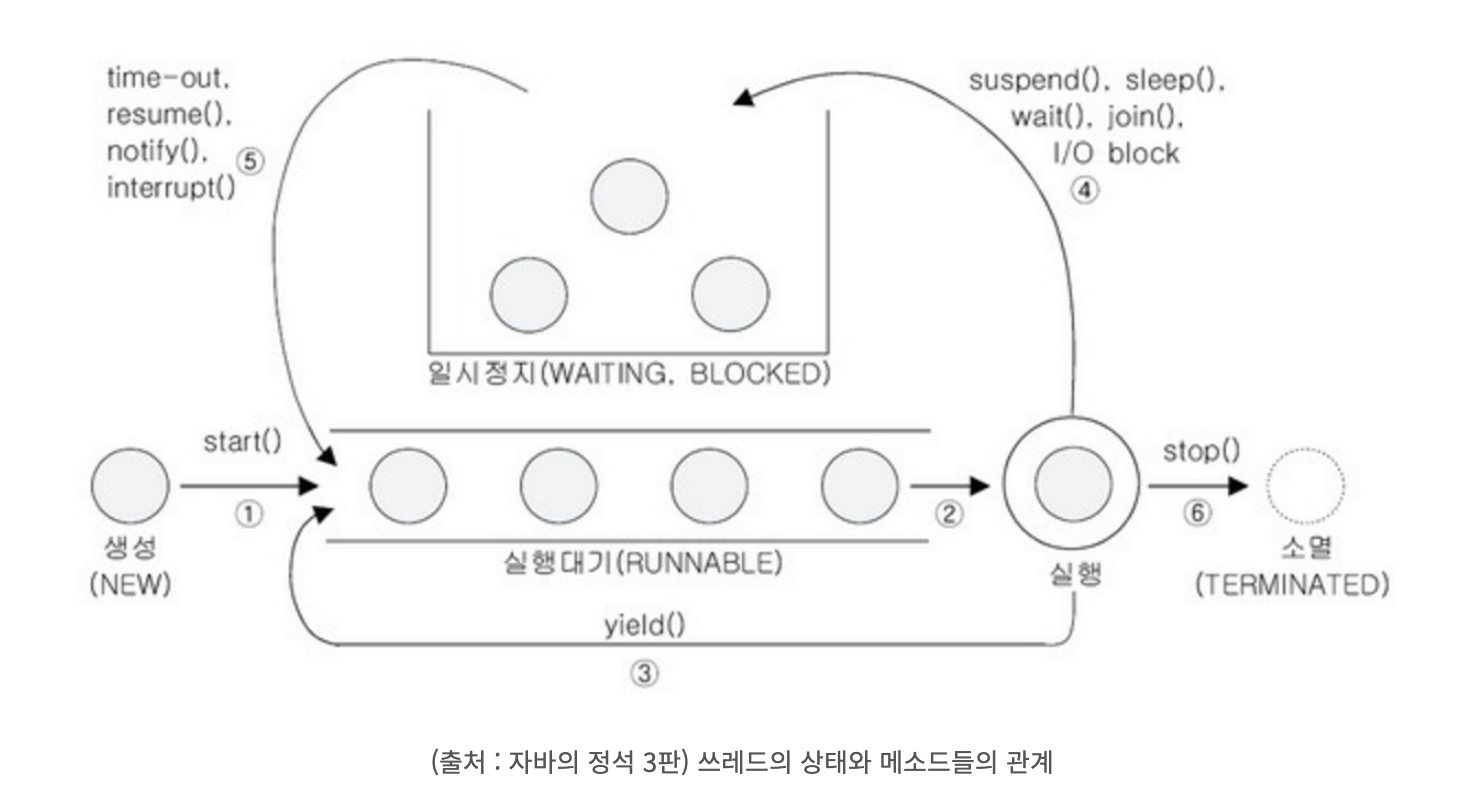
1) 쓰레드 관련 메서드
-
sleep(long millis) -
interrupt(),interrupted(): 실행 정지 상태인 sleep(), join()를 다시 실행 대기 상태로 변경
👉 (InterruptedException발생,isInterrupted()= true)interrupt()호출
1)isInterrupted()가 true로 변경
2) 내부에서interrupted()호출,InterruptedException도 발생,isInterrupted()로 false변경
-
suspend(): 일시 정지
resume(): 재시작
stop(): 정지
👉 교착상태를 유발할 가능성이 크므로 사용 지양 -
yield(): 다른 쓰레드에게 작업 양보 -
join(): join한 쓰레드가 완료 되면 현재 쓰레드가 종료
public class Ex04 {
    public static void main(String[] args) {
        Runnable r1 = () -> {
            for(int i = 0; i < 300; i++){
                System.out.print("-");
                for(long j = 0; j < 100000000L; j++);
            }
        };

        Runnable r2 = () -> {
            for(int i = 0; i < 300; i++){
                System.out.print("=");
                for(long j = 0; j < 100000000L; j++);
            }
        };

        Thread th1 = new Thread(r1);
        Thread th2 = new Thread(r2);
        th1.setPriority(Thread.MAX_PRIORITY);
        th2.setPriority(Thread.MIN_PRIORITY);
        System.out.printf("th1 : %d, th2 : %d",th1.getPriority(), th2.getPriority());

        th1.start();
        th2.start();
        try {
            th1.join(); // join
            th2.join(); // join
        }catch(InterruptedException e){};

        System.out.println("작업 종료!"); //메인쓰레드 th1, th2쓰레드가 종료되어야지 작업

    }
}
10. 쓰레드의 동기화
1. synchronized를 이용한 동기화
1) 메서드 전체를 임계영역으로 지정
public class Account {
    private int balance = 1000;

    public int getBalance(){
        return balance;
    }

    public synchronized void wirhdraw(int money){
        if(balance >= money){
            try{
                Thread.sleep(1000);

            }catch(InterruptedException e){}

            balance -= money;
        }
    }
}

public class Ex01 {
    public static void main(String[] args) {
        Ex01_1 ex01_1 = new Ex01_1();
        Thread th1 = new Thread(ex01_1);
        Thread th2 = new Thread(ex01_1);
        th1.start();
        th2.start();
    }
}

class Ex01_1 implements Runnable{
    private Account acc = new Account();
    @Override
    public void run() {
        while(acc.getBalance() > 0){
            int money = (int)(Math.random() * 3 + 1) * 100; //100~300
            acc.wirhdraw(money);
            System.out.println("balance : " + acc.getBalance());

        }
    }
}
2) 특정한 영역을 임계 영역으로 지정
public class Account {
    private int balance = 1000;

    public int getBalance(){
        return balance;
    }

    public  void wirhdraw(int money){
        synchronized(this) {
            if (balance >= money) {
                try {
                    Thread.sleep(1000);

                } catch (InterruptedException e) {
                }

                balance -= money;
            }
        }
    }
}
2. volatile
11. 시분할 방식
시간을 분할하는 방식