이벤트 처리
1. 이벤트 처리기를 등록하는 방법
document 객체에 "on이벤트명" 속성에 이벤트 핸들러 함수를 직접 대입
const header = document.getElementById("header");
header.onclick= function(){
    alert("클릭!");
};
이벤트 처리기의 문제점
전역환경에서 사용하면 안됨
window.onload = function()이 겹치기 때문에 window.onload의 function이 마지막으로 값이 입력된 script2.js에서 실행된다.
<!DOCTYPE html>
<html>
    <head>
        <meta charset="UTF-8">
        <script src="script1.js"></script>
        <script src="script2.js"></script>
    </head>
    <body>
        <button type="button" id="button">클릭</button>
    </body>
</html>window.onload = function(){
alert("메우중요한 로직1...");
};window.onload = function(){
alert("메우중요한 로직2...");
};해결방법
addEventListener를 사용한다. 절대 window.onload사용 금지
<!DOCTYPE html>
<html>
    <head>
        <meta charset="UTF-8">
        <script src="script1.js"></script>
        <script src="script2.js"></script>
        <script>
            window.addEventListener("DOMContentLoaded", function(){
                const buttonEl = document.getElementById("button");
                buttonEl.addEventListener("click", function(){
                    alert("클릭1");
                });
                buttonEl.addEventListener("click", function(){
                    alert("클릭2");
                });
            });
        </script>
    </head>
    <body>
        <button type="button" id="button">클릭</button>
    </body>
</html>
2. 이벤트 리스너를 등록하고 삭제하는 방법
이벤트 객체
1. 이벤트 객체의 공통 프로퍼티
2. 마우스 이벤트 객체
- 마우스 이벤트 객체에서 좌표를 담당하는 프로퍼티
3. 키보드 이벤트 객체
이벤트 전파
1. 이벤트의 단계
addEventListener("이벤트 명", 이벤트 핸들러 함수, 캡쳐링 여부 - false (기본값))
- false (기본값) : 버블링 단계에서 이벤트 전파 (실행)
- true : 캡쳐링 단계에서 이벤트 전파 (실행)
캡쳐링 여부
- false (기본값) : 버블링 단계에서 이벤트 전파
- true : 캡쳐링 단계에서 이벤트 전파
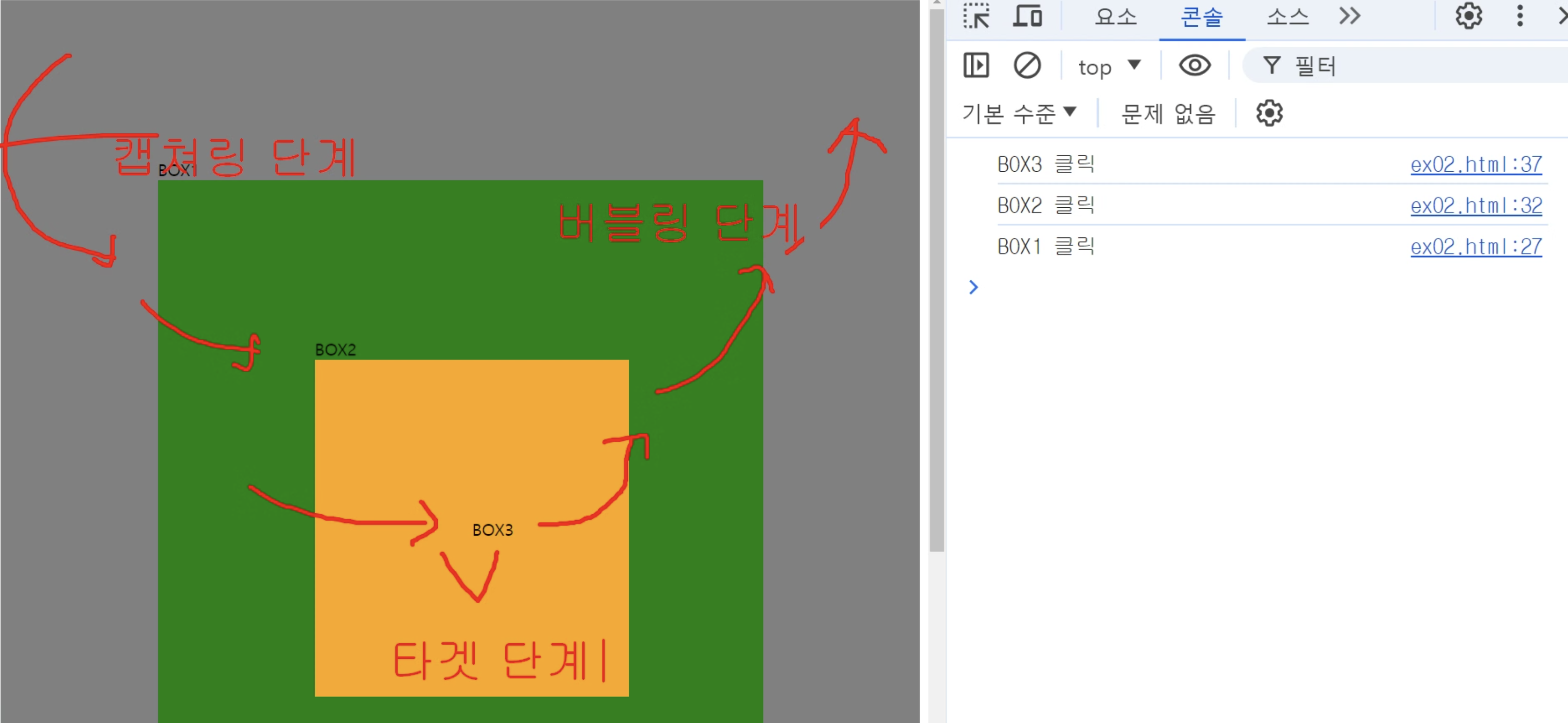
1) 캡펴링 단계
2) 타깃 단계
3) 버블링 단계
2. 이벤트 전파
1) 이벤트 전파 취소하기
stopPropagation() : 이벤트 전파 취소, 동일 이벤트에 한해서 전파 취소
window.addEventListener("DOMContentLoaded",function(){
                const box1El = document.querySelector(".box1");
                box1El.addEventListener("click", function(e){
                    console.log("box1 클릭");
                });
                const box2El = document.querySelector(".box2");
                box2El.addEventListener("click", function(e){
                    console.log("box2 클릭");
                });
                const box3El = document.querySelector(".box3");
                box3El.addEventListener("click", function(e){
                    e.stopPropagation(); //이벤트 전파 취소
                    console.log("box3 클릭");
                });
            });
2) 이벤트 전파의 일시 정지
stopImmediatePropagation() : 발생하는 모든 이벤트 전파 취소
3) 기본 동작 취소하기
preventDefault()
3. 이벤트 리스너 안의 this
event
.target
.currentTarget
1) 이벤트 리스너 안의 this는 이벤트가 발생한 요소 객체
2) this가 원하는 객체를 가리키도록 설정하는 방법
bind 메서드를 사용하는 방법
익명 함수 안에서 실행하는 방법
화살표 함수를 사용하는 방법
addEventListener의 두 번째 인수로 객체를 넘기는 방법
handleEvent

안녕하세요!