0. 의존성
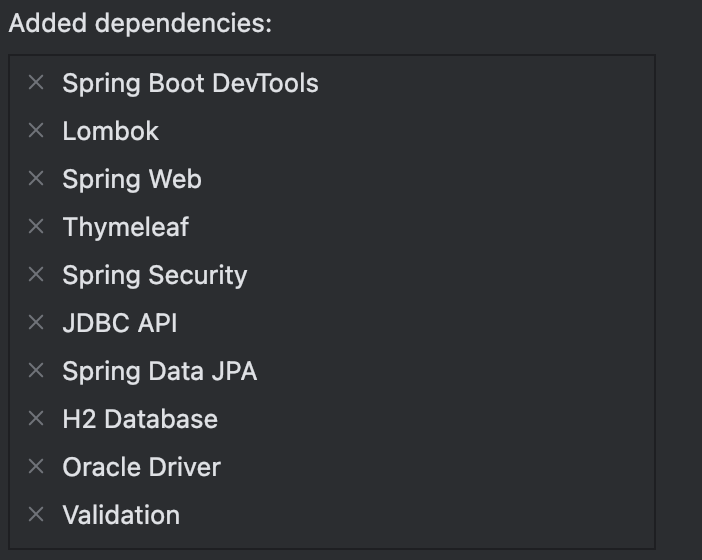
dependencies {
    implementation 'org.springframework.boot:spring-boot-starter-data-jpa'
    implementation 'org.springframework.boot:spring-boot-starter-security'
    implementation 'org.springframework.boot:spring-boot-starter-thymeleaf'
    implementation 'nz.net.ultraq.thymeleaf:thymeleaf-layout-dialect:3.3.0' //Thymeleaf Layout Dialect » 3.3.0
    implementation 'org.springframework.boot:spring-boot-starter-validation'
    implementation 'org.springframework.boot:spring-boot-starter-web'
    implementation 'org.thymeleaf.extras:thymeleaf-extras-springsecurity6'
    implementation 'org.modelmapper:modelmapper:3.2.1' //ModelMapper » 3.2.1

    implementation 'com.querydsl:querydsl-jpa:5.1.0:jakarta' //Querydsl JPA Support » 5.1.0
    annotationProcessor 'com.querydsl:querydsl-apt:5.1.0:jakarta' //Querydsl APT Support » 5.1.0

    annotationProcessor 'jakarta.annotation:jakarta.annotation-api' //jakarta.annotation
    annotationProcessor 'jakarta.persistence:jakarta.persistence-api' //jakarta.persistence


    compileOnly 'org.projectlombok:lombok'
    developmentOnly 'org.springframework.boot:spring-boot-devtools'
    testRuntimeOnly 'com.h2database:h2'
    runtimeOnly 'com.oracle.database.jdbc:ojdbc11'
    annotationProcessor 'org.projectlombok:lombok'

    testImplementation 'org.springframework.boot:spring-boot-starter-test'
    testImplementation 'org.springframework.security:spring-security-test'
    testRuntimeOnly 'org.junit.platform:junit-platform-launcher'
}
QueryDSL 설정
//querydsl 설정
tasks.named('test') {
    useJUnitPlatform()
}

tasks.named('test') {
    useJUnitPlatform()
}

def querydslDir = layout.buildDirectory.dir("generated/querydsl").get().asFile

sourceSets {
    main.java.srcDirs += [ querydslDir ]
}

tasks.withType(JavaCompile) {
    options.getGeneratedSourceOutputDirectory().set(file(querydslDir))
}

clean.doLast {
    file(querydslDir).deleteDir()
}
1. application 설정
application.yml
#기본 profile

#서버 설정
server:
  port: 3000

#스프링 설정
spring:
  #데이터베이스 설정
  datasource:
    driverClassName: oracle.jdbc.driver.OracleDriver
    url: jdbc:oracle:thin:@${db.host}:${db.port}:XE
    username: ${db.username}
    password: ${db.password}

  #JPA 설정
  jpa:
    properties:
      hibernate:
        show_sql: true
        format_sql: true
        use_sql_comments: true
    hibernate:
      ddl-auto: create

  #라이브 리로드 설정(배포 시 설정 x false)
  devtools:
    livereload:
      enabled: true

  #정적 자원 설정(css, js, image ...)
  web:
    resources:
      static-locations: file:src/main/resources/static/


  #파일 업로드 용량 설정 (서블릿 설정)
  servlet:
    multipart:
      max-file-size: 20MB
      max-request-size: 60MB
      file-size-threshold: 30MB

#파일 업로드 경로 설정
file:
  upload:
    path: /Users/oreo/uploads
    url: /upload/


#로거 설정
logging:
  level:
    org.hibernate.type: trace
    org.hibernate.orm.jdbc.bind: trace
application-prod.yml
    livereload:
      enabled: false

  #정적 자원 설정(css, js, image ...)
  web:
    resources:
      static-locations: classpath:/static/

  #타임리프 설정
  thymeleaf:
    cache: true
    prefix: classpath:/templates/

#파일 업로드 경로 설정, ubuntu 서버
file:
  upload:
    path: /home/ubuntu/uploads
    url: /upload/
application-test.yml
#스프링 설정
spring:
  #데이터베이스 설정
  datasource:
    driverClassName: org.h2.Driver
    url: jdbc:h2:hem:test
    username: sa
    password:
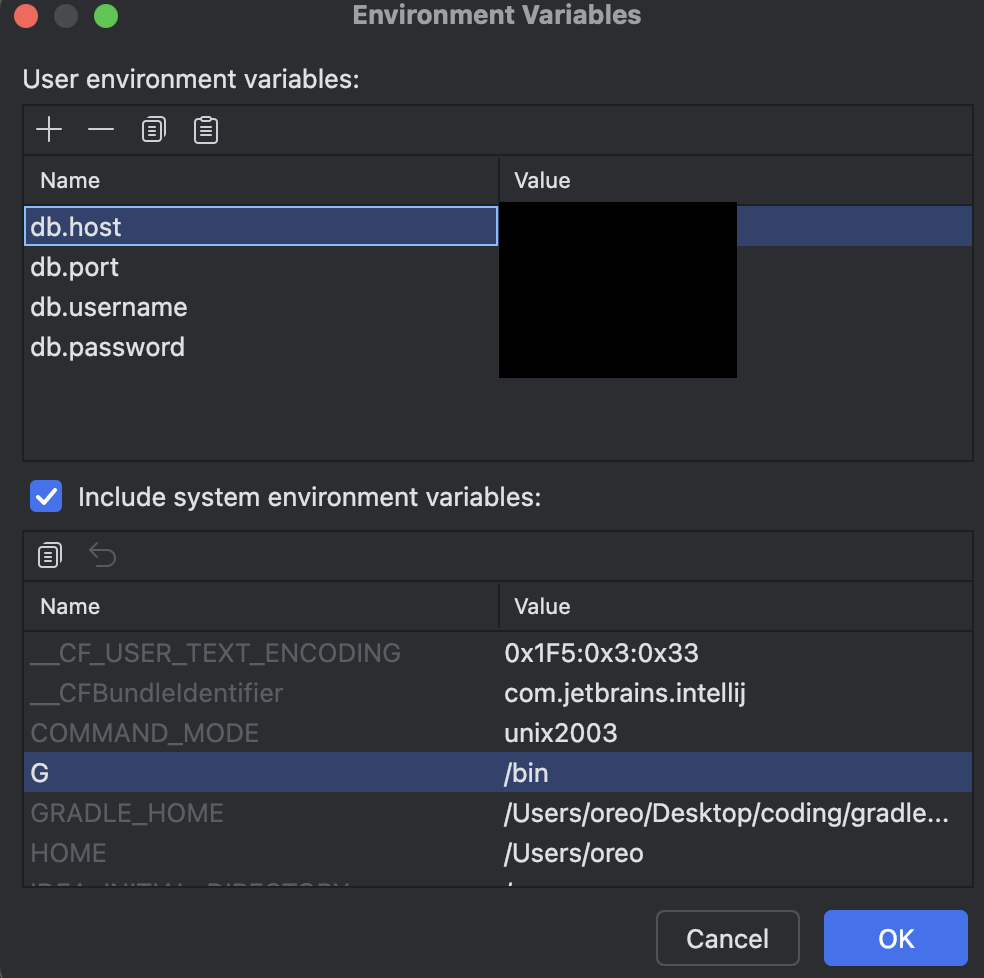
1-1 환경변수 설정
2. Mvc설정
HiddenHttpMethodFilter : HTML 폼을 통해 PUT, DELETE 등의 HTTP 메서드를 사용할 수 있게 해주는 필터입니다. 이는 HTML 폼이 기본적으로 GET과 POST 메서드만 지원하기 때문에 추가적인 HTTP 메서드를 사용할 수 있도록 하기 위한 방법입니다.
@Configuration
@EnableJpaAuditing //Spring Boot 애플리케이션에서 JPA 감사(Auditing) 기능을 활성화합니다. 주로 @CreatedDate와 @LastModifiedDate와 같은 필드를 자동으로 관리하기 위해 사용됩니다.
public class MvcConfig implements WebMvcConfigurer {

    /**
     * <inpu type="hidden" name="_method" value="PATCH"></inpu> -> PATCH 방식으로 요청
     * ?_method=DELETE
     * @return
     */
    @Bean
    public HiddenHttpMethodFilter hiddenHttpMethodFilter() {
        return new HiddenHttpMethodFilter();
    }
}
2-1. 파일 설정
FileConfig
@Configuration
@RequiredArgsConstructor
@EnableConfigurationProperties(FileProperties.class)
public class FileConfig implements WebMvcConfigurer{

    private final FileProperties properties;

    @Override
    public void addResourceHandlers(ResourceHandlerRegistry registry) {
        registry.addResourceHandler(properties.getUrl()+ "**").addResourceLocations("file:/" + properties.getPath());
    }
}
FileProperties
@Data
@ConfigurationProperties(prefix = "file.upload")
public class FileProperties {
    private String path; //file.upload.path
    private String url; //file.upload.url
}
2-2. 메세지 설정
MessageSource
@Configuration
public class MessageConfig {

    @Bean
    public MessageSource messageSource() {
        ResourceBundleMessageSource ms = new ResourceBundleMessageSource();
        ms.setDefaultEncoding("UTF-8");
        ms.setUseCodeAsDefaultMessage(true);
        ms.setBasenames("messages.commons", "messages.validations","messages.errors");

        return ms;
    }
}
3. 회원가입 구현
0) 뷰, 레이아웃 구성
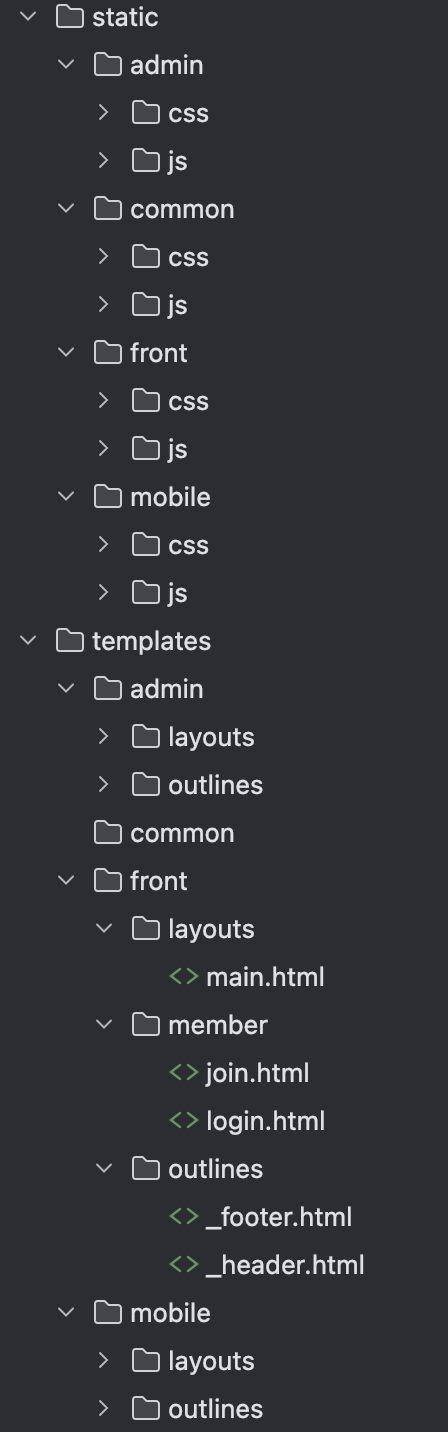
일반 뷰
front.layout.main.html
<!DOCTYPE html>
<html xmlns:th="http://www.thymeleaf.org"
      xmlns:layout="http://www.ultraq.net.nz/thymeleaf/layout">
<head>
    <meta charset="UTF-8">
    <title>
        <th:block th:if="${pageTitle != null}" th:text="${#string.concat(pageTitle, ' - ')}"></th:block>
        사이트 제목
    </title>

    <!-- 모든 페이지 css   -->
    <link rel="stylesheet" type="text/css" th:href="@{/common/css/style.css}">
    <!-- main 페이지 css   -->
    <link rel="stylesheet" type="text/css" th:href="#{/front/css/style.css}">
    <!-- 다른페이지에서 추가될 css   -->
    <link th:if="${addCss != null}" rel="stylesheet" type="text/css"
          th:each="cssFile: ${addCss}" th:href="@{/front/css/{file}.css(file=${cssFile})}">
    <!-- addViewController 추가된 뷰구성   -->
    <th:block layout:fragment="addCss"></th:block>


    <!-- 모든 페이지 js   -->
    <script th:src="@{/common/js/common.js}"></script>
    <!-- main 페이지 js   -->
    <script th:src="@{/front/js/common.js}"></script>
    <!-- 다른페이지에서 추가될 js  -->
    <script th:if="${addScript != null}" th:each="jsFile : ${addScript}" th:src="@{/front/js/{file}.js(file=${jsFile})}"></script>
    <!-- addViewController 추가된 뷰구성   -->
    <th:block layout:fragment="addScript"></th:block>
</head>
<body>
    <!-- 공통 헤더 <header th:fragment="common"> -->
    <header th:replace="~{front/outlines/_header::common}"></header>
    <!--  치환될 각 페이지의 바디  -->
    <main layout:fragment="content"></main>
    <!-- 공통 푸터 <footer th:fragment="common"> -->
    <footer th:replace="~{front/outlines/_footer::common}"></footer>
    <!-- 히든프레임 -->
    <iframe name="ifrmHidden" class="dn"></iframe>
</body>
</html>
front.member.join.html
<!DOCTYPE html>
<html xmlns:th="http://www.thymeleaf.org"
      xmlns:layout="http://www.ultraq.net.nz/thymeleaf/layout"
      layout:decorate="~{front/layouts/main}">

    <main layout:fragment="content">
        <h1 th:text="#{회원가입}"></h1>
        <form name="frmRegist" method="POST" th:action="@{/member/join}" autocomplete="off" th:object="${requestJoin}">
            <div class="error global" th:each="err : ${#fields.globalErrors()}" th:text="${err}"></div>
            <dl>
                <dt th:text="#{이메일}"></dt>
                <dd>
                    <input type="text" name="email" th:field="*{email}">
                    <div class="error" th:each="err : ${#fields.errors('email')}" th:text="${err}"></div>
                </dd>
            </dl>
            <dl>
                <dt th:text="#{비밀번호}"></dt>
                <dd>
                    <input type="password" name="password" th:field="*{password}">
                    <div class="error" th:each="err : ${#fields.errors('password')}" th:text="${err}"></div>
                </dd>
            </dl>
            <dl>
                <dt th:text="#{비밀번호_확인}"></dt>
                <dd>
                    <input type="password" name="confirmPassword" th:field="*{confirmPassword}">
                    <div class="error" th:each="err : ${#fields.errors('confirmPassword')}" th:text="${err}"></div>
                </dd>
            </dl>
            <dl>
                <dt th:text="#{회원명}"></dt>
                <dd>
                    <input type="text" name="userName" th:field="*{userName}">
                    <div class="error" th:each="err : ${#fields.errors('userName')}" th:text="${err}"></div>
                </dd>
            </dl>
            <dl>
                <dt th:text="#{휴대폰}"></dt>
                <dd>
                    <input type="text" name="mobile" th:field="*{mobile}">
                    <div class="error" th:each="err : ${#fields.errors('mobile')}" th:text="${err}"></div>
                </dd>
            </dl>
            <div class="terms">
                <div class="tit" th:text="#{회원가입_약관}"></div>
                <div class="terms-contents">회원가입 약관...</div>
                <input type="checkbox" name="agree" value="true" id="agree" th:field="*{agree}">
                <label for="agree" th:text="${회원가입_약관_동의}"></label>
                <div class="error" th:each="err : ${#fields.errors('agree')}" th:text="${err}"></div>
            </div>
            <div class="buttons">
                <button type="button" th:text="#{다시입력}"></button>
                <button type="submit" th:text="#{가입하기}"></button>
            </div>
        </form>
    </main>
</html>
front.member.loin.html
<!DOCTYPE html>
<html xmlns:th="http://www.thymeleaf.org"
      xmlns:layout="http://www.ultraq.net.nz/thymeleaf/layout"
      layout:decorate="~{front/layouts/main}">

<main layout:fragment="content">
    <h1 th:text="#{로그인}"></h1>
    <form name="frmLogin" method="POST" th:action="@{/member/login}" autocomplete="off">
        <dl>
            <dt th:text="#{이메일}"></dt>
            <dd>
                <input type="text" name="email">
            </dd>
        </dl>
        <dl>
            <dt th:text="#{비밀번호}"></dt>
            <dd>
                <input type="password" name="password">
            </dd>
        </dl>
        <button type="submit" th:text="#{로그인}"></button>
    </form>
</main>
</html>
관리자뷰
admin.layout.main.html
<!DOCTYPE html>
<html xmlns:th="http://www.thymeleaf.org"
      xmlns:layout="http://www.ultraq.net.nz/thymeleaf/layout">
<head>
    <meta charset="UTF-8">
    <title>
        <th:block th:if="${pageTitle != null}" th:text="${#string.concat(pageTitle, ' - ')}"></th:block>
        사이트 제목
    </title>

    <!-- 모든 페이지 css   -->
    <link rel="stylesheet" type="text/css" th:href="@{/common/css/style.css}">
    <!-- main 페이지 css   -->
    <link rel="stylesheet" type="text/css" th:href="#{/admin/css/style.css}">
    <!-- 다른페이지에서 추가될 css   -->
    <link th:if="${addCss != null}" rel="stylesheet" type="text/css"
          th:each="cssFile: ${addCss}" th:href="@{/admin/css/{file}.css(file=${cssFile})}">
    <!-- addViewController 추가된 뷰구성   -->
    <th:block layout:fragment="addCss"></th:block>


    <!-- 모든 페이지 js   -->
    <script th:src="@{/common/js/common.js}"></script>
    <!-- main 페이지 js   -->
    <script th:src="@{/admin/js/common.js}"></script>
    <!-- 다른페이지에서 추가될 js  -->
    <script th:if="${addScript != null}" th:each="jsFile : ${addScript}" th:src="@{/admin/js/{file}.js(file=${jsFile})}"></script>
    <!-- addViewController 추가된 뷰구성   -->
    <th:block layout:fragment="addScript"></th:block>
</head>
<body>
    <!-- 공통 헤더 <header th:fragment="common"> -->
    <header th:replace="~{admin/outlines/_header::common}"></header>
    <!--  치환될 각 페이지의 바디  -->
    <main layout:fragment="content"></main>
    <!-- 공통 푸터 <footer th:fragment="common"> -->
    <footer th:replace="~{admin/outlines/_footer::common}"></footer>
    <!-- 히든프레임 -->
    <iframe name="ifrmHidden" class="dn"></iframe>
</body>
</html>
admin.outlines._footeer, _header.html
똑같이 설정함.모바일
mobile.layout.main.html
<!DOCTYPE html>
<html xmlns:th="http://www.thymeleaf.org"
      xmlns:layout="http://www.ultraq.net.nz/thymeleaf/layout">
<head>
    <meta charset="UTF-8">
    <title>
        <th:block th:if="${pageTitle != null}" th:text="${#string.concat(pageTitle, ' - ')}"></th:block>
        사이트 제목
    </title>

    <!-- 모든 페이지 css   -->
    <link rel="stylesheet" type="text/css" th:href="@{/common/css/style.css}">
    <!-- main 페이지 css   -->
    <link rel="stylesheet" type="text/css" th:href="#{/mobile/css/style.css}">
    <!-- 다른페이지에서 추가될 css   -->
    <link th:if="${addCss != null}" rel="stylesheet" type="text/css"
          th:each="cssFile: ${addCss}" th:href="@{/mobile/css/{file}.css(file=${cssFile})}">
    <!-- addViewController 추가된 뷰구성   -->
    <th:block layout:fragment="addCss"></th:block>


    <!-- 모든 페이지 js   -->
    <script th:src="@{/common/js/common.js}"></script>
    <!-- main 페이지 js   -->
    <script th:src="@{/mobile/js/common.js}"></script>
    <!-- 다른페이지에서 추가될 js  -->
    <script th:if="${addScript != null}" th:each="jsFile : ${addScript}" th:src="@{/mobile/js/{file}.js(file=${jsFile})}"></script>
    <!-- addViewController 추가된 뷰구성   -->
    <th:block layout:fragment="addScript"></th:block>
</head>
<body>
    <!-- 공통 헤더 <header th:fragment="common"> -->
    <header th:replace="~{mobile/outlines/_header::common}"></header>
    <!--  치환될 각 페이지의 바디  -->
    <main layout:fragment="content"></main>
    <!-- 공통 푸터 <footer th:fragment="common"> -->
    <footer th:replace="~{mobile/outlines/_footer::common}"></footer>
    <!-- 히든프레임 -->
    <iframe name="ifrmHidden" class="dn"></iframe>
</body>
</html>
mobile.outlines._footeer, _header.html
똑같이 설정함.CSS
common.css.style.css
.dn {
    display: none !important;
}
1) 커맨드객체 구성
member.RequestJoin.java
@Data
public class RequestJoin {
    @NotBlank @Email
    private String email;

    @NotBlank @Size(min = 8)
    private String password;

    @NotBlank
    private String confirmPassword;

    @NotBlank
    private String userName;

    @NotBlank
    private String mobile;

    @AssertTrue
    private boolean agree;
}
1-1) 공통 커맨드객체 구성
BaseEntity
@Getter @Setter
@MappedSuperclass //공통 속성화를 위한 상위 클래스. 추상클래스를 상속을 통해 공통으로 사용될 속성들을 공유.
@EntityListeners(AuditingEntityListener.class)
public abstract class BaseEntity {

    @CreatedDate
    @Column(updatable = false) //수정불가
    protected LocalDateTime createdAt;

    @LastModifiedDate
    @Column(insertable = false) //추가불가
    protected LocalDateTime modifiedAt;

    @Column(insertable = false) //추가불가
    protected LocalDateTime deletedAt;
}
2) 엔티티 구성
Member
@Data
@Entity
@Builder
@AllArgsConstructor @NoArgsConstructor
public class Member extends BaseEntity {

    @Id @GeneratedValue
    private Long seq;

    @Column(length = 65, unique = true, nullable = false)
    private String email;

    @Column(length = 65, nullable = false)
    private String password;

    @Column(length = 40, nullable = false)
    private String userName;

    @Column(length = 15, nullable = false)
    private String mobile;

    @ToString.Exclude
    @OneToMany(mappedBy = "member")
    private List<Authorities> authorities;
}
Authorities
@Data
@Entity
@Builder
@IdClass(AuthoritiesId.class)
@NoArgsConstructor @AllArgsConstructor
public class Authorities {

    @Id
    @ManyToOne(fetch= FetchType.LAZY)
    private Member member;

    @Id
    @Column(length = 20)
    @Enumerated(EnumType.STRING)
    private Authority authority;
}
AuthoritiesId 복합키
@EqualsAndHashCode
@AllArgsConstructor
@NoArgsConstructor
public class AuthoritiesId {
    private Member member;
    private Authority authority;

}
2-1) 인증 enum 구성
member.constants.Authority
public enum Authority {
    USER,
    ADMIN
}
3) 레포지토리
MemberRepository
public interface MemberRepository extends JpaRepository<Member, Long>, QuerydslPredicateExecutor<Member> {

    @EntityGraph(attributePaths = "authorities") //JPA에서 엔티티 그래프를 정의하여 특정 쿼리 시에 연관된 엔티티를 즉시 로딩(Eager Fetch)하도록 하는 방법
    Optional<Member> findByEmail(String username);

    default boolean exists(String email){
        QMember member = QMember.member;
        return exists(member.email.eq(email));
    }
}
AuthoritiesRepository
public interface AuthoritiesRepository extends JpaRepository<Authorities, AuthoritiesId>, QuerydslPredicateExecutor<Authorities> {
}
4) 컨트롤러 구성
memberController.java
@Controller
@RequestMapping("/member")
@RequiredArgsConstructor
public class MemberController {

    private final JoinValidator joinValidator;
    private final MemberSaveService memberSaveService;

    @GetMapping("/join")
    public String join(@ModelAttribute RequestJoin form) {
        return "front/member/join";
    }

    @PostMapping("/join")
    public String joinPs(@Valid RequestJoin form, Errors errors) {

        joinValidator.validate(form, errors);

        if (errors.hasErrors()) {
            return "front/member/join";
        }

        memberSaveService.save(form); //회원가입 처리

        return "redirect:/member/login";
    }

    @GetMapping("/login")
    public String login() {

        return "front/member/login";
    }
}
5) 검증 구성
간단한 정규 표현식 체크 👉 String 클래스 👉 matches(..)
matches(..) : 처음 위치부터 일치 여부 체크
[0-9]+
\d+
123abc 👉 ⭕️
abc123def 👉 ❌
.*[0-9].*
JoinValidator
@Component
@RequiredArgsConstructor
public class JoinValidator implements Validator, PasswordValidator, MobileValidator {

    private final MemberRepository memberRepository;

    @Override
    public boolean supports(Class<?> clazz) {
        return clazz.isAssignableFrom(RequestJoin.class);
    }

    @Override
    public void validate(Object target, Errors errors) {
        if (errors.hasErrors()) {
            return;
        }

        /**
         * 1. 이미 가입된 회원인지 체크
         * 2. 비밀번호, 비밀번호 확인 일치 여부
         * 3. 비밀번호 복잡성 체크
         * 4. 휴대전화번호 형식 체크
         */

        RequestJoin form = (RequestJoin) target;
        String email = form.getEmail();
        String password = form.getPassword();
        String confirmPassword = form.getConfirmPassword();
        String mobile = form.getMobile();

        //1. 이미 가입된 회원인지 체크
        if(memberRepository.exists(email)){
            errors.rejectValue("email", "Duplicated");
        }

        //2. 비밀번호, 비밀번호 확인 일치 여부
        if (!password.equals(confirmPassword)) {
            errors.rejectValue("confirmPassword", "Mismatch.password");
        }

        // 3. 비밀번호 복잡성 체크 - 알파벳 대소문자 각각 1개 이상, 숫자 1개 이상, 특수문자 1개 이상
        if (!alphaCheck(password, false) || !numberCheck(password) || !specialCharsCheck(password)) {
            errors.rejectValue("password", "Complexity");
        }

        // 4. 휴대전화번호 형식 체크
        if (!mobileCheck(mobile)) {
            errors.rejectValue("mobile", "Mobile");
        }
    }
}
PasswordValidator
public interface PasswordValidator {

    /**
     * 알파벳 복잡성 체크
     * @param password
     * @param caseInsensitive - false : 대소문자 각각 1개씩 이상 포함, true : 대소문자 구분 X
     * @return
     */
    default boolean alphaCheck(String password, boolean caseInsensitive) {
        if (caseInsensitive) { //대소문자 구분없이 알파벳 체크
            return password.matches(".*[a-zA-Z]+.*");
        }
        return password.matches(".*[a-z]+.*") && password.matches(".*[A-Z]+.*");
    }

    /**
     * 숫자 복잡성 체크
     * @param password
     * @return
     */
    default boolean numberCheck(String password){
        return password.matches(".*\\d+.*");
    }

    /**
     * 특수문자 복잡성 체크
     * @param password
     * @return
     */
    default boolean specialCharCheck(String password){
        String pattern = "[^\\w\\s]";
        return password.matches(pattern);
    }
}
MobileValidator
public interface MobileValidator {
    default boolean mobileCheck(String mobile) {
        /**
         * 01[016]-0000/000-0000
         * 01[016] - \d{3,4} - \d{4}
         * 010.1111.1111
         * 010 1111 1111
         * 010-1111-1111
         * 01011111111
         * 1. 숫자만 남긴다
         * 2. 패턴 만들기
         * 3. 체크
         */

        mobile = mobile.replaceAll("\\D", "");
        String pattern = "01[016]\\d{3,4}\\d{4}$";
        return mobile.matches(pattern);
    }
}
6) 메시지 구성
validations.properties
#공통
NotBlank=필수 입력 항목 입니다.
Email = 이메일 형식이 아닙니다.
Mobile=휴대전화 형식이 아닙니다.
AssertTrue.agree=약관에 동의 하세요.

NotBlank.email=이메일을 입력하세요.
NotBlank.password=비밀번호를 입력하세요.
NotBlank.confirmPassword=비밀번호를 확인하세요.
NotBlank.userName=회원명을 입력하세요.
NotBlank.mobile=휴대전화번호를 입력하세요.

Mismatch.password=비밀번호가 일치하지 않습니다.


#회원 공통
Size.requestJoin.password=비밀번호는 8자리 이상 입력하세요.
AssertTrue.requestJoin.agree=회원가입 약관의 동의합니다.
Complexity.requestJoin.password=비밀번호는 알파벳 대소문자가 각각 1개, 숫자 1개 이상, 특수문자 1개 이상을 포함하세요.
Duplicate.requestJoin.email=이미 가입된 이메일 입니다.
7) 서비스 구현
MemberSaveService
@Service
@Transactional
@RequiredArgsConstructor
public class MemberSaveService {

    private final MemberRepository memberRepository;
    private final AuthoritiesRepository authoritiesRepository;
    private final PasswordEncoder passwordEncoder;

    public void save(RequestJoin form) {
        Member member = new ModelMapper().map(form, Member.class);
        //ModelMapper : Java에서 객체 간의 매핑을 단순화하고 자동화하는 라이브러리입니다. DTO(Data Transfer Object)와 엔티티 간의 변환을 쉽게 할 수 있게 도와줍니다
        String hash = passwordEncoder.encode(member.getPassword());
        member.setPassword(hash);

        save(member, List.of(Authority.USER));
    }

    public void save(Member member, List<Authority> authorities){
        //휴대전화번호 숫자만 기록
        String mobile = member.getMobile();
        if(StringUtils.hasText(mobile)) {
            mobile = mobile.replaceAll("\\D", "");
            member.setMobile(mobile);
        }f

        memberRepository.saveAndFlush(member);
        //권한 추가, 수정 S
        if(authorities != null){
            List<Authorities> items = authoritiesRepository.findByMember(member);
            authoritiesRepository.deleteAll(items);
            authoritiesRepository.flush();

            items = authorities.stream().map( a -> Authorities.builder()
                    .member(member)
                    .authority(a)
                    .build()).toList();

            authoritiesRepository.saveAllAndFlush(items);
        }
        //권한 추가, 수정 E
    }
}
스프링 시큐리티
인증 인가
인증 : 로그인
인가 : 접근통제
1. 로그인 구현
1) UserDetails
인터페이스 : DTO
MemberInfo
@Data
@Builder
public class MemberInfo implements UserDetails {

    private String email;
    private String password;
    private Collection<? extends GrantedAuthority> authorities;
    private Member member;

    @Override
    public Collection<? extends GrantedAuthority> getAuthorities() {
        return authorities;
    }

    @Override
    public String getPassword() {
        return password;
    }

    @Override
    public String getUsername() {
        return email;
    }

    @Override
    public boolean isAccountNonExpired() {
        return true;
    }

    @Override
    public boolean isAccountNonLocked() {
        return true;
    }

    @Override
    public boolean isCredentialsNonExpired() {
        return true;
    }

    @Override
    public boolean isEnabled() {
        return true;
    }
}
getAuthorities():
사용자가 가진 권한(roles 또는 permissions)을 반환합니다.
getPassword():
사용자의 비밀번호를 반환합니다.
getUsername():
사용자의 사용자 이름을 반환합니다. 이 경우 이메일이 사용자 이름으로 사용됩니다.
isAccountNonExpired():
사용자의 계정이 만료되지 않았는지 확인합니다. true를 반환하면 계정이 유효함을 의미합니다.
isAccountNonLocked():
사용자가 잠겨 있지 않은지 확인합니다. true를 반환하면 사용자가 잠겨있지 않음을 의미합니다.
isCredentialsNonExpired():
사용자의 인증 정보(비밀번호)가 만료되지 않았는지 확인합니다. true를 반환하면 인증 정보가 유효함을 의미합니다.
isEnabled():
사용자가 활성화되어 있는지 확인합니다. true를 반환하면 사용자가 활성화되어 있음을 의미합니다.
2) UserDetailsService
인터페이스 : Service
MemberInfoService
@Service
@RequiredArgsConstructor
public class MemberInfoService implements UserDetailsService {

    private MemberRepository memberRepository;

    @Override
    public UserDetails loadUserByUsername(String username) throws UsernameNotFoundException {

        Member member = memberRepository.findByEmail(username).orElseThrow(() -> new UsernameNotFoundException(username));

        //null값을 방지하기 위해 기본값을 USER로 설정.
        List<Authorities> tmp = Objects.requireNonNullElse(member.getAuthorities(),
                List.of(Authorities.builder()
                .member(member)
                .authority(Authority.USER)
                        .build()));

        List<SimpleGrantedAuthority> authorities = tmp.stream()
                .map(a -> new SimpleGrantedAuthority(a.getAuthority().name()))
                .toList();

        return MemberInfo.builder()
                .email(member.getEmail())
                .password(member.getPassword())
                .member(member)
                .authorities(authorities)
                .build();
    }
}
5. 시큐리티를 이용한 회원 인증(로그인) 구현
1) 스프링 시큐티리 설정
SecurityConfig
@Configuration
public class SecurityConfig {

    @Bean
    public SecurityFilterChain filterChain(HttpSecurity http) throws Exception {
        /**
         * 로그인 처리를 넘길 페이지 설정
         * 개발자마다 파라미터명이 다르기 때문에 파라미트명 설정.
         * 로그인 성공 후 페이지 설정
         * 로그인 실패 후 페이지 설정
         */
        /* 로그인, 로그아웃 S */
        http.formLogin(f -> {
            f.loginPage("/member/login")
                    .usernameParameter("email")
                    .passwordParameter("password")
                    .successHandler(new LoginSuccessHandler())
                    .failureHandler(new LoginFailureHandler());
        });


        http.logout(f -> {
            f.logoutRequestMatcher(new AntPathRequestMatcher("/member/logout"))
                    .logoutSuccessUrl("/member/login");

        });
        /* 로그인, 로그아웃 E */

        return http.build();
    }

    @Bean
    public PasswordEncoder passwordEncoder() {
        return new BCryptPasswordEncoder();
    }
}
2) 인증(성공, 실패) 핸들러 구현
로그인을 성공 or 실패 했을 때의 메서드를 구현.
실패 했을 때의 각각의 에러에 대한 에러코드 설정 👉 각 에러에 대한 처리는 본인의 개발
LoginSuccessHandler
public class LoginSuccessHandler implements AuthenticationSuccessHandler {
    //로그인 성공시에 유입되는 메서드
    @Override
    public void onAuthenticationSuccess(HttpServletRequest request, HttpServletResponse response, Authentication authentication) throws IOException, ServletException {
        //세션에 남아 있는 requestLogin삭제
        HttpSession session = request.getSession();
        session.removeAttribute("requestLogin");

        //로그인 성공시 - redirectUrl 이 있으면 해당 주소로 이동, 아니면 메인 페이지 이동
        String redirectUrl = request.getParameter("redirectUrl");
        redirectUrl = StringUtils.hasText(redirectUrl) ? redirectUrl.trim() : "/";

        response.sendRedirect(request.getContextPath() + redirectUrl);
    }
LoginFailureHandler
public class LoginFailureHandler implements AuthenticationFailureHandler {

    //로그인 실패시에 유입되는 메서드
    @Override
    public void onAuthenticationFailure(HttpServletRequest request, HttpServletResponse response, AuthenticationException exception) throws IOException, ServletException {

        //세션가져오기
        HttpSession session = request.getSession();

        RequestLogin form = new RequestLogin();
        form.setEmail(request.getParameter("email"));
        form.setPassword(request.getParameter("password"));


        if(exception instanceof BadCredentialsException) { //아이디 또는 비밀번호가 일치하지 않는 경우
            form.setCode("BadCredentials.Login");
        }else if(exception instanceof DisabledException){ //탈퇴한 회원인경우
            form.setCode("Disabled.Login");
        }else if(exception instanceof CredentialsExpiredException){ //비밀번호 유효기간 만료
            form.setCode("CredentialsExpired.Login");
        }else if(exception instanceof AccountExpiredException){ //사용자 계정 유효기간 만료
            form.setCode("AccountExpired.Login");
        }else if(exception instanceof LockedException){ //사용자 계정 일시정지 상태 일때
            form.setCode("Locked.Login");
        }else{
            form.setCode("Fail.Login");
        }

        form.setDefaultMessage(exception.getMessage());


        form.setSuccess(false); //로그인 실패 설정
        session.setAttribute("requestLogin", form);

        //로그인 실패시 로그인 페이지 이동
        response.sendRedirect(request.getContextPath() + "/member/login");
    }
}
3) 컨트롤러 구현
로그인 객체는 세션으로 유지해야함.
@Controller
@RequestMapping("/member")
@RequiredArgsConstructor
@SessionAttributes("requestLogin")
public class MemberController {

    private final JoinValidator joinValidator;
    private final MemberSaveService memberSaveService;

    @ModelAttribute
    public RequestLogin requestLogin() {
        return new RequestLogin();
    }

    @GetMapping("/join")
    public String join(@ModelAttribute RequestJoin form) {
        return "front/member/join";
    }

    @PostMapping("/join")
    public String joinPs(@Valid RequestJoin form, Errors errors) {

        joinValidator.validate(form, errors);

        if (errors.hasErrors()) {
            return "front/member/join";
        }

        memberSaveService.save(form); // 회원 가입 처리

        return "redirect:/member/login";
    }

    @GetMapping("/login")
    public String login(@Valid @ModelAttribute RequestLogin form, Errors errors) {
        String code = form.getCode();
        if(errors.hasErrors()) {
            errors.reject(code, form.getDefaultMessage());

            //비번 만료인 경우 비번 재설정 페이지 이동
            if(code.equals("CredentialsExpired.Login")){
                return "redirect:/member/password/reset";
            }
        }

        return "front/member/login";
    }
}
4) 로그인 뷰 구성
login.html*
<!DOCTYPE html>
<html xmlns:th="http://www.thymeleaf.org"
      xmlns:layout="http://www.ultraq.net.nz/thymeleaf/layout"
      layout:decorate="~{front/layouts/main}">
<main layout:fragment="content">
    <h1 th:text="#{로그인}"></h1>
    <form name="frmLogin" method="POST" th:action="@{/member/login}" autocomplete="off" th:object="${requestLogin}">
<!--   redirectUrl     -->
        <input type="hidden" name="redirectUrl" th:field="*{redirectUrl}">
        <dl>
            <dt th:text="#{이메일}"></dt>
            <dd>
                <input type="text" name="email" th:field="*{email}">
                <div th:if="*{!success}" class="error" th:each="err : ${#fields.errors('email')}" th:text="${err}"></div>
            </dd>
        </dl>
        <dl>
            <dt th:text="#{비밀번호}"></dt>
            <dd>
                <input type="password" name="password" th:field="*{password}">
                <div th:if="*{!success}" class="error" th:each="err : ${#fields.errors('password')}" th:text="${err}"></div>
            </dd>
        </dl>
        <button type="submit" th:text="#{로그인}"></button>
        <div class="error global" th:each="err : ${#fields.globalErrors()}" th:text="${err}"></div>
    </form>
</main>
</html>
5) 로그인 커맨드 객체
@Data
public class RequestLogin {

    @NotBlank
    private String email;

    @NotBlank
    private String password;

    private boolean success = true;

    //에러처리를 위한 값
    private String code;
    private String defaultMessage;

    private String redirectUrl; //로그인 성공시에 이동할 주소
}
6. 로그인 정보 가져오기
1) Principal 요청메서드에 주입
getName() : 아이디 : 요청 메서드의 주입
MemberController
...
	@ResponseBody
    @GetMapping("/test")
    public void test(Principal principal){
        log.info("로그인 아이디 : {}", principal.getName());
    }
...
2) @AuthenticationPrincipal
UserDetails 구현 객체 주입, 요청 메서드의 주입시 밖에 사용 가능
MemberController
...
	@ResponseBody
    @GetMapping("/test2")
    public void test2(@AuthenticationPrincipal MemberInfo memberInfo){
        log.info("로그인 회원 : {}", memberInfo.toString());
    }
...
3) SecurityContextHolder를 통해서 가져오기
1,2 번방법은 요청메서드 컨트롤러에서만 사용가능. 이를 해결하기 위해서
SecurityContextHolder사용한다.
	@ResponseBody
    @GetMapping("/test3")
    public void test3(){
        Authentication authentication = SecurityContextHolder.getContext().getAuthentication();

        log.info("로그인 상태 : {} ", authentication.isAuthenticated());
        if(authentication.isAuthenticated() && authentication.getPrincipal() instanceof  MemberInfo) { //로그인 상태 일때 - UserDetails 구현체
            MemberInfo memberInfo = (MemberInfo) authentication.getPrincipal();
            log.info("로그인 회원 : {} ", memberInfo.toString());
        }else{ // 미로그인 상태 일때는 - String anonymousUser ( getPrincipal() )로 되어있다.
            log.info("getPrincipal() : {}", authentication.getPrincipal());
        }
    }
4) MemberUtil 2차가공
회원정보 편하게 조회하는 메서드
MemberUtil*
@Component
public class MemberUtil {

    public boolean isLogin(){
        return getMember() != null;
    }

    public boolean isAdmin(){
        if(isLogin()){
            Member member = getMember();
            List<Authorities> authorities = member.getAuthorities();

            return authorities.stream().anyMatch(a -> a.getAuthority() == Authority.ADMIN);
        }
        return false;
    }

    public Member getMember(){
        Authentication authentication = SecurityContextHolder.getContext().getAuthentication();
        if(authentication.isAuthenticated() && authentication.getPrincipal() instanceof MemberInfo){
            MemberInfo memberInfo = (MemberInfo) authentication.getPrincipal();

            return memberInfo.getMember();
        }
        return null;
    }
}
MemberController
 @ResponseBody
    @GetMapping("/test4")
    public void test4(){
        log.info("로그인 여부 : {}", memberUtil.isLogin());
        log.info("로그인 회원 : {}", memberUtil.getMember());
    }
5) Authentication
Object getPrincipal(...) : UserDetails의 구현 객체, 미로그인 상태일 때는 String형태로 anonymousUser로 설정되어있다.
boolean isAuthenticated() : 인증 여부
7. 권한 별로 뷰 다르게 보여주기
thymeleaf-extras-springsecurity6
1)
xmlns:sec="http://www.thymeleaf.org/extras/spring-security"
2)
sec:authorize="hasAnyAuthority(...)", sec:authorize="hasAuthority(...)"
3)
sec:authorize="isAuthenticated()"
로그인 상태
4)
sec:authorize="isAnonymous()"
미로그인 상태
_header.html
<!DOCTYPE html>
<html xmlns:th="http://www.thymeleaf.org"
      xmlns:sec="http://www.hymeleaf.org/extras/spring-security">
    <header th:fragment="common">
        <div>
            <th:block sec:authorize="isAnonymous()">
                <a th:href="@{/member/join}" th:text="#{회원가입}"></a>
                <a th:href="@{/member/login}" th:text="#{로그인}"></a>
            </th:block>
            <th:block sec:authorize="isAuthenticated()">
                <span th:text="${#messages.msg('LOGIN_MSG', loggedMember.userName, loggedMember.email)}"></span>
                <a th:href="@{/member/logout}" th:text="#{로그아웃}"></a>
                <a th:href="@{/mypage}" th:text="#{마이페이지}"></a>

                <a sec:authorize="hasAnyAuthority('ADMIN')" th:href="@{/admin}" target="_blank" th:text="#{사이트_관리}"></a>
            </th:block>
        </div>
    </header>
</html>
commons.properties
LOGIN_MSG={0}{1}님 로그인csrf 토큰 설정하기
CSRF(Cross Site Request Frgery)
사이트간의 데이터 위변조방지
1) 서버에서 토큰 발금
2) 양식 제출시에 서버가 발급한 토큰을 전송
3) 서버에서 토큰 검증 👉 검증 실패 👉 위변조 데이터인식 👉 차단(403
4) 같은 서버(same Origin)의 요청만 처리
${_csrf.token}${_csrf.headerName}

8. ControllerAdvice 구현
9. 페이지 권한 설정하기
AuthenticationEntryPoint
MemberAuthenticationEntryPoint를 재정의해서 사용
MemberAuthenticationEntryPoint
public class MemberAuthenticationEntryPoint implements AuthenticationEntryPoint {
    @Override
    public void commence(HttpServletRequest request, HttpServletResponse response, AuthenticationException authException) throws IOException, ServletException {

        /** 회원 전용 페이지로 접근한 경우 ->로그인 -> 그전에 요청했던 페이지로 이동
         * 관리자 페이지로 접근한 경우 - 응답 코드 401, 에러페이지 출력
         */
        String uri = request.getRequestURI(); //사용자가 접근한 uri 조회
        if(uri.contains("/admin")) { //관리자페이지로 접근하면
            response.sendError(HttpServletResponse.SC_UNAUTHORIZED); //404에러
        }else{ //회원전용 페이지
            String qs = request.getQueryString(); //사용자가 요청한 쿼리스트링을 조회
            String redirectUrl = uri.replace(request.getContextPath(), "");
            if(StringUtils.hasText(qs)) {
                redirectUrl += "?" + qs;
            }

            response.sendRedirect(request.getContextPath() + "/member/login?redirectUrl=" + redirectUrl);
        }

    }
}
SecurityConfig
http.exceptionHandling(c-> {
           c.authenticationEntryPoint(new MemberAuthenticationEntryPoint());
        });
9. Spring Data Auditing + Spring Security
로그인 사용자 정보를 자동 DB 추가
csrf 토큰 설정하기
CSRF(Cross Site Request Frgery)
사이트간의 데이터 위변조방지
1) 서버에서 토큰 발금
2) 양식 제출시에 서버가 발급한 토큰을 전송
3) 서버에서 토큰 검증 👉 검증 실패 👉 위변조 데이터인식 👉 차단(403
4) 같은 서버(same Origin)의 요청만 처리
${_csrf.token}${_csrf.headerName}
layout.main.html
<!DOCTYPE html>
<html xmlns:th="http://www.thymeleaf.org"
      xmlns:layout="http://www.ultraq.net.nz/thymeleaf/layout">
<head>
    <meta charset="UTF-8">
    <meta name="csrf_token" th:content="${_csrf.token}">
    <meta name="csrf_header" th:content="${_csrf.headerName}">
    <title>
        <th:block th:if="${pageTitle != null}" th:text="${#string.concat(pageTitle, ' - ')}"></th:block>
        사이트 제목
    </title>
토근을 설정하면, 보안을 위해 토큰헤더와 토큰값을 설정해서 보내야 데이터 전송이 가능.
1) AuditorAware 인터페이스
POST 요청시 CSRF 토큰 검증 : 검증 실패시 403
자바 스크립트 ajax 형태로 POST 데이터를 전송할시 CSRF 토큰 검증
게시판설정을 누가 변경했는지 언제변경했는지 로그기록
AuditorAwareImpl
@Component
@RequiredArgsConstructor
public class AuditorAwareImpl implements AuditorAware<String> {

    private final MemberUtil memberUtil;

    @Override
    public Optional<String> getCurrentAuditor() {
        String email = memberUtil.isLogin() ? memberUtil.getMember().getEmail() : null;
        return Optional.ofNullable(email);
    }
}
BaseMemberEntity
@Getter @Setter
@MappedSuperclass
@EntityListeners(AuditingEntityListener.class)
public abstract class BaseMemberEntity extends BaseEntity {

    @CreatedBy
    @Column(length = 65, updatable = false)
    private String createdBy;

    @LastModifiedBy
    @Column(length = 65, updatable = false)
    private String modifiedBy;

}
Board
@Data
@Entity
@Builder
@NoArgsConstructor @AllArgsConstructor
public class Board extends BaseMemberEntity {

    @Id
    @Column(length = 30)
    private String bId;

    @Column(length = 60, nullable = false)
    private String bName;

}
BoardController
@ResponseBody
    @GetMapping("/test5")
    public void test5(){
        /*
        Board board = Board.builder()
                .bId("freetalk")
                .bName("자유게시판")
                .build();

        boardRepository.saveAndFlush(board);
         */

        Board board = boardRepository.findById("freetalk").orElse(null);
        board.setBName("(수정123)자유게시판");
        boardRepository.saveAndFlush(board);
    }
자동으로 누가 생성했는지 수정했는지 회원이 자동으로 적용됨

10. @EnableMethodSecurity
1) @PreAuthorize
메서드가 실행되기 전에 인증을 거친다.
2) @PostAuthorize
메서드가 실행되고 나서 응답을 보내기 전에 인증을 거친다.
3) 사용할수 있는 표현식
hasRole([role]): 현재 사용자의 권한이 파라미터의 권한과 동일한 경우 truehasAnyRole([role1,role2]): 현재 사용자의 권한디 파라미터의 권한 중 일치하는 것이 있는 경우 trueprincipal: 사용자를 증명하는 주요객체(User)를 직접 접근할 수 있다.authentication: SecurityContext에 있는 authentication 객체에 접근 할 수 있다.permitAll: 모든 접근 허용denyAll: 모든 접근 비허용isAnonymous(): 현재 사용자가 익명(비로그인)인 상태인 경우 trueisRememberMe(): 현재 사용자가 RememberMe 사용자라면 trueisAuthenticated(): 현재 사용자가 익명이 아니라면 (로그인 상태라면) trueisFullyAuthenticated(): 현재 사용자가 익명이거나 RememberMe 사용자가 아니라면 true
SecurityConfig
@@Configuration
@EnableWebSecurity
@EnableMethodSecurity
public class SecurityConfig {
    @Bean
    public SecurityFilterChain filterChain(HttpSecurity http) throws Exception {
...
컨트롤러 메서드 내부에서도 권한부여가 가능
MeberController
	 @ResponseBody
    @GetMapping("/test1")
    @PreAuthorize("isAuthenticated()")
    public void test1(){
        log.info("test1 - 회원만 접근 가능");

    }
MeberController
	@ResponseBody
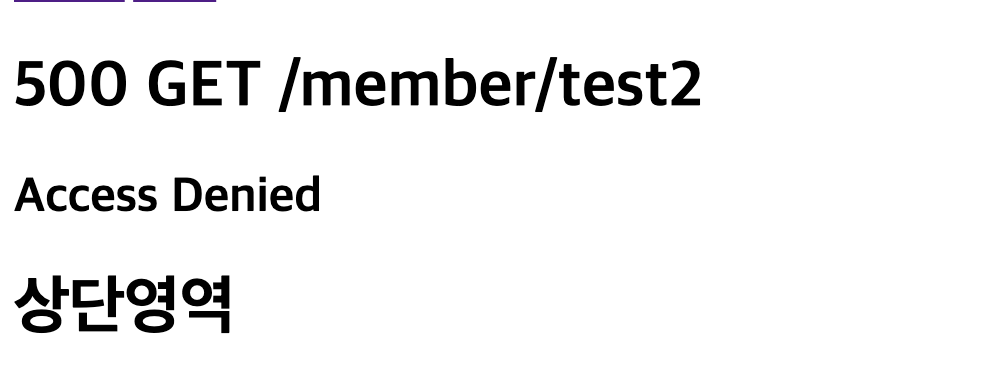
    @GetMapping("/test2")
    @PreAuthorize("hasAnyAuthority('ADMIN')")
    public void test2(){
        log.info("test2 - 관리자만 접근 가능");
    }
그러나 권한 문제인데 500에러가 발생됨 👉 정상적인 에러코드 발생되도록 조치 401
SecurityConfig
@Configuration
@EnableWebSecurity
@EnableMethodSecurity
public class SecurityConfig {
    @Bean
    public SecurityFilterChain filterChain(HttpSecurity http) throws Exception {
        /**
         * 로그인 처리를 넘길 페이지 설정
         * 개발자마다 파라미터명이 다르기 때문에 파라미트명 설정.
         * 로그인 성공 후 페이지 설정
         * 로그인 실패 후 페이지 설정
         */
        /* 로그인, 로그아웃 S */
        http.formLogin(f -> {
            f.loginPage("/member/login")
                    .usernameParameter("email")
                    .passwordParameter("password")
                    .successHandler(new LoginSuccessHandler())
                    .failureHandler(new LoginFailureHandler());
        });


        http.logout(f -> {
            f.logoutRequestMatcher(new AntPathRequestMatcher("/member/logout"))
                    .logoutSuccessUrl("/member/login");

        });
        /* 로그인, 로그아웃 E */

        /*인가(접근 통제) 설정 S*/
        http.authorizeHttpRequests(c -> {
            c.requestMatchers("/mypage/**").authenticated() //회원전용
                    .requestMatchers("/admin/**").hasAnyAuthority("ADMIN")//어드민전용
                    .anyRequest().permitAll(); //모든페이지를 열고 일부만 회원 or 어드민
        });

        //로그인 회원가입만 전체 허용하고, 그 외 페이지는 모두 회원만 가능
        /*
        http.authorizeHttpRequests(c -> {
            c.requestMatchers("/member/**").anonymous()
                    .requestMatchers("/admin/**").hasAnyAuthority()
                    .anyRequest().authenticated();
                }
         */

        http.exceptionHandling(c-> {
           c.authenticationEntryPoint(new MemberAuthenticationEntryPoint())
                   .accessDeniedHandler((req, res, e) ->{
                       res.sendError(HttpStatus.UNAUTHORIZED.value(), e.getMessage());
                   });
        });


        /*인가(접근 통제) 설정 E*/

        return http.build();
    }

    @Bean
    public PasswordEncoder passwordEncoder() {
        return new BCryptPasswordEncoder();
    }
}
ExceptionProcessor
public interface ExceptionProcessor {
    @ExceptionHandler(Exception.class)
    default ModelAndView errorHandler(Exception e, HttpServletRequest request) {

        ModelAndView mv = new ModelAndView();
        HttpStatus status = HttpStatus.INTERNAL_SERVER_ERROR; // 기본 응답 코드 500
        String tpl = "error/error";


        if (e instanceof CommonException commonException) {
            status = commonException.getStatus();

            if (e instanceof AlertException) {
                tpl = "common/_execute_script";
                String script = String.format("alert('%s');", e.getMessage());

                if (e instanceof AlertBackException alertBackException) {
                    script += String.format("%s.history.back();", alertBackException.getTarget());
                }

                if (e instanceof AlertRedirectException alertRedirectException) {
                    String url = alertRedirectException.getUrl();
                    if (!url.startsWith("http")) { // 외부 URL이 아닌 경우
                        url = request.getContextPath() + url;
                    }

                    script += String.format("%s.location.replace('%s');", alertRedirectException.getTarget(), url);
                }

                mv.addObject("script", script);
            }

        } else if (e instanceof AccessDeniedException) {
            status = HttpStatus.UNAUTHORIZED;
        }

        String url = request.getRequestURI();
        String qs = request.getQueryString();

        if (StringUtils.hasText(qs)) url += "?" + qs;


        mv.addObject("message", e.getMessage());
        mv.addObject("status", status.value());
        mv.addObject("method", request.getMethod());
        mv.addObject("path", url);
        mv.setStatus(status);
        mv.setViewName(tpl);


        return mv;
    }
}
에러 페이지설정
에러 페이지설정
/error 에 응답코드.html 으로 설정한경우 에러코드에 대한 에러페이지 자동 구현됨.
${timestamp} : 에러 발생 날짜, 시간
${status} : 응답 상태코드
${error} : 에러코드
${path} : 에러발생 URI
${message} : 에러메세지
기타 exception, erros, trace - 자세한 에러 정보(발생위치 👉 파생위치)
404.html
<!DOCTYPE html>
<html xmlns:th="http://www.thymeleaf.org">
<body>
<div>timestamp : <th:block th:text="${timestamp}"></th:block></div>
<div>status : <th:block th:text="${status}"></th:block></div>
<div>path : <th:block th:text="${path}"></th:block></div>
<div>message : <th:block th:text="${message}"></th:block></div>
<div>trace : <th:block th:text="${trace}"></th:block></div>
</body>
</html>
_common.html
<!DOCTYPE html>
<html xmlns:th="http://www.thymeleaf.org">
<th:block th:fragment="common">
    <h1>
        <th:block th:text="${status}"></th:block>
        <th:block th:if="${method != null}" th:text="${method}"></th:block>
        <th:block th:text="${path}"></th:block>
    </h1>
    <h2 th:text="${message}"></h2>
<!--    <img th:src="@{/images/error/{status}.png(status=${status})}">-->
</th:block>
</html>
error.html
<!DOCTYPE html>
<html xmlns:th="http://www.thymeleaf.org"
xmlns:layout="http://www.ultraq.net.nz/thymeleaf/layout"
layout:decorate="~{front/layouts/main}">
<main layout:fragment="content">
    <th:block th:replace="~{error/_common::common}"></th:block>
</main>
</html>
1) 에러처리
CommonException
@Getter @Setter
public class CommonException extends RuntimeException {
    private HttpStatus status;
    private Map<String, List<String>> errorMessages;

    public CommonException(String message){
        this(message, HttpStatus.INTERNAL_SERVER_ERROR); //기본 응답 에러코드 500
    }

    public CommonException(String meesage, HttpStatus status) {
        super(meesage);
        this.status = status;
    }
}
ExceptionProcessor
public interface ExceptionProcessor {
    @ExceptionHandler
    default ModelAndView errorHandler(Exception e, HttpServletRequest request){

        HttpStatus status = HttpStatus.INTERNAL_SERVER_ERROR;
        if(e instanceof CommonException commonException) {
            status = commonException.getStatus();
        }

        String url = request.getRequestURI();
        String qs = request.getQueryString();

        if(StringUtils.hasText(qs)) url += "?" + qs;

        ModelAndView mv = new ModelAndView();
        mv.addObject("message", e.getMessage());
        mv.addObject("status", status.value());
        mv.addObject("method", request.getMethod());
        mv.addObject("path", url);
        mv.setStatus(status);
        mv.setViewName("error/error");
        return mv;
    }
}
2) 자바스크립트로 에러
- 에러메세지 alert 출력
- 에러메세지 alert 출력 + 뒤로가기
- 에러메세지 alert 출력 + 특정 URL로 이동 👉 location.replace(...) 👉 방문 기록 X
2,3 👉 target(창의 위치 - self, parent, top, 특정 iframe)
common._execute_script.html
<!DOCTYPE html>
<html xmlns:th="http://www.thymeleaf.org">
<script th:if="${script != null}" th:utext="${script}"></script>
</html>
global.exceptions.script.AlertException
public class AlertException extends CommonException {
    public AlertException(String message, HttpStatus status) {
        super(message, status);
    }
}
global.exceptions.script.AlertBackException
@Getter
public class AlertBackException extends AlertException {

    private String target;

    public AlertBackException(String message, HttpStatus status, String target) {
        super(message, status);

        target = StringUtils.hasText(target) ? target : "self";

        this.target = target;

    }

    public AlertBackException(String message, HttpStatus status) {
        this(message, status, null);
    }
}
global.exceptions.script.AlertRedirectException
@Getter
public class AlertRedirectException extends AlertException {

    private String url;
    private String target;

    public AlertRedirectException(String message, String url, HttpStatus status ,String target) {
        super(message, status);

        target = StringUtils.hasText(target) ? target : "self";

        this.url = url;
        this.target = target;
    }

    public AlertRedirectException(String message, String url, HttpStatus status ) {
        this(message, url, status, null);
    }
}
ExceptionProcessor
public interface ExceptionProcessor {
    @ExceptionHandler
    default ModelAndView errorHandler(Exception e, HttpServletRequest request){

        ModelAndView mv = new ModelAndView();
        HttpStatus status = HttpStatus.INTERNAL_SERVER_ERROR;
        String tpl = "error/error";

        if(e instanceof CommonException commonException) {
            status = commonException.getStatus();

            if(e instanceof AlertException){
                tpl="common/_execute_script";
                String script = String.format("alert('%s');", e.getMessage());

                if(e instanceof AlertBackException alertBackException){
                    script += String.format("%s.history.back();", alertBackException.getTarget());
                }

                if(e instanceof AlertRedirectException alertRedirectException){
                    String url = alertRedirectException.getUrl();
                    if(!url.startsWith("http")){
                        url = request.getContextPath() + url; //외부 URL이 아닌 경우
                    }
                    script += String.format("%s.location.replace('%s');", url);
                }
                mv.addObject("script", script);
            }

        }

        String url = request.getRequestURI();
        String qs = request.getQueryString();

        if(StringUtils.hasText(qs)) url += "?" + qs;

        mv.addObject("message", e.getMessage());
        mv.addObject("status", status.value());
        mv.addObject("method", request.getMethod());
        mv.addObject("path", url);
        mv.setStatus(status);
        mv.setViewName(tpl);

        return mv;
    }
}
MemberController
컨트롤러에다 implements로 했지만, 구현할때는 advice를 통해서 각 도메인마다 설정
@Slf4j
@Controller
@RequestMapping("/member")
@RequiredArgsConstructor
@SessionAttributes("requestLogin")
public class MemberController implements ExceptionProcessor {

    private final JoinValidator joinValidator;
    private final MemberSaveService memberSaveService;

    @ModelAttribute
    public RequestLogin requestLogin() {
        return new RequestLogin();
    }

    @GetMapping("/join")
    public String join(@ModelAttribute RequestJoin form) {

        return "front/member/join";
    }

    @PostMapping("/join")
    public String joinPs(@Valid RequestJoin form, Errors errors) {

        joinValidator.validate(form, errors);

        if (errors.hasErrors()) {
            return "front/member/join";
        }

        memberSaveService.save(form); // 회원 가입 처리

        return "redirect:/member/login";
    }

    @GetMapping("/login")
    public String login(@Valid @ModelAttribute RequestLogin form, Errors errors) {
        String code = form.getCode();
        if (StringUtils.hasText(code)) {
            errors.reject(code, form.getDefaultMessage());

            // 비번 만료인 경우 비번 재설정 페이지 이동
            if (code.equals("CredentialsExpired.Login")) {
                return "redirect:/member/password/reset";
            }
        }

        return "front/member/login";
    }


}