타임리프(Thymeleaf)
1. 설정(의존성)
thymeleaf-spring6
thymeleaf - java8time // JDK8 Date & TIME API -> #temporals : 형식화
thymeleaf layout :레이아웃 기능
implementation 'org.thymeleaf:thymeleaf-spring6:3.1.2.RELEASE' //Thymeleaf Spring6 » 3.1.2.RELEASE
implementation 'nz.net.ultraq.thymeleaf:thymeleaf-layout-dialect:3.3.0' //Thymeleaf Layout Dialect » 3.3.0
implementation 'org.thymeleaf.extras:thymeleaf-extras-java8time:3.0.4.RELEASE' //Thymeleaf Extras Java8time » 3.0.4.RELEASE
ThymeleafConfig
@Configuration
@RequiredArgsConstructor
public class ThymeleafConfig implements WebMvcConfigurer {

    private final WebApplicationContext applicationContext;

    @Bean
    public SpringResourceTemplateResolver templateResolver() { //템플릿 경로에 대한 설정
        SpringResourceTemplateResolver templateResolver = new SpringResourceTemplateResolver();
        templateResolver.setApplicationContext(applicationContext);
        templateResolver.setPrefix("/WEB-INF/templates2/");
        templateResolver.setSuffix(".html"); //다른 확장자도 가능, jsp 등등 but 타임리프는 html추구함
        templateResolver.setCacheable(false); //캐시설정은 개발할때는 false 배포할떄는 true
        return templateResolver;
    }

    @Bean
    public SpringTemplateEngine templateEngine() {
        SpringTemplateEngine templateEngine = new SpringTemplateEngine();
        templateEngine.setTemplateResolver(templateResolver());
        templateEngine.setEnableSpringELCompiler(true);
        templateEngine.addDialect(new Java8TimeDialect()); //확장기능 :  형식기능 -> 형식화
        templateEngine.addDialect(new LayoutDialect()); //확장기능 : 레이아웃기능
        return templateEngine;
    }

    @Bean
    public ThymeleafViewResolver thymeleafViewResolver() {
        ThymeleafViewResolver resolver = new ThymeleafViewResolver();
        resolver.setContentType("text/html");
        resolver.setCharacterEncoding("utf-8");
        resolver.setTemplateEngine(templateEngine());
        return resolver;
    }

    @Override
    public void configureViewResolvers(ViewResolverRegistry registry) { //설정추가
        registry.viewResolver(thymeleafViewResolver());
    }
}
2. 특징
- Natural Template
- 원래 HTML과 서버사이드 렌더링 결과 거의 동일하게 보이는 효과
- 번역 기술
- 캐시 기능 제공
타임리프 기본문법
1. 타임리프의 주요 식(expression)
1) 변수 식
${변수, 연산 ...}
<input type="text" name="email" th:value="${request}" value="user01@test.org">2) 메세지 식
#{메세지 코드}
    <dl>
        <dt th:text="#{이메일}">이메일</dt>
        <dd th:text="*{email}"></dd>
    </dl>
    <dl>
        <dt th:text="#{회원명}">회원명</dt>
        <dd th:text="*{userName}"></dd>
    </dl>
    <dl>
        <dt th:text="#{가입일시}">가입일시</dt>
        <dd th:text="*{regDt}"></dd>
    </dl>
commons.properties
LOGIN_MSG={0}({1})님 로그인
이메일=이메일(교체)
비밀번호=비밀번호
비밀번호_확인=비밀번호 확인
회원명=회원명(교체)
로그인=로그인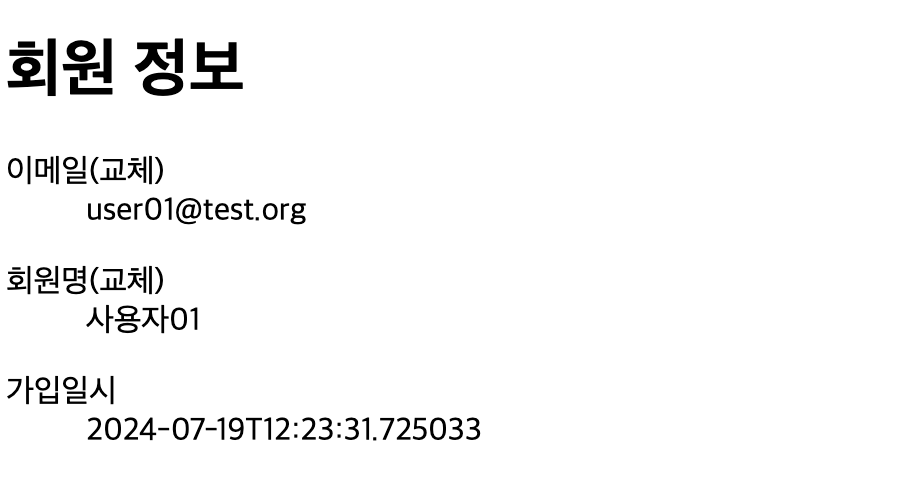
참고)
fmt:setBundle
<fmt:message key="메세지 코드">3) 링크 식
@{링크}
- 컨텍스트 경로 추가
- URL 변수 식, 요청 파라미터 쉽게 추가
- href를 제거해도 가능.
<a href="#" th:href="@{/member/login}" th:text="#{로그인}"></a>
<a th:href="@{/member/login}" th:text="#{로그인}"></a>
경로변수
<!-- /day05/member/login?p1=user01...&p2=사용자01   -->
<a th:href="@{/member/login(p1=*{email},p2=*{userName})}" th:text="#{로그인}"></a>
<!-- /day05/member/login?p1=user01...&p2=사용자01   -->

<a th:href="@{/member/info/{email}/{email2}(email=*{email}, email2=*{userName})}"></a>
참고)
<c:url value="...." /> = 링크식
4) 선택 변수식
*{속성명}
th:object="${객체}"와 함께 사용
th:text="*{속성명}"
<div th:object="${member}">
        <dl>
            <dt>이메일</dt>
            <dd th:text="*{email}"></dd>
        </dl>
        <dl>
            <dt>회원명</dt>
            <dd th:text="*{userName}"></dd>
        </dl>
        <dl>
            <dt>가입일시</dt>
            <dd th:text="*{regDt}"></dd>
        </dl>
    </div>
</head>
th:block 태그 👉 번역되면 삭제 👉 기능만 필요한 경우
<div>가 존재 사용하고 싶지않으면 th:block사용
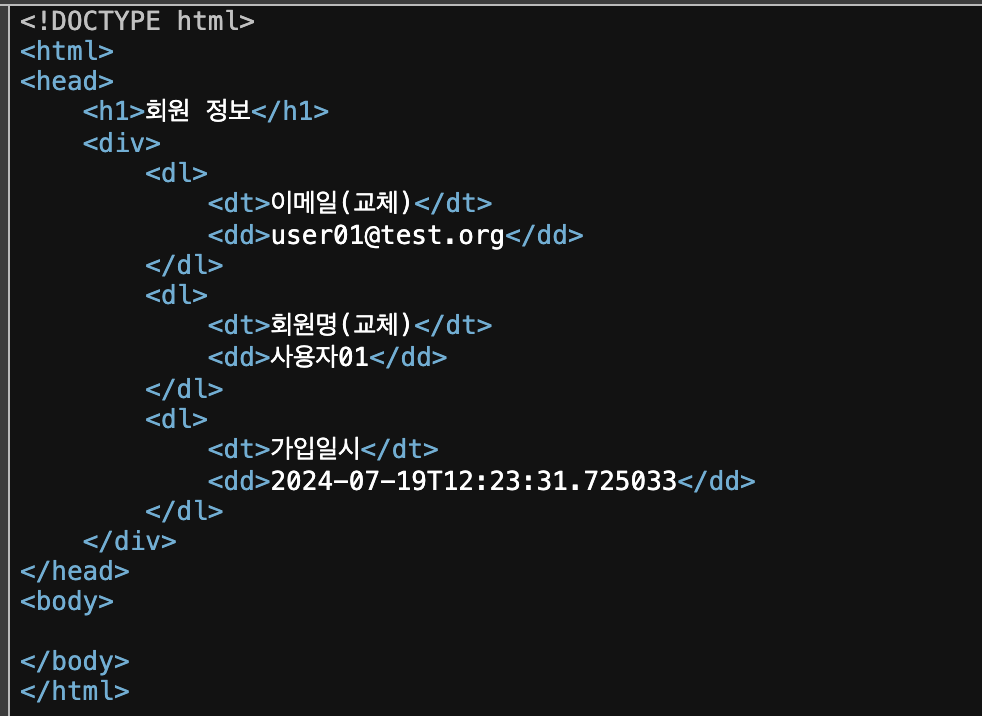
<th:block th:object="${member}">
    <dl>
        <dt th:text="#{이메일}">이메일</dt>
        <dd th:text="*{email}"></dd>
    </dl>
    <dl>
        <dt th:text="#{회원명}">회원명</dt>
        <dd th:text="*{userName}"></dd>
    </dl>
    <dl>
        <dt th:text="#{가입일시}">가입일시</dt>
        <dd th:text="*{regDt}"></dd>
    </dl>
</th:block>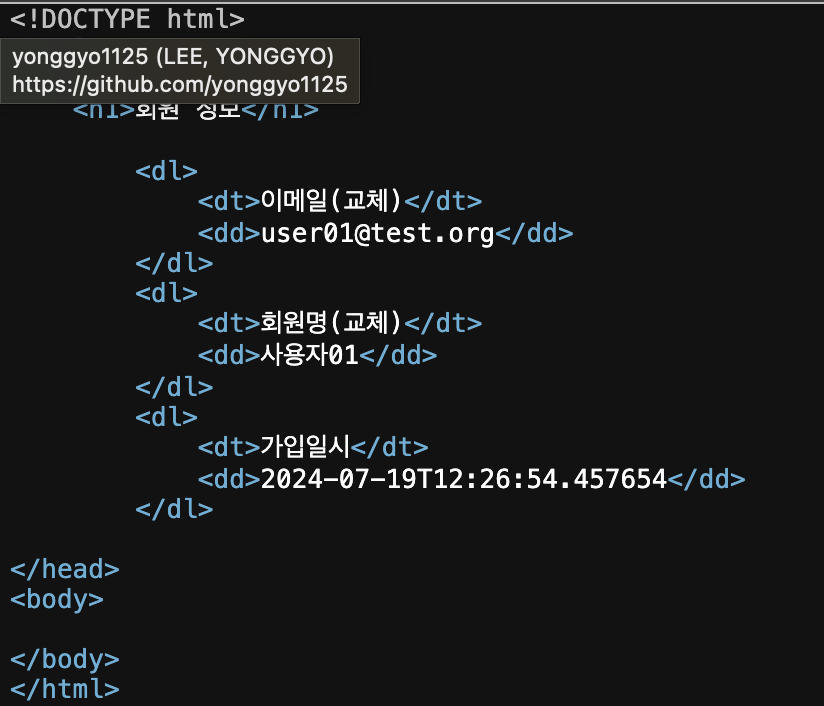
2. 타임리프 식 객체
1) #strings
2) #numbers
3) #dates, #calendars, #temporals : (java 8, java.time 패키지)
4) #lists, #sets, #maps
👉 내장 식객체에 없는 기능? 스프링 빈으로 생성
${@빈이름.메서드명(...)}
3. th:text
- 문자열 출력 (문자열만!! - HTML 태그는 해석 X)
th:utext- HTML 태그도 해석 O<dd th:utext="*{userName}"></dd>- 기본 : 속성을 통해서 번역
[[${.. }]]: 태그 안쪽에서도 출력 / 문자열만 인식, HTML 태그는 해석 X
<td>
    순번:[[${status.count}]]
    / 첫번째 : [[${status.first}]]
    / 마지막 : [[${status.last}]]
    / 짝수 : [[${status.even}]]
    / 홀수 : [[${status.odd}]]
</td>
4. th:each
- 반복문
<tr th:each="item : ${items}" th:object="${item}">
    <td th:text="*{email}"></td>
    <td th:text="*{userName}"></td>
    <td th:text="*{regDt}"></td>
</tr>
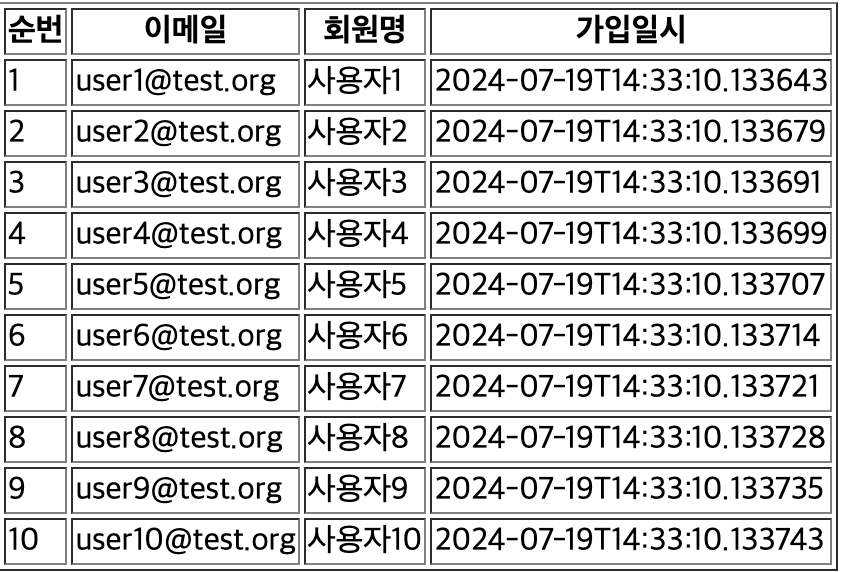
- status
index: 0부터 시작하는 순서 번호count: 1부터 시작하는 순서 번호first: 첫번째 행 여부last: 마지막 행 여부even: 짝수 행 여부odd: 홀수 행 여부
<tr th:each="item,status : ${items}" th:object="${item}">
    <td th:text="${status.count}"></td>
    <td th:text="*{email}"></td>
    <td th:text="*{userName}"></td>
    <td th:text="*{regDt}"></td>
</tr>
5. th:if, th:unless
th:if : 조건식
th:if="${....}"
<tr th:each="item, s : ${items}" th:object="${item}">
    <td>
        순번:[[${s.count}]]
        / 첫번째 : [[${s.first}]]
        / 마지막 : [[${s.last}]]
        <th:block th:if="${s.even}">짝수</th:block>
        <th:block th:if="${s.odd}">홀수</th:block>
    </td>
    <td th:text="*{email}"></td>
    <td th:text="*{userName}"></td>
    <td th:text="*{regDt}"></td>
</tr>
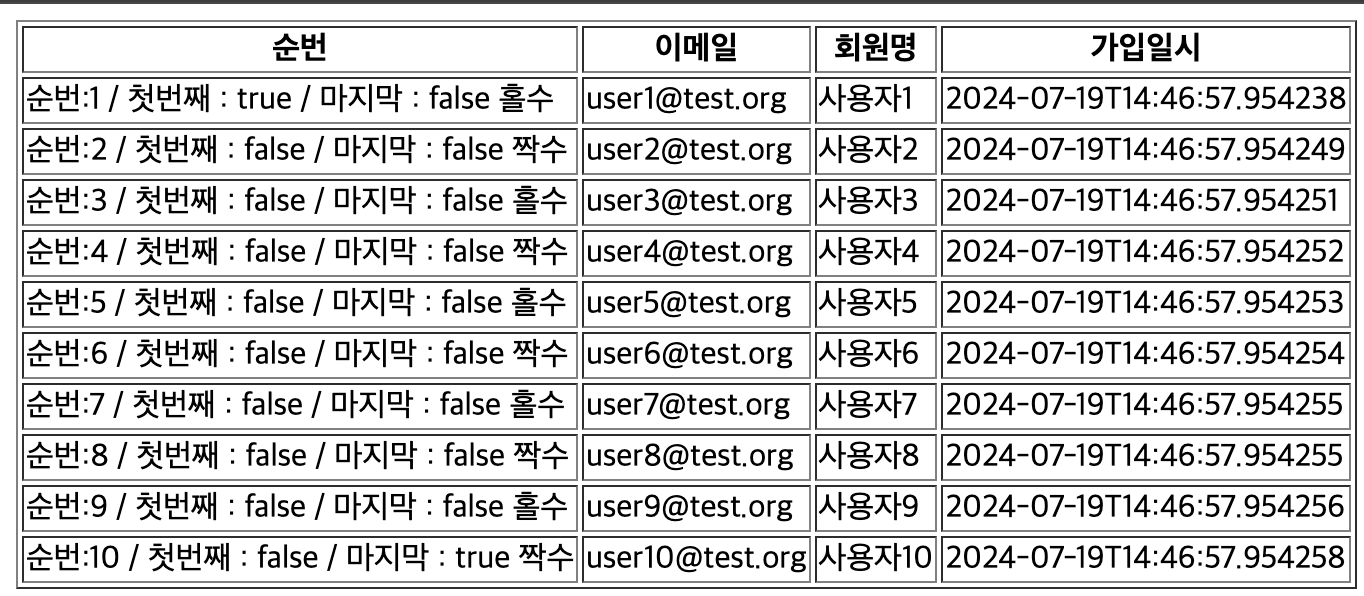
th:unless="${...}" : 조건식이 false -> 노출, true -> 노출 X
true, false -> 상수로 바로 인식
<tr th:each="item, s : ${items}" th:object="${item}">
    <td>
        순번:[[${s.count}]]
        / 첫번째 : [[${s.first}]]
        / 마지막 : [[${s.last}]]
        <th:block th:if="${s.even}">짝수</th:block>
        <th:block th:unless="${s.odd}">홀수</th:block>
    </td>
    <td th:text="*{email}"></td>
    <td th:text="*{userName}"></td>
    <td th:text="*{regDt}"></td>
</tr>
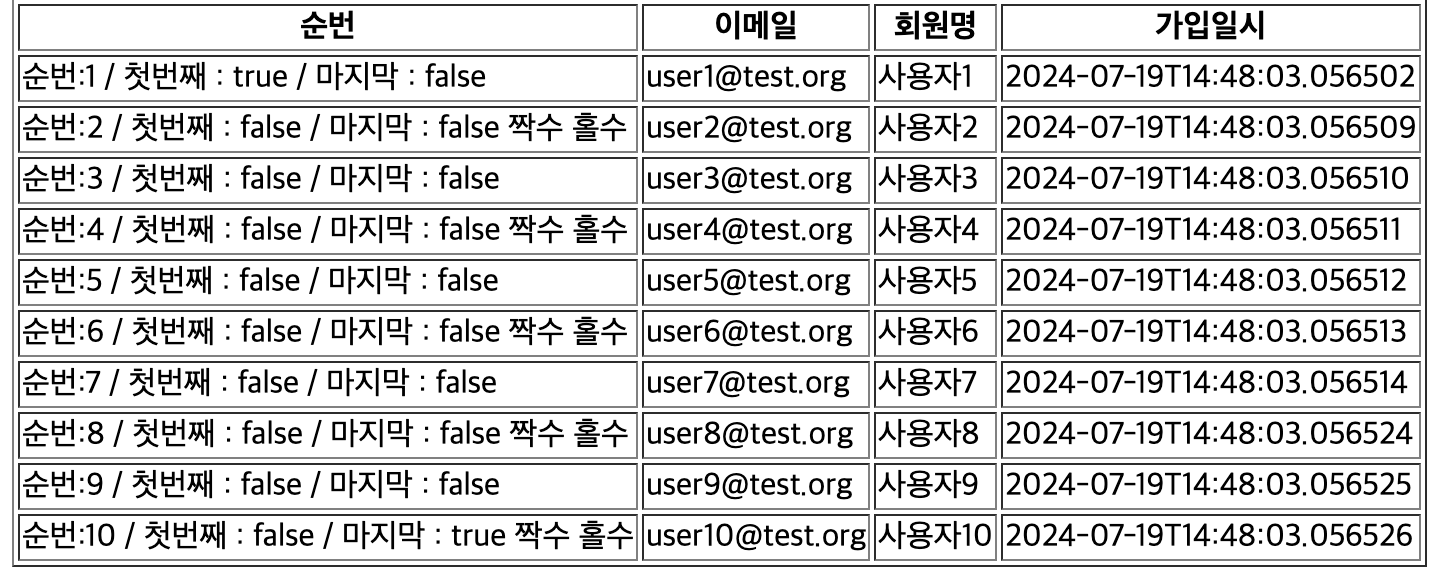
6. th:switch, th:case
<td>
    순번:[[${s.count}]]
    / 첫번째 : [[${s.first}]]
    / 마지막 : [[${s.last}]]
    <th:block th:switch="${s.even}">
        <span th:case="true">짝수</span>
        <span th:case="false">홀수</span>
    </th:block>
</td>
7. th:href
th:src
th:action
8. th:object
9. th:classappend
클래스를 조건에 따라 추가 제거하는 문법
th:classappend="${조건식 ? '참일때 추가될 클래스명' : '거짓일때 추가될 클래스명'}"
th:classappend="${조건식} ? '참일때' : '거짓일떄'"
<tr th:each="item, s : ${items}" th:object="${item}" class="item" th:classappend="${s.even} ? 'on':''">스프링 MVC 폼과 에러 메시지 연동
0. th:field="*{속성명}"
<!DOCTYPE html>
<html xmlns:th="http://www.thymeleaf.org">
<head>
    <meta charset="UTF-8">
    <title>회원가입</title>
</head>
<body>
    <h1>회원가입</h1>
    <form method="post" autocomplete="off" th:object="${requestJoin}">
        <dl>
            <dt th:text="#{이메일}">이메일</dt>
            <dd>
                <input type="text" name="email" th:field="*{email}">
            </dd>
        </dl>
        <dl>
            <dt>비밀번호</dt>
            <dd>
                <input type="password" name="password" th:field="*{password}">
            </dd>
        </dl>
        <dl>
            <dt>비밀번호 확인</dt>
            <dd>
                <input type="password" name="confirmPassword" th:field="*{confirmPassword}">
            </dd>
        </dl>
        <dl>
            <dt>회원명</dt>
            <dd>
                <input type="text" name="userName" th:field="*{userName}">
            </dd>
        </dl>
        <div>
            <input type="checkbox" name="agree" value="true" id="agree" th:field="*{agree}">
            <labe for="agree">회원가입 약관에 동의합니다.</labe>
        </div>
        <button type="submit">가입하기</button>
    </form>
</body>
</html>
1. #fields.errors(..)
- 특정 필드에 한정한 오류 출력(email. password ..)
- 커맨드 객체 있는 애노테이션 검증(
@NotBlank...) Errors::rejectValue("필드명", "에러코드")- 다만 global 필드이면 Global Error 출력
<body>
    <h1>회원가입</h1>
    <form method="post" autocomplete="off" th:object="${requestJoin}">
        <dl>
            <dt th:text="#{이메일}">이메일</dt>
            <dd>
                <input type="text" name="email" th:field="*{email}">
                <div th:each="err : ${#fields.errors('email')}" th:text="${err}"></div>
            </dd>
        </dl>
        <dl>
            <dt>비밀번호</dt>
            <dd>
                <input type="password" name="password" th:field="*{password}">
                <div th:each="err : ${#fields.errors('password')}" th:text="${err}"></div>
            </dd>
        </dl>
        <dl>
            <dt>비밀번호 확인</dt>
            <dd>
                <input type="password" name="confirmPassword" th:field="*{confirmPassword}">
                <div th:each="err : ${#fields.errors('confirmPassword')}" th:text="${err}"></div>
            </dd>
        </dl>
        <dl>
            <dt>회원명</dt>
            <dd>
                <input type="text" name="userName" th:field="*{userName}">
                <div th:each="err : ${#fields.errors('userName')}" th:text="${err}"></div>
            </dd>
        </dl>
        <div>
            <input type="checkbox" name="agree" value="true" id="agree" th:field="*{agree}">
            <labe for="agree">회원가입 약관에 동의합니다.</labe>
            <div th:each="err : ${#fields.errors('agree')}" th:text="${err}"></div>
        </div>
        <button type="submit">가입하기</button>
    </form>
</body>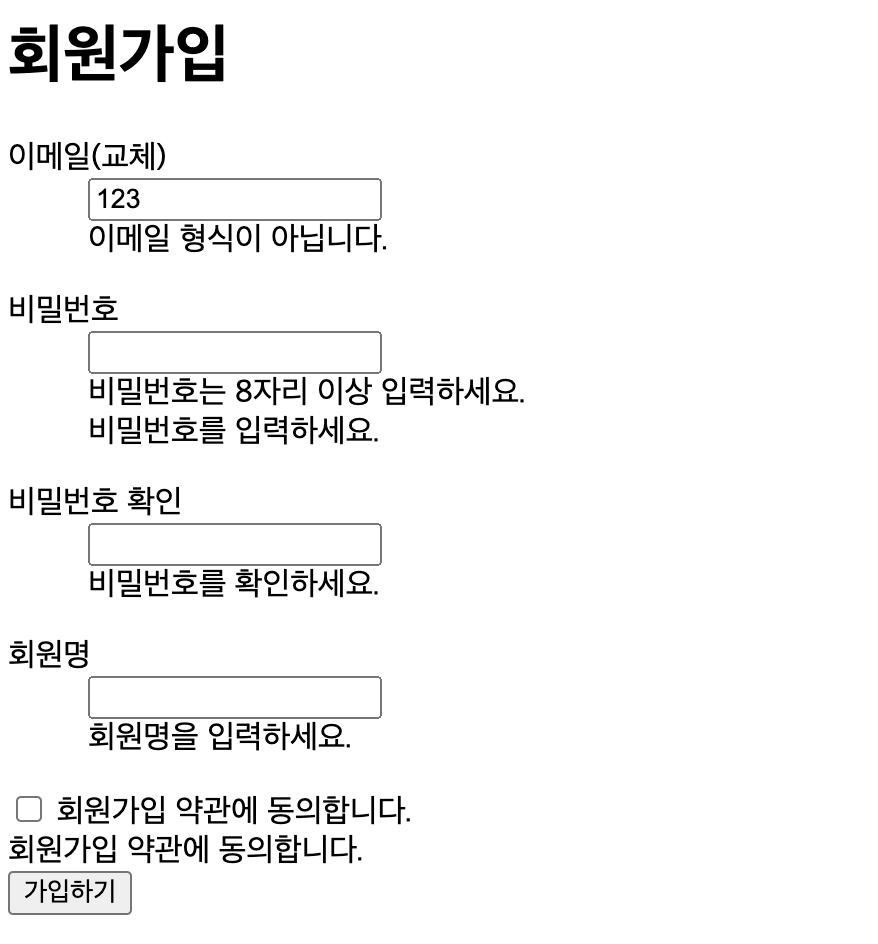
2. #fields.globalErrors(..)
- 글로벌 오류 출력
Erros::reject("에러코드")
<div th:each="err : ${#fields.errors('global')}" th:text="${err}"></div>
<div th:each="err : ${#fields.globalErrors()}" th:text="${err}"></div>
<!DOCTYPE html>
<html xmlns:th="http://www.thymeleaf.org">
<body>
<form method="post" th:action="@{/member/login}" autocomplete="off" th:object="${requestLogin}">
<dl>
<dt th:text="#{이메일}"></dt>
<dd>
<input type="text" name="email" th:field="*{email}">
<div th:each="err : ${#fields.errors('email')}" th:text="${err}"></div>
</dd>
</dl>
<dl>
<dt th:text="#{비밀번호}"></dt>
<dd>
<input type="password" name="password" th:field="*{password}">
<div th:each="err : ${#fields.errors('password')}" th:text="${err}"></div>
</dd>
</dl>
<div>
<input type="checkbox" name="saveEmail" vaule="true" id="saveEmail" th:field="*{saveEmail}">
<label for="saveEmail" th:text="#{이메일_기억하기}"></label>
</div>
<div th:each="err : ${#fields.errors('global')}" th:text="${err}"></div>
<div th:each="err : ${#fields.globalErrors()}" th:text="${err}"></div>
<button type="submit" th:text="#{로그인}"></button>
</form>
</body>
</html>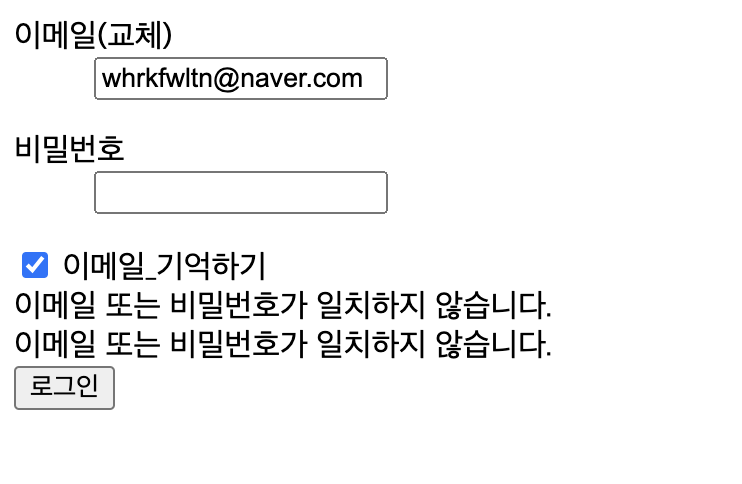
참고)
#이 붙어 있는 경우 👉 식 객체(내장 객체 - #으로 시작)
기본객체
#ctx : response, request, session, servletContent
#locale : java.util.Locale
context: 요청 파라미터, param
map형태 속성 데이터 : session, application
#session - jakarta.servlet.http.HttpSession
#request - jakarta.servlet.HttpServletRequest
#response - jakarta.servlet.http.HttpServletResponse
편의객체
#temporals : java.time 패키지 관련 형식화 및 편의 메서드가 정의된 식 색체
format : 날짜, 시간 형식
<td th:text="*{#temporals.format(regDt, 'yyyy.MM.dd HH:mm')}"></td>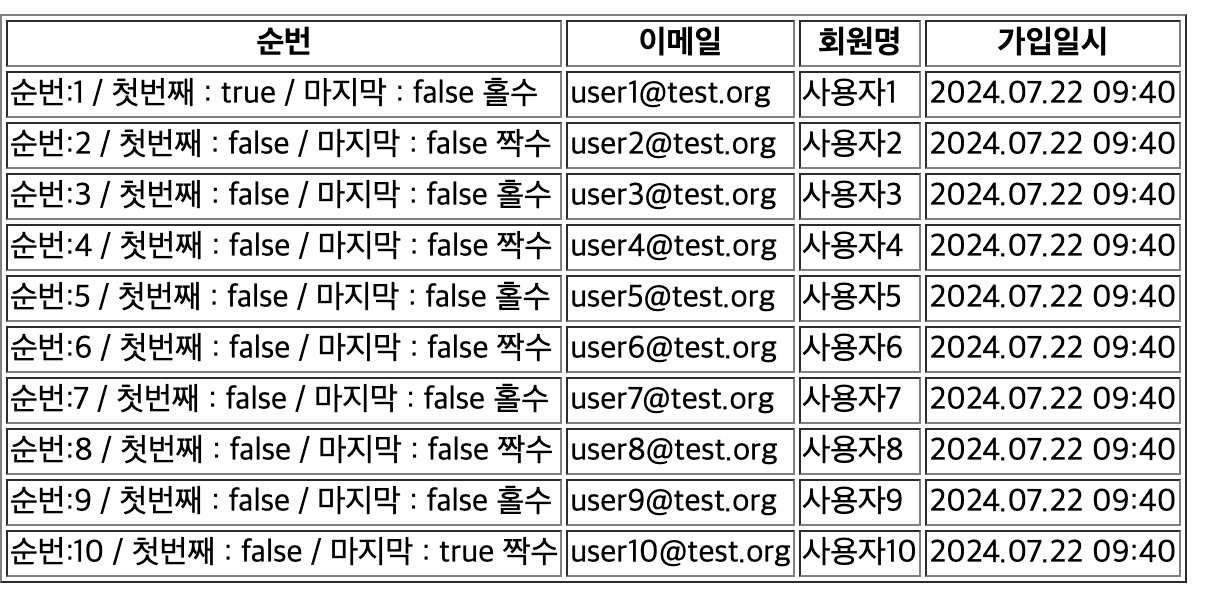
strings concat() : 문자열 결합
<td th:text="*{#strings.concat(userName, '(', email, ')')}"></td>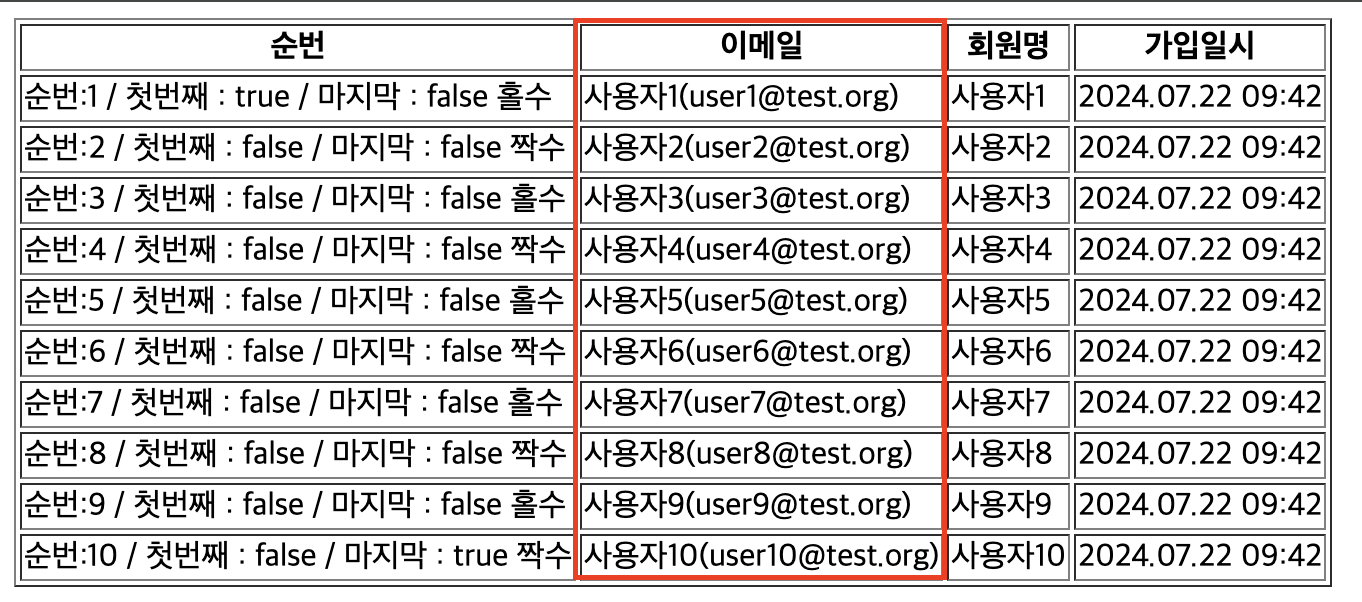
#numbers.formatInteger : 숫자 형식
#numbers.sequence() : 숫자 출력
<div th:text="${#numbers.formatInteger(1000000000, 3, 'COMMA')}"></div>
<div th:each="num : ${#numbers.sequence(1,10)}">
${@빈이름.메서드명(..)}
*{@빈이름.메서드명(..)}
Utils
@Component
@RequiredArgsConstructor
public class Utils { //빈 이름 - utils

    private final MessageSource messageSource;
    private final HttpServletRequest request;

    public String toUpper(String str){
        return str.toUpperCase();
    }
}<td th:text="*{#strings.concat(userName, '(', @utils.toUpper(email), ')')}"></td>
타임리프 페이지 레이아웃
th:replace : 템플릿 파일 치환
th:fragment : 재사용 가능한 HTML 코드 조각을 정의하고 다른 템플릿에서 참조가능.
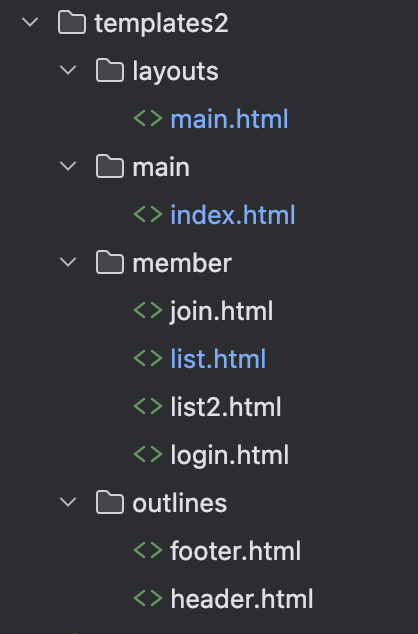
공통헤더
<!DOCTYPE html>
<html xmlns:th="http://www.thymeleaf.org">
<header th:fragment="common">
    <h1>헤더 영역...</h1>
</header>
</html>
공통푸터
<!DOCTYPE html>
<html xmlns:th="http://www.thymeleaf.org">
<footer th:fragment="common">
    <h1>푸터 영역...</h1>
</footer>
</html>
MemberController.java
@GetMapping("/list")
    public String list2(Model model){
        model.addAttribute("items", items);
        model.addAttribute("addCss", new String[] {"member/style", "member/list"});
        model.addAttribute("addScript", List.of("member/common", "member/list"));
        return "member/list";
    }
레이아웃
<!DOCTYPE html>
<html xmlns:th="http://www.thymeleaf.org"
      xmlns:layout="http://www.ultraq.net.nz/thymeleaf/layout">
<head>
    <meta charset="UTF-8">
	<title th:if="${pageTitle != null}" th:text="${pageTitle}"></title>

    <link rel="stylesheet" type="text/css" th:href="@{/css/style.css}">
    <!--   컨트롤러가 없는 main.list뷰는 모델속성 추가가 불가능하기 때문에 내용 치환 추가  -->
  	<th:block layout:fragment="addCss">
    </th:block>
    <th:block th:if="${addCss != null}">
        <link rel="stylesheet" type="text/css" th:each="cssFile : ${addCss}" th:href="@{/css/{file}.css(file=${cssFile})}">
    </th:block>


    <script th:src="@{/js/common.js}"></script>
  	<!--   컨트롤러가 없는 main.list뷰는 모델속성 추가가 불가능하기 때문에 내용 치환 추가  -->
    <th:block layout:fragment="addScript">
    </th:block>
    <th:block th:if="${addScript != null}">
        <script th:each="jsFile : ${addScript}" th:src="@{/js/{file}.js(file=${jsFile})}"></script>
    </th:block>


</head>
<body>
  	<!-- 공통헤더 -->
    <header th:replace="~{outlines/header::common}"></header>
  	<!-- 각각의 뷰의 메인 -->
    <main layout:fragment="content"></main>
  	<!-- 공통푸터 -->
    <footer th:replace="~{outlines/footer::common}"></footer>
  	<iframe name="ifrmProcess" class="dn"></iframe>
</body>
</html>
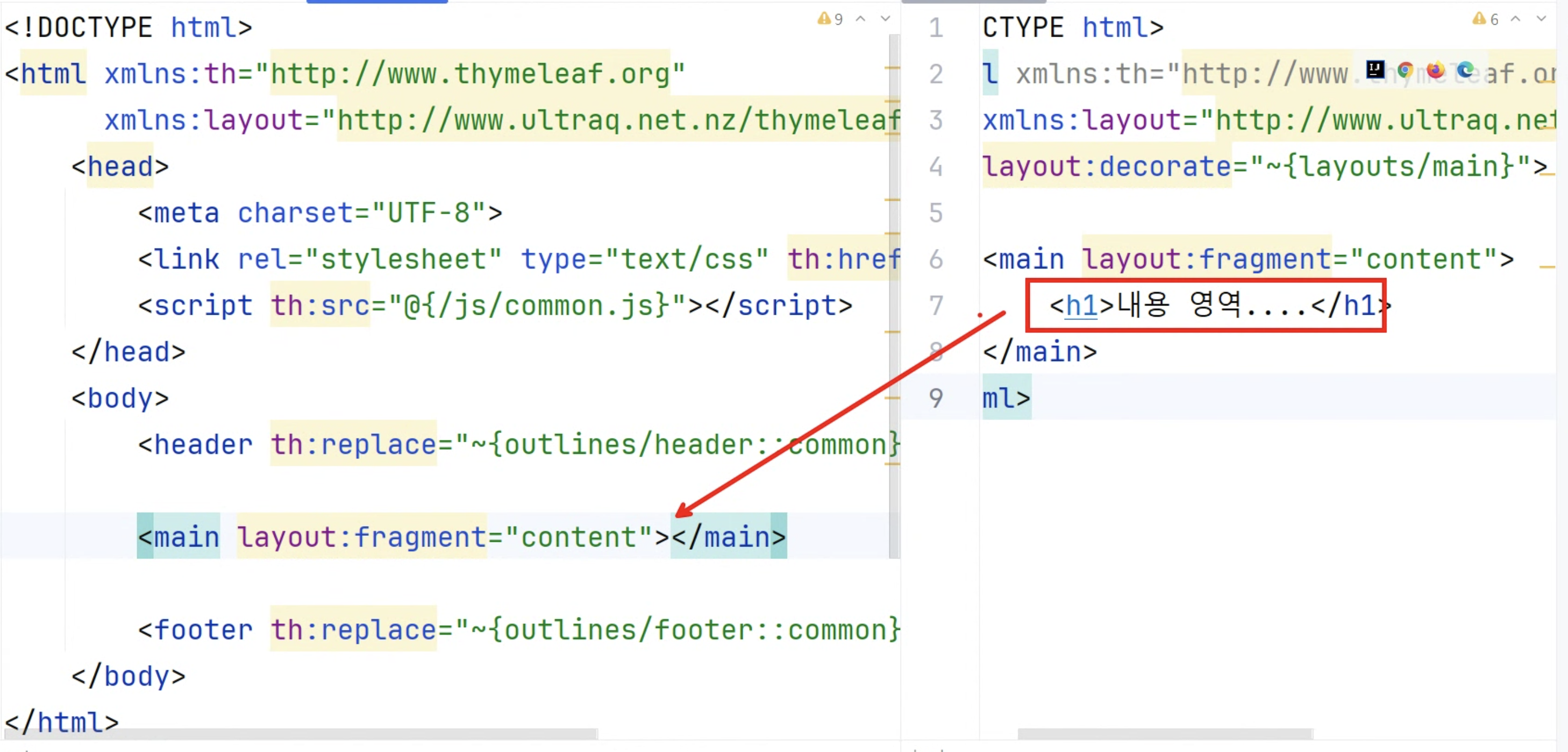
main.index.html은 컨트롤러가 없는 뷰이기 때문에 모델속성값 추가 불가능
MVCConfig@Configuration @EnableWebMvc @ComponentScan("org.choongang") @Import({DBConfig.class, MessageConfig.class, InterceptorConfig.class, FileConfig.class}) //@RequiredArgsConstructor public class MvcConfig implements WebMvcConfigurer { @Override public void addViewControllers(ViewControllerRegistry registry) { registry.addViewController("/") .setViewName("main/index"); registry.addViewController("/mypage") .setViewName("mypage/index"); }👉 css, js추가 불가능 👉 레이아웃에서
<th:block layout:fragment="addCss"></th:block>main.html>뷰에서는
<th:block layout:fragment="addCss">
        <link rel="stylesheet" type="text/css" th:href="@{/css/main/style.css}">
</th:block>
내용 치환을 추가해서 정적경로의 css, js를 레이아웃의 addCSS, addScript으로 넘김
main.index.html
<!--main.index.html은 컨트롤러가 없는 뷰-->
<!DOCTYPE html>
<!--레이아웃에서 공통헤드, 공통푸터 가져옴-->
<html xmlns:th="http://www.thymeleaf.org"
      xmlns:layout="http://www.ultraq.net.nz/thymeleaf/layout"
      layout:decorate="~{layouts/main}">
    <th:block layout:fragment="addCss">
        <link rel="stylesheet" type="text/css" th:href="@{/css/main/style.css}">
    </th:block>
    <th:block layout:fragment="addScript">
        <script th:src="@{/js/main/common.js}"></script>
    </th:block>
    <main layout:fragment="content">
        <h1>내용 영역...</h1>
    </main>
</html>
list.html
<!DOCTYPE html>
<html xmlns:th="http://www.thymeleaf.org"
      xmlns:layout="http://www.ultraq.net.nz/thymeleaf/layout"
      layout:decorate="~{layouts/main}">

    <main layout:fragment="content">
        <h1>내용 영역...</h1>
    </main>
</html>
member.list.html
<!DOCTYPE html>
<html xmlns:th="http://www.thymeleaf.org"
xmlns:layout="http://www.ultraq.net/nz/thymeleaf/layout"
layout:decorate="~{layouts/main}">
<main layout:fragment="content">
    <body>
        <table border="1">
            <thead>
            <tr>
                <th>순번</th>
                <th>이메일</th>
                <th>회원명</th>
                <th>가입일시</th>
            </tr>
            </thead>
            <tbody>
            <tr th:each="item, s : ${items}" th:object="${item}" class="item" th:classappend="${s.even} ? 'on':''">
                <td>
                    순번:[[${s.count}]]
                    / 첫번째 : [[${s.first}]]
                    / 마지막 : [[${s.last}]]
                    <th:block th:switch="${s.even}">
                        <span th:case="true">짝수</span>
                        <span th:case="false">홀수</span>
                    </th:block>
                    <!--
                    <th:block th:if="${s.even}">짝수</th:block>
                    <th:block th:unless="${s.odd}">홀수</th:block>
                    -->
                </td>
                <td th:text="*{#strings.concat(userName, '(', @utils.toUpper(email), ')')}"></td>
                <td th:text="*{userName}"></td>
                <td th:text="*{#temporals.format(regDt, 'yyyy.MM.dd HH:mm')}"></td>
            </tr>
            </tbody>
        </table>
        <div th:text="${#numbers.formatInteger(1000000000, 3, 'COMMA')}"></div>
        <div th:each="num : ${#numbers.sequence(1,10)}">
            <div th:text="${num}"></div>
        </div>
    </body>
</main>
</html>