생성자
생성자 함수명 : 첫시작 문자 대문자
함수객체 -> 다른 객체생산
prototype 객체 : 생성자 함수로 역할
객체를 생성하는 과정은 생성자 함수의 prototype 객체의 상속 과정이므로
new 생성자함수() : 메모리에 공간을 생성하는 연산자
1) prototype 객체 : prototype 자원(속성,함수)을 공유
2) this값 -> 현재 생성될 객체의 주소 -> 생성자 함수호출 -> 초기화
function Person() {
    this.name = "이이름";
    this.age = 40;
}
const p1 = new Person();
const p2 = new Person();
p1 === p2; // >false
p1 === p2가 false은 이유는 p1과 p2는 다른 객체를 가르키고있다. 객체가 생성되는 과정에서 함수에 있는
prototype객체를[[prototype]]체인을 통해 상속 받기 때문이다.
1. 객체가 생성되는 과정
- 함수 객체에 정의된 prototype 객체의 상속
- this가 prototype객체를 상속받은 객체로 주소 변경(초기화)
함수는 다른객체에 달리 prototype객체를 갖고있다.
그렇기 떄문에 객체를 생성할수있다. 다른 객체들은 갖고있지않다.
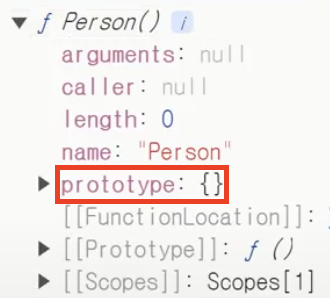
1) __proto__
__proto__ : 자신의 [[Prototype]] 내부에 접근할 수 있다.
const objA = {a:10, B:20};
const objB = {a:10, B:20};
objA.__proto__= objB;
//a가 b를 상속받았다.(a는 B에 접근이 가능하다)
위 코드는 __proto__통해 objA가 objB를 상속받아 objA가 objB에 접근이 가능하다.
2) apply()
호출을 통해 this의 값을 변경하는 함수
function  Person(name,age) {
    this.name = "이이름";
    this.age = 40;
}
p1.__proto__= Person.prototype; // 프로토타입체인에 연결
Person.apply(p1); //apply통해 Person을 호출하여 Person함수 내부에 this값을 변경함으로서 p1객체에 값을 넣어준다.
3) call()
호출을 통해 this의 값을 변경하는 함수
function  Person(name,age) {
    this.name = "이이름";
    this.age = 40;
}
p1.__proto__= Person.prototype; // 프로토타입체인에 연결
Person.call(p1); //call통해 Person을 호출하여 Person함수 내부에 this값을 변경함으로서 p1객체에 값을 넣어준다.
4) bind()
메소드가 호출되면 새로운 함수를 생성
function add(num1, num2){
    return num1 + num2;
}
const add10 = add.bind(this, 10); //새로운함수생성
add10(20) // > 30
const Person = {
name : "이이름",
age : 40
};
function showinfo(){
console.log(this.name, this.age);
}
showinfo=showinfo.bind(person); //this를변경5) call과 apply의 차이
call과 apply는 호출을 통해 함수내부의 this를 가르킬 객체를 받게 된다.
이 둘의 차이는 인자를 배열로 받냐 안받냐의 차이이다.
apply는 call과 다르게 배열로 인자를 받는다.
6) constructor
함수객체에 존재하는 prototype객체에 constructor가 존재한다. constructor은 함수객체의 주소값과 동일하다.
내부적으로는 constructor의 값을 가지고 초기화하고 호출하고있다.
function  Person(name,age) {
    this.name = "이이름";
    this.age = 40;
}
const p1 = {};
p1.__proto__= Person.prototype; // 프로토타입체인에 연결
Person.prototype.constructor.call(p1)
2. prototype의 자원공유
내부에 함수가 있는 함수객체를 생성하게 되면 자원낭비가된다.
똑같은 기능을 수행하는 함수가 각각 다른 객체로 생성되어진다면 자원낭비를 야기한다.
그렇기 때문에 상속을 통해 자원을 공유해야한다.
function  Person(name,age) {
    this.name = name;
    this.age = age;
}
Person.prototype.showinfo = function() {
    console.log(this.name, this.age)
} //showinfo를 프로토타입객체에 정의함으로써 상속을 통해 자원을 공유함으로써 자원낭비를 막는다.
const p1 = new Person("김김김",40);
const p2 = new Person("이이이",30);
p1.showinfo(); // > 김김김 40
p2.showinfo(); // > 이이이 30
p1.showinfo === p2.showinfo // >true
위 코드는 Person 함수객체에 showinfo라는 함수를 프로토타입객체에 정의함으로써 상속을 통해 자원을 공유했다.
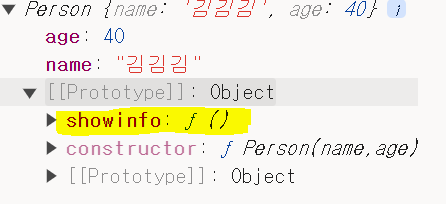
함수를 프로토타입객체에 정의함으로써 상속을 통해 자원을 공유함으로써 자원낭비를 막는다.
3. 생성자함수간의 상속
function Ellipse(a,b){
  this.a = a;
  this.b = b;
}
Ellipse.prototype.area = function(){
  console.log(this.a * this.b * Math.PI);
};
function Circle(r){
  this.a= r;
  this.b= r;
}
Circle.prototype.__proto__=Ellipse.prototype;
Circle.prototype.constructor = Circle;
const c1 = new Circle(10);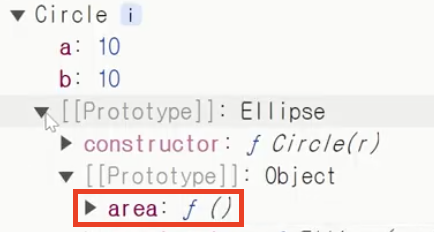
4. class
class를 사용하여 객체내부에 함수를 프토로타입객체에 정의를 편리하게 할 수 있다.
class Person{
    constructor(name, age){
        this.name = name;
        this.age = age;
    }
    showInfo(){ //프로토타입으로 들어감
        console.log(this.name, this.age);
    }
}
class에서 정의된 showinfo함수는 프로토타입객체 내부에 저장되기 때문에 공유가 가능하다. 그러나 생성자로 불가능하다
why? showinfo함수에는 프로토타입 객체 없기떄문에
5. static
static은 person의 프로토타입의 객체로 들어가는게아니라 person으로들어간다. 그래서 객체를 만들지 않아도 바로 사용이 가능하다.
class Person{
    constructor(name, age){
        this.name = name;
        this.age = age;
    }
  	static count = 10;
    static staticMethod(){
      console.log("정적매서드...")
    }
Person.count;//객체를 생성하지않아도 바로 사용이 가능하다.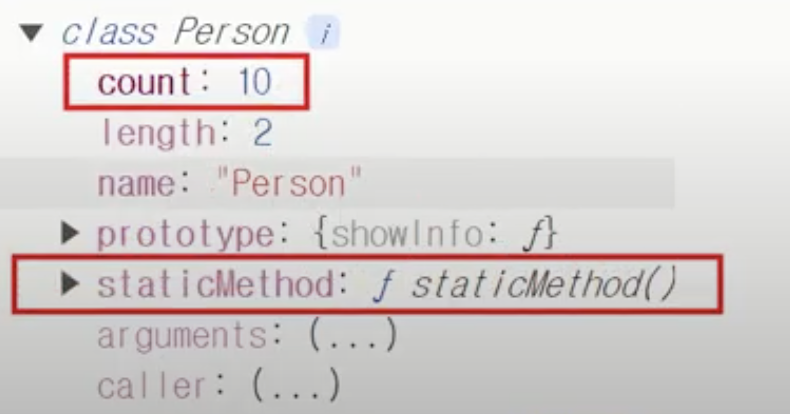
6. 접근자 프로퍼티
- 함수형태 : 단축표현편
set 함수명: 값을 변경하는 접근자 속성get 함수명: 값을 조회하는 접근자 속성enumerable
configurableconst schedule={ _year : 2024, _month : 3, _day : 28, set year(year){ this._year=year; }, get year(){ return this.year; }, set month(month){ this._month=year; }, get year(){ return this.month; }, set day(day){ this._day=year; }, get day(){ return this.day; } }
## 7.은닉

```js
const schedule = (function(){
    let _year = 2024;
    let _month = 3;
    let _day = 28;
    return{
        set year(year){
            _year = year;
        },
        get year(year){
            return _year;
        },
        set month(month){
            _month = month;
        },
        get month(month){
            return _month;
        },
        set year(day){
            _day = day;
        },
        get year(day){
            return _day;
        }
    };
})();
8. 얕은복사(주소복사), 깊은복사
Object.assign({},);
const person = {
    name:"이이름",
    age:40,
};
const person2 = person;//얕은복사(주소복사)
person  === person2; //true
const person3 = Object.assign({}, person); //깊은복사
rson3 === person; //false
9.전개연산자 : 깊은복사가능
const person2 = {...person};
const person = {
    name:"이이름",
    age:40,
};
const person2 = {...person}; //전개연산자(깊은복사가능)
person === person2 // false
일부값을 변경하면서 깊은복사
const person = {
    name:"이이름",
    age:40,
};
const person2 = {...person, age:30}; //age를 30으로 변경하여 깊은복사
person2 // {name: '이이름', age: 30}
참고)
entries
Map.Entry : 이름-값의쌍
for(const entry of Object.entries(person)){
    console.log(entry);
}
//['name', '이이름']
//['age', 40]
---------수정라인------------
자바스크립트 객체에는
- 코어객체
- 내장 생성자 함수 객체
- 내장 객체- math - 수학관련 편의 메서드가있는 객체
- JSON
- 호스트객체 : 실행환경에 따른 객체
- 웹브라우저객체 : 웹브라우저의 기능과 관련된 객체- window (상위객체)
- location 객체 : 브라우저의주소와 관련된 기능, 정보
- history 객체 : 브라우저의 방문 기록과 기능
- screen 객체 : 화면에 대한 정보
- navigator 객체 :
- document 객체 : 웹 문서를 다루는 객체
- window (상위객체)
내장생성자
자바스크립트에 처음부터 포함된 내장 생성자
내장 생성자
1. Object
Objecct.prototype
const 변수명 = new Object()
prototype.toLoacalString()
1) getOwnPropertyDescriptor(); getOwnPropertyDescriptors();
데이터 프로퍼티
value: 값writable: false -> 값변경xconfigurable: false -> 설정 변경 불가, false이여도 단한번만 writabl이 true->false 단한번만 설정가능enumerable: 열거불가
2) defineProperty()
변경하는것
참고) 속성 : 통제 기능 포함
객체에 데이터를 열거할때 함수부분에는 굳이 열거할필요가 없기 때문에 함수는 enumerable을 false을 설정하여 열거되지않게 한다.
3) preventExtensions()
객체의 새로운 속성 추가 불가 설정
4) seal()
삭제불가, 속성추가불가
값변경가능
5) freeze()
삭제불가, 속성추가불가
값 변경 불가
2. String
wrapper 생성자객체
1) toUpperCase()
작동원리
1. new String(str)
2. toUpperCase()
3. 원시값 변환
2) concat
문자연결
3) indexOf, lastindexOf
indexOf : 좌 → 우
lastindexOf : 우 → 좌
-문자열의 위치 번호 반환
-문자열을 찾지 못하면 -1 반환
4) replace
const str2 = str1.replaceAll("little","big");
5) trim
공백제거
3. Number
wrapper 생성자객체
1) isNaN
숫자가 아니면 true, 숫자이면 false 반환
2) Number
문자형을 숫자형으로 변경
'123' → 123
문자형에 숫자가 아닌 글자가 들어갈경우 NaN
- int : 정수(소수점이 없는 수)
- float : 실수(소수점이 있는 수)
parseInt(...): 문자열, 실수 → 정수
parseFloat(...): 문자열 → 실수
4. Boolean
함수처럼 사용햇을 경우 : 값에 대한 평가 → 실제 논리값
5. Array
const 변수명 = new Array(...)
=[...];
=Array.prototype
- 배열 X
- 배열 객체
참고) 배열 - 같은 자료형이 연속해서 나열된 형태
6. Date
날짜와 시간
const date = new Date();
date;
// > /Fri mar 29...getFullYear(): 년도getMonth(): 월 0~11getDate(): 일getDay(): 요일 (일)0-~6(토)getHours(): 시간getMinutes(): 분getSeconds(): 초
이 외에 날짜와 시간을 설정하는 set메서드들이 있다.getTime(): 1970.1.1자정 → 1000분1초 단위로 카운트 수치 → Epoch time → 초단위 → Timestamp
예) 유일한 값으로 ID를 만들떄Date.now(): 현재시간 Epoch timeDate.parse(문자열 날짜): 문자열 날짜 → Date객체로 변환
달력만들기
1) 이번달이 몇일로 끝나는지
-다음달 1일 - 1일차감 → 현재 달의 마지막 날짜
2) 이번달 1일이 몇 요일에 시작하는지
- getDay(): 0~6 → 5
기타 내장 객체
1. JSON)Java script Object Notation) : 자바스크립트 객체 표기법
{
  "이름" : "값",
  "이름" : "값",
  ...
}
.parse(...) : JSON 문자열 → 자바스크립트 객체 변환
.stringify(...) : 자바크립트 객체 → JSON 문자열
2. MATH : 수학 관련 편의 함수, 상수
- PI : 원주율
- round() : 반올림
- floor() : 버림
- ceil() : 올림
- abs() : 절댓값
- sqrt() : 제곱근
3. 전역 객체
-
전역 프로퍼티
undefined, NaN, Infinity -
생성자
Object(), String(), Number() 등 -
전역 함수
parseInt(), parseFloat(), isNaN() 등 -
내장 객체Math, JSON, Reflect