웹 브라우저 객체
window
location : URL 관련된 객체
history : 방문 기록관 관련된 객체
screen : 화면정보
navigator : 브라우저 환경정보
document
웹 브라우저에서 자바스크립트 실행순서
- 서버가 html문자열 응답
- 브라우저
- document 객체 변환
- 트리구조 재구성(이진트리 - 검색에 최적화) - "DOMTree"
- DOMContentLoaded 이벤트발생
- documet 객체 반환 완료
async와 defer 속성
defer: 외부 링크 연결하는 방식
<script defer src="..."></script>
src스크립트 실행은 DOMContentLoaded 이벤트 발생 이후에 진행async: 비동기 실행
1. window
프로퍼티
1) console
log(값):dir(...): 객체의 이름과 값 형태로 구성 출력.error(값): 글자색이 빨간색..trace: coneols.trace()에 도달하기 까지 위치를 쌓아가듯이(stack) 보여주는 기능.
2) self : Window 객체를 가리킨다.
3) parent
해당 창이 프레임 안의 창이면 부모 window 객체를 가리킨다. 그렇지 않으면 자기 자신을 가리킨다.
4) top
해당 창이 프레임 안의 창이면 top 레벨의 window 객체를 가리킨다. 그렇지 않으면 자기 자신을 가리킨다.
5) open
open(주소,창의 이름, 옵션)
- width : 너비
- height : 높이
- scrolling
- location
6) opener
open을 호출해서 열어준 창
7) pageXOffset, pageYOffset
pageXOffset : 가로 방향 스크롤 정도
pageYOffset : 세로 방향 스크롤 정도
8) innerHeight, innerWidth
스크롤바를 제외한 현재 창의 보이는 영역
9) outerHeight, outerWeight
스크롤바를 포함한 현재 창의 보이는 영역
메서드
1) alert("메시지")
알림 메세지
2) prompt()
입력 창, 반환값이 입력한 값
3) confirm()
확인 취소
확인-true, 취소-false
진행 여부 통제시 많이 사용
3. Location
프로퍼티
hash: 앵커부분 #foothost: 호스트 이름 : 포트번호hostname: 호스트이름href: 전체URLpathname: 루트기준 상대경로port: 포트번호protocol: 프로토콜search: 질의 문자열
메서드
assign: 주소이동(방문기록O)reload: 새로고침replace: 주소이동(방문기록X)
참고) 뒤로가기 할 떄 데이터 입력 중복 막음.
4. History
방문 기록과 관련된 객체
프로퍼티
length: 방문 기록 갯수scrollRestoration
-auto(기본값): 페이지 스크롤 위치복구
-manual: 스크롤 위치 복구 x, 문서상단위치
메서드
back(): 뒤로가기forward(): 앞으로가기go(number)
음수 : 뒤로 숫자만큼 이동
양수 : 앞으로 숫자만큼 이동pushState(state, title, url)
replaceState(state, title, url)
5. Naviator
스크립트가 실행 중인 웹 브라우저 등의 애플리케이션 정보를 관리합니다.
6. Document
창에 표시되고 있는 웹 페이지를 관리
웹페이지의 내용물인 DOM 트리를 읽거나 쓸수 있다.
선택을 위한 메서드
-
아이디로 선택(단일 선택)
document.getElementById("아이디명") -
클래스명으로 선택(복수 선택)
document.getElementsByClassName("클래스명") -
태그명으로 선택(복수 선택)
document.getElementsByTagName("아이디명") -
네임속성으로 선택(복수 선택)
document.getElementsByName("속성명")
CSS 선택자형식
- CSS 선택자으로 선택(단일 선택)
document.qyeruSelctor("CSS선택자형식") - CSS 선택자으로 선택(복수 선택)
document.qyeruSelctorAll("CSS선택자형식")
const blinds = document.querySelctor(".blind");- 자식 요소들 :
childern - 부모 요소 :
parentElement - 첫번째 자식 요소 :
firstElementChild - 마지막 자식 요소 :
lastElementChild - 앞쪽 형제 :
previousElementSibling - 뒤쪽 형제 :
nextElemnetSibling
- html :
document - head :
document.head - body :
dovument.body
form의 name속성(양식의 이름값)
document."양식이름"document."양식이름"."이름항목이름
속성을 관리하는 메서드
- 추가/변경 :
setAttribute("속성명", "값"); - 조회 :
getAttribute("속성명"); - 삭제 :
removeAttribute("속성명");
const inputEl = document.getElementById("text");
const type = inputEl.getAttribute("data-price-type");//속성조회
type//>order
사용빈도가 높은 기능과 관련된 속성은
document 객체에서 하위속성으로 접근이 가능
id, type, name, value, target, action, href, src
class속성 클래스는 예약어이기떄문에 안됨 - classname
inputEl.type;
//>'text'
inputEl.type="button"
//>'button'
inputEl.type="text"
//>'text'
inputEl.name="userId";
//>'userId'
dataset
data-속성명 : document 객체에 하위 속성 dataset객체를 통해 접근가능
classList
document 객체에 하위 속성
클래스만을 위한 속성
const inputEl = document.getElementById("text");
const classList = inputEl.classList;
classList
//> DOMTokenList(3) ['cls1', 'cls2', 'cls3', value: 'cls1 cls2 cls3']
classList 메서드
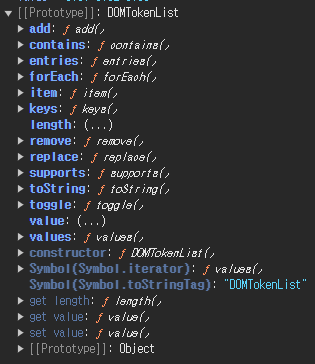
추가 : add()
제거 : remove()
교체 : replace()
toggle() : 클래스가 있으면 제거, 없으면 추가
contains() : 클래스의 존재 유무
classList.add("cls4"); //추가
classList.remove("cls2"); //제거
classList.toggle("cls2"); //토글(추가됨)-cls없을떄
classList.toggle("cls2"); //토글(제거됨)-cls있을떄
clssList.contains("cls4"); //>true(cls4존재함)
동적 요소 생성, 변경
document.createElement("태그명") : 태그생성
document.createTextNode() : 텍스트생성
부모요소.appendChild("자식요소") : 가장 마지막 자식 요소로 추가
부모요소.removeChild("자식요소") : 자식요소 제거
부모요소.replaceChild("기존요소,"새로운요소") : 기존요소가 새로운요소로 변경
부모요소.insertbefore("기존요소,"새로운요소") : 기준 요소 앞에 추가요소가 추가
//끝에 추가하기
const liEl = document.createElement("li"); //태그생성
const textEl = document.createTextNode("메뉴3"); //텍스트생성
liEl.appendChild(textEl);//자식요소로 추가
liEl; //> <li>메뉴3</li>, 아직 메모리상에만 존재함.
const menusEl = document.querySelector(".menus");
menusEl.appendChild(liEl); //실제 추가
menusEl.removeChild(liEl); //제거
//가운데 추가하기
const liEl = document.createElement("li");
const textEl=document.createTextNode("메뉴3");
liEl.appendChild(textEl);
const menu2El= document.querySelector(".menus li:last-of-type");
const menusEl =document.querySelector(".menus");
menusEl.insertBefore(menu2El,liEl);
menusEl.insertBefore(liEl,menu2El);