git은 문제가 없다.. 내가 문제다
내 로컬 저장소에
master branch가 있고, jeongyeon-park브랜치가 있다.
master branch에서 코드 작업을 하고
git push origin jeongyeon-park하려고 했는데
🎁 오류
updates were rejected because a pushed branch tip is behind its remote hint: counterpart. check out this branch and integrate the remote changes hint: (e.g. 'git pull ...') before pushing again. hint: see the 'note about fast-forwards' in 'git push --help' for details.
🎀오류
pulling is not possible because you have unmerged files. hint: fix them up in the work tree, and then use 'git add/rm ' hint: as appropriate to mark resolution and make a commit. fatal: exiting because of an unresolved conflict
이런 오류가 났다.
git 공부가 덜 된 상태에서 계속 push만 하려니 늘 할 때마다 다시 공부하고 또 다시 하고..
무한 반복이라 글을 쓰게 되었다.
git checkout jeongyeon-park 해서 브랜치 변경 한 후에는 git push 가 잘만 됐다.
master 브랜치에서 push가 안되구나.
내가 remote할 때 어떻게 했더라 ..
하고 기록 안 해 둔걸 후회했다.
앞으로 무조건!
git 쓸 때는 하나하나 다 기록 할거다..
아무튼 나는 master 브랜치에서 이미 작업을 해 버렸고,
나는 jeongyeon-park 원격 브랜치에 로컬 master 브랜치에서 작업 한 걸 올리고 싶은 상태고,
원격 jeongyeon-park에 올리려면, 로컬 jeongyeon-park에서 작업을 했었어야 한다.
그래서 master 브랜치의 변경 사항을 jeongyeon-park에 병합해 보려 한다.
https://backlog.com/git-tutorial/kr/stepup/stepup2_4.html
위 게시글을 참조 했다.
master 브랜치의 변경 사항을 jeongyeon-park에 병합하기
- git checkout jeongyeon-park
병합 할 곳에 checkout
- git merge master
했을 때
Auto-merging README.md
CONFLICT (content): Merge conflict in README.md
Automatic merge failed; fix conflicts and then commit the result.
라는 오류가 떴는데, README.md에 auto-merging 문제가 있다는 말 이라서 README.md가서 수정 해 줌.
고쳐 준 후 다시 git merge master
- 병합 완료 !
commit까지 모두 merge되는 것 같음.
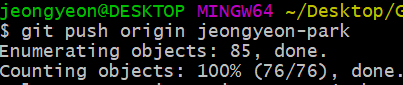
push 성공!
(づ ̄3 ̄)づ╭❤~
알게 된 점
- git merge branch_name 으로 branch를 병합할 수 있다.
- merging이 덜 됐을 때 conflict 난 부분 수정하고 add,commit, push 해 주면 master|MERGING이라고 떠 있는 부분 해결 된다.
- jeongyeon-park 브랜치에 push하고 싶을 떄 로컬 jeongyeon-park에서 작업하자.
느낀점
나는 여전히 깃이 무섭다..
이것때문에 2시간정도를 삽질 했는데 2시간 삽질하고 branch 병합하는거 배운거면 나쁘지 않은듯!
GIT이 무섭지 않을 때 까지 열공하기 !!
