배포결정!
사이드 프로젝트가 진행률이 50%를 넘어서면서
드디어 FE 쪽도 배포를 하게 됐다!
늘 하던데로 dev 브랜치를 main으로 PR 하고
해당 repo를 vercel로 배포하려고 했는데
이게 organization의 팀 프로젝트다 보니 vercel 유료버전(team plan)을 사용해야만 했다
그런데 달마다 내야하는 요금이 적지 않길래 다른 방법을 찾아봤다
그것은 바로 github action을 통해 팀 repo를 개인 repo로 옮겨 배포하기!
안그래도 gitgub Action을 사용해보고 싶었기 때문에 쉽지 않아보였지만 도전했다!
github action을 사용해보자
(팀repo / 개인repo 구별 잘하기!)
- 개인 repo를 만든다 (혹은 팀repo fork)
- vercel에 개인 repo를 연동한다 (⭐ 환경변수 잊지말기!)
- https://github.com/settings/tokens 에서 secrets 토큰 생성
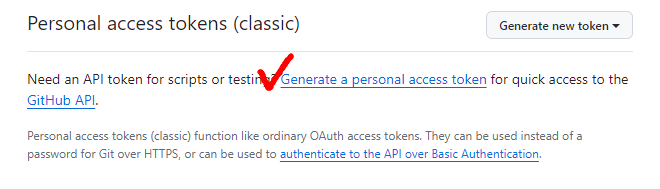
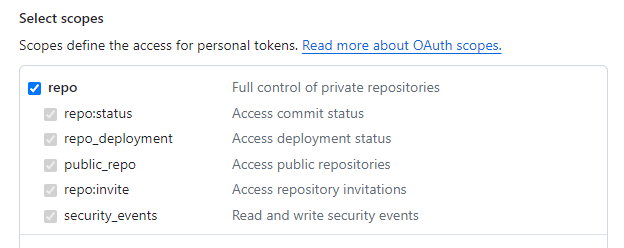
- repo 권한에 체크하고 토큰 만들기(⭐
ghp_로 시작하는 토큰 따로 잘 저장해놓기!!)
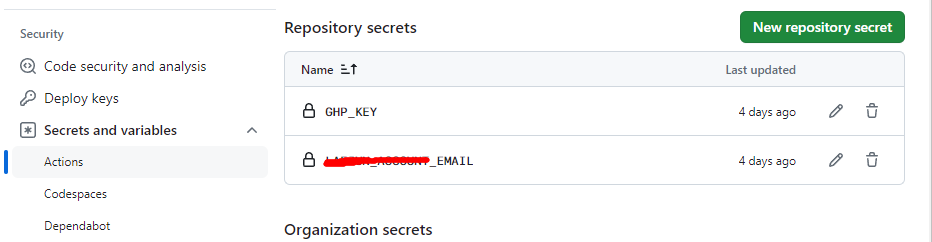
- 팀 repo 의 settings에서 위에서 만든 토큰과 개인 계정 이메일을 시크릿 변수로 각각 등록하기
- 팀 repo 루트 경로에 build.sh 파일 생성하고 아래 내용으로 만들기
(.gitignore에 저절로 들어가기때문에 이를 빼서 깃헙에 올라가게 해줘야함
=> 안올라가니 github action 작동이 안됐음)
#!/bin/sh
cd ../
mkdir output
cp -R ./팀repo이름/* ./output
cp -R ./output ./팀repo이름/- 팀 repo의 gitgub actions 탭에서 .yml 파일 생성하고 아래 내용 잘 써주기

name: git push into another repo to deploy to vercel

on:
  push:
    branches: [main]

jobs:
  build:
    runs-on: ubuntu-latest
    container: pandoc/latex
    steps:
      - uses: actions/checkout@v4
      - name: Install mustache (to update the date)
        run: apk add ruby && gem install mustache
      - name: creates output
        run: sh ./build.sh
      - name: Pushes to another repository
        id: push_directory
        uses: cpina/github-action-push-to-another-repository@main
        env:
          API_TOKEN_GITHUB: ${{ GTP_KEY(시크릿변수) }}
        with:
          source-directory: 'output'
          destination-github-username: 개인 깃헙 계정 이름(username)
          destination-repository-name: 개인repo 이름(repository)
          user-email: ${{ EMAIL(시크릿변수) }}
          commit-message: ${{ github.event.commits[0].message }}
          target-branch: main
      - name: Test get variable exported by push-to-another-repository
run: echo $DESTINATION_CLONED_DIRECTORY(uses: actions/checkout@v4에서
참고한 문서들은 다 @v2로 되어있었는데 해보니 버전이 낮다고 경고가 떴음)
- 이제 팀 repo의 main 브랜치에 commit 이나 PR이 되면 github action이 작동되어 자동으로 개인 repo에 push 됨
- vercel에 연동/배포 잘 되나 확인까지 해보면 완성!!

생각보다 어려웠지만 잘 되니 너무너무 신기했다 😉
(그 후에 끝없는 배포오류에 빠지게 된 건.. 안비밀.. 타입, SSR ㅂㄷㅂㄷ)
참고 :
https://velog.io/@newjin46/Next.js-Vercel로-GitHub-Organization-무료-배포하기-with-github-actions
https://velog.io/@rmaomina/organization-vercel-hobby-deploy

호기심 많은 귀차니즘의 공부 일기