useReducer?
Hook for managing state
Defines state in a component, just like useState.
- Alternative to useState
- Produces state
- Changing this state makes component rerender
- Useful when you have several different closely-related pieces of state
- Useful when future state values depend on the current state

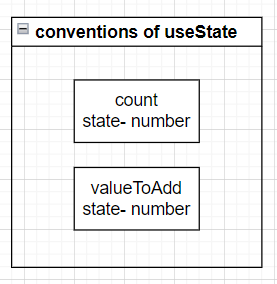
Each piece of state defined as a seperate variable
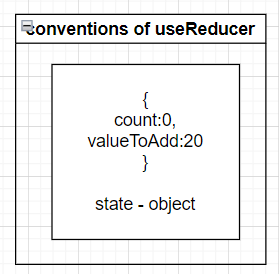
All state for the whole component defined in a single object
Call the each state
state.count = 10
Rules of Reducer function
current state : {count:10, valueToAdd:20} / dispatch(5)
- when dispatch calls, the reducer function will be called
=>
const reducer = (state, action) =>{
// whatever gets returned will be the new state
  {
    count :200,
    valueToAdd :30
    // new state
  }
}
//Component rerender- Whatever gets returened will be the new state
- If you return nothing, then your state will be undefined.
- No async, await, promise, request, outside variables
Dont directly modify the state object
Bad
const reducer = (state, action) =>{
  state.count = state.count +1
  return state
}
Good
return {
 ... state,
 // copy paste over all the values from the existing state object
 count : state.count + 1
 // overwrites the count property
}
Understanding Action Object
User clicks Button > state updated need, call dispatch > dispatch >
const reducer = (state, action) =>{
  // ok, am i supposed to be uploading 'count' or 'valueToAdd'
}
We need some way of telling the reducer why it is being executed and what pieces of state needs to update.
const increment = () =>{
  dispatch({
    type: 'increment-count'
  })
}
// otherwise
dispatch({
  type:'change-value'
  , payload:value
})- When we need to modify state, we will call dispatch and always pass in ans 'action' object.
- the action object will have a 'type' property that is a string. This helps tell the reducer what state update it needs to make.
- If we need to communicate some data to the reducer, it will be placed on the 'payload' property of the action object.
Examples
User Clicks OR Types in the input
=>
const reducer = (state, action) =>{
  if(action.type === 'increment-count'){
    return {
      ...state,
      count : state.count +1
    }
  }
  if(action.type === 'change-value'){
    return {
      ...state,
      // 나중에 state를 추가할 사항이 있을때 까먹을수있기에 지금 필요 없어도 작성
      valueToAdd:action.payload
    }
  }
  return state
  // Nomatter what, we have to return a value from a reducer.
  //If we return nothing, our state will be updated 'undefined'
  // return my current state
}
Constant Action Types
const INCREMENT_COUNT = 'increment-count'
type:INCREMENT_COUNT
Immer
npm i immer
Normal Reducer
const reducer = (state, action) =>{
  switch(action.type){
    case INCREMENT_COUNT;
      return {
        ...state,
        count:state.count+1
      }
    defalut:
      return state
  }
  // No directly changing state
  // Must return a new value to use for state
Immer
const reducer = (state, action) =>{
  switch(action.type){
    case INCREMENT_COUNT;
      count:state.count+1
      return;
      // you have to return in here, If not JS keeps reading code. When you return JS stops.
    defalut:
      return
  }
  // Can Mutate state
  // Do not have to return a new value
  // Still return in each case, otherwise you get 'fallthrough'
Final Demo
const reducer = (state, action) => {
  switch (action.type) {
    case INCREMENT_COUNT:
      state.count = state.count + 1;
      return;
    case SET_VALUE_TO_ADD:
      state.valueToAdd = action.payload;
      return;
    case DECREMENT_COUNT:
      state.count = state.count - 1;
      return;
    case ADD_VALUE_TO_COUNT:
      state.count = state.count + state.valueToAdd;
      state.valueToAdd = 0;
      return;
    default:
      // throw new Error("unexpected action type");
      return;
  }
};
Web Developer