🌈 Most popular html 태그

🌈 html 태그의 속성
1. html 태그의 속성이란?
- html 태그는 태그 내부에 값을 넣을 수 있을 뿐만 아니라, 태그마다 속성을 부여할 수 있음
- 태그의 속성은 <속성명="속성값"> 의 형태로 사용하며, 태그마다 여러 속성을 부여 할 수 있음
- 태그 마다 가질 수 있는 속성에는 차이가 있음
- id 속성과 class 속성은 자주 쓰이는 속성으로 모든 태그에서 사용할 수 있음
🌈 <img> 태그
1. img 태그란?
- 이미지를 삽입하는 태그로, src 속성을 통해 이미지 경로를 지정함
- src 속성은 img 태그에서 필수 속성으로 지정한 경로가 없을시, 이미지는 출력되지 않음
- src 속성 : 이미지의 경로
- width: 이미지 가로 크기
- height: 이미지 세로 크기
- alt : 대안적 기능으로 어떤 그림인지 텍스트로 정보를 나타냄(그림이 깨질 때)
- title : 마우스를 대면 텍스트로 어떤 그림인지 설명을 보여줌
✍🏻 HTML
<img src="이미지 경로" width="500" height="300">
🌈 <from> 태그
1. form 태그란?
- HTML은 사용자의 입력을 받기 위한 태그로 다양한 from을 제공함
- 입력 받은 데이터를 처리하기 위한 목적으로
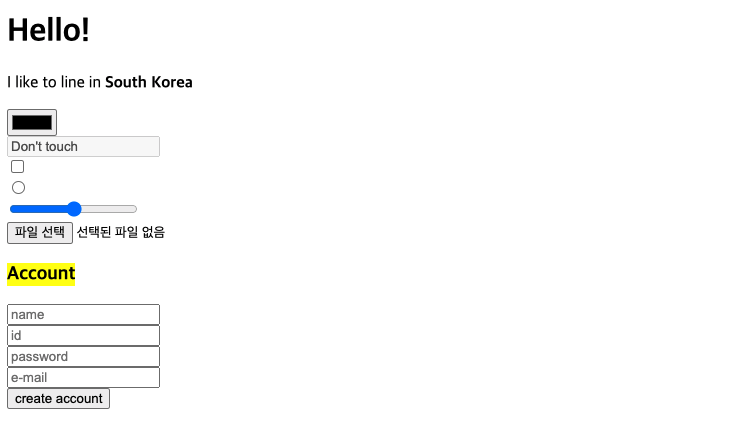
<input>과 <label>쌍을 이뤄 사용<input id="">과 <label for="">태그의 두 속성명을 일치하여 쌍으로 사용<input>과<label>태그는 inline-level 태그에 속함- 연속되는
<input>과<label>를 세로로 배치하고 싶을 땐 block-level 태그인<div></div>로 감싸줌
✍🏻 HTML
 <body>
  <h1>Hello!</h1>
  <p>I like to line in <strong>South Korea</strong></p>
  <form>
    <div>
      <label for="form_color"></label>
      <input id="form_color" type="color" />
    </div>
    <div>
      <label for="form_touch"></label>
      <input id="form_touch" type="text" disabled value="Don't touch" />
    </div>
    <div>
      <label for="form_checkbox"></label>
      <input id="form_checkbox" type="checkbox" />
    </div>
    <div>
      <label for="form_radio"></label>
      <input id="form_raido" type="radio" />
    </div>
    <div>
      <label for="form_range"></label>
      <input id="form_range" type="range" />
    </div>
    <div>
      <label for="form_file"></label>
      <input id="form_file" type="file" accept=".pdf" />
    </div>
    <div>
      <h3><mark>Account</mark></h3>
    </div>
    <div>
      <label for="account_name"></label>
      <input id="account_name" required placeholder="name" type="text" />
    </div>
    <div>
      <label for="account_id"></label>
      <input id="account_id" required placeholder="id" type="text" />
    </div>
    <div>
      <label for="account_password"></label>
      <input
        id="account_password"
        required
        placeholder="password"
        minlength="10"
        type="password"
      />
    </div>
    <div>
      <label for="account_email"></label>
      <input id="account_email" required placeholder="e-mail" type="email" />
    </div>
    <div>
      <input type="submit" value="create account" />
    </div>
  </form>
</body>
🌈 <ol>, <ul>, <li> 태그
1. list(목록)의 구조를 만드는 태그
- 순서가 있는 목록은
<ol></ol>- 순서가 없는 목록은
<ul></ul>- 그 안에 목록의 태그 표현은
<li></li>- type을 설정할 수 있고, 순서를 역으로 바꾸는 것도 가능
✍🏻 HTML
 <ol type="i" reversed>
     <li>first order-list</li>
     <li>second order-list</li>
     <li>third order-list</li>
 </ol>
 <ul>
     <li>first unorder-list</li>
     <li>second unorder-list</li>
     <li>third unorder-list</li>
 </ul>

Keep Going, Keep Coding!