interface
class interface
{
	public :
	virtual void MustFunction() = 0;	//순수 가상 함수
};
이런식으로 그냥 클래스로 구현후, 순수 가상 함수를 선언해 상속받는 자식 클래스들은 전부
구현하도록 강제함.
__interface IInterface2
{
public:
	virtual void MustMustFunction() abstract;
};
이런식으로 __interface 키워드로 interface를 명시해준다면
해당 인터페이스를 상속받는 모든 자식은 인터페이스 내부의 함수를 전부 구현해야 함.
또한 멤버 함수에서 virtual =0, abstract 키워드가 붙지 않아도 순수가상함수 취급된다.
이런식으로
IInterface2 interface;인터페이스를 선언하면 에러가 뜬다.
C++ typecast
static_cast<type>
명시적 변환을 수행한다.
int i{ 3 };
int k{ 4 };
double Result = static_cast<double>(i) / k;
double Result = (double)(i) / k;동일한 결과다.
reinterpret_cast<type>
임의의 포인터 타입끼리 변환이 가능하도록 만들어진 cast이고,
static_cast 보다 자유도가 훨씬 높지만 그만큼 안정성이 떨어진다.
dynamic_cast<type>
런타임에 타입 검사를 수행한다.
타입검사를해 두 타입이 서로 관련이 있다면 type casting을 해주고,
관련 없다면 nullptr로 초기화 시켜준다.
다운 캐스팅이 될때 safe하게 동작하는데 다운 캐스팅이 실행되면
nullptr을 반환하게된다.
주의할점은 RTTI(runtime type info)가 켜져있어야 동작한다.
구글 c++ 가이드에서 RTTI를 사용하지 말라고 적혀있다.
https://google.github.io/styleguide/cppguide.html#Run-Time_Type_Information__RTTI_
사용을 피하자
const_cast< type >
const 키워드를 임시적으로 제거할 수 있다.
const int Value = 10;
int* RemoveConst = const_cast<int*>(&Value);
이렇게 RemoveConst에 Value의 주소를 const_cast로 int*형으로 캐스팅 시,
*RemoveConst = 1234;변경이 가능해진다!
물론
const int Value = 10;
int* RemoveConst = const_cast<int*>(&Value);
*RemoveConst = 1234;
int Arr[Value] = {};
이런식으로 배열을 Value가 변경된 후, 나중에 선언한다고 해서
배열 크기가 1234로 변하진 않는다.
이미 컴파일 때 결정된 사항이니까
템플릿
템플릿으로 변수를 미리 잡아줄 수도 있다.
//변수 선언 가능
template<class T, size_t WIDTH = 640, size_t HEIGHT = 480>
class FClass
{
public :
	size_t GetDefaultWidth() const { return WIDTH; }
	size_t GetDefaultHeight() const { return HEIGHT; }

	void Function(const T& InValue)
	{
		Value = InValue;
	}

	template<typename T2>
	T2 Function2()
	{
		T2 Var = 10.5;
		return Var + WIDTH;//가능;
	}

private:
	T Value{};
};
이런 식으로 템플릿으로 WIDTH와 HEIGHT를 설정해줄 수 있다.
FClass2<float, 640, 240> Class;fold-expression
C++ 17에서 추가된 사항으로
inline void HandleValue(int InValue)
{
	std::cout << "int: " << InValue << std::endl;
}

inline void HandleValue(std::string_view InValue)
{
	std::cout << "string view: " << InValue << "\n";
}

template<typename... T>
void ProcessValues(const T&... InValues)
{
	(HandleValue(InValues), ...);
}
이런식으로 구현 후,
ProcessValues(1, 2, 3, "Hello");이렇게 인자를 넣어주면 ,
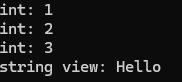
이렇게 알아서 각 인자에 맞게 실행된다