유효성 검사란?
- 유효성 검사는 데이터가 서버 혹은 데이터베이스로 옮겨지기 전, 개발자가 만든 조건에 부합하는지 확인, 검증하는 작업을 말한다.
validate check code
validate.js 추가
아래의 CDN주소를 추가해서 validate 라이브러리를 사용하자
<script src="//cdnjs.cloudflare.com/ajax/libs/validate.js/0.12.0/validate.min.js"></script>-간단한 예제를 통해 알아보자!
<!-- Sample 회원가입 Form -->

<form id = "myForm">

  <div class="form-group">

    <label>ID</label>

    <input type="text" name="id">

  </div>

  <div class="form-group">

    <label>Password</label><br />

    <input type="password" name="password">

  </div>

  <div class="form-group">

    <label>Password Check</label><br />

    <input type="password" name="passwordCheck">

  </div>

  <button type="submit">JOIN</button><br />

</form>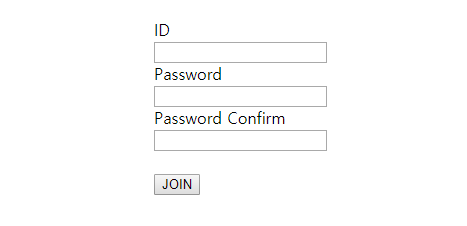
form을 만들면 위와 같이 출력된다.
- input type을 password로 줘야지만 값이 화면에 노출되지 않는다.
이제 여기에 validate.js 라이브러리를 활용한 script 코드를 작성해보자!
ID항목은 필수값 체크 그리고 중복체크를 하도록 설정후 Password 항목은 필수값 체크와 Password Confirm과 값이 같은지 확인하도록 하였다.
// Sample 회원가입 Form Validate Check

<script>

$(document).ready(function () {
    $("#myForm").validate({
        rules: {
            id: {
                required: true,
                remote: {
                    url: "/isDuplicated",
                    type: "POST",
                    data: {
                        id: function () {
                            return $('input[name="id"]').val();
                        }
                    }
                }
            },
            password: {
                required: true
            },
            passwordConfirm: {
                required: true,
                equalTo: "input[name='password']"
            }
        },
        messages: {
            id: {
                remote: 'This id is duplicated! please use another id.'
            },
            passwordConfirm: {
                equalTo: 'please enter the same password again.'
            }
        },
        submitHandler: function () {
            $.ajax({
                url: "/join",
                type: "POST",
                dataType: "text",
                data: $("#myForm").serialize(),
                success: function () {
                    alert("success")
                },
                error: function () {
                    alert("fail");
                }
            })
        }
    });
});

</script>
사용법은 위의 코드와 같다.
1. rules에 적용한 규칙을 체크하고, 통과하지 못할 시 에러 메시지를 보준다.
2. required는 필수 값 체크이며, equalTo는 값이 지정한 값과 똑같은지를 체크한다.
3. id에 있는 remote는 input창의 변화가 생길 때 해당 함수를 호출한다.
4. 여기서는 함수의 리턴값을 true / false로 구분한다.
5. true일 경우 통과, false일 경우 에러 메시지를 발송합니다. 이 코드에서는 id 중복체크를 위해 사용되었다.
6. 서버의 /isDuplicated api는 true / false를 리턴하도록 구현했다.
7. messages는 기본으로 설정된 에러메시지 외의 다른 메시지를 출력하고 싶을 때 설정한다.
8. submitHandler를 통해 성공 시 수행할 함수를 작성하고 여기서는 회원가입을 예시로 들었기 때문에 ajax로 /join api를 호출한다.
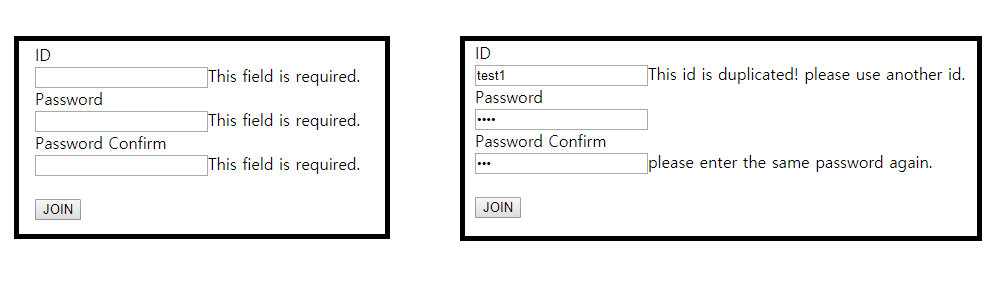
9. 완료되었으면 이제 join 버튼을 눌러 validate 체크가 정상적으로 되는지 확인한다.
결과는 아래 이미지와 같다.
정규표현식(Regular Expression)이란?
- 특정한 규칙을 가진 문자열의 집합을 표현하는 형식 언어로 정규표현식을 이용하여 입력된 문자열에 대한
특정 조건 검색,일치여부 판단,치환등에 대한 조건문을 간단히 처리할 수 있다.(유효성 검사시 사용)
정규표현식 객체 생성 및 확인하기
- 정규표현식 객체 생성 방법
//1
const regExp = new RegExp("정규표현식")

//2 (양쪽 슬래시 기호는 정규표현식의 리터럴 표기법)
const regExp2 = /정규표현식/- 문자열 패턴 확인 함수
//1. 문자열에 정규표현식과 일치하는 패턴이 있을 경우 true, 없으면 false
regExp.test("문자열")

//2. 문자열에 정규표현식과 일치하는 패턴이 있을 경우 해당 문자열을 반환, 없으면 null을 반환
regExp.exec("문자열")
확인하기
document.getElementByID("check1").addEventListenr("click", function(){
    // 정규표현식 객체 생성
    const regEx1 = new RegExp("script")
    const regEx2 = /java/

    // 검사할 문자열
    const str1 = "javascript 정규표현식"
    const str2 = "java, html, css, js 사용중"
    const str3 = "heyjava, java, java"

    // 1. "string" 문자열 확인
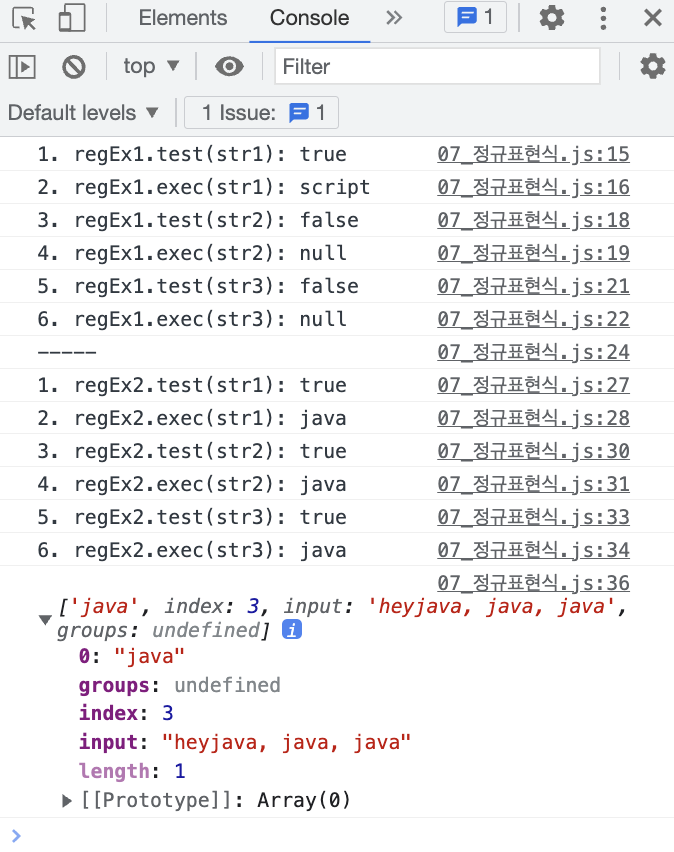
    console.log("1. regEx1.test(str1): " + regEx1.test(str1));
    console.log("2. regEx1.exec(str1): " + regEx1.exec(str1));

    console.log("3. regEx1.test(str2): " + regEx1.test(str2));
    console.log("4. regEx1.exec(str2): " + regEx1.exec(str2));

    console.log("5. regEx1.test(str3): " + regEx1.test(str3));
    console.log("6. regEx1.exec(str3): " + regEx1.exec(str3));

    console.log("-----")

    // 2 "java" 문자열을 확인
    console.log("1. regEx2.test(str1): " + regEx2.test(str1));
    console.log("2. regEx2.exec(str1): " + regEx2.exec(str1));

    console.log("3. regEx2.test(str2): " + regEx2.test(str2));
    console.log("4. regEx2.exec(str2): " + regEx2.exec(str2));

    console.log("5. regEx2.test(str3): " + regEx2.test(str3));
    console.log("6. regEx2.exec(str3): " + regEx2.exec(str3));

    console.log(regEx2.exec(str3))
}
정규표현식 메타문자
- 문자열의 패턴을 나타내는 문자
a : 문자열 내에 a라는 문자열이 존재하는지 검색
[abcd] : 문자열 내에 a, b, c, d 중 하나라도 일치하는 문자가 있는지 검색
^(캐럿) : 문자열의 시작
$(달러) : 문자열의 끝
\w (word, 단어) : 아무 글자(띄어쓰기, 특수문자, 한글 제외)
\d (digit, 숫자) : 아무 숫자(0~9)
\s (space, 공간) : 아무 공백 문자(띄어쓰기, 엔터, 탭 등)
-> 소문자/대문자 구분 중요: 대문자인 경우 Not의 뜻을 가지고 있음.
[0-9] : 0 ~ 9까지의 모든 숫자
[ㄱ-힣] : ㄱ ~ 힣까지의 한글(자음, 모음 포함)
[가-힣] : 자음+모음이 결합한 형태의 한글(단모음, 단자음 불가)
[a-z] , [A-Z] : 모든 영어의 소문자, 대문자
a{5} : a라는 문자가 5개 존재 -> aaaaa
a{2,5} : a가 2개 이상 5개 이하 -> aa, aaa, aaaa, aaaaa
a{2,} : a가 2개 이상
a{,5} : a가 5개 이하
* : 0개 이상, 0번 이상 반복 (= 있어도 되고 없어도 됨)
+ : 1개 이상, 1번 이상 반복
? : 0개 또는 한 개
. : 한 칸(개행문자 제외한 문자 하나)
확인하기
    // 결과 출력용 div
    const div1 = document.getElementById("div1")

    // [abcd]: 문자열 내에 a, b, c, d 중 하나라도 일치하는 문자가 있는지 검색
    const regEx1 = /[abcd]/

    div1.innerHTML += "/[abcd]/, apple : " + regEx1.test("apple") + "<br>"
    div1.innerHTML += "/[abcd]/, qwerty : " + regEx1.test("qwerty") + "<hr>"

    // ^(캐럿): 문자열의 시작
    const regEx2 = /^group/
    div1.innerHTML += "/^group/, group100 : " + regEx2.test("group100") + "<br>"
    div1.innerHTML += "/^group/, 100group : " + regEx2.test("100group") + "<hr>"

    //^[abcd] : 문자열이 a, b, c, d 중 하나로 시작하는지 검색
    const regEx3 = /^[abcd]/
    div1.innerHTML += "/^[abcd]/, group : " + regEx3.test("group") + "<br>"
    div1.innerHTML += "/^[abcd]/, car : " + regEx3.test("car") + "<br>"
    div1.innerHTML += "/^[abcd]/, dark : " + regEx3.test("dark") + "<hr>"

    //$(달러) : 문자열의 끝
    const regEx4 = /team$/
    div1.innerHTML += "/team4/, A-team : " + regEx4.test("A-team") + "<br>"
    div1.innerHTML += "/team4/, team-A : " + regEx4.test("team-A") + "<hr>"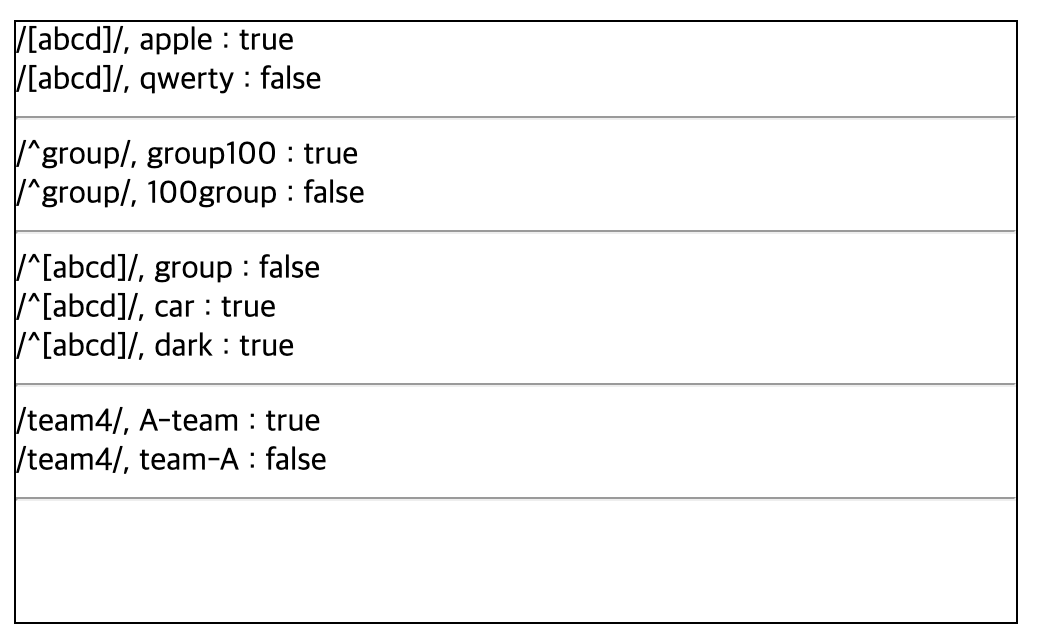
-
응용
- a~d-team이 모두 true이려면 : /[a,b,c,d]-team$/
- 시작은 영어 대문자, 끝은 숫자 : /^[A-Z][0-9]$/
- 특수문자를 제외한 문자 하나 : /^[a-zA-Z0-9ㄱ-힣]$/