Api서버로 구축한 스프링 부트 프로젝트에서 웹 브라우저가 아닌 윈도우폼 같은 클라이언트에 적합한 세션 관리 방법을 찾아보니 JWT![]
가 있었다.
1. JWT란
JWT(JSON Web Token)는 JSON 포맷으로 작성된 인증 정보를 포함하는 토큰으로, 웹 애플리케이션 간 안전한 데이터 교환에 사용됩니다. JWT는 주로 사용자 인증 및 정보 전달에 사용되며, 간단하고 독립적인 방법으로 데이터를 검증할 수 있다는 장점이 있습니다.
- JWT의 특징
자체적으로 정보 포함
- JWT는 상태를 저장하기 위해 별도의 데이터베이스가 필요하지 않습니다. 토큰 자체에 필요한 정보를 포함합니다.
무결성 검증 가능
- 서명을 통해 토큰이 변조되지 않았음을 검증할 수 있습니다.
유효기간 포함
- WT에는 만료 시간(
exp)을 설정할 수 있어 보안성을 강화할 수 있습니다.
단점
- 토큰 크기가 커질 수 있습니다.
- 민감한 정보를 저장하면 안 됩니다(평문으로 저장되기 때문).
- 사용 예시
사용자 인증
- 사용자가 로그인하면 서버가 JWT를 생성하여 클라이언트에 전달합니다.
- 클라이언트는 이 토큰을 로컬 스토리지, 세션 스토리지, 혹은 쿠키에 저장합니다.
- 이후 요청마다 토큰을 서버로 전송하며 인증을 처리합니다.
정보 전달
- JWT는 다른 서비스 간 인증 또는 데이터를 안전하게 전달하는 데에도 사용됩니다.
- JWT와 세션 기반 인증의 차이
| 특징 | JWT | 세션 기반 인증 |
|---|---|---|
| 상태 저장 | 서버가 상태를 저장하지 않음 | 서버가 세션 상태를 저장함 |
| 스케일링 | 확장성 좋음 | 확장성 낮음 |
| 클라이언트-서버 의존성 | 의존성 적음 | 의존성이 높음 |
| 토큰 저장 위치 | 클라이언트 (쿠키, 로컬 스토리지 등) | 서버 |
2. 프로젝트에 JWT를 사용하기 위한 준비
build.gradle에서 디펜던시 추가
Edit Starters에서 Spring Security 추가
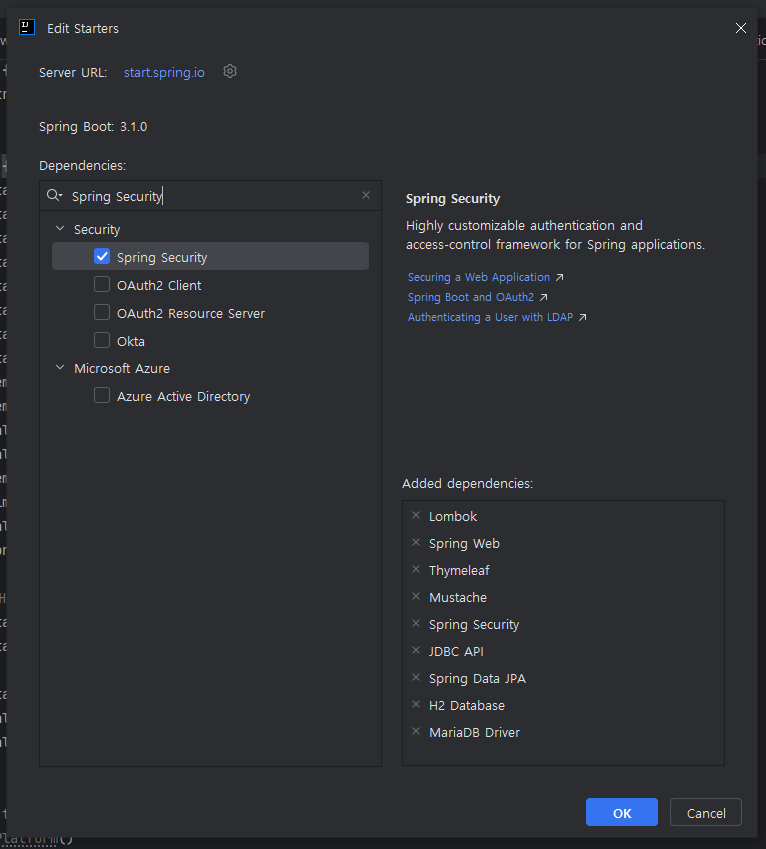
JWT 디펜던시 추가
	implementation 'io.jsonwebtoken:jjwt-api:0.11.5'
	runtimeOnly 'io.jsonwebtoken:jjwt-impl:0.11.5'
	runtimeOnly 'io.jsonwebtoken:jjwt-jackson:0.11.5' // JSON 처리
3. JWT를 통해 로그인시 세션 인증 토큰 발행 및 검증 구현
3-1. JWT 설정값 정의
application.properties
# JWT 설정
## 256비트 이상의 랜덤 비밀키
jwt.secret=256비트 이상의 랜덤 비밀키
# 만료 시간 (밀리초, 1시간)
jwt.expiration=3600000
- jwt.secret: JWT 서명을 생성하거나 검증할 때 사용하는 비밀 키(Secret Key)
- JWT의 Signature를 생성할 때 사용됩니다.
- 클라이언트가 보낸 JWT의 변조 여부를 서버에서 검증하기 위해 사용됩니다.
- 보통 길이와 복잡도를 높이기 위해 256비트 이상의 랜덤 문자열을 사용합니다.
(제시된 키는 256비트 이상이며, Base64로 인코딩된 값입니다.) - 반드시 비밀로 유지해야 합니다. 이 키가 노출되면 누구나 JWT를 변조할 수 있습니다. <- 실제 서비스시 명심
jwt.expiration=3600000
- JWT의 유효기간(만료 시간) 을 설정합니다
- 3600000 (밀리초 단위) = 1시간
- 클라이언트가 서버에 보낸 JWT의 유효성을 검사할 때 사용됩니다.
- 만료된 토큰은 더 이상 유효하지 않으며, 클라이언트는 새로운 토큰을 요청해야 합니다.
JWT 설정 프로퍼티 설정 파일
package com.okdk.board.config;

import lombok.Getter;
import lombok.Setter;
import org.springframework.boot.context.properties.ConfigurationProperties;
import org.springframework.stereotype.Component;

@Getter
@Setter
@Component
@ConfigurationProperties(prefix = "jwt") // jwt.* 설정값을 매핑
public class JwtProperties {
    private String secret;     // 비밀키
    private long expiration;   // 만료 시간
}
설정 프로퍼티 등록 클래스를 생성하여 위 properties에서 설정 프로퍼티 정의.
3-2. JWT 토큰 생성 및 검증 기능 구현
package com.okdk.board.util;

import com.okdk.board.config.JwtProperties;
import io.jsonwebtoken.*;
import io.jsonwebtoken.security.Keys;
import lombok.RequiredArgsConstructor;
import org.springframework.stereotype.Component;

import java.util.Date;

@Component
@RequiredArgsConstructor
public class JwtUtil {
    private final JwtProperties jwtProperties;

    // JWT 생성
    public String generateToken(String username) {
        return Jwts.builder()
                .setSubject(username) // 사용자 이름
                .setIssuedAt(new Date()) // 현재 시간
                .setExpiration(new Date(System.currentTimeMillis() + jwtProperties.getExpiration())) // 만료 시간
                .signWith(Keys.hmacShaKeyFor(jwtProperties.getSecret().getBytes()), SignatureAlgorithm.HS256)
                .compact();
    }

    // JWT 검증
    public String validateToken(String token) {
        try {
            Claims claims = Jwts.parserBuilder()
                    .setSigningKey(Keys.hmacShaKeyFor(jwtProperties.getSecret().getBytes()))
                    .build()
                    .parseClaimsJws(token)
                    .getBody();
            return claims.getSubject(); // 토큰에서 사용자 이름 추출
        } catch (JwtException e) {
            return null; // 유효하지 않은 토큰
        }
    }
}
3-3. JWT 인증 필터 생성
package com.okdk.board.filter;

import com.okdk.board.util.JwtUtil;
import jakarta.servlet.FilterChain;
import jakarta.servlet.ServletException;
import jakarta.servlet.http.HttpServletRequest;
import jakarta.servlet.http.HttpServletResponse;
import lombok.RequiredArgsConstructor;
import org.springframework.security.authentication.UsernamePasswordAuthenticationToken;
import org.springframework.security.core.context.SecurityContextHolder;
import org.springframework.security.core.userdetails.User;
import org.springframework.security.core.userdetails.UserDetails;
import org.springframework.stereotype.Component;
import org.springframework.web.filter.OncePerRequestFilter;

import java.io.IOException;
import java.util.Collections;

@Component
@RequiredArgsConstructor
public class JwtAuthenticationFilter extends OncePerRequestFilter {
    private final JwtUtil jwtUtil;

    @Override
    protected void doFilterInternal(HttpServletRequest request, HttpServletResponse response, FilterChain filterChain) throws ServletException, IOException {
        String authorizationHeader = request.getHeader("Authorization");

        if (authorizationHeader != null && authorizationHeader.startsWith("Bearer ")) {
            String token = authorizationHeader.substring(7); // "Bearer "를 제외한 토큰 추출
            String username = jwtUtil.validateToken(token); // 토큰 검증 및 사용자명 추출

            if (username != null) { // 유효한 토큰일 경우
                UserDetails userDetails = User.withUsername(username)
                        .password("") // 비밀번호는 JWT 기반 인증에 필요하지 않음
                        .authorities(Collections.emptyList()) // 권한 리스트를 빈 값으로 설정
                        .build();
                UsernamePasswordAuthenticationToken authentication = new UsernamePasswordAuthenticationToken(userDetails, null, userDetails.getAuthorities());
                SecurityContextHolder.getContext().setAuthentication(authentication); // 인증 정보 설정
            }
        }

        filterChain.doFilter(request, response); // 다음 필터로 요청 전달
    }
}
3-4. Security 설정 및 JWT필터 사용
package com.okdk.board.config;

import com.okdk.board.filter.JwtAuthenticationFilter;
import lombok.RequiredArgsConstructor;
import org.springframework.context.annotation.Bean;
import org.springframework.context.annotation.Configuration;
import org.springframework.security.config.annotation.web.builders.HttpSecurity;
import org.springframework.security.config.annotation.web.configurers.AbstractHttpConfigurer;
import org.springframework.security.web.SecurityFilterChain;

@Configuration
@RequiredArgsConstructor
public class SecurityConfig {
    private final JwtAuthenticationFilter jwtAuthenticationFilter;

    @Bean
    public SecurityFilterChain securityFilterChain(HttpSecurity http) throws Exception {
        return http
                .csrf(AbstractHttpConfigurer::disable) // csrf 설정 비활성화
                .authorizeHttpRequests(auth -> auth
                        .requestMatchers("/api/user/login").permitAll() // 로그인은 인증 필요 없음
                        .anyRequest().authenticated() // 나머지 요청은 인증 필요
                )
                .addFilterBefore(jwtAuthenticationFilter, org.springframework.security.web.authentication.UsernamePasswordAuthenticationFilter.class)
                .build();
    }

}/api/user/login로 들어온 로그인 url 요청을 제외한 나머지 요청은 인증이 필요하도록 설정
3-5. 로그인시 JWT 발행
컨트롤러
@RestController
@RequestMapping("/api/user")
@RequiredArgsConstructor
public class UserApiController {

    private final UserService userService;

    // 로그인 기능
    @PostMapping("/login")
    public ResponseEntity<HashMap<String, Object>> login(@RequestBody LoginRequest loginRequest) {
        return userService.authenticate(loginRequest);
}
서비스
	private final UserRepository userRepository;
	private final JwtUtil jwtUtil;

    // 사용자 로그인
    @Transactional
    public ResponseEntity<HashMap<String, Object>> authenticate(LoginRequest loginRequest) {
        HashMap<String, Object> retMap = new HashMap<String, Object>();

        // 사용자 조회
        Optional<User> result = userRepository.findByUserId(loginRequest.getUserId());


        if (result.isPresent()) {
            User user = result.get();

            if (user.getUserPassword().equals(loginRequest.getUserPassword())) {
                // JWT 토큰 생성
                String token = jwtUtil.generateToken(user.getUserId());

                // 사용자 정보와 성공 메시지 추가
                retMap.put("resUser", toDto(user)); // User 엔티티를 DTO로 변환
                retMap.put("resMsg", "SUCCESS"); // 성공 메시지

                // JWT를 헤더에 추가하고 응답 반환
                return ResponseEntity.ok()
                        .header("Authorization", "Bearer " + token) // JWT를 헤더에 추가
                        .body(retMap); // 본문에 메시지와 사용자 정보 포함
            } else {
                // 비밀번호 불일치 처리
                retMap.put("resMsg", "PASSWORD_INCORRECT");
                return ResponseEntity.status(HttpStatus.UNAUTHORIZED).body(retMap);
            }
        } else {
            // 사용자 없음 처리
            retMap.put("resMsg", "USER_NOT_FOUND");
            return ResponseEntity.status(HttpStatus.NOT_FOUND).body(retMap);
        }
    }
4. 테스트
로그인을 통해 JWT 인증 토큰 발행 받기
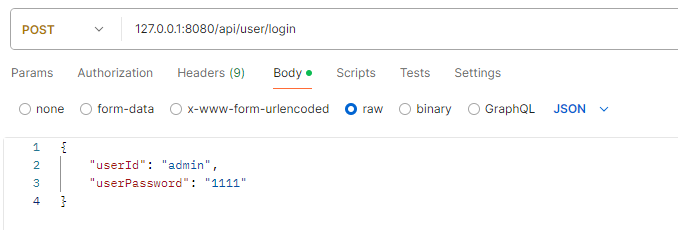
포스트맨으로 다음과 같이 요청을 보낸다
응답 결과
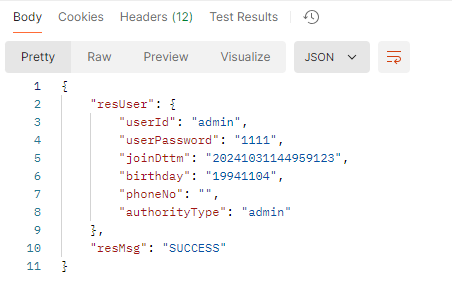

헤더를 확인해보면 인증 토큰이 담겨있다
조회 요청하기
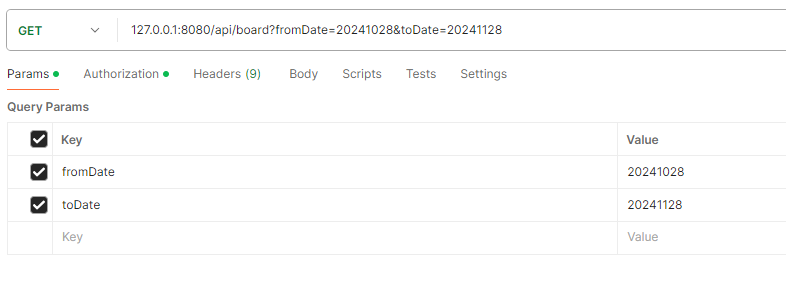
위와같이 조회요청을 보낼때

Authorization 탭에서 Auth Type을 Bearer Token으로 선택하고 로그인때 응답받은 토큰을 복사에서 붙여 넣는다
결과
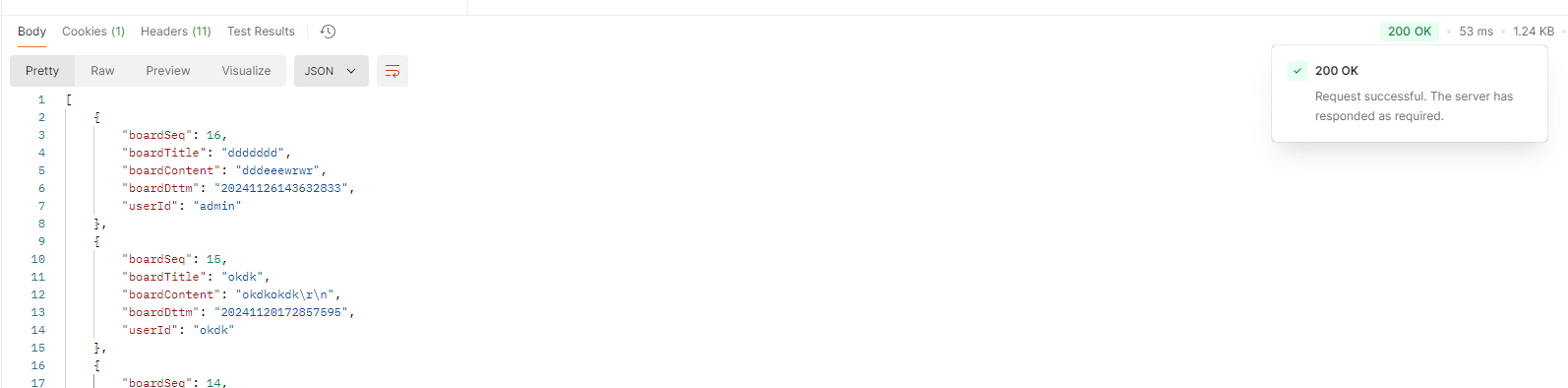
200으로 조회가 정상적으로 잘 완료된 모습
정상적으로 구현이 완료 되었다면 조회 요청같은 로그인 요청이 아닌 요청이 들어오면 보안 필터에서 토큰을 통해 검증이 완료되어야 정상적인 응답이 온다
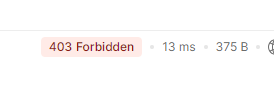
검증이 실해하면 403 Forbidden에러 발생

오키동키