
무엇이든 담을 수 있는 상자를 만들어보자!
< 최상위 클래스인 Object를 이용한 무엇이든 담을 수 있는 ObjectBox >
public class ObjectBox {
    private Object object;

    public void set(Object obj){
        this.object = obj;
    }

    public Object get() {
        return this.object;
    }
}
< 위 상자를 이용한 Main>
public class ObjectBoxMain {
    public static void main(String[] args) {
        ObjectBox box = new ObjectBox();
        box.set("kim");
        🚩String str = (String)box.get();//형변환 해줘야 한다.
        System.out.println("str.toUppertCase() = " + str.toUpperCase());

    }
}
→ get()메서드로 객체를 얻을 때 Object로 얻기 때문에 형변환 해줘야한다.
ObjectBox는 어떤 Object든 저장할 수 있고, 어떤 Object를 꺼낼 수도 있다.
하지만, 꺼내서 사용할 때는 원래 타입으로 변환시키는 번거로운 과정이 필요하다.
-> 이를 해결해주는 것이 제네릭 문법이다.
GenericBox
🏁 GenericBox
- T는 제네릭과 관련된 부분이다.
- 제네릭은 클래스이름 뒤나, 메소드의 리턴타입 앞에 붙을 수 있다.
- < T >부분은 T라는 이름의 제네릭 타입을 선언한다는 것을 의미한다.
- T는 Type의 약자기 때문에 많이 사용되는 문자이지 꼭 T를 쓸필요는 없다.
- T가 아니라 E나 D 등의 단어를 사용해도 된다.
제네릭의 장점
- 정해진 타입만 사용하도록 강제할 수 있다.
- 타입을 강제함으로써 컴파일할 때 잘못된 타입의 값이 저장되는 것을 막을 수 있다.
< GenericBox Class >
public class GenericBox <T>{
    private T t;

    public void set(T obj){
        this.t=obj;
    }

    public T get() {
        return this.t;
    }
}
< GenericBox Main >
public class GenericBoxMain {
    public static void main(String[] args) {
        GenericBox<String> genericBox = new GenericBox<>();
        genericBox.set("kim");
        String str = genericBox.get();
        System.out.println("str.toUpperCase() = " + str.toUpperCase());
    }
}
컬렉션 프레임워크 (Collection Framework)
컬렉션 프레임워크란?
-> Java Collections Framework라고 불리는 Collections API는 Java 2부터 추가된 자료 구조 클래스 패키지를 말한다. 자료(Data)를 다룰 때 반드시 필요한 클래스의 모음으로써 JAVA 프로그래머라면 꼭 숙지하고 있어야만 한다.
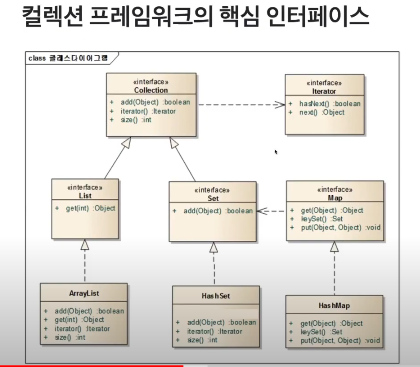
🏁 java.util.Collection 인터페이스 (=바구니같은 역할)
- java.util.Collection 인터페이스는 컬렉션 프레임워크에서 가장 기본이 되는 인터페이스이다.
- 해당 인터페이스는 순서를 기억하지 않고, 중복을 허용하여 자료를 다루는 목적으로 만들어졌다.
- Collection 인터페이스 타입으로 코드 작성
public static void main(String[] args) {
        Collection<String> collection = new ArrayList<>();
        collection.add("kim");//ArrayList가 오버라이딩 한 add 메서드 이용
        collection.add("lee");
        collection.add("hong");

        System.out.println(collection.size());//ArrayList가 오버라이딩 한 size함수 이용

        Iterator<String> iter = collection.iterator();
        while(iter.hasNext()){// 출력값이 kim,lee,hong 순서대로인 이유
            String str = iter.next(); // -> ArrayList가 Collection의 메서드를 오버라이딩 하고 있어서
            System.out.println(str);
        }
    }
-> 🚩언제든 인터페이스를 구현한 더 좋은 클래스들이 있을 수 있기 때문에 위에서 Collection 타입으로 코드를 작성한 것처럼 인터페이스 타입으로 코드를 작성해야한다.
🏁java.util.List 인터페이스 (=바구니에 들어온 순서를 기억하는 자료구조)
- java.util.List 인터페이스는 순서가 중요한 자료를 다룰 때 사용하는 인터페이스다.
- Collection을 상속받음으로써 Collection이 가지고 있는 add(), size(), iterator()메소드를 사용할 수 있다.
- 해당 인터페이스는 순서를 알고 있다고 가정하기 때문에 특정 순서로 저장된 자료를 꺼낼 수 있는 get(int) 메소드를 가지고 있다.
- ArrayList 예시
public static void main(String[] args) {
        // 자료구조객체들은 제네릭을 사용하지 않으면
        // Object 타입을 저장합니다.
        ArrayList list = new ArrayList();
        list.add("kim");
        list.add("lee");
        list.add("hong");

        String str1 = (String)list.get(0);
        String str2 = (String)list.get(1);
        String str3 = (String)list.get(2);

        System.out.println(str1);
        System.out.println(str2);
        System.out.println(str3);
}🏁java.util.Set 인터페이스(=바구니에 들어온 데이터의 중복을 허용하지 않는 자료구조)
- java,util.Set 인터페이스는 중복을 허용하지 않는 자료를 다룰 때 사용하는 인터페이스이다.
- 중복을 허용하지 않는다는 것은 같은 값을 저장할 수 없다는 것이다.
- 같은 값을 여러번 추가하여도 마지막 값 하나만 저장됨을 의미한다.
- Set인터페이스와 같이 해시 알고리즘이 나오면 저장되는 객체들은 Object가 가지고 있는 equals()메소드와 hashCode()메소드를 오버라이딩 해야한다.
- Set & HastSet 사용 예시
    public static void main(String[] args) {
        Set<MyData> mySet = new HashSet<>();
        mySet.add(new MyData("kim", 500));
        mySet.add(new MyData("lee", 200));
        mySet.add(new MyData("hong", 700));
        mySet.add(new MyData("hong", 700));//위에 것과 반복 같은데 왜 둘 다 저장되지?
        // -> 서로 다른 객체이기 때문이다.

        Iterator<MyData> iter = mySet.iterator();
        while(iter.hasNext()){
            MyData myData = iter.next();
            System.out.println("myData = " + myData);
        }
    }
< MyData Class >
class MyData{
    private String name;
    private int value;

    public MyData(String name, int value) {
        this.name = name;
        this.value = value;
    }

    public String getName() {
        return name;
    }

    public int getValue() {
        return value;
    }

    @Override
    public String toString() {
        return "MyData{" +
                "name='" + name + '\'' +
                ", value=" + value +
                '}';
    }
}🏁java.util.Iterator 인터페이스 (=바구니의 것을 꺼내는 역할)
- java.util.Itorator 인터페이스는 자료구조에서 자료를 꺼내기 위한 목적으로 사용되는 인터페이스다.
- Iterator 패턴을 구현하고 있다.
- hasNext() 메서드는 꺼낼 것이 있는지 없는지 boolean 형태로 반환해주는 메서드
- next() 메서드는 Object를 꺼내주는 메서드
🏁java.util.Map 인터페이스 (=키와 값을 가진 자료구조)
- java.util.Map 인터페이스는 키(Key)와 값(Value)를 함께 저장하기 위한 목적으로 만들어진 인터페이스이다.
- 같은 Key값으론 하나의 값만 저장할 수 있다.
- Map & Set 예시
public static void main(String[] args) {
        Map<String, String> map = new HashMap<>();
        map.put("k1", "hello");
        map.put("k2", "hi");
        map.put("k3", "안녕");
        map.put("k3", "안녕하세요");//기존의 키값에 덮어쓴다.

        Set<String> keySet = map.keySet();//Map에 있는 모든 키들에 접근할 수 있는 Set 객체가 나옴
        Iterator<String> iter = keySet.iterator();//set으로부터 하나씩 꺼낼 수 있는 iterator 반환
        while(iter.hasNext()){
            String key = iter.next();
            String value = map.get(key);

            System.out.println((key + " : " + value));
        }
}- key 값이 모여 있는 건 Set으로 출력할 수 있고, value는 Map에 있는 get()메서드로 출력할 수 있다.
collections 클래스
sort(list) : 정렬하는 메서드
shuffle(list) : 섞는 메서드

기회를 잡기 위해 준비하자 !