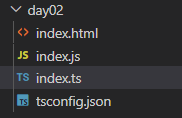
tsconfig.json
{
  "compilerOptions": {
    "target": "ES6",
    "module": "ES6",
    "lib": ["es2015", "dom", "dom.iterable"],
    "strictNullChecks": true
  }
}
index.html
<!DOCTYPE html>
<html lang="en">
  <head>
    <meta charset="UTF-8" />
    <meta http-equiv="X-UA-Compatible" content="IE=edge" />
    <meta name="viewport" content="width=device-width, initial-scale=1.0" />
    <title>Document</title>
  </head>
  <body>
    <h4 id="title">Hello!</h4>
    <a href="naver.com">link</a>
    <button id="button">button</button>

    <script src="index.js"></script>
  </body>
</html>
index.ts
let title = document.getElementById("title");

// null 방지 --> narrowing
// way 1.
if (title != null) {
  title.innerHTML = "Nice to meet you!";
}
// way 2.
if (title instanceof Element) {
  title.innerHTML = "Nice to meet you!";
}
// way 3.
let title1 = document.getElementById("title") as Element;
// null이 저장되어도 무조건 Element 타입으로 간주(비권장)
title1.innerHTML = "Nice to meet you!";

// way 4. (option chaining)
// title에 innerHTML이 존재하면 출력
// 없으면 undefined
if (title?.innerHTML != undefined) {
  title.innerHTML = "Nice to meet you!";
}

// way 5.
// tsconfing에서 null check 해제(비권장)
- Dom 객체에 접근할 때, Union type (Element | null)으로 인해 null 값을 방지하기 위한 방법 (narrowing)
- 방법 2 권장
Element type
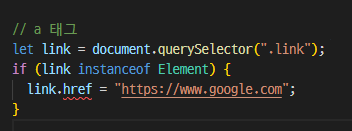
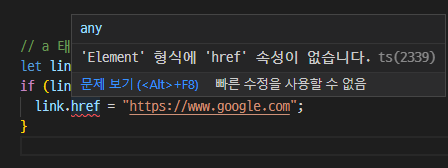
- a링크의 href 속성을 변경하고 싶지만, Element type으로 narrowing 했고 Element type에는 href 속성이 없다.
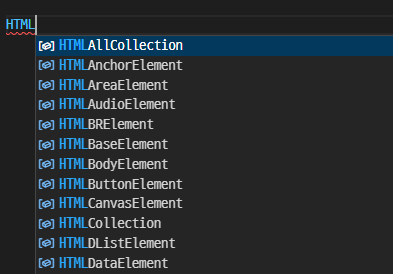
- 하지만 typescript에는 Element type을 상속한 type들이 있고 그 중 HTMLAnchorElement 이용
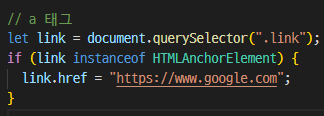
Element 는 광범위하기 때문에 정리가 잘 안되있다. 특정 속성을 사용하려면 그에 맞는 type을 선택
event listener
// button 태그
let button = document.getElementById('button');
button?.addEventListener('click', () => {

})
一期一会