프로젝트 진행 중 스마트폰의 터치 이벤트 좌표를 실시간으로 읽어와야 하는 상황이 발생했습니다. 이에 ADB(Android Debug Bridge)를 이용해 데이터를 받아오는 방법을 선택하게 되었고, 여러 번의 시행착오를 겪으며 문제를 해결해 나갔습니다. 아래는 진행 과정과 해결 과정을 일자별로 정리한 내용입니다.
먼저 ADB란
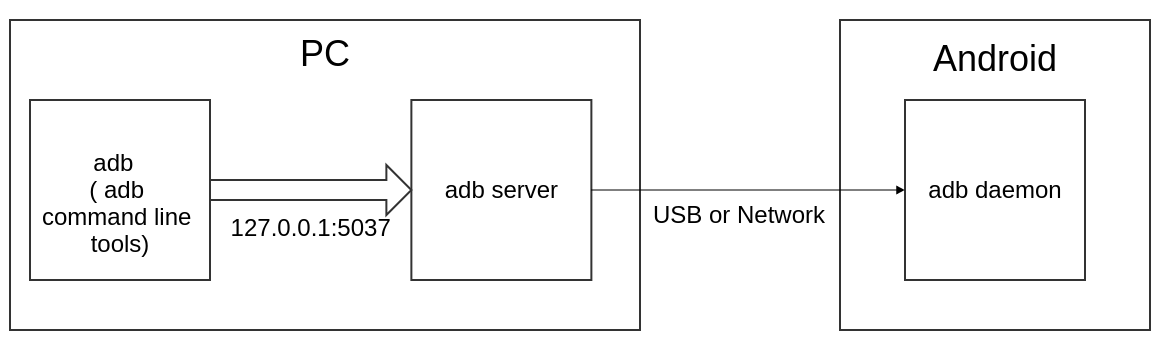
ADB(Android Debug Bridge)는 안드로이드 디바이스와 PC 간의 디버깅 및 통신을 가능하게 해주는 도구입니다.
ADB를 통해 명령을 보내거나 디바이스 상태를 확인하고, 데이터를 추출할 수 있습니다.
📆 Day 1: ADB를 통한 초기 데이터 수집 시도
목표:
Python 코드를 활용하여 ADB를 통해 스마트폰의 터치 좌표 값을 읽어오기
시행:
- 인터넷과 GPT의 도움을 받아 ADB를 호출하는 Python 코드를 작성
- 초기 실행 시도에서 터치 값 읽기가 실패
문제점 및 원인:
- CMD에서 로그를 확인한 결과, 사용한 케이블이 충전 전용 케이블이라 데이터 전송이 되지 않는 문제 발견
- 이후 데이터 전송이 가능한 케이블로 교체
느낀 점:
하드웨어 환경(케이블 등)의 기본 설정이 소프트웨어 디버깅에 미치는 영향이 크다는 점을 인지
📆 Day 2: 디바이스 권한 문제와 해결
문제:
새로운 케이블과 다른 스마트폰 기기를 사용했음에도 여전히 문제가 발생하였고, 에러 메시지로는 다음과 같이 나타났습니다.
RuntimeError: ERROR: 'FAIL' 00a7device unauthorized.
해결 과정:
- 원인을 조사한 결과, 디바이스의 USB 디버깅 권한 문제가 원인이었음을 확인
- 다음 3가지 절차로 문제 해결:
adb kill-server명령어 실행하여 기존의 ADB 연결 종료- 스마트폰의 개발자 옵션에서 USB 권한 삭제
- USB 디버깅 기능을 껐다가 다시 켜면서 나타난 팝업 창에서 USB 디버깅 허용 선택
- 이후
adb devices명령어를 통해 PC와 스마트폰 간 연결 상태를 정상적으로 확인
느낀 점:
ADB 사용 시 디바이스의 권한 설정 및 인증 과정이 중요하며, 문제 발생 시 우선적으로 해당 부분을 점검해야 함
📆 Day 3: 좌표 읽기 성공과 초기 문제 해결
목표:
스마트폰 터치 좌표 값을 성공적으로 읽어오기
방법:
- ADB 명령어를 Python의
subprocess모듈로 호출하여 터치 좌표 데이터를 추출 - 경로 문제 등 초기의 설정 관련 오류를 수정하기 위해 필요한 경로를 명시적으로 지정
from ppadb.client import Client as AdbClient
import time
import subprocess

class ADBTest:

    def __init__(self):
        print('ADBTest ready')

    def connect(self):
        client = AdbClient(host="127.0.0.1", port=5037)
        devices = client.devices()

        if len(devices) == 0:
            print('장치가 없습니다')
            quit()

        device = devices[0]
        print(f'장치: {device}')
        return device

    def listen_touch_events(self):
        device = self.connect()
        print("터치 이벤트 감지 중... (Ctrl+C로 종료)")
        adb_path = r"C:\adb\platform-tools\adb.exe"  # 절대경로로 지정

        try:
            process = subprocess.Popen(
                [adb_path, "shell", "getevent", "-lt"],
                stdout=subprocess.PIPE,
                stderr=subprocess.PIPE,
                universal_newlines=True,
                bufsize=1
            )

            for line in process.stdout:
                if "ABS_MT_POSITION" in line or "SYN_REPORT" in line:
                    print(line.strip())
        except KeyboardInterrupt:
            print("종료합니다.")
            process.terminate()
            process.wait()
        except FileNotFoundError:
            print("ADB 경로를 다시 확인하세요.")
        except Exception as e:
            print(f"오류 발생: {e}")

if __name__ == "__main__":
    ADBbot = ADBTest()
    ADBbot.listen_touch_events()
결과:
PC 콘솔에 핸드폰 터치 좌표 값이 정상적으로 출력되는 것을 확인함
📆 Day 4: 좌표 값 포맷팅과 해상도 문제 해결
문제점:
- ADB로 받아온 좌표 값이 읽기 어려운 형식으로 출력됨
- 개발자 옵션에 표시되는 실제 해상도와 ADB에서 확인되는 해상도가 상이하여 좌표 값이 부정확하게 매핑됨
해결책:
- 문자열 슬라이싱 등 텍스트 파싱 기법을 활용하여 좌표 값을 가공 및 정제
adb shell getevent -p명령어로 확인한 해상도를 기준으로 변환 식(예:
실제 좌표 = (adb 좌표) * (실제 해상도) / (adb 해상도))를 적용하여 정확한 좌표 값을 산출
import time
import subprocess
from ppadb.client import Client as AdbClient

class ADBTest:

    def __init__(self):
        print('ADBTest ready')
        self.lines = []  # 선(line) 들을 저장
        self.current_line = []  # 현재 선의 좌표들
        self.last_touch_time = None
        self.touch_timeout = 3  # 3초

    def connect(self):
        client = AdbClient(host="127.0.0.1", port=5037)
        devices = client.devices()

        if len(devices) == 0:
            print('장치가 없습니다')
            quit()

        device = devices[0]
        print(f'장치: {device}')
        return device

    def listen_touch_events(self):
        device = self.connect()
        print("터치 이벤트 감지 중... (Ctrl+C로 종료)")
        adb_path = r"C:\adb\platform-tools\adb.exe"

        x = y = None
        try:
            process = subprocess.Popen(
                [adb_path, "shell", "getevent", "-lt"],
                stdout=subprocess.PIPE,
                stderr=subprocess.PIPE,
                universal_newlines=True,
                bufsize=1
            )

            for line in process.stdout:
                now = time.time()

                # 터치 좌표가 들어오면 갱신
                if "ABS_MT_POSITION_X" in line:
                    x = int(line.strip().split()[-1], 16)
                elif "ABS_MT_POSITION_Y" in line:
                    y = int(line.strip().split()[-1], 16)
                elif "SYN_REPORT" in line and x is not None and y is not None:
                	x = x * PANEL_INFO["x_res_max"] / 4095
                    y = y * PANEL_INFO["y_res_max"] / 4095
                    self.current_line.append((x, y))
                    self.last_touch_time = now
                    print(f"터치 좌표: ({x}, {y})")
                    x = y = None

                # 3초 이상 터치가 없으면 현재 좌표들을 하나의 선으로 저장
                if self.last_touch_time and now - self.last_touch_time > self.touch_timeout:
                    if self.current_line:
                        self.lines.append(self.current_line)
                        print(f"🟢 선 하나 저장 (좌표 {len(self.current_line)}개)")
                        self.current_line = []
                        self.last_touch_time = None

        except KeyboardInterrupt:
            print("\n종료합니다.")
            process.terminate()
            process.wait()

            # 종료 시 현재까지 수집된 선들 출력
            for idx, line in enumerate(self.lines):
                print(f"\n📝 Line {idx+1}: {line}")
        except FileNotFoundError:
            print("ADB 경로를 다시 확인하세요.")
        except Exception as e:
            print(f"오류 발생: {e}")
느낀 점:
좌표 데이터의 포맷과 해상도 불일치는 ADB 사용 시 예상치 못한 문제로 작용할 수 있으므로, 추가적인 후처리 과정을 통해 보정이 필요함
📆 Day 5: 멀티스레딩을 통한 실시간 데이터 처리
목표:
터치 좌표 값을 기존 코드와 동시 실행할 수 있도록 통합
방법:
- Python의 멀티스레딩 기술을 도입하여, 터치 데이터를 읽어오는 프로세스와 기존 코드가 병렬로 동작하도록 구현
결과:
실시간으로 터치 좌표 데이터를 효율적으로 받아 처리할 수 있게 되어 전체 시스템의 안정성과 속도를 개선
느낀 점0:
멀티스레딩을 활용함으로써 ADB와의 데이터 통신이 다른 프로세스와 원활하게 동작할 수 있게 되어, 프로젝트의 요구사항을 성공적으로 충족할 수 있었음
from ppadb.client import Client as AdbClient
import time
import subprocess
import re
import sys
import os
import threading
import queue

# 패널 정보 설정 (전역 상수)
PANEL_INFO = {
    "x_panel": 70,
    "y_panel": 160,
    "x_res_max": 1440,
    "y_res_max": 3088
}

# 전역 상태 저장
lines = []
current_line = []
last_touch_time = None
touch_timeout = 0.5  # 초

def connect_device():
    client = AdbClient(host="127.0.0.1", port=5037)
    devices = client.devices()
    if len(devices) == 0:
        print("No devices found")
        quit()
    return devices[0]

def adb_on(test_type, mode=None, stop_event=None):
    print("🟢 adb_on() called")
    device = connect_device()
    adb_path = r"C:\adb\platform-tools\adb.exe"

    global lines, current_line, last_touch_time

    x = y = None

    try:
        process = subprocess.Popen(
            [adb_path, "shell", "getevent", "-lt"],
            stdout=subprocess.PIPE,
            stderr=subprocess.PIPE,
            universal_newlines=True,
            bufsize=1
        )

        stdout_queue = queue.Queue()

        def enqueue_output(out, queue):
            for line in iter(out.readline, ''):
                queue.put(line)
            out.close()

        thread = threading.Thread(target=enqueue_output, args=(process.stdout, stdout_queue))
        thread.daemon = True
        thread.start()

        while not stop_event.is_set():
            if not queue.Empty():
                line = stdout_queue.get(timeout=0.2)  # 0.2초 기다리고 없으면 다시 stop_event 확인

            now = time.time()

            match = re.search(r'ABS_MT_POSITION_X\s+([0-9a-fx]+)', line, re.IGNORECASE)
            if match:
                x = int(match.group(1), 16)
                continue

            match = re.search(r'ABS_MT_POSITION_Y\s+([0-9a-fx]+)', line, re.IGNORECASE)
            if match:
                y = int(match.group(1), 16)
                continue

            if "SYN_REPORT" in line and x is not None and y is not None:
                last_touch_time = now

                x_mm = x * PANEL_INFO["x_res_max"] / 4095
                y_mm = y * PANEL_INFO["y_res_max"] / 4095

                current_line.append((x_mm, y_mm))
                x = y = None

            if last_touch_time and now - last_touch_time > touch_timeout and current_line:
                lines.append(current_line)
                current_line = []
                last_touch_time = None


            if len(lines) >= 3:
                break

    finally:
        print("🔚 adb_on(): ADB 프로세스 종료")
        process.terminate()
        try:
            process.wait(timeout=1)
        except subprocess.TimeoutExpired:
            process.kill()
마치며
처음 접해보는 ADB 기술과 터치 데이터 처리 과정은 예상치 못한 난관을 많이 겪게 했지만, 각 단계별로 문제를 차근차근 해결하면서 기술적으로 큰 성장을 이루었습니다.
이번 경험은 하드웨어와 소프트웨어 간의 상호 작용, 디바이스 권한 설정, 데이터 후처리, 그리고 멀티스레딩 등 다양한 영역에서의 학습과 개선의 기회가 되었습니다.
앞으로도 이러한 경험을 기반으로 더 복잡한 프로젝트에 도전해보고, 문제 해결 능력을 더욱 발전시켜 나갈 계획입니다.