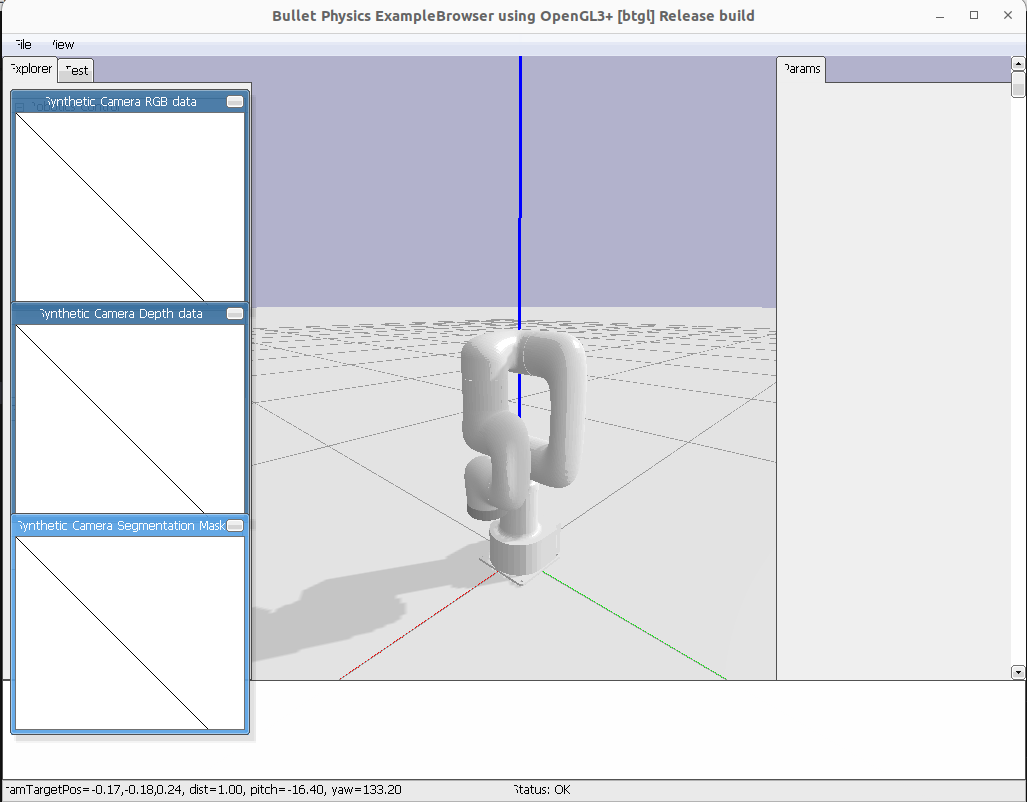
1.참고자료
<환경>
OS : ubuntu 22.04
ROS2 : humble
<tree구조>
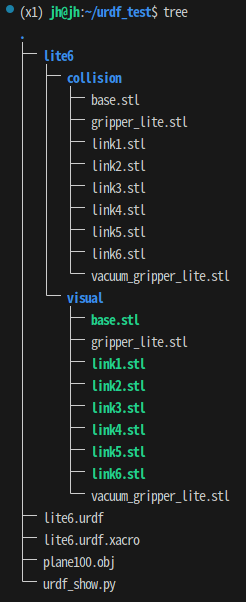
<참고 소스>
1.월드맵 좌표 오브젝트 모델 (*안쓰고 pybullet 자체 월드맵 사용해도 무관)
https://github.com/bulletphysics/bullet3/blob/master/data/plane100.obj
2.Ufactory로봇회사의 lite6 로봇팔 xacro파일
https://github.com/xArm-Developer/xarm_ros2/blob/master/xarm_description/urdf/lite6/lite6.urdf.xacro
2.진행
<pybullet 3.2.6 설치>
pip install pybullet==3.2.6<numpy 1.26.4 설치>
pip install numpy==1.26.4<버전 호환 이슈 : 파이불렛3.2.6 = 넘파이1.26.4 or 1.26.3 / 3.2.5 = 1.23.3>
링크 : https://github.com/bulletphysics/bullet3/issues/4523
<lite6.urdf.xacro 코드 수정>
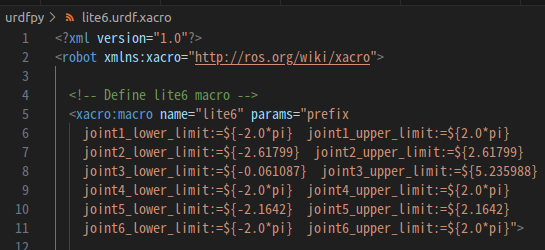
xacro 파일의 5번째 줄 보면 macro를 선언하고 있기 때문에 꼭 닫아줘야함.
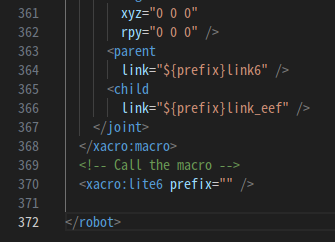
370번째 줄에 <xacro:lite6 prefix="" /> 이렇게 추가해서 닫아줄 것.
<xacro -> urdf 파일로 변환>
ros2 run xacro xacro /폴더명/lite6.urdf.xacro > /폴더명/lite6.urdf<lite6.urdf 코드 수정>
1.로봇 이름만들기
<?xml version="1.0" ?>
<robot name="lite6_robot_arm">
2.stl경로 지정하기
<mesh filename="/저장폴더/lite6/visual/base.stl"/><urdf시각화 실행 코드>
import pybullet as p
import pybullet_data
import os

urdf_file_path = os.path.abspath("/home/jh/urdf_test/lite6.urdf")

def visualize_urdf(urdf_file_path):
  # PyBullet GUI 초기화
  p.connect(p.GUI)
  p.setAdditionalSearchPath(pybullet_data.getDataPath())

  # 중력 및 평면 설정
  p.setGravity(0, 0, -9.81)
  plane_id = p.loadURDF("plane.urdf")

  try:
      # URDF 모델 로드
      model_id = p.loadURDF(urdf_file_path, useFixedBase=False)  # useFixedBase=False로 수정
      if model_id == -1:
          raise ValueError(f"Failed to load URDF: {urdf_file_path}")
      print(f"Successfully loaded URDF: {urdf_file_path}")

      # 카메라 초기화
      p.resetDebugVisualizerCamera(cameraDistance=2.0, cameraYaw=50, cameraPitch=-30, cameraTargetPosition=[0, 0, 0.5])

      # PyBullet 유지
      print("Press Enter in the console to exit.")
      input()  # 사용자 입력 대기

  except Exception as e:
      print(f"Error loading URDF: {e}")
  finally:
      p.disconnect()  # PyBullet 연결 종료

# 실행 코드
if __name__ == "__main__":
  if urdf_file_path:
      # URDF를 시각화
      visualize_urdf(urdf_file_path)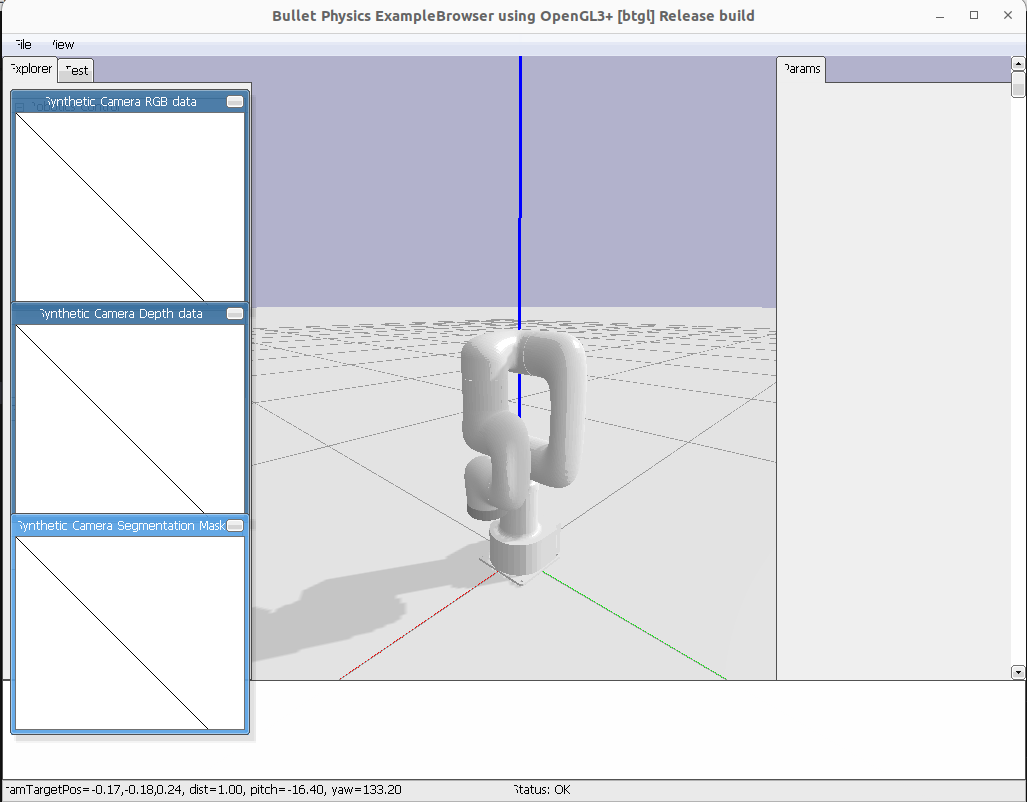
잘뜬다!
<쓰려는 이유?>
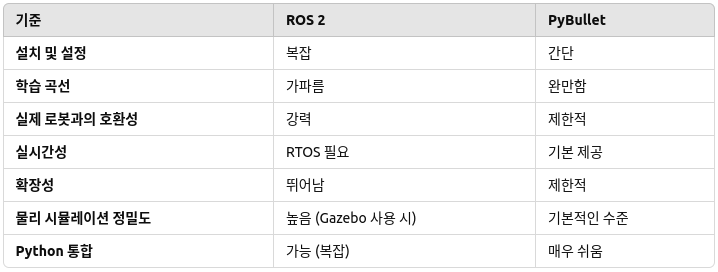
나는 로봇암의 urdf모델을 시뮬레이션에 불러와 로봇제어 검증 및 pyqt5의 gui에 실시간 영상으로 로봇의 동작모습을 띄우고 로봇의 각 앵글값을 조절하는 슬라이드바를 함께 설치하려는게 목적이었다.
장기적인 프로젝트와 실제 로봇에 배포할 계획이라면 ROS2가 좋지만..
나는 실시간 시뮬레이션과 빠른 개발을 원한다 고로 pybullet을 선택했다.
여차하면 PyBullet로 간단한 실시간 시뮬레이션을 처리하고 ROS2로 제어 메시징 및 확장성을 추가하는 방식으로, PyBullet과 ROS 2를 연결하려면 ROS2 Bullet Bridge를 활용하거나 직접 커스텀 통신 노드를 구현할 수 있다.
3.코드 총정리
<lite6.urdf>
<?xml version="1.0" ?>
<robot name="lite6_robot_arm">
<material name="White">
  <color rgba="1.0 1.0 1.0 1.0"/>
</material>
<material name="Silver">
  <color rgba="0.753 0.753 0.753 1.0"/>
</material>
<link name="link_base">
  <inertial>
    <origin rpy="0 0 0" xyz="-0.00829544579053192 3.26357432323433E-05 0.0631194584987089"/>
    <mass value="1.65393501783165"/>
    <inertia ixx="0" ixy="0" ixz="0" iyy="0" iyz="0" izz="0"/>
  </inertial>
  <visual>
    <origin rpy="0 0 0" xyz="0 0 0"/>
    <geometry>
      <mesh filename="/home/jh/urdf_test/lite6/visual/base.stl"/>
    </geometry>
    <material name="White"/>
  </visual>
  <collision>
    <origin rpy="0 0 0" xyz="0 0 0"/>
    <geometry>
      <mesh filename="/home/jh/urdf_test/lite6/visual/base.stl"/>
    </geometry>
  </collision>
</link>
<link name="link1">
  <inertial>
    <origin rpy="0 0 0" xyz="-0.00036 0.03788 -0.0027"/>
    <mass value="1.169"/>
    <inertia ixx="1.45164E-03" ixy="1.24E-05" ixz="-6.7E-06" iyy="8.873E-04" iyz="1.255E-04" izz="1.31993E-03"/>
  </inertial>
  <visual>
    <origin rpy="0 0 0" xyz="0 0 0"/>
    <geometry>
      <mesh filename="/home/jh/urdf_test/lite6/visual/link1.stl"/>
    </geometry>
    <material name="White"/>
  </visual>
  <collision>
    <origin rpy="0 0 0" xyz="0 0 0"/>
    <geometry>
      <mesh filename="/home/jh/urdf_test/lite6/visual/link1.stl"/>
    </geometry>
  </collision>
</link>
<joint name="joint1" type="revolute">
  <origin rpy="0 0 0" xyz="0 0 0.2435"/>
  <parent link="link_base"/>
  <child link="link1"/>
  <axis xyz="0 0 1"/>
  <limit effort="50.0" lower="-6.283185307179586" upper="6.283185307179586" velocity="3.14"/>
  <dynamics damping="1.0" friction="1.0"/>
</joint>
<link name="link2">
  <inertial>
    <origin rpy="0 0 0" xyz="0.178 0.0 0.0576"/>
    <mass value="1.192"/>
    <inertia ixx="1.5854E-03" ixy="-6.766E-06" ixz="-1.15136E-03" iyy="5.6097E-03" iyz="1.14E-06" izz="4.85E-03"/>
  </inertial>
  <visual>
    <origin rpy="0 0 0" xyz="0 0 0"/>
    <geometry>
      <mesh filename="/home/jh/urdf_test/lite6/visual/link2.stl"/>
    </geometry>
    <material name="White"/>
  </visual>
  <collision>
    <origin rpy="0 0 0" xyz="0 0 0"/>
    <geometry>
      <mesh filename="/home/jh/urdf_test/lite6/visual/link2.stl"/>
    </geometry>
  </collision>
</link>
<joint name="joint2" type="revolute">
  <origin rpy="1.5708 -1.5708 3.1416" xyz="0 0 0"/>
  <parent link="link1"/>
  <child link="link2"/>
  <axis xyz="0 0 1"/>
  <limit effort="50.0" lower="-2.61799" upper="2.61799" velocity="3.14"/>
  <dynamics damping="1.0" friction="1.0"/>
</joint>
<link name="link3">
  <inertial>
    <origin rpy="0 0 0" xyz="0.07285 -0.030 -0.0009"/>
    <mass value="0.930"/>
    <inertia ixx="8.861E-04" ixy="-3.9287E-04" ixz="7.066E-05" iyy="1.5785E-03" iyz="-2.445E-05" izz="1.84677E-03"/>
  </inertial>
  <visual>
    <origin rpy="0 0 0" xyz="0 0 0"/>
    <geometry>
      <mesh filename="/home/jh/urdf_test/lite6/visual/link3.stl"/>
    </geometry>
    <material name="White"/>
  </visual>
  <collision>
    <origin rpy="0 0 0" xyz="0 0 0"/>
    <geometry>
      <mesh filename="/home/jh/urdf_test/lite6/visual/link3.stl"/>
    </geometry>
  </collision>
</link>
<joint name="joint3" type="revolute">
  <origin rpy="-3.1416 0 1.5708" xyz="0.2002 0 0"/>
  <parent link="link2"/>
  <child link="link3"/>
  <axis xyz="0 0 1"/>
  <limit effort="32.0" lower="-0.061087" upper="5.235988" velocity="3.14"/>
  <dynamics damping="1.0" friction="1.0"/>
</joint>
<link name="link4">
  <inertial>
    <origin rpy="0 0 0" xyz="-0.0004 -0.0275 -0.0817"/>
    <mass value="1.31"/>
    <inertia ixx="3.705E-03" ixy="-2.0E-06" ixz="7.17E-06" iyy="3.0455E-03" iyz="-9.3188E-04" izz="1.5413E-03"/>
  </inertial>
  <visual>
    <origin rpy="0 0 0" xyz="0 0 0"/>
    <geometry>
      <mesh filename="/home/jh/urdf_test/lite6/visual/link4.stl"/>
    </geometry>
    <material name="White"/>
  </visual>
  <collision>
    <origin rpy="0 0 0" xyz="0 0 0"/>
    <geometry>
      <mesh filename="/home/jh/urdf_test/lite6/visual/link4.stl"/>
    </geometry>
  </collision>
</link>
<joint name="joint4" type="revolute">
  <origin rpy="1.5708 0 0" xyz="0.087 -0.22761 0"/>
  <parent link="link3"/>
  <child link="link4"/>
  <axis xyz="0 0 1"/>
  <limit effort="32.0" lower="-6.283185307179586" upper="6.283185307179586" velocity="3.14"/>
  <dynamics damping="1.0" friction="1.0"/>
</joint>
<link name="link5">
  <inertial>
    <origin rpy="0 0 0" xyz="0.0 0.010 0.0019"/>
    <mass value="0.784"/>
    <inertia ixx="5.668E-04" ixy="6E-07" ixz="-5.3E-06" iyy="5.077E-04" iyz="-4.8E-07" izz="5.3E-04"/>
  </inertial>
  <visual>
    <origin rpy="0 0 0" xyz="0 0 0"/>
    <geometry>
      <mesh filename="/home/jh/urdf_test/lite6/visual/link5.stl"/>
    </geometry>
    <material name="White"/>
  </visual>
  <collision>
    <origin rpy="0 0 0" xyz="0 0 0"/>
    <geometry>
      <mesh filename="/home/jh/urdf_test/lite6/visual/link5.stl"/>
    </geometry>
  </collision>
</link>
<joint name="joint5" type="revolute">
  <origin rpy="1.5708 0 0" xyz="0 0 0"/>
  <parent link="link4"/>
  <child link="link5"/>
  <axis xyz="0 0 1"/>
  <limit effort="32.0" lower="-2.1642" upper="2.1642" velocity="3.14"/>
  <dynamics damping="1.0" friction="1.0"/>
</joint>
<link name="link6">
  <inertial>
    <origin rpy="0 0 0" xyz="0.0 -0.00194 -0.0102"/>
    <mass value="0.180"/>
    <inertia ixx="7.726E-05" ixy="1E-06" ixz="4E-07" iyy="8.5665E-05" iyz="-6E-07" izz="1.4814E-04"/>
  </inertial>
  <visual>
    <origin rpy="0 0 0" xyz="0 0 0"/>
    <geometry>
      <mesh filename="/home/jh/urdf_test/lite6/visual/link6.stl"/>
    </geometry>
    <material name="Silver"/>
  </visual>
  <collision>
    <origin rpy="0 0 0" xyz="0 0 0"/>
    <geometry>
      <mesh filename="/home/jh/urdf_test/lite6/visual/link6.stl"/>
    </geometry>
  </collision>
</link>
<joint name="joint6" type="revolute">
  <origin rpy="-1.5708 0 0" xyz="0 0.0625 0"/>
  <parent link="link5"/>
  <child link="link6"/>
  <axis xyz="0 0 1"/>
  <limit effort="20.0" lower="-6.283185307179586" upper="6.283185307179586" velocity="3.14"/>
  <dynamics damping="1.0" friction="1.0"/>
</joint>
<link name="link_eef"/>
<joint name="joint_eef" type="fixed">
  <origin rpy="0 0 0" xyz="0 0 0"/>
  <parent link="link6"/>
  <child link="link_eef"/>
</joint>
</robot>
<urdf_show.py>
import pybullet as p
import pybullet_data
import os

urdf_file_path = os.path.abspath("/home/jh/urdf_test/lite6.urdf")

def visualize_urdf(urdf_file_path):
    # PyBullet GUI 초기화
    p.connect(p.GUI)
    p.setAdditionalSearchPath(pybullet_data.getDataPath())

    # 중력 및 평면 설정
    p.setGravity(0, 0, -9.81)
    plane_id = p.loadURDF("plane.urdf")

    try:
        # URDF 모델 로드
        model_id = p.loadURDF(urdf_file_path, useFixedBase=False)  # useFixedBase=False로 수정
        if model_id == -1:
            raise ValueError(f"Failed to load URDF: {urdf_file_path}")
        print(f"Successfully loaded URDF: {urdf_file_path}")

        # 카메라 초기화
        p.resetDebugVisualizerCamera(cameraDistance=2.0, cameraYaw=50, cameraPitch=-30, cameraTargetPosition=[0, 0, 0.5])

        # PyBullet 유지
        print("Press Enter in the console to exit.")
        input()  # 사용자 입력 대기

    except Exception as e:
        print(f"Error loading URDF: {e}")
    finally:
        p.disconnect()  # PyBullet 연결 종료

# 실행 코드
if __name__ == "__main__":
    if urdf_file_path:
        # URDF를 시각화
        visualize_urdf(urdf_file_path)