CSS 구성 요소
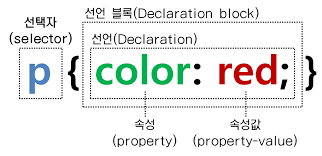
Sample code
- CSS 적용 전
<!doctype html>
<html>
<head>
  <title>PHX SUNS - DB</title>
  <meta charset="utf-8">
</head>
<body>
  <h1><a href="index.html">PHOENIX SUNS BIG 3</a></h1>
  <ol>
    <li><a href="1.html">Chris Paul</a></li>
    <li><a href="2.html">Devin Booker</a></li>
    <li><a href="3.html">Deandre Ayton</a></li>
  </ol>
  <h2>Devin Booker</h2>
  <p>
    Devin Armani Booker (born October 30, 1996) is an
    American professional basketball player for the Phoenix Suns of the
    National Basketball Association (NBA).
  </p>
  </body>
</html>
Selector
element
- 해당하는 태그에 CSS 적용
Excercise
a 태그와 h1 태그에 CSS 적용
<!doctype html>
<html>
<head>
  <title>PHX SUNS - DB</title>
  <meta charset="utf-8">
</head>
<!-- CSS 속성 추가 -->
<style>
  a {                       /* a 태그에 적용 */
    color:black;            /* 파란 글씨 검정으로 */
    text-decoration: none;  /* 밑줄 제거 */
  }
  h1 {                      /* h1 태그에 적용 */
    font-size: 45px;
    text-align: center;
  }
</style>
<body>
  <h1><a href="index.html">PHOENIX SUNS BIG 3</a></h1>
  <ol>
    <li><a href="1.html">Chris Paul</a></li>
    <li><a href="2.html">Devin Booker</a></li>
    <li><a href="3.html">Deandre Ayton</a></li>
  </ol>
  <h2>Devin Booker</h2>
  <p>
    Devin Armani Booker (born October 30, 1996) is an
    American professional basketball player for the Phoenix Suns of the
    National Basketball Association (NBA).
  </p>
  </body>
</html>
class
.class명으로 적용- class 는 여러개 적용 가능하고, 띄어쓰기로 구분. 이 경우에는 나중에 적용된 class 가 적용됨.
->active클래스가saw클래스보다 나중에 적용됐으므로 폰트 색상 purple 이 적용됨.
Exercise
sawclass 를 생성하여 들어가본 페이지(1, 2 페이지)의 폰트 색상을 orange 색으로 적용하기activeclass 를 생성하여 현재 페이지(2 페이지)의 폰트 색상을 purple 색으로 적용하기.
<!doctype html>
<html>
<head>
  <title>PHX SUNS - DB</title>
  <meta charset="utf-8">
</head>
<!-- CSS 속성 추가 -->
<style>
  .saw {                    /* saw class 에 적용 */
    color: orange;
  }
  .active {                 /* active class 에 적용 */
    color: purple;
  }
  a {                       /* a 태그에 적용 */
    color:black;            /* 파란 글씨 검정으로 */
    text-decoration: none;  /* 밑줄 제거 */
  }
  h1 {                      /* h1 태그에 적용 */
    font-size: 45px;
    text-align: center;
  }
</style>
<body>
  <h1><a href="index.html">PHOENIX SUNS BIG 3</a></h1>
  <ol>
    <li><a href="1.html" class="saw">Chris Paul</a></li>
    <li><a href="2.html" class="saw active">Devin Booker</a></li>
    <li><a href="3.html">Deandre Ayton</a></li>
  </ol>
  <h2>Devin Booker</h2>
  <p>
    Devin Armani Booker (born October 30, 1996) is an
    American professional basketball player for the Phoenix Suns of the
    National Basketball Association (NBA).
  </p>
  </body>
</html>
id
#id값으로 적용- class 보다 우선적으로 적용된다.
- 선택자 우선순위 : id > class > 기본 태그 선택자
- 하나의 id 값은 유일해야 한다. 즉, 하나의 태그에만 적용 가능하다.
Exercise
현재 페이지에 active id 값을 적용해 폰트 색상 purple 적용하기
<!doctype html>
<html>
<head>
  <title>PHX SUNS - DB</title>
  <meta charset="utf-8">
</head>
<!-- CSS 속성 추가 -->
<style>
  #active {                 /* active id 값 적용 */
    color: purple;
  }
  .saw {                    /* saw class 에 적용 */
    color: orange;
  }
  a {                       /* a 태그에 적용 */
    color:black;            /* 파란 글씨 검정으로 */
    text-decoration: none;  /* 밑줄 제거 */
  }
  h1 {                      /* h1 태그에 적용 */
    font-size: 45px;
    text-align: center;
  }
</style>
<body>
  <h1><a href="index.html">PHOENIX SUNS BIG 3</a></h1>
  <ol>
    <li><a href="1.html" class="saw">Chris Paul</a></li>
    <li><a href="2.html" class="saw" id="active">Devin Booker</a></li>
    <li><a href="3.html">Deandre Ayton</a></li>
  </ol>
  <h2>Devin Booker</h2>
  <p>
    Devin Armani Booker (born October 30, 1996) is an
    American professional basketball player for the Phoenix Suns of the
    National Basketball Association (NBA).
  </p>
  </body>
</html>