
1. ifPresentOrElse VS map & orElseGet
    user.ifPresentOrElse(
        u -> {
          log.info("user already exists with socialId = {}", socialId);

          u.updateNameAndEmail(name, email);
          userRepository.save(u);
        },
        () -> {
          log.info("user not found with socialId = {}", socialId);

          User u = new User(name, email, Role.USER, socialId);
          User savedUser = userRepository.save(u);
        });

return new CustomOAuth2User(name, user.get().getId(), Role.USER, socialId);- ifPresentOrElse의 경우 유저가 없을 때 유저를 새로 만들고, 그 만들어진 유저 id를 해당 스코프 밖에서 사용할 수가 없었다. 그 이유는 람다의 실행 결과가 user 인스턴스에 반영되지 않았기 때문인데, Security Filter에서 처리하고 있어서 @Transaction 어노테이션을 사용할 수 없었기 때문이다.
- 추가적인 변수를 사용해서 return 한다고 해도,
ifPresentOrElse는 Void를 리턴하기 때문에 컴파일되지 않는다. 아래와 같이 map과 orElseGet을 사용할 수 있다.
User user = userOptional.map(u -> {
    log.info("User already exists with socialId = {}", socialId);

    u.updateNameAndEmail(name, email);
    return userRepository.save(u);
}).orElseGet(() -> {
    log.info("User not found with socialId = {}", socialId);

    User newUser = new User(name, email, Role.USER, socialId);
    return userRepository.save(newUser);
});
2. Gitlab status=409 Conflict
- 문제 상황: 여러 깃랩 러너 중 환경 변수로 특정 러너를 활성화해서 사용하고 있었는데, 도커로 로그인하는 스크립트에서 충돌 에러가 난다.
WARNING: Checking for jobs... failed runner=d5abe3ㄴ5 status=409 Conflict- 나와 똑같은 에러가 이미 깃랩 이슈로 등록되어 있었다.
- https://gitlab.com/gitlab-org/gitlab-runner/-/issues/4360
- 문제 원인: 답변을 요약하면 동시에 시작하려는 러너가 2개 이상인 경우 해당 에러가 발생할 수 있다고 한다. 하지만 러너를 2개 이상 동시에 실행하지 않는다. 실행할 러너를 환경 변수로 전달하기 때문이다. 그런데 왜 이런 문제가 발생할까?
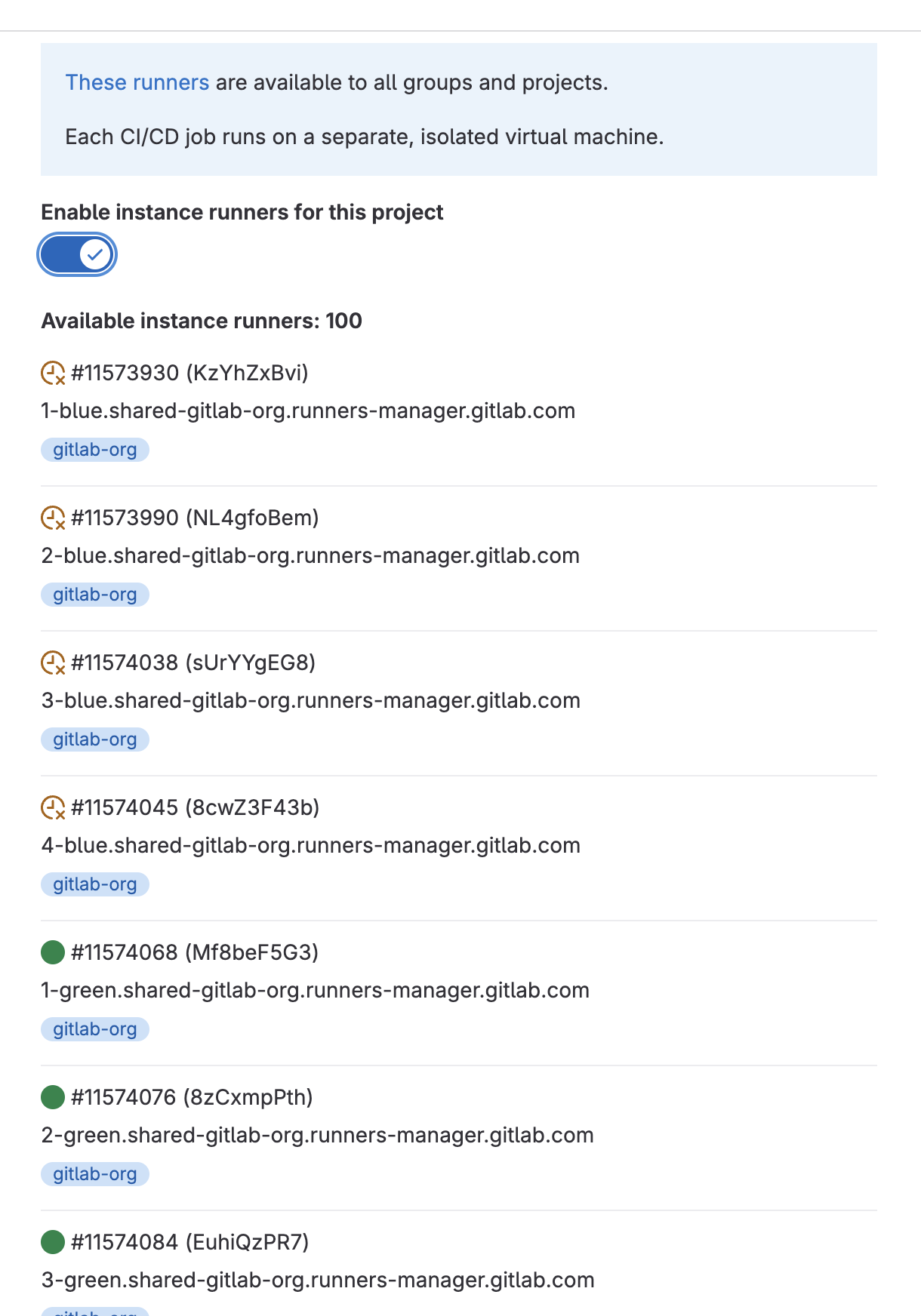
- 의심 가는 부분은 gitlab에서 무료로 제공하는 intance runner 이다. 이유는 모르겠지만, 환경 변수로 전달하면서 아래 러너들이 동시에 트리거 되는 문제가 발생했다. 비활성화하면 더 이상 충돌 문제가 발생하지 않는다.
3. Https에서 쿠키 전달 문제
- 문제 상황
- 소셜 로그인이 완료되고, 토큰을 Body로 응답하기 위해 임시로 쿠키를 설정한다. 임시 쿠키를 통해서 특정 API를 호출해 바디로 토큰들을 응답받는다.
- 로컬 서버에서는 테스트가 성공하고, postman에서도 성공한다. 하지만 서버에 배포하면 쿠키를 읽을 수 없는 문제가 발생한다.
- 기존 코드
{ ... response.addCookie(createCookie("refresh", refreshToken, jwtUtil.REFRESH_TOKEN_EXPIRED)); response.sendRedirect("http://localhost:5173/social_login_handler?social_login=success"); } private Cookie createCookie(String refresh, String refreshToken, Long expiration) { Cookie cookie = new Cookie(refresh, refreshToken); cookie.setMaxAge(expiration.intValue()); cookie.setPath("/"); cookie.setHttpOnly(true); // cookie.setSecure(true); // cookie.setDomain("spacestory.duckdns.org"); return cookie; - 이때까지만 해도 문제를 정확히 파악할 수 없었다. 하지만, 한 가지 확실한 건 Scheme이 https로 변경되었을 때 쿠키가 노출되지 않는다는 것이다.

- 서버 도메인에서 발급한 쿠키를 확인하니, SameSite가 비어있었다. 처음에는 대수롭지 않게 생각하다가 이렇게 비어있는 경우 해당 설정이 None이 아닐 수도 있겠다는 의심이 들었다. (Nginx로 앞단에서 배포한다고 해도 개발 단계에선 교차 출처 허용을 해주어야 한다. SameSite 옵션이 활성화되어 있으면 쿠키가 보이지 않는다)
1) SameSite None으로 설정하기
- cookie.setSameSite 메서드가 있으면 좋겠지만, 제공되지 않는다. cookie 객체로 SameSite None 옵션을 주기 위해선 약간의 하드 코딩이 필요하다.
- ResponseCookie 객체를 이용하면 메서드체이닝 방식으로 쿠키 옵션을 설정할 수 있다.
  private ResponseCookie createCookie(String refresh, String refreshToken, Long expiration) {

    return ResponseCookie.from(refresh, refreshToken)
        .path("/")
        .maxAge(expiration)
        .httpOnly(true)
        .sameSite("None")
        .build();
}- 기존 설정에서 SameSite 옵션을 “None”으로 추가한다. 하지만 여전히 쿠키가 보이지 않았다. 이해가 되지 않아 계속 찾아본 결과 Https에서 sameSite을 “None”으로 하여 쿠키를 노출시킬 경우 Secure 옵션을 활성화해야 쿠키가 클라이언트에게 전달된다고 한다.
2) Secure(true)로 설정하기
  private ResponseCookie createCookie(String refresh, String refreshToken, Long expiration) {

    return ResponseCookie.from(refresh, refreshToken)
        .path("/")
        .maxAge(expiration)
        .httpOnly(true)
        .secure(true)
        .sameSite("None")
        .build();
  }
- 위처럼 설정하면 잘 된다. 간단한 문제였지만, 로컬 환경과 배포 환경(Https)이 달라 생기는 문제는 역시 잘 안 보인다.
3) 참고자료

꾸준하게