var testFolder = './data';
var fs = require('fs');

fs.readdir(testFolder, function(error, filelist){
  console.log(filelist);
})
fs의 readdir를 이용해서 디렉토리의 파일목록을 리스트형태로 읽어온다

여기서 중요한 것은 디렉토리 구조
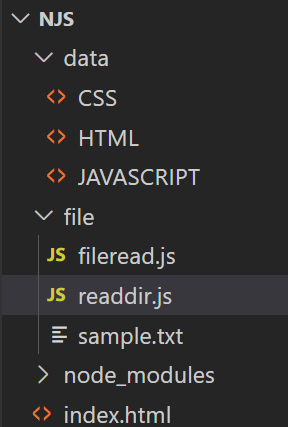
내가 NJS 디렉토리에서 file/readdir.js를 실행함
이러면 testFolder의 경로는 내가 실행한 위치 즉 NJS 디렉토리 기준으로 data 디렉토리를 찾아가야함
readdir.js의 위치를 기준으로 하는게 아님
목록가져오기
var http = require('http');
var fs = require('fs');
var url = require('url');

var app = http.createServer(function(request,response){
    var _url = request.url;
    var queryData = url.parse(_url, true).query;
    var pathname = url.parse(_url, true).pathname;
    if(pathname === '/'){
      if(queryData.id === undefined){

        fs.readdir('./data', function(error, filelist){
          var title = 'Welcome';
          var description = 'Hello, Node.js';
          var list = '<ul>';
          var i = 0;
          while(i < filelist.length){
            list = list + `<li><a href="/?id=${filelist[i]}">${filelist[i]}</a></li>`;
            i = i + 1;
          }
          list = list+'</ul>';
          var template = `
          <!doctype html>
          <html>
          <head>
            <title>WEB1 - ${title}</title>
            <meta charset="utf-8">
          </head>
          <body>
            <h1><a href="/">WEB</a></h1>
            ${list}
            <h2>${title}</h2>
            <p>${description}</p>
          </body>
          </html>
          `;
          response.writeHead(200);
          response.end(template);
        })


      } else {
        fs.readdir('./data', function(error, filelist){
          var title = 'Welcome';
          var description = 'Hello, Node.js';
          var list = '<ul>';
          var i = 0;
          while(i < filelist.length){
            list = list + `<li><a href="/?id=${filelist[i]}">${filelist[i]}</a></li>`;
            i = i + 1;
          }
          list = list+'</ul>';
          fs.readFile(`data/${queryData.id}`, 'utf8', function(err, description){
            var title = queryData.id;
            var template = `
            <!doctype html>
            <html>
            <head>
              <title>WEB1 - ${title}</title>
              <meta charset="utf-8">
            </head>
            <body>
              <h1><a href="/">WEB</a></h1>
              ${list}
              <h2>${title}</h2>
              <p>${description}</p>
            </body>
            </html>
            `;
            response.writeHead(200);
            response.end(template);
          });
        });
      }
    } else {
      response.writeHead(404);
      response.end('Not found');
    }


});
app.listen(3000);
fs.readdir('./data', function(error, filelist)readdir로 filelist에 /data에 있는 파일목록을 가져옴
이 목록을 페이지에 넣어주고 싶음
var list = '<ul>';
          var i = 0;
          while(i < filelist.length){
            list = list + `<li><a href="/?id=${filelist[i]}">${filelist[i]}</a></li>`;
            i = i + 1;
          }
          list = list+'</ul>';
list 문자열을 만듬
ul로 시작해서 ul로 닫아주고
중간에는 while을 이용해서 filelist의 i번째 요소를 처음부터 끝까지 넣어줌
이렇게 list 문자열을 만들고
 <body>
              <h1><a href="/">WEB</a></h1>
              ${list}
              <h2>${title}</h2>
              <p>${description}</p>
            </body>
body에 이렇게 list를 넣어주면됨
이렇게 하고 /file 디렉토리에 파일을 추가하면 그냥 알아서 리스트에 추가됨
데이터가 변경되었을 때 로직을 변경할 필요가 없다