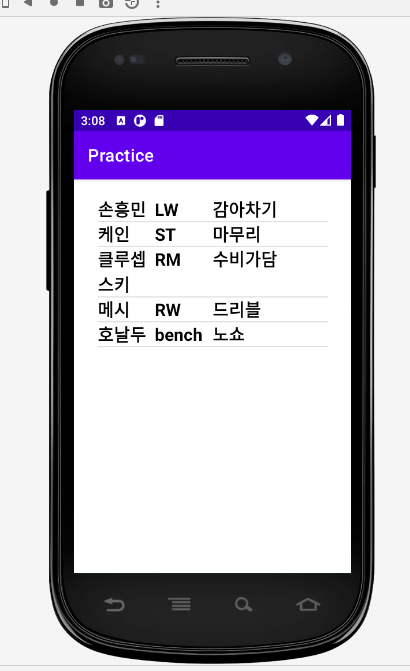
동영상 강의 시청한 내용 토대로 한번 비슷하게 만들어봤다.
코드만 첨부해서 나중에 다시 보기 위해 작성
activity_main.xml
<?xml version="1.0" encoding="utf-8"?>
<androidx.constraintlayout.widget.ConstraintLayout xmlns:android="http://schemas.android.com/apk/res/android"
    xmlns:app="http://schemas.android.com/apk/res-auto"
    xmlns:tools="http://schemas.android.com/tools"
    android:layout_width="match_parent"
    android:layout_height="match_parent"
    tools:context=".MainActivity">


    <ListView
        android:id="@+id/listView"
        android:layout_width="266dp"
        android:layout_height="412dp"
        app:layout_constraintBottom_toBottomOf="parent"
        app:layout_constraintEnd_toEndOf="parent"
        app:layout_constraintStart_toStartOf="parent"
        app:layout_constraintTop_toTopOf="parent" />


</androidx.constraintlayout.widget.ConstraintLayout>
MainActivity.java
package com.example.practice;

import androidx.appcompat.app.AppCompatActivity;

import android.os.Bundle;
import android.view.View;
import android.view.ViewGroup;
import android.widget.BaseAdapter;
import android.widget.ListView;

import java.util.ArrayList;

public class MainActivity extends AppCompatActivity {

    @Override
    protected void onCreate(Bundle savedInstanceState) {
        super.onCreate(savedInstanceState);
        setContentView(R.layout.activity_main);

        ListView listView = (ListView) findViewById(R.id.listView);

        MyAdapter adapter = new MyAdapter();

        adapter.addItem(new Champion("손흥민","LW","감아차기"));
        adapter.addItem(new Champion("케인","ST","마무리"));
        adapter.addItem(new Champion("클루셉스키","RM","수비가담"));
        adapter.addItem(new Champion("메시","RW","드리블"));
        adapter.addItem(new Champion("호날두","bench","노쇼"));


        listView.setAdapter(adapter);


    }

    class MyAdapter extends BaseAdapter{

        ArrayList<Champion> arrayList = new ArrayList<Champion>();

        public void addItem(Champion item){
            arrayList.add(item);
        }

        @Override
        public int getCount() {
            return arrayList.size();
        }

        @Override
        public Object getItem(int i) {
            return arrayList.get(i);
        }

        @Override
        public long getItemId(int i) {
            return i;
        }

        @Override
        public View getView(int i, View view, ViewGroup viewGroup) {

            ChampView itemView = new ChampView(getApplicationContext());

            Champion champ = arrayList.get(i);
            itemView.setName(champ.getName());
            itemView.setPoistion(champ.getPosition());
            itemView.setSpecial(champ.getSpecial());


            return itemView;
        }
    }


}
champ_view.xml
<?xml version="1.0" encoding="utf-8"?>
<LinearLayout xmlns:android="http://schemas.android.com/apk/res/android"
    android:orientation="horizontal"
    android:layout_width="match_parent"
    android:layout_height="wrap_content">

    <TextView
        android:id="@+id/name"
        android:layout_width="0dp"
        android:layout_height="match_parent"
        android:layout_weight="1"
        android:textSize="20dp"
        android:textStyle="bold"
        android:textColor="@android:color/background_dark"
        android:text="이름"
        ></TextView>

    <TextView
        android:id="@+id/position"
        android:layout_width="0dp"
        android:layout_weight="1"
        android:layout_height="match_parent"
        android:textSize="20dp"
        android:textStyle="bold"
        android:textColor="@android:color/background_dark"
        android:text="포지션"
        ></TextView>

    <TextView
        android:id="@+id/special"
        android:layout_width="0dp"
        android:layout_weight="2"
        android:layout_height="match_parent"
        android:textSize="20dp"
        android:textStyle="bold"
        android:textColor="@android:color/background_dark"
        android:text="특징"
        ></TextView>

</LinearLayout>
ChampView.java
package com.example.practice;

import android.content.Context;
import android.util.AttributeSet;
import android.view.LayoutInflater;
import android.view.View;
import android.widget.LinearLayout;
import android.widget.TextView;

import androidx.annotation.Nullable;

public class ChampView extends LinearLayout {

    TextView nameV;
    TextView positionV;
    TextView specialV;


    public ChampView(Context context) {
        super(context);
        init(context);
    }

    public ChampView(Context context, @Nullable AttributeSet attrs) {
        super(context, attrs);
        init(context);
    }

    public void init(Context context){

        LayoutInflater inflater = (LayoutInflater) context.getSystemService(Context.LAYOUT_INFLATER_SERVICE);

        inflater.inflate(R.layout.champ_view,this,true);

        nameV = (TextView) findViewById(R.id.name);
        positionV = (TextView) findViewById(R.id.position);
        specialV = (TextView) findViewById(R.id.special);

    }

    public void setName(String n){
        nameV.setText(n);
    }

    public void setPoistion(String p){
        positionV.setText(p);
    }

    public void setSpecial(String s){
        specialV.setText(s);
    }

}
Champion.java
package com.example.practice;

public class Champion {
    String name;
    String position;
    String special;

    public Champion(String name, String position, String special) {
        this.name = name;
        this.position = position;
        this.special = special;
    }

    public String getName() {
        return name;
    }

    public void setName(String name) {
        this.name = name;
    }

    public String getPosition() {
        return position;
    }

    public void setPosition(String position) {
        this.position = position;
    }

    public String getSpecial() {
        return special;
    }

    public void setSpecial(String special) {
        this.special = special;
    }

    @Override
    public String toString() {
        return "Champion{" +
                "name='" + name + '\'' +
                ", position='" + position + '\'' +
                ", special='" + special + '\'' +
                '}';
    }
}
결과