테이블 레이아웃
테이블 레이아웃은 격자 형태로 배치하기 위해 사용한다
격자의 한 행(레코드,row)는 TableRow라는 태그로 구성된다.
TableLayout 태그 안에 TableRow 태그가 한 줄을 나타낸다
TableRow
<?xml version="1.0" encoding="utf-8"?>
<TableLayout xmlns:android="http://schemas.android.com/apk/res/android"
    android:layout_width="match_parent"
    android:layout_height="match_parent"
   >

    <TableRow
        android:layout_width="match_parent"
        android:layout_height="match_parent"
        >

    </TableRow>


</TableLayout>
TableLayout안에 TableRow 요소를 만든다
TableRow도 뷰 처럼 크기 속성이 필요하다.
참고 : 팔레트에서 컴포넌트 트리에 드래그앤 드롭으로 뷰를 넣을 수 있다.
stretchColumns 속성
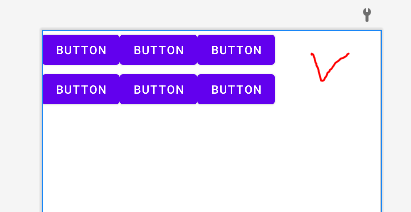
TableLayout의 TableRow에 Button들을 추가했는데 오른쪽에 공간이 빈다.
이 공간을 채워서 구성하고 싶으면 stretchColulmns 속성을 이용한다.
<TableLayout xmlns:android="http://schemas.android.com/apk/res/android"
    android:layout_width="match_parent"
    android:layout_height="match_parent"
    android:stretchColumns="0,1,2"
   >
TableLayout에 stretchColumns 속성을 추가한다.
0,1,2는 0,1,2번째 열이 빈 공간을 채우도록 한다는 뜻이다.
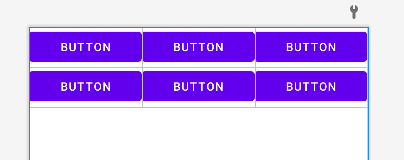
이렇게 빈 공간을 채워서 활용한다.
layout xml 파일 만들기
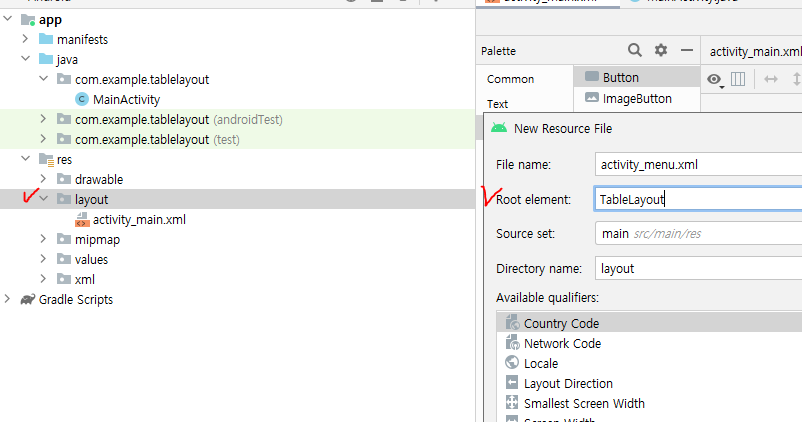
res>layout>새로운 layout resource 파일 만들기
이 때 기본이 되는 레이아웃을 원하는 레이아웃으로 설정해 줄 수 있다.
지금의 경우 TableLayout으로 설정했다.
tableLayout 채우기
<?xml version="1.0" encoding="utf-8"?>
<TableLayout xmlns:android="http://schemas.android.com/apk/res/android"
    xmlns:tools="http://schemas.android.com/tools"
    android:layout_width="match_parent"
    android:layout_height="match_parent"
    android:stretchColumns="0,1,2"
    >

    <TableRow
        android:layout_width="match_parent"
        android:layout_height="wrap_content"

        >

        <TextView
            android:layout_width="wrap_content"
            android:layout_height="wrap_content"
            android:text="이름 :"
            android:textSize="50dp"
            />

        <EditText
            android:layout_width="wrap_content"
            android:layout_height="wrap_content"
            android:layout_span="2"
            tools:ignore="SpeakableTextPresentCheck" />

    </TableRow>

    <TableRow
        android:layout_width="match_parent"
        android:layout_height="match_parent"
        >
        <Button
            android:layout_width="wrap_content"
            android:layout_height="wrap_content"
            android:text="아니오"
            android:layout_column="1"
            android:textSize="50dp"
            />

        <Button
            android:layout_width="wrap_content"
            android:layout_height="wrap_content"
            android:text="예"
            android:layout_column="2"
            android:textSize="50dp"
            />


    </TableRow>

</TableLayout>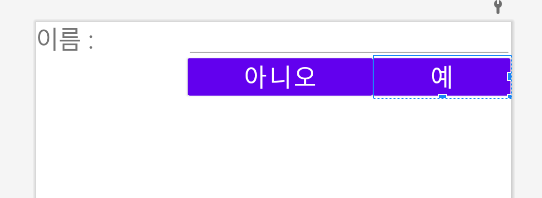
TableRow로 행 하나를 구성한다.
첫번째 TableRow에 TextView와 EditText 요소를 넣었다.
EditText 뷰
EditText 뷰는 텍스트를 입력받기 위해 사용한다.
layout_span 속성
layout_span 이라는 속성은 Table의 column을 몇칸 차지할지 적는 속성이다.
2를 입력해서 1,2번째 열을 차지한다.
즉 한 열에 하나씩 들어가는 것이 아니라 이렇게 늘려서 넣을 수도 있다.
layout_column 속성
두번째 TableRow는 버튼 2개로 구성된다.
layout_column 속성은 몇번째 열을 차지할지 나타낸다.
각각 1번째, 2번째 열을 차지한다.