
✅Presigned URL이란?
- AWS S3와 같은 클라우드 스토리지 서비스에서 제한된 시간 동안 접근 권한을 임시로 부여하는 URL
- 일반적으로 인증 없이도 파일 업로드/다운로드를 허용하고자 할 때 사용된다.
☑️Presigned URL의 필요성
-
AWS S3는 기본적으로 인증된 사용자만 파일을 업로드하거나 다운로드할 수 있다. 하지만 다음과 같은 상황에서는 인증 없이도 접근을 허용해야 할 수 있다.
① 사용자가 웹 브라우저나 앱에서 직접 S3에 파일을 업로드하도록 하고 싶을 때
② 특정 사용자에게만 일시적으로 파일 다운로드 권한을 주고 싶을 때
-
이때 Presigned URL을 사용하면 서버에서 인증된 토큰이 포함된 URL을 생성해서, 클라이언트에게 전달하고, 이 URL을 통해 제한된 시간 동안 안전하게 접근할 수 있다.
☑️ 작동방식
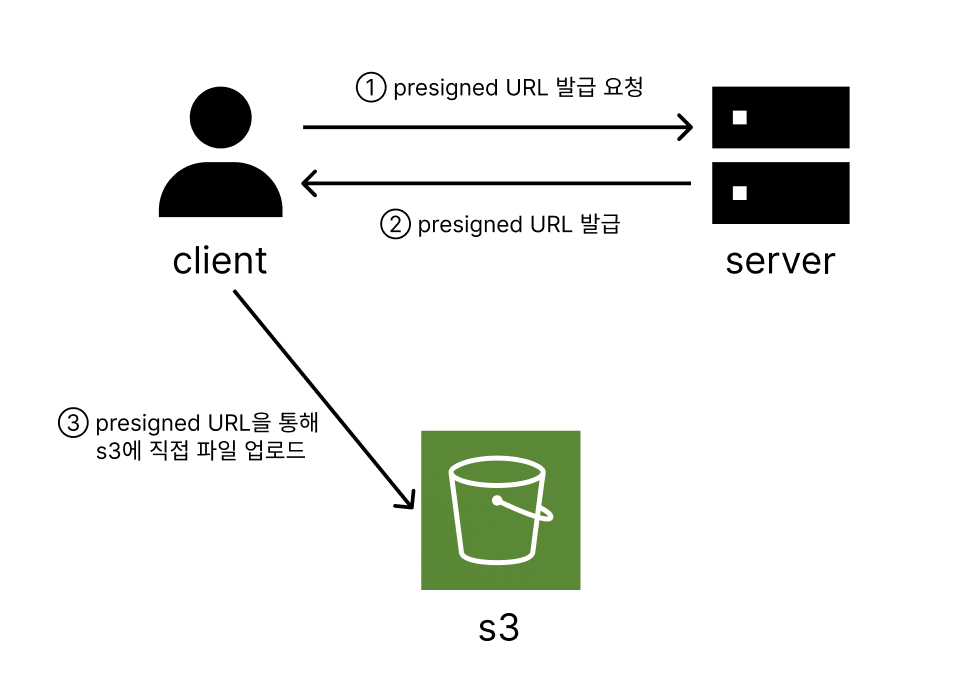
-
서버가 S3와 통신해서 Presigned URL을 생성한다.
-
해당 URL에는 S3 버킷 정보, HTTP 메서드(GET/PUT 등), 유효기간, 서명(Signature) 이 포함됩니다.
-
클라이언트는 이 URL을 통해 S3에 직접 접근할 수 있습니다.
예시: https://your-bucket.s3.amazonaws.com/file.jpg?X-Amz-Algorithm=AWS4-HMAC-SHA256&X-Amz-Credential=...
✅ AWS에서 S3 버킷 생성
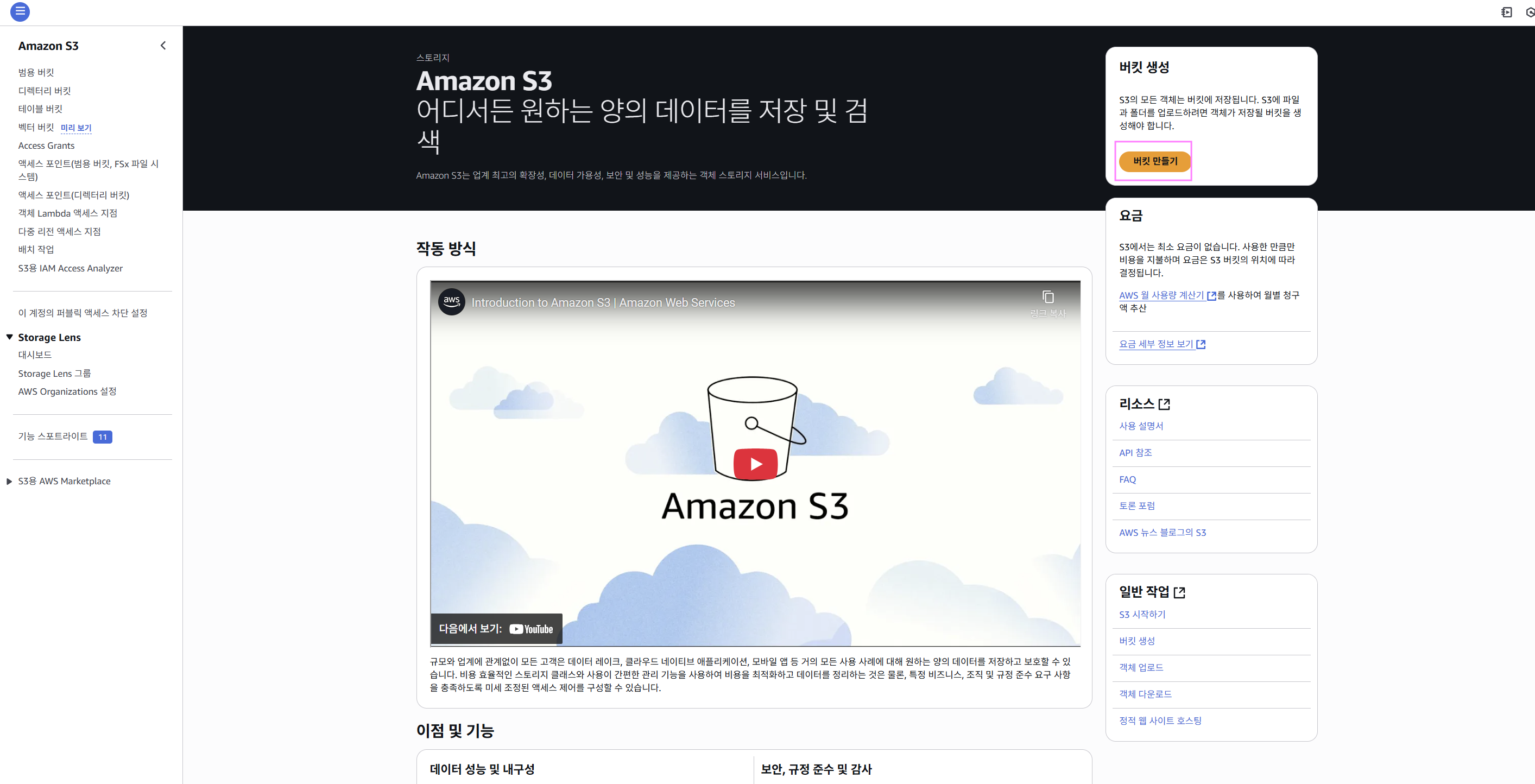
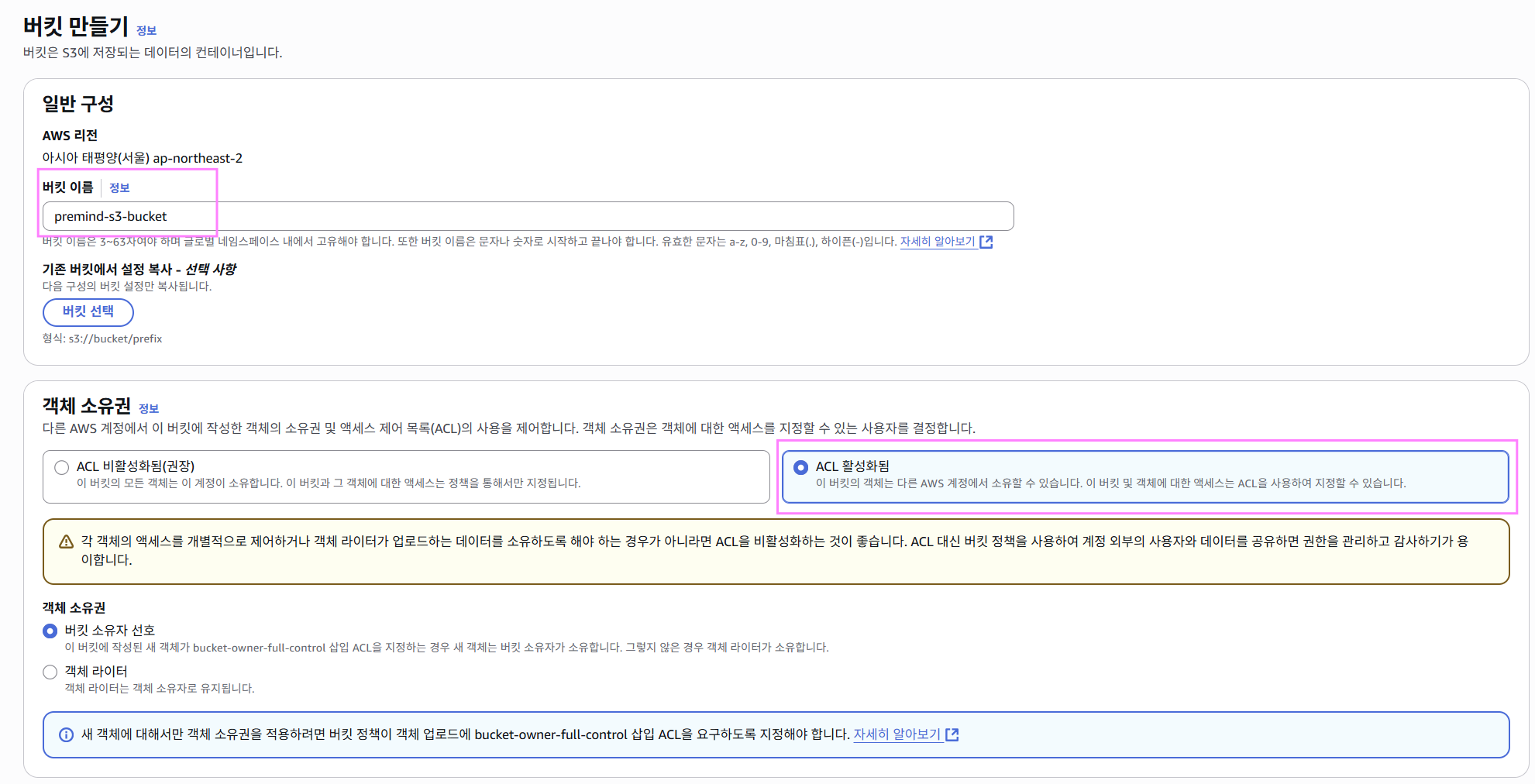
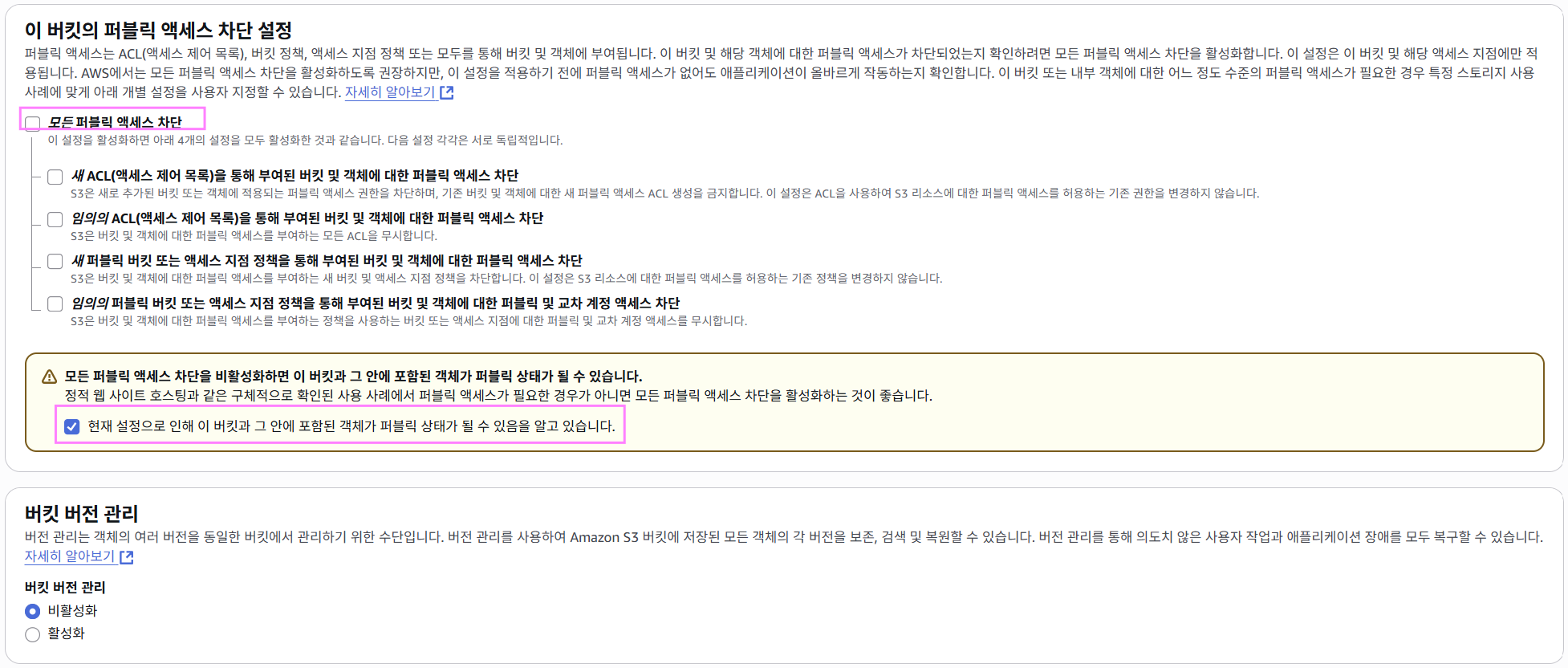
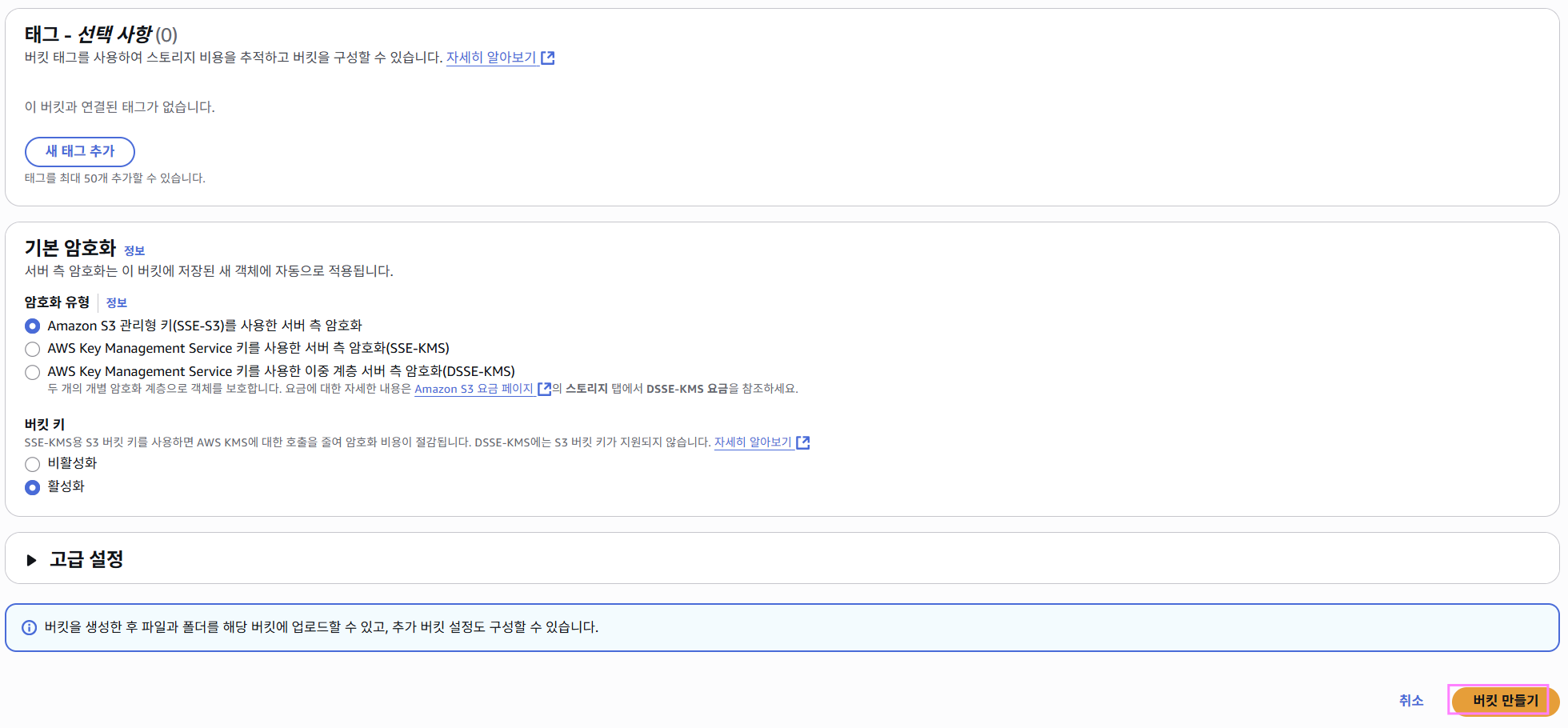
☑️ S3 버킷 생성
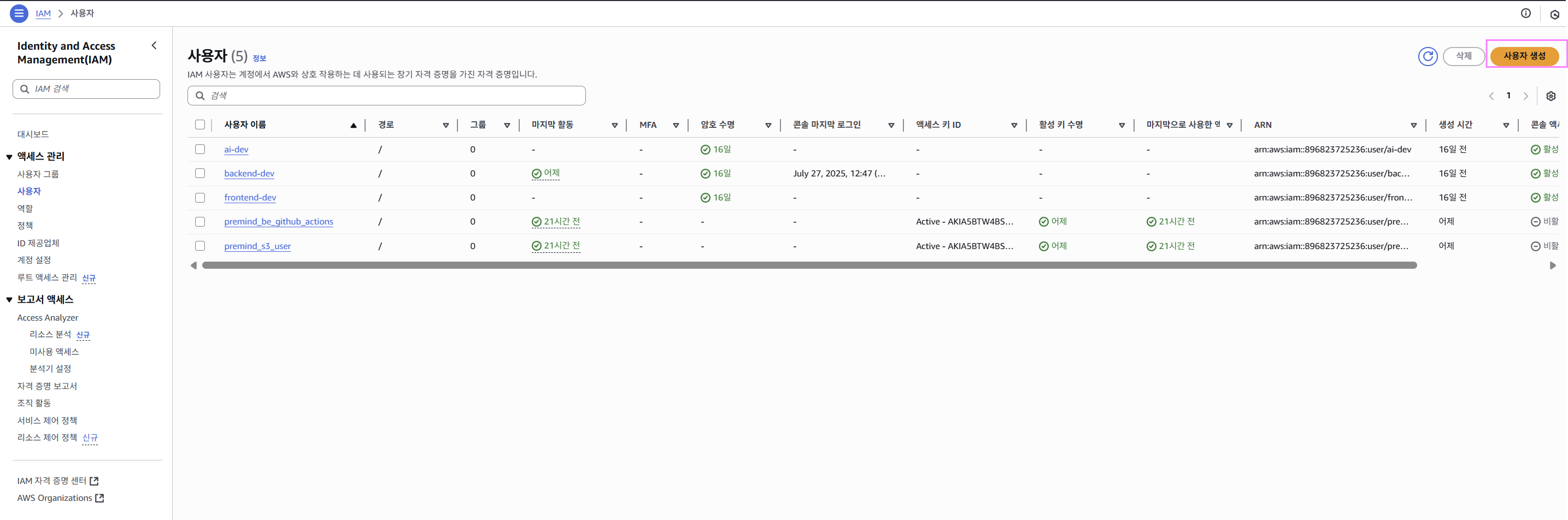
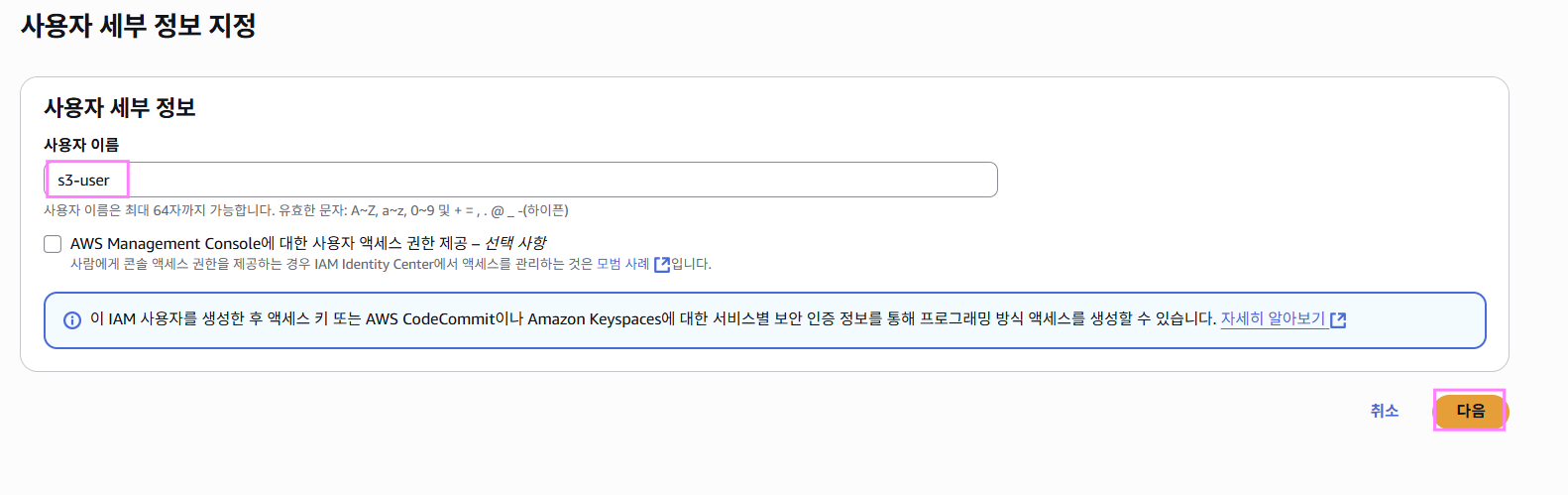
☑️ IAM 사용자 생성
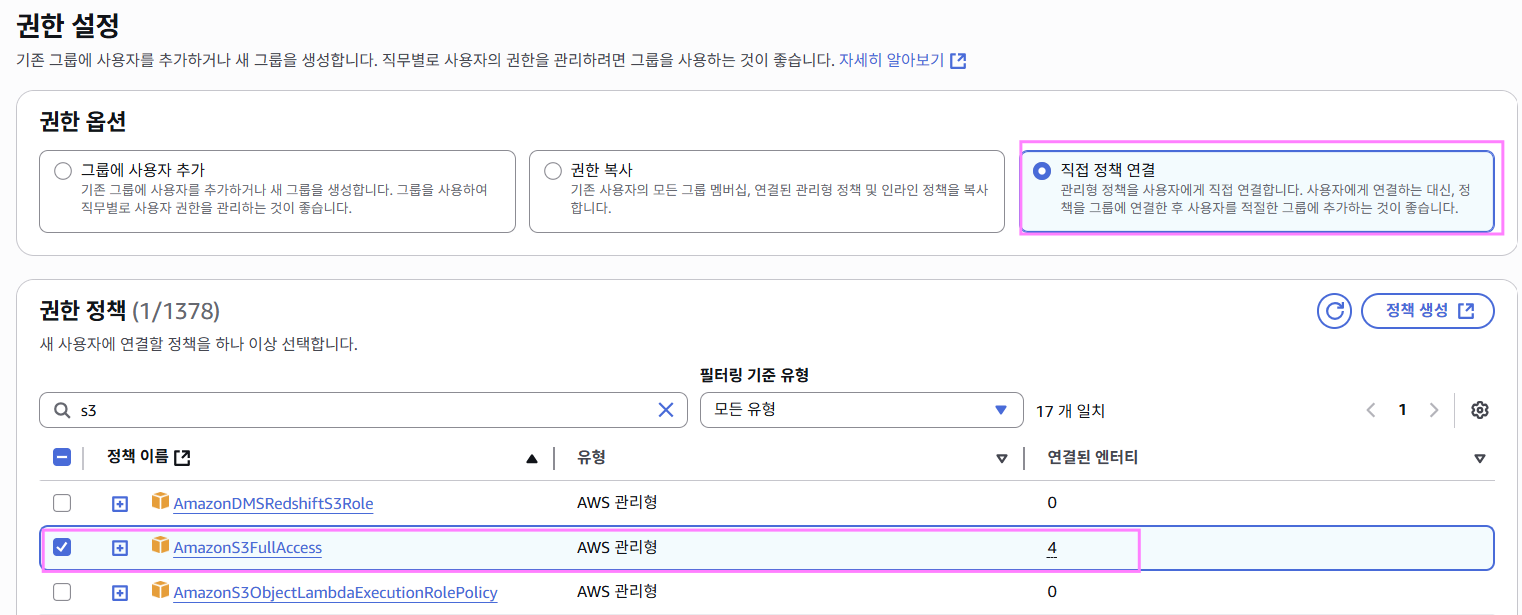
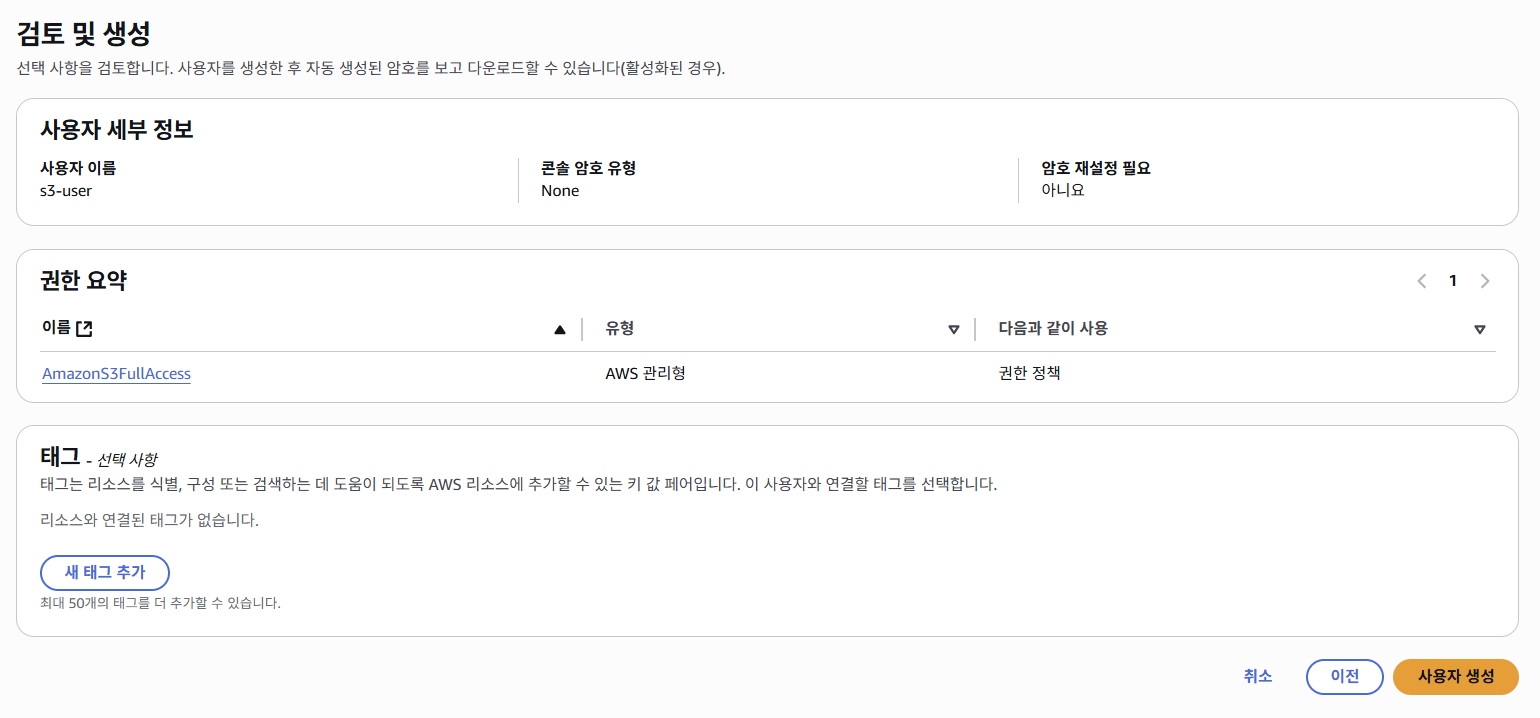
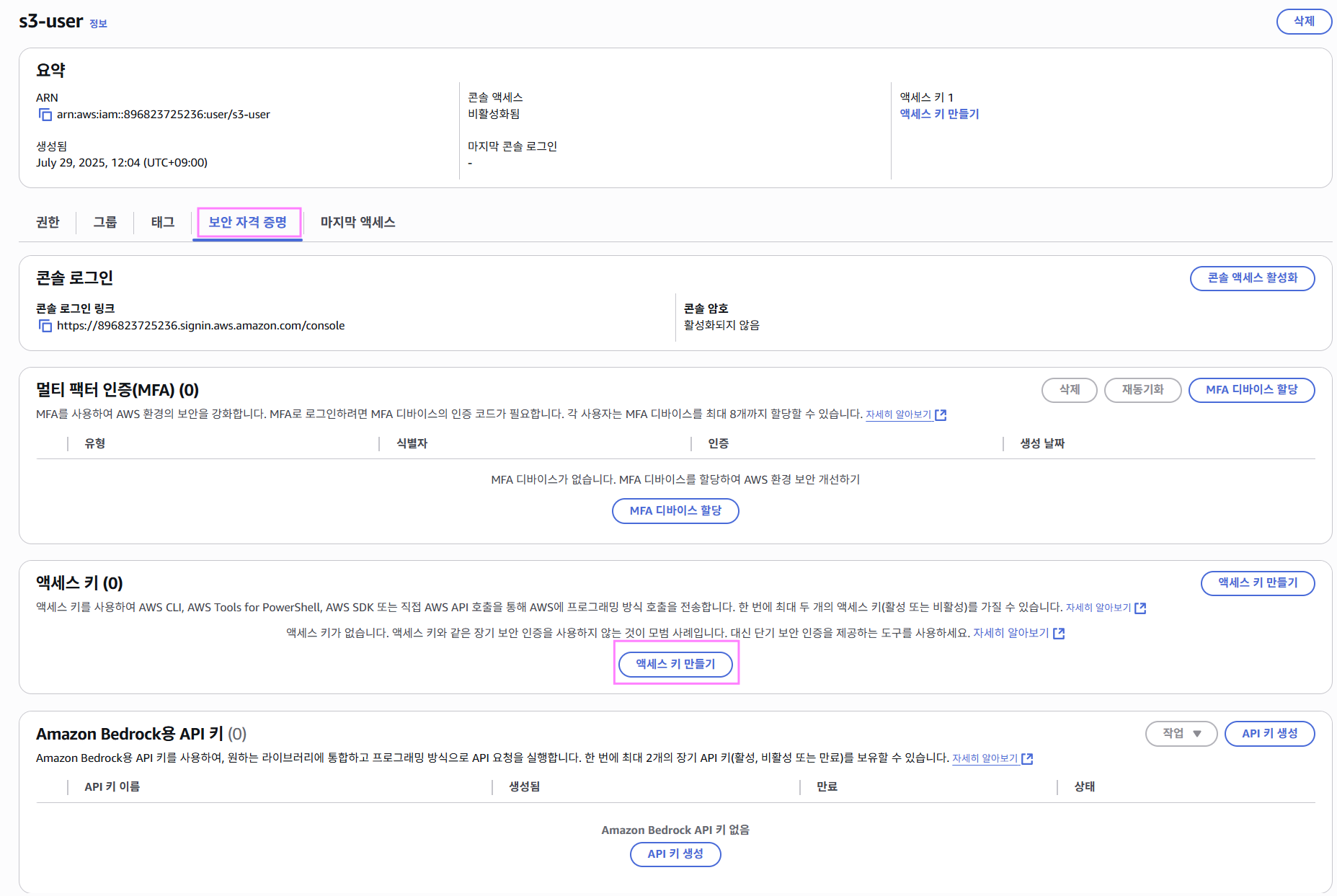
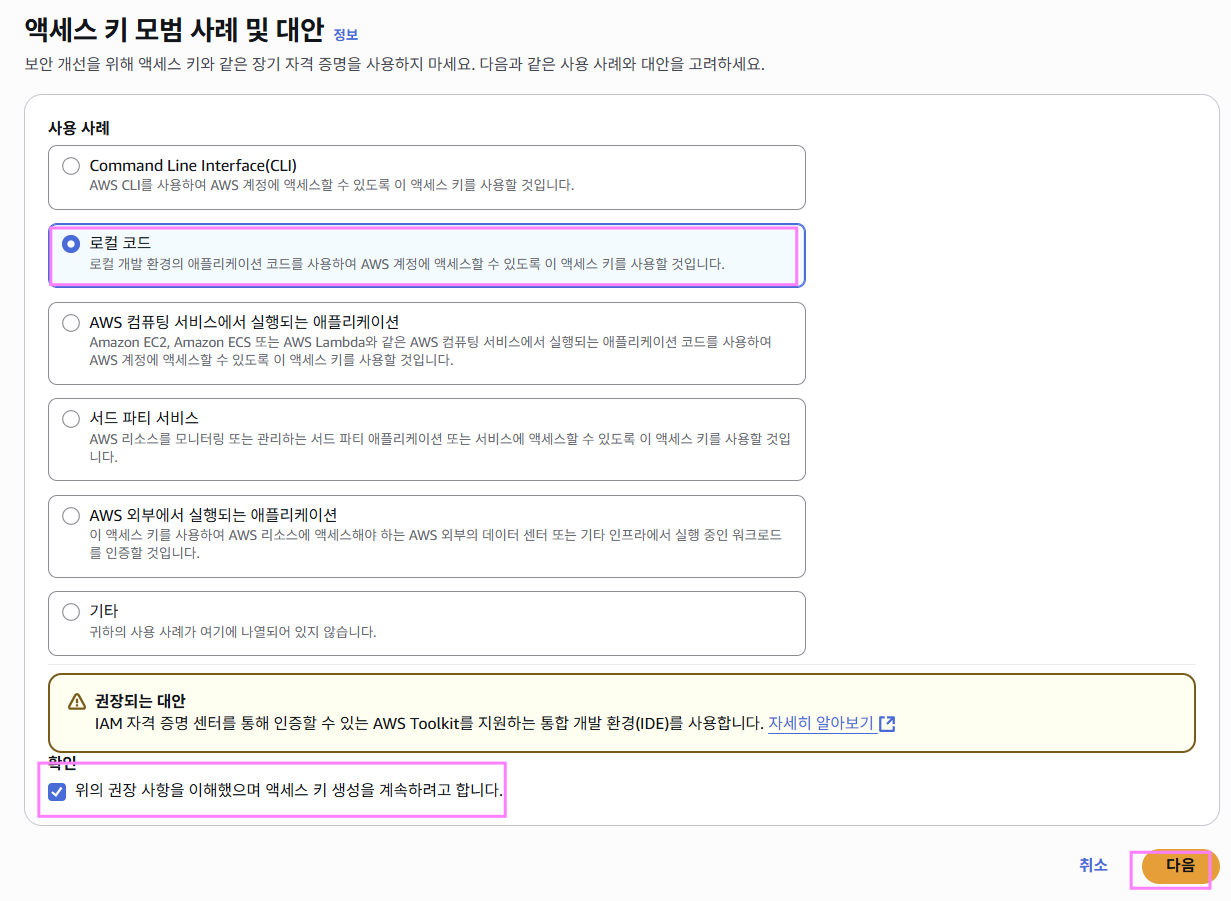
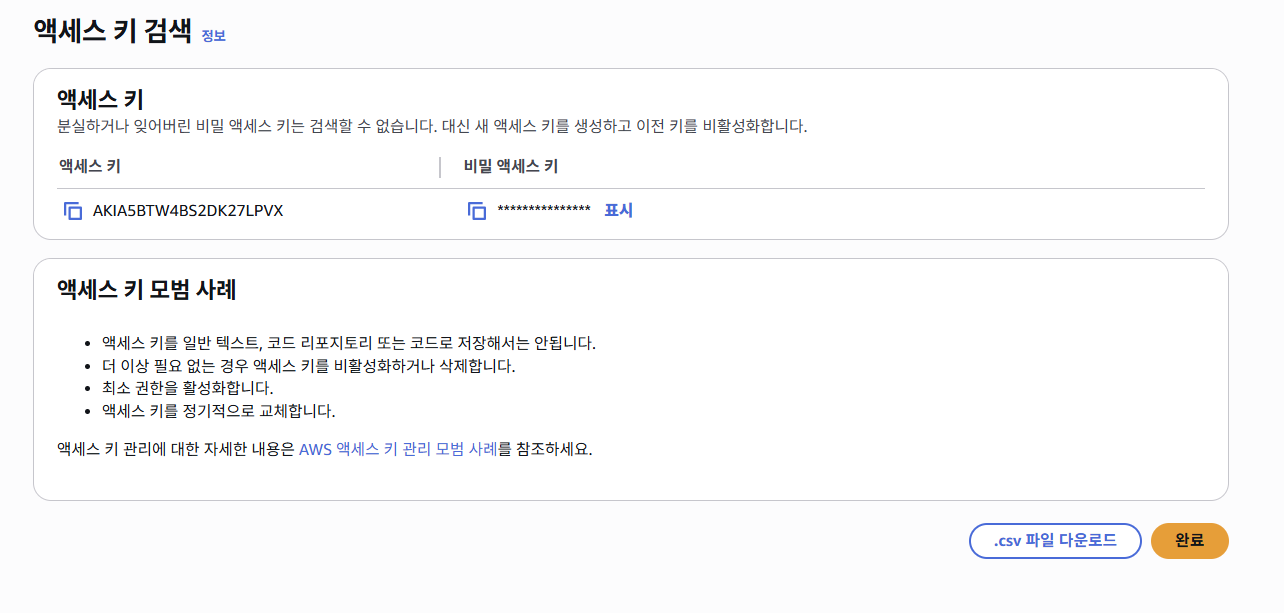
=> 위의 access-key와 secret-key를 꼭 저장해둔다.
✅ 코드 구현
✔️ build.gradle
dependencies {

	...

	// jdk 의존성 추가
	implementation 'com.amazonaws:aws-java-sdk-s3:1.12.676'

}
✔️ application.yml
cloud:
  aws:
    access-key: [access-key 값]
    secret-key: [secret-key 값]
    region: ap-northeast-2
    bucket: [bucket 이름]
    endpoint: s3.ap-northeast-2.amazonaws.com
✔️ S3Properties
=> AWS S3에 접근하기 위한 설정값들을 외부 설정 파일(application.yml 등)로부터 바인딩 받기 위한 역할을 한다.
package com.example.Premind_BE.infra.s3;

import lombok.Getter;
import lombok.Setter;
import org.springframework.boot.context.properties.ConfigurationProperties;

@ConfigurationProperties(prefix = "cloud.aws")
@Getter
@Setter
public class S3Properties {
    private String accessKey;
    private String secretKey;
    private String region;
    private String bucket;
    private String endpoint;
}
✔️ S3 Config
=> S3Config는 AmazonS3 객체를 생성하고, AWS 인증 정보 및 엔드포인트 설정을 읽어와 구성한 뒤, Spring Bean으로 등록하는 설정 클래스이다.
package com.example.Premind_BE.infra.s3;

import com.amazonaws.auth.AWSCredentials;
import com.amazonaws.auth.AWSStaticCredentialsProvider;
import com.amazonaws.auth.BasicAWSCredentials;
import com.amazonaws.client.builder.AwsClientBuilder;
import com.amazonaws.services.s3.AmazonS3;
import com.amazonaws.services.s3.AmazonS3ClientBuilder;
import lombok.RequiredArgsConstructor;
import org.springframework.boot.context.properties.EnableConfigurationProperties;
import org.springframework.context.annotation.Bean;
import org.springframework.context.annotation.Configuration;

@Configuration
@RequiredArgsConstructor
@EnableConfigurationProperties(S3Properties.class)
public class S3Config {

    private final S3Properties s3Properties;

    @Bean
    public AmazonS3 amazonS3() {
        AWSCredentials credentials = new BasicAWSCredentials(
                s3Properties.getAccessKey(), s3Properties.getSecretKey());

        AwsClientBuilder.EndpointConfiguration endpointConfig =
                new AwsClientBuilder.EndpointConfiguration(
                        s3Properties.getEndpoint(), s3Properties.getRegion());

        return AmazonS3ClientBuilder.standard()
                .withEndpointConfiguration(endpointConfig)
                .withCredentials(new AWSStaticCredentialsProvider(credentials))
                .build();
    }
}
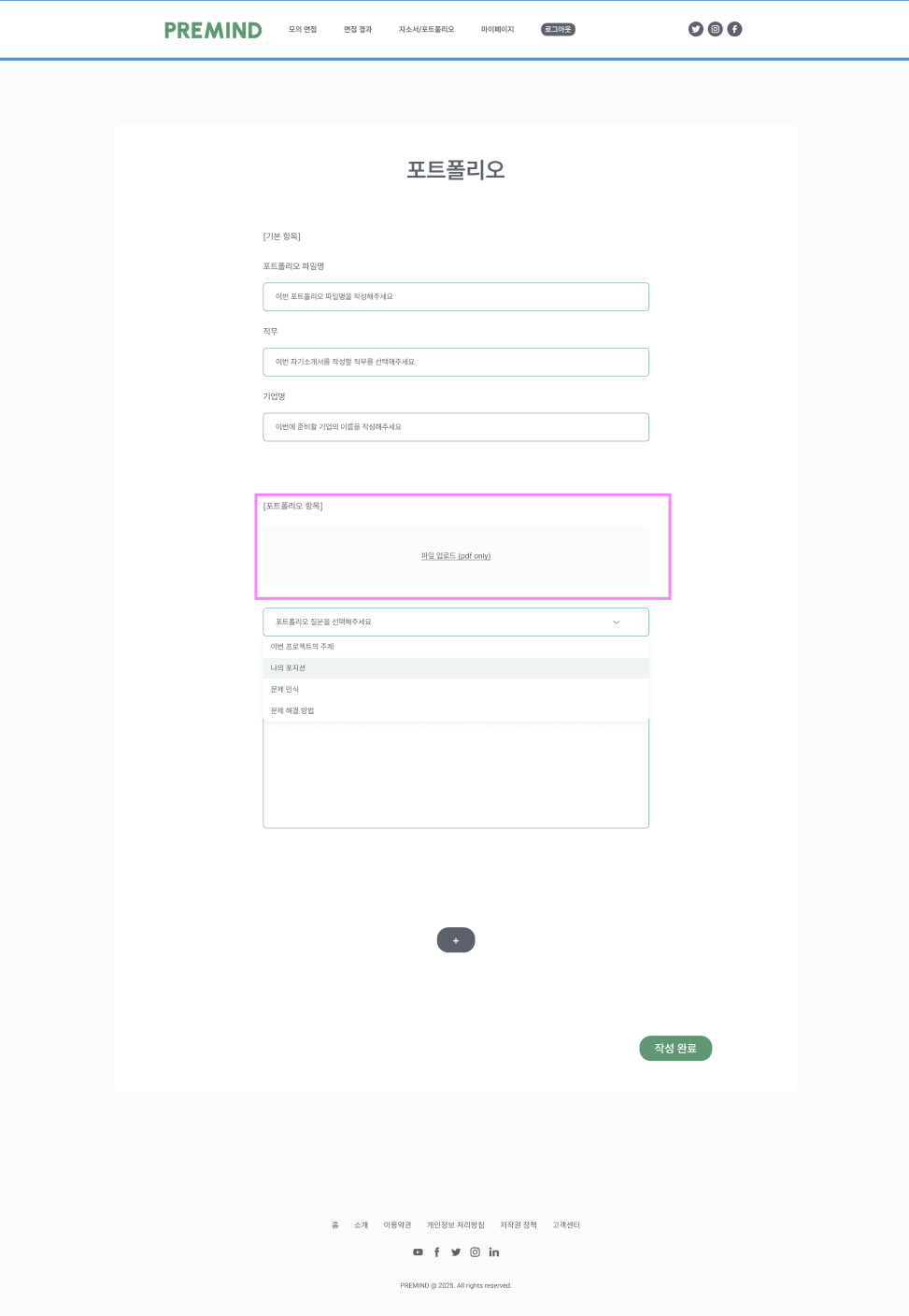
- 나는 위 화면에서 파일 업로드 항목에 클라이언트가 파일을 놓는 순간 presigned url 발급 요청(클라이언트 역할)이 오면 presigned url을 발급(서버 역할)하고 클라이언트는 발급 받은 presigned url을 이용하여 PUT요청으로 S3에 파일을 업로드 한다.
- 위 서비스는 하나의 포트폴리오당 하나의 pdf파일만 업로드 가능하기 때문에 하나의 presigned url만 발급하도록 구현하였다.
☑️ 1단계: presigned url 발급하기
✔️ PortfolioController
public class PortfolioController {
    private final PortfolioService portfolioService;

    @Operation(summary = "presigned url 발급",description = "포트폴리오 업로드 페이지에서 파일을 pdf업로드 항목에 드래그하여 놓는 순간 presigned url을 발급 받고 해당 url로 파일 업로드 진행")
    @PostMapping(value = "/file-upload")
    public PresignedUrlResDto generatePresignedUrl() {
        return portfolioService.generatePresignedUrl();
    }
}
✔️ PortfolioService
=> 파일 이름(fileName)은 사용자의 고유 정보와 UUID 등을 기반으로 생성되며, S3에 저장될 경로 역할을 한다.
public class PortfolioService {
    private final PortfolioRepository portfolioRepository;
    private final UserRepository userRepository;
    private final JobCategoryRepository jobCategoryRepository;
    private final PortfolioQuestionRepository portfolioQuestionRepository;
    private final FileService fileService;
    private final S3Properties s3Properties;
    private final AmazonS3 amazonS3;
    private final JobService jobService;

    public PresignedUrlResDto generatePresignedUrl() {
        Long memberId = getCurrentMember().getId();
        String fileKey = fileService.generateUUID(); // UUID 기반 고유 파일 키 생성
        String fileName = fileService.createFileName(memberId, fileKey); // 사용자 ID와 UUID를 조합한 파일 이름 생성

		// Presigned URL 요청 객체 생성
        GeneratePresignedUrlRequest generatePresignedUrlRequest =
                fileService.createGeneratePresignedUrlRequest(s3Properties.getBucket(), fileName);

        // Presigned URL 생성
        String presignedUrl = amazonS3.generatePresignedUrl(generatePresignedUrlRequest).toString();
        return new PresignedUrlResDto(presignedUrl, fileKey);
    }
}
✔️ FileService
=> AWS S3 Presigned URL을 생성, 관리, 삭제하는 데 사용되는 유틸리티성 서비스이다.
@Slf4j
@Service
@Transactional
@RequiredArgsConstructor
public class FileService {
    private final AmazonS3 amazonS3;
    private final S3Properties s3Properties;

	// 	파일 구분용 고유 UUID 생성
    public String generateUUID() {
        return UUID.randomUUID().toString();
    }

	// 사용자 ID + UUID 조합으로 S3에 저장할 파일 이름 생성
    public String createFileName(Long memberId, String imageKey) {
        return memberId
                + "/"
                + imageKey;
    }

	// 	Presigned URL 생성을 위한 요청 객체 구성
    public GeneratePresignedUrlRequest createGeneratePresignedUrlRequest(String bucket, String fileName) {

        GeneratePresignedUrlRequest generatePresignedUrlRequest = new GeneratePresignedUrlRequest(bucket, fileName)
                .withKey(fileName)
                .withMethod(HttpMethod.PUT)
                .withExpiration(getPresignedUrlExpiration());

        generatePresignedUrlRequest.addRequestParameter(
                Headers.S3_CANNED_ACL, CannedAccessControlList.PublicRead.toString()
        );

        return generatePresignedUrlRequest;
    }

	// Presigned URL의 유효시간(5분) 설정
    public Date getPresignedUrlExpiration() {
        Date expiration = new Date();
        long expTime = expiration.getTime();
        expTime += TimeUnit.MINUTES.toMillis(5);
        expiration.setTime(expTime);

        return expiration;
    }

	// S3에서 해당 파일 삭제
    public void deleteFile(String fileUrl) {
        try {
            String bucket = s3Properties.getBucket();
            String fileKey = extractKeyFromUrl(fileUrl);
            amazonS3.deleteObject(bucket, fileKey);
            log.info("Deleted file from S3: {}", fileKey);
        } catch (Exception e) {
            log.error("Failed to delete file from S3: {}", fileUrl, e);
        }
    }

	// 	전체 URL에서 S3 파일 키만 추출
    private String extractKeyFromUrl(String fileUrl) {
        // presigned URL의 실제 파일 경로만 추출
        URI uri = URI.create(fileUrl);
        return uri.getPath().substring(1); // e.g., "1/f829333c-2e4f-4a38-8eb9-2ee10ae2117e"
    }
}
✔️ 예시 응답
{
    "status": 200,
    "timestamp": "2025-07-28T12:35:31.4411101",
    "success": true,
    "data": {
        "presignedUrl": "[서버측에서 생성한 presigned url 값]"
    }
}
☑️ 2단계: 작성완료하여 fileUrl과 포트폴리오 작성 내용들을 저장
✔️ PortfolioController
@RestController
@RequestMapping("/portfolio")
@RequiredArgsConstructor
@Tag(name = "Portfolio API", description = "포트폴리오 관련 API입니다.")
public class PortfolioController {
    private final PortfolioService portfolioService;

    ...

    @Operation(summary = "포트폴리오 업로드",description = "PDF 포트폴리오 파일과 제목/직무/기업/질문답변 정보 등을 함께 업로드합니다.")
    @PostMapping(value = "/upload")
    public PortfolioUploadResDto uploadPortfolio(@RequestBody PortfolioUploadReqDto reqDto) {
        return portfolioService.uploadPortfolio(reqDto);
    }
}
✔️ PortfolioUploadReqDto (포트폴리오 업로드 요청 DTO)
=> 여기서 요청으로 받는 fileUrl값은 프론트측에서 presignedUrl.split('?')[0]을 통해 구한 후 요청으로 보내면 된다!!
package com.example.Premind_BE.domain.portfolio.dto.request;

import io.swagger.v3.oas.annotations.media.Schema;
import lombok.AllArgsConstructor;
import lombok.Data;
import lombok.NoArgsConstructor;

import java.util.List;

@Data
@AllArgsConstructor
@NoArgsConstructor
@Schema(description = "포트폴리오 업로드를 위한 요청 DTO")
public class PortfolioUploadReqDto {
    @Schema(description = "선택한 직무의 대분류 ID값")
    private Long jobMajorId;
    @Schema(description = "선택한 직무의 중분류 ID값")
    private Long jobMiddleId;
    @Schema(description = "선택한 직무의 소분류 ID값")
    private Long jobMinorId;
    @Schema(description = "포트폴리오 제목")
    private String title;
    @Schema(description = "포트폴리오 지원 기업명")
    private String company;
    @Schema(description = "포트폴리오 질문-답변 항목 리스트")
    private List<PortfolioSectionReqDto> qaList;
    @Schema(description = "업로드된 S3 파일 경로, presignedUrl.split('?')[0] 값이다.")
    private String fileUrl;

}
✔️ PortfolioService
public PortfolioUploadResDto uploadPortfolio(PortfolioUploadReqDto reqDto) {
        List<JobCategory> jobCategories = jobService.findJobCategory(reqDto.getJobMajorId(), reqDto.getJobMiddleId(), reqDto.getJobMinorId());
        Portfolio portfolio = Portfolio.builder()
                .user(getCurrentMember())
                .jobMajor(jobCategories.get(0))
                .jobMiddle(jobCategories.get(1))
                .jobMinor(jobCategories.get(2))
                .title(reqDto.getTitle())
                .company(reqDto.getCompany())
                .filePath(reqDto.getFileUrl())
                .createdDate(LocalDateTime.now())
                .build();

        log.info("Portfolio created with title: {}", portfolio.getTitle());

        List<PortfolioSectionReqDto> sectionList = reqDto.getQaList();
        for (int i = 0; i < sectionList.size(); i++) {
            PortfolioSectionReqDto section = sectionList.get(i);
            PortfolioSection resumeSection = PortfolioSection.builder()
                    .sequence(i + 1)
                    .question(section.getQuestion())
                    .answer(section.getAnswer())
                    .build();
            portfolio.addSection(resumeSection);
        }

        portfolioRepository.save(portfolio);

        return new PortfolioUploadResDto(portfolio.getId());
    }