회원가입 (사용자 추가)
비밀번호 암호화 설정
📌 비밀번호 암호화 개요
Spring Secuity사용
1.Authentication: 인증
2.Authorization: 권한- 구현 순서
1. 애플리케이션에Spring Security jar을 Dependency에 추가
2.WebSecurityConfiguerAdapter를 상속받는Security Configuaration클래스 생성
3.Security Configuration클래스에@EnableWebSevurity추가
4. Authentication →configure(AuthenticationManagerBuilder auth)메서드를 재정의
5. Password encode를 위한BCryptPasswordEncoder빈 정의
6. Authorization →configure(HttpSecurity http)메서드 재정의
📌 소스코드 구현
- pom.xml 의존성 추가
<dependency>
    <groupId>org.springframework.boot</groupId>
    <artifactId>spring-boot-starter-security</artifactId>
</dependency>- WebSecurity.java 클래스 생성
package com.example.euserservice.security;

import com.example.euserservice.service.UserService;
import org.springframework.context.annotation.Bean;
import org.springframework.context.annotation.Configuration;
import org.springframework.core.env.Environment;
import org.springframework.http.HttpMethod;
import org.springframework.security.authentication.AuthenticationManager;
import org.springframework.security.authorization.AuthorizationDecision;
import org.springframework.security.config.Customizer;
import org.springframework.security.config.annotation.authentication.builders.AuthenticationManagerBuilder;
import org.springframework.security.config.annotation.web.builders.HttpSecurity;
import org.springframework.security.config.annotation.web.configuration.EnableWebSecurity;
import org.springframework.security.config.annotation.web.configurers.AbstractHttpConfigurer;
import org.springframework.security.config.http.SessionCreationPolicy;
import org.springframework.security.core.Authentication;
import org.springframework.security.crypto.bcrypt.BCryptPasswordEncoder;
import org.springframework.security.web.SecurityFilterChain;
import org.springframework.security.web.access.expression.WebExpressionAuthorizationManager;
import org.springframework.security.web.access.intercept.RequestAuthorizationContext;
import org.springframework.security.web.authentication.AuthenticationFilter;
import org.springframework.security.web.util.matcher.AntPathRequestMatcher;
import org.springframework.security.web.util.matcher.IpAddressMatcher;

import java.util.function.Supplier;


@Configuration
@EnableWebSecurity
public class WebSecurity {
    private UserService userService;
    private BCryptPasswordEncoder bCryptPasswordEncoder;
    private Environment env;

    public WebSecurity(Environment env, UserService userService, BCryptPasswordEncoder bCryptPasswordEncoder) {
        this.env = env;
        this.userService = userService;
        this.bCryptPasswordEncoder = bCryptPasswordEncoder;
    }

    @Bean
    protected SecurityFilterChain configure(HttpSecurity http) throws Exception {
        // Configure AuthenticationManagerBuilder
        AuthenticationManagerBuilder authenticationManagerBuilder =
                http.getSharedObject(AuthenticationManagerBuilder.class);

        AuthenticationManager authenticationManager = authenticationManagerBuilder.build();

        http.csrf( (csrf) -> csrf.disable());
//        http.csrf(AbstractHttpConfigurer::disable);

        http.authorizeHttpRequests((authz) -> authz
                                .requestMatchers(new AntPathRequestMatcher("/actuator/**")).permitAll()
                                .requestMatchers(new AntPathRequestMatcher("/h2-console/**")).permitAll()
                                .requestMatchers(new AntPathRequestMatcher("/users", "POST")).permitAll()
                                .requestMatchers(new AntPathRequestMatcher("/welcome")).permitAll()
                                .requestMatchers(new AntPathRequestMatcher("/health-check")).permitAll()
                                .requestMatchers(new AntPathRequestMatcher("/swagger-ui/**")).permitAll()
                                .requestMatchers(new AntPathRequestMatcher("/swagger-resources/**")).permitAll()
                                .requestMatchers(new AntPathRequestMatcher("/v3/api-docs/**")).permitAll()
//                        .requestMatchers("/**").access(this::hasIpAddress)
                                .requestMatchers("/**").access(
                                        new WebExpressionAuthorizationManager("hasIpAddress('localhost') or hasIpAddress('127.0.0.1') or hasIpAddress('172.30.96.94')")) // host pc ip address
                                .anyRequest().authenticated()
                )
                .authenticationManager(authenticationManager)
                .sessionManagement((session) -> session
                        .sessionCreationPolicy(SessionCreationPolicy.STATELESS));

        http.headers((headers) -> headers.frameOptions((frameOptions) -> frameOptions.sameOrigin()));

        return http.build();
    }

}
✅ 상세 설명
- 클래스 및 필드 선언
1.@Configuration: Spring의 설정 클래스 선언
@EnableWebSecurity: Spring Security 기능 활성화. Spring Security의 기본 설정을 사용하려면 이 어노테이션 추가 필요- SecurityFilterChain 빈 설정
1.SecurityFilterChain은 Spring Security의 HTTP 요청에 대한 보안 필터를 설정하는 방식
http.csrf().disable(): CSRF(Cross-Site Request Forgery) 공격을 방지하는 기능을 비활성화 ➡ 주로 API 서버에서 사용, 클라이언트가 CSRF 토큰을 전달하지 않기 때문에 이 설정을 통해 CSRF 보호를 비활성화 설정- HTTP 요청에 대한 권한 부여 설정
1.authorizeHttpRequests: HTTP 요청에 대해 어떤 경로가 인증 없이 접근 가능한지, 또는 인증이 필요한지를 설정
2.requestMatchers: 특정 경로에 대해 접근을 허용하거나 제한- 인증 및 세션 관리 설정
1.authenticationManager: 위에서 생성한 AuthenticationManager를 설정
2.AuthenticationManager: 인증 프로세스를 처리
3.sessionManagement: 세션 관리 방식을 설정
➡SessionCreationPolicy.STATELESS: 이 설정은 상태 비저장(stateless) 세션 관리를 의미. 즉, 서버가 세션을 저장하지 않으며, 클라이언트가 매번 인증을 해야 함
(REST API 서버에서 주로 사용됨)- 헤더 설정
1.frameOptions: X-Frame-Options 헤더를 설정하여 클릭재킹(Clickjacking) 공격을 방지
➡sameOrigin(): 동일 출처에서만 해당 페이지를 iframe으로 삽입할 수 있도록 하여 보안을 강화하는 데 유용- 최종 반환
1.http.build(): 설정이 완료된 HttpSecurity 객체를 빌드하여 반환
이 반환값은 Spring Security가 실제로 사용할 보안 설정
- EUserServiceApplication.java 수정
package com.example.euserservice;

import org.springframework.boot.SpringApplication;
import org.springframework.boot.autoconfigure.SpringBootApplication;
import org.springframework.cloud.client.discovery.EnableDiscoveryClient;
import org.springframework.context.annotation.Bean;
import org.springframework.security.crypto.bcrypt.BCryptPasswordEncoder;

@SpringBootApplication
@EnableDiscoveryClient
public class EUserServiceApplication {

    public static void main(String[] args) {
        SpringApplication.run(EUserServiceApplication.class, args);
    }

    @Bean
    public BCryptPasswordEncoder passwordEncoder(){
        return new BCryptPasswordEncoder();
    }

}
✅ 상세 설명
UserServiceImpl.java에서 사용할BCryptPasswordEncoder를 미리 애플리케이션 중 가장 먼저 실행되는-Appication.java파일에 Bean으로 등록해 둠- 이 작업을 하지 않으면
UserServiceImpl.java생성자 생성 시,BCryptPasswordEncoder를 찾지 못하는 에러 발생
- UserServiceImpl.java 수정
package com.example.euserservice.service;

import com.example.euserservice.dto.UserDto;
import com.example.euserservice.jpa.UserEntity;
import com.example.euserservice.jpa.UserRepository;
import org.modelmapper.ModelMapper;
import org.modelmapper.convention.MatchingStrategies;
import org.springframework.beans.factory.annotation.Autowired;
import org.springframework.security.crypto.bcrypt.BCryptPasswordEncoder;
import org.springframework.stereotype.Service;

import java.util.UUID;

@Service
public class UserServiceImpl implements UserService {

    UserRepository userRepository;
    BCryptPasswordEncoder passwordEncoder;

    @Autowired
    public UserServiceImpl(UserRepository userRepository, BCryptPasswordEncoder passwordEncoder) {
        this.userRepository = userRepository;
        this.passwordEncoder = passwordEncoder;
    }

    @Override
    public UserDto createUser(UserDto userDto) {
        userDto.setUserId(UUID.randomUUID().toString());

        ModelMapper mapper = new ModelMapper();
        mapper.getConfiguration().setMatchingStrategy(MatchingStrategies.STRICT);
        UserEntity userEntity = mapper.map(userDto, UserEntity.class);
        userEntity.setEncryptPwd(passwordEncoder.encode(userDto.getPwd())); //암호화 추가

        userRepository.save(userEntity);

        UserDto returnUserDto = mapper.map(userEntity, UserDto.class);

        return returnUserDto;
    }
}
✅ 상세 설명
암호화 설정 추가
userEntity.setEncryptPwd(passwordEncoder.encode(userDto.getPwd()))
📌 실행결과
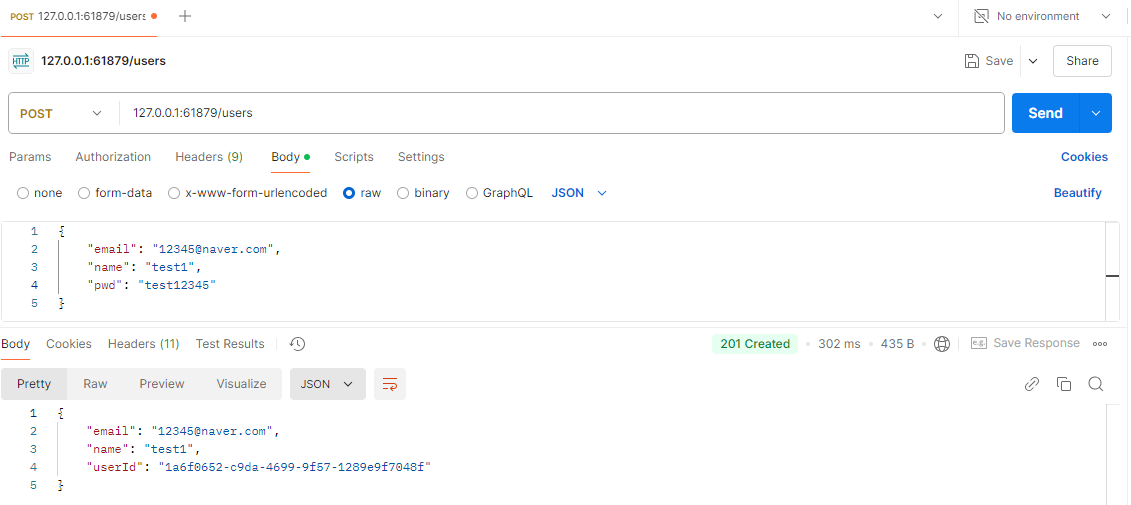
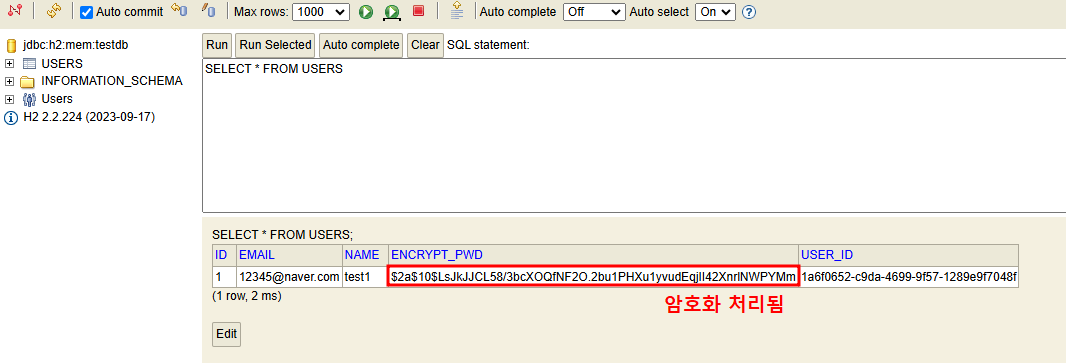

새싹 개발자