Template System
Django Template system
-
데이터 표현을 제어하면서, 표현과 관련된 부분을 담당
-
Ex) HTML 콘텐츠를 변수 값으로 변경
- 변경 전
{% comment %} index.html {% endcomment %} <body> <h1>Hello, django!</h1> </body>- 변경 후
# views.py
def index(request):
    context = {
        'name': 'Jane'
    }
    return render(request, 'articles/index.html', context)
{% comment %} index.html {% endcomment %} <body> <h1>Hello, {{name}}</h1> </body>
Django Template Language(DTL)
- Template에서 조건, 반복, 변수 등의 프로그래적 기능을 제공하는 시스템
DTL Syntax
-
- Variable
- render 함수의 세번째 인자로 딕셔너리 데이터를 사용
- 딕셔너리 key에 해당하는 문자열이 template에서 사용가능한 변수명이 됨
- dot('.')를 사용하여 변수 속성에 접근할 수 있음
			{{variable}}
   {{variable.attribute}}
-
- Filters
- 표시할 변수를 수정할 때 사용 (변수 + '|' + 필터)
- chained(연결)이 가능하며 일부 필터는 인자를 받기도 함
- 약 60개의 built-in template filters를 제공
		{{ variable|filter }}
{{ name|truncatewords:30 }}
-
- Tags
- 반복 또는 논리를 수행하여 제어 흐름을 만듦
- 일부 태그는 시작과 종료 태그가 필요
- 약 24개의 built-in template tags를 제공
	{% tag %}
 {% if %} {% endif %}
-
- Comments
- {% comment %} {% endcomment %}
-
Ex)
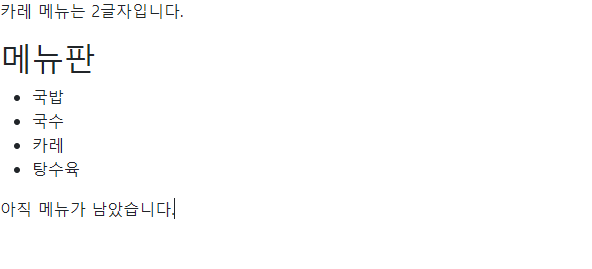
<!-- dinner.html -->
{% extends "articles/base.html" %}

{% block content %}
  <p>{{ picked }} 메뉴는 {{ picked|length }}글자입니다.</p>
  <h2>메뉴판</h2>
  <ul>
    {% for food in foods %}
      <li>{{ food }}</li>
    {% endfor %}
  </ul>

  {% if foods|length == 0 %}
    <p>메뉴가 소진되었습니다.</p>
  {% else %}
    <p>아직 메뉴가 남았습니다.</p>
  {% endif %}
{% endblock content %}
# views.py
def dinner(request):
foods = [
'국밥',
'국수',
'카레',
'탕수육',
]
picked = random.choice(foods)
context = {
'foods': foods,
'picked': picked,
}
return render(request, 'articles/dinner.html', context)urlpatterns = [
path('admin/', admin.site.urls),
path('dinner/', views.dinner),
]템플릿 상속
- 페이지의 공통요소를 포함하고, 하위 템플릿이 재정의 할 수 있는 공간을 정의하는 기본 'skeleton' 템플릿을 작성하여 상속 구조를 구축
<!doctype html>
<html lang="en">
  <head>
    <meta charset="utf-8">
    <meta name="viewport" content="width=device-width, initial-scale=1">
    <title>Bootstrap demo</title>
    <link href="https://cdn.jsdelivr.net/npm/bootstrap@5.3.3/dist/css/bootstrap.min.css" rel="stylesheet" integrity="sha384-QWTKZyjpPEjISv5WaRU9OFeRpok6YctnYmDr5pNlyT2bRjXh0JMhjY6hW+ALEwIH" crossorigin="anonymous">
    {% block style %}
    {% endblock style %}
  </head>
  <body>
    {% block content %}
    {% endblock content %}
    <script src="https://cdn.jsdelivr.net/npm/bootstrap@5.3.3/dist/js/bootstrap.bundle.min.js" integrity="sha384-YvpcrYf0tY3lHB60NNkmXc5s9fDVZLESaAA55NDzOxhy9GkcIdslK1eN7N6jIeHz" crossorigin="anonymous"></script>
  </body>
</html>- extends tag
- {% extends 'path' %}
- 자식(하위)템플릿이 부모 템플릿을 확장한다는 것을 알림
- {% extends 'path' %}
- block tag
- {% block name %}{% endblock name %}
- 하위 템플릿에서 재정의 할 수 있는 블록을 정의
- {% block name %}{% endblock name %}
HTML form 요청과 응답
- 데이터를 보내고 가져오기
- HTML 'form' element를 통해 사용자와 애플리케이션 간의 상호작용 이해하기
formelement- 사용자로부터 할당된 데이터를 서버로 전송
- 웹에서 사용자 정보를 입력하는 여러 방식을 제공
action & method- 데이터를 어디(action)로 어떤 방식(method)으로 요청할지
action- 입력데이터가 전송될 URL을 지정(목적지)
- 만약 이 속성을 지정하지 않으면 데이터는 현재 form이 있는 페이지의 URL로 보내짐
method- 데이터를 어떤 방식으로 보낼 것인지 정의
- 데이터의 HTTP request methods (GET,POST)를 지정
inputelement- 사용자의 데이터를 입력 받을 수 있는 요소
nameattribute- 입력한 데이터에 붙이는 이름
- 데이터를 제출했을 때 서버는 name 속성에 설정된 값을 통해서만 사용자가 입력한 데이터에 접근할 수 있음
- Query String Parameters
-
사용자의 입력 데이터를 URL 주소에 파라미터를 통해 서버로 보내는 방법
-
문자열은 앰퍼샌드('&')로 연결된 key=value 쌍으로 구성되며, 기본 URL과는 물음표('?')로 구분됨
-
https://host:port/path?key=value&key=value
-
throw & catch logic
throw
# urls.py
urlpatterns = [
    path('admin/', admin.site.urls),
    path('throw/', views.throw),
]
# views.py
def throw(request):
return render(request, 'articles/throw.html')<!-- throw.html -->
{% extends "articles/base.html" %}
{% block content %}
<h1>Throw</h1>
<form action="/catch/" method="GET">
<input type="text" name="message">
<input type="submit">
</form>
{% endblock content %}catch
# urls.py
urlpatterns = [
    path('admin/', admin.site.urls),
    path('catch/', views.catch),
]
# views.py
def catch(request):
print(request) # <WSGIRequest: GET '/catch/?message=hello'>
print(type(request)) # <class 'django.core.handlers.wsgi.WSGIRequest'>
print(dir(request)) #
print(request.GET) # <QueryDict: {'message': ['hello']}>
print(request.GET.get('message')) # hello
message = request.GET.get('message')
context = {
'message': message,
}
return render(request, 'articles/catch.html', context)<!-- catch.html -->
{% extends "articles/base.html" %}
{% block content %}
<h1>Catch</h1>
<h2>{{ message }}를 받았습니다!!!</h2>
{% endblock content %}PS : 경로 지정시 settings.py에 들어가 TEMPLATES의 DIRS 경로를 지정하면 쉽게 할 수 있다. DTL 주의사항
- Python처럼 일부 프로그래밍 구조(if, for등)를 사용할 수 있지만 명칭을 그렇게 설계했을 뿐이지 Python 코드로 실행되는 것이 아니며 Python과는 관련 없음
- 프로그래밍 로직이 아니라 표현을 위한 것임을 명심하기
- 프로그래밍적 로직은 되도록 view 함수에서 작성 및 처리할 것
URL이 일부만 변경되고 다 같을 때
- Variable Routing
- URL 일부에 변수 포함하기
#urls.py
	urlpatterns = [
 path('admin/', admin.site.urls),
 path('greeting/<str:name>/', views.greeting),
 path('articles/<int:num>/', views.detail),
	]
- URL 일부에 변수 포함하기

데이터 분석에서 백엔드까지...