AWS IAM
0. Introduction
IAM : Identity & Access Management
Today, We'll break down how AWS controls IAM in a nutshell. 🪪
1. Who : Principals
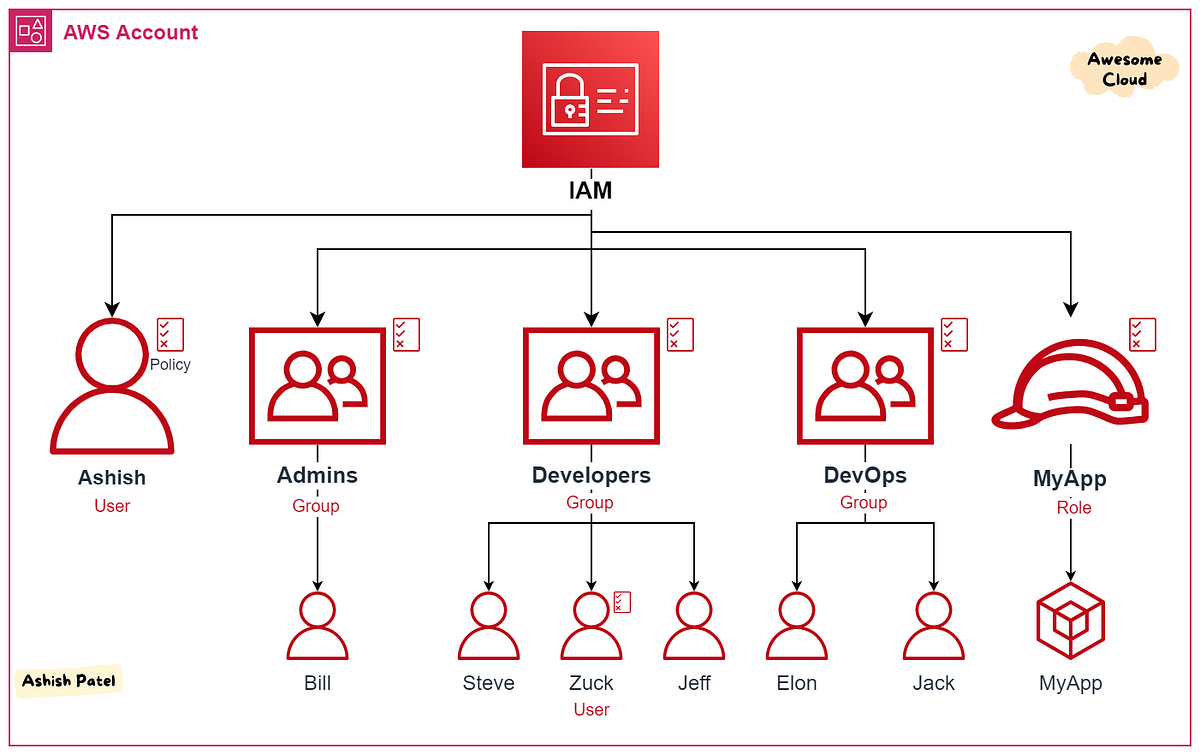
In IAM, you manage Principals.
IAM User: A persistent identity for a specific person or service. (Avoid these for services; they use static Access Keys which are a security nightmare).
IAM Group: A collection of users. Use these to apply policies to multiple people at once (e.g., "Dev-Team-Group").
IAM Role: A temporary identity. It doesn't have passwords or keys. Instead, it uses STS (Security Token Service) to get short-lived credentials.d
| Elements | Description | Metaphor |
|---|---|---|
| User | Real Humans | A Employee |
| Group | a set of humans | A Department |
| Role | temporary Privelige | A Visitor Card |
DevOps Tip: Always use Roles for EC2 instances, Lambda functions, and CI/CD pipelines (like GitHub Actions).
2. What : Permissions
Policy = Principal + Permissions (Act)
- Permission : the act of drinking water
- Policy : Jinhyuk is allowed to drink water at 7pm
-
Action: What to do? (Permissions -> s3:ListBucket)
-
Resource: To Whom? (always ARN)
-
Condition: When?
3. How : Policy
3.1. 4 Pllars of IAM Policy
-
Effect: (Allow / Deny)
-
Action: What to do? (Permissions -> s3:ListBucket)
-
Resource: To Whom? (always ARN)
-
Condition: When?
Policies are JSON documents that define permissions.
3.2. Policy Types:
-
Identity-based Policies: Attached to Users, Groups, or Roles.
-
Rreesource-based Policies: Attached directly to a resource (e.g., S3 Bucket Policy, KMS Key Policy).
- Trust Policy: For Roles, there is a special policy called a Trust Policy. It defines who is allowed to assume this role. -
Permissions Boundaries: A "maximum limit" you set for a user so they can't escalate their own privileges.
-
SCPs (Service Control Policies): Applied at the AWS Organizations level. They act as a guardrail for the entire account.
3.3. The JSON Structure
As a security expert, you’ll spend a lot of time auditing these blocks:
{
  "Version": "2012-10-17",
  "Statement": [
    {
      "Sid": "AllowSpecificS3Access",
      "Effect": "Allow",
      "Action": ["s3:GetObject", "s3:PutObject"],
      "Resource": "arn:aws:s3:::my-secure-bucket/*",
      "Condition": {
        "IpAddress": { "aws:SourceIp": "203.0.113.0/24" },
        "Bool": { "aws:MultiFactorAuthPresent": "true" }
      }
    }
  ]
}- Identity-based Policy : it has no principal.
{
    "Version": "2012-10-17",
    "Statement": [
        {
            "Effect": "Allow",
            "Principal": {
                "AWS": "arn:aws:iam::123456789012:user/BossName"
            },
            "Action": "s3:GetObject",
            "Resource": "arn:aws:s3:::my-boss-bucket/*"
        }
    ]
}- Resource-based Policy
{
    "Version": "2012-10-17",
    "Statement": [
        {
            "Effect": "Allow",
            "Principal": {
                "Service": "ec2.amazonaws.com"
            },
            "Action": "sts:AssumeRole"
        }
    ]
}- Trust Policy
! Tip
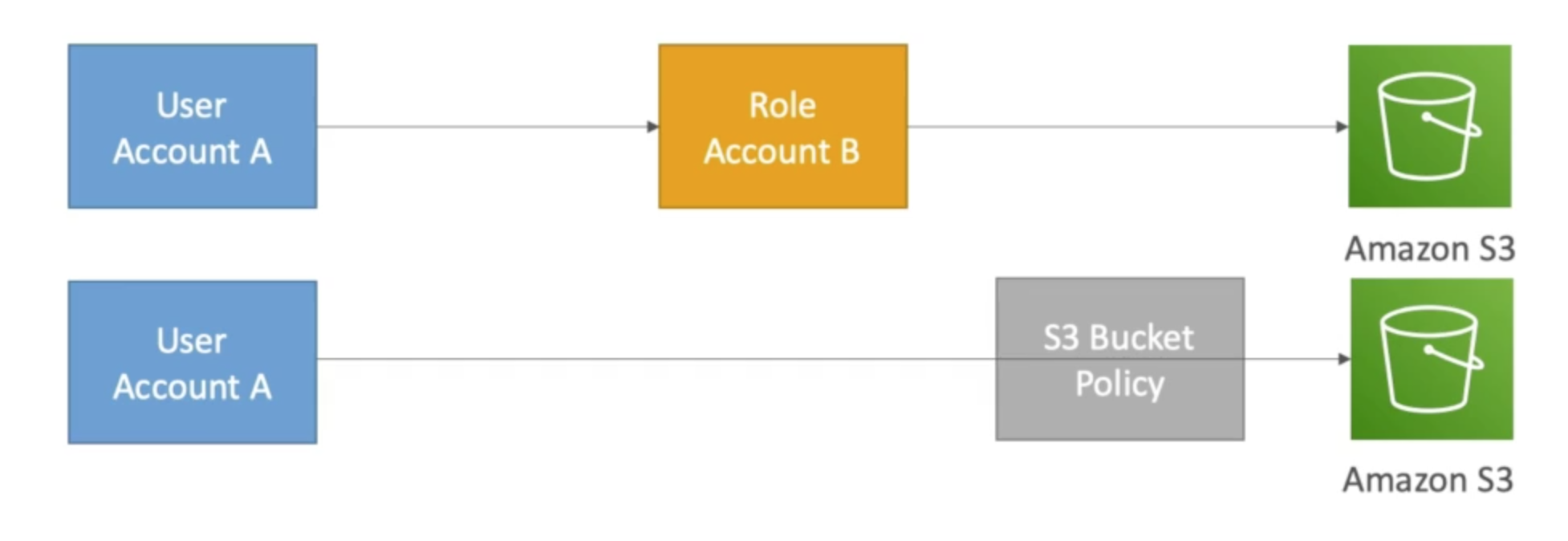
There are two ways to allow cross-account users to S3
1. Role as a Proxy
2. S3 Bucket-Policy
3.4. Policy Evaluation Logic
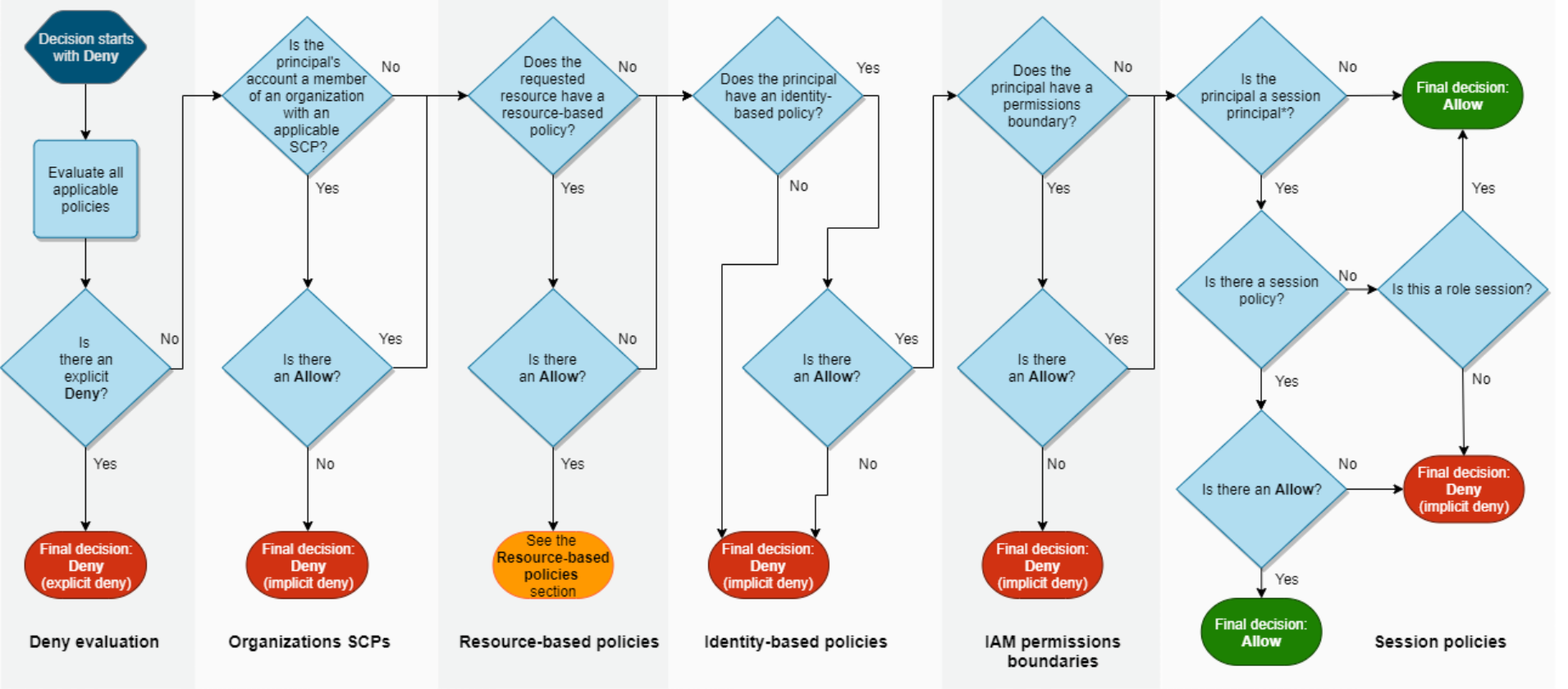
Priorities :
"Explicit Deny" rule : If there is a Deny anywhere, the request is rejected, regardless of any Allow.
4. When: Conditions
"Condition": {
  "<ConditionOperator>": {
    "<ConditionKey>": "<Value | [Values]>"
  }
}
4.1. Logical Operators
everyting is evaluated using & operator within a condition block execpt for value arrays
if you want to express OR operator, use multiple statements instead
{
  "Statement": [
    {
      "Effect": "Allow",
      "Action": "s3:GetObject",
      "Resource": "*",
      "Condition": {
        "Bool": {
          "aws:MultiFactorAuthPresent": "true"
        }
      }
    },
    {
      "Effect": "Allow",
      "Action": "s3:GetObject",
      "Resource": "*",
      "Condition": {
        "IpAddress": {
          "aws:SourceIp": "10.0.0.0/16"
        }
      }
    }
  ]
}
10.0.0.0/16 OR MFA
5. Guardrail
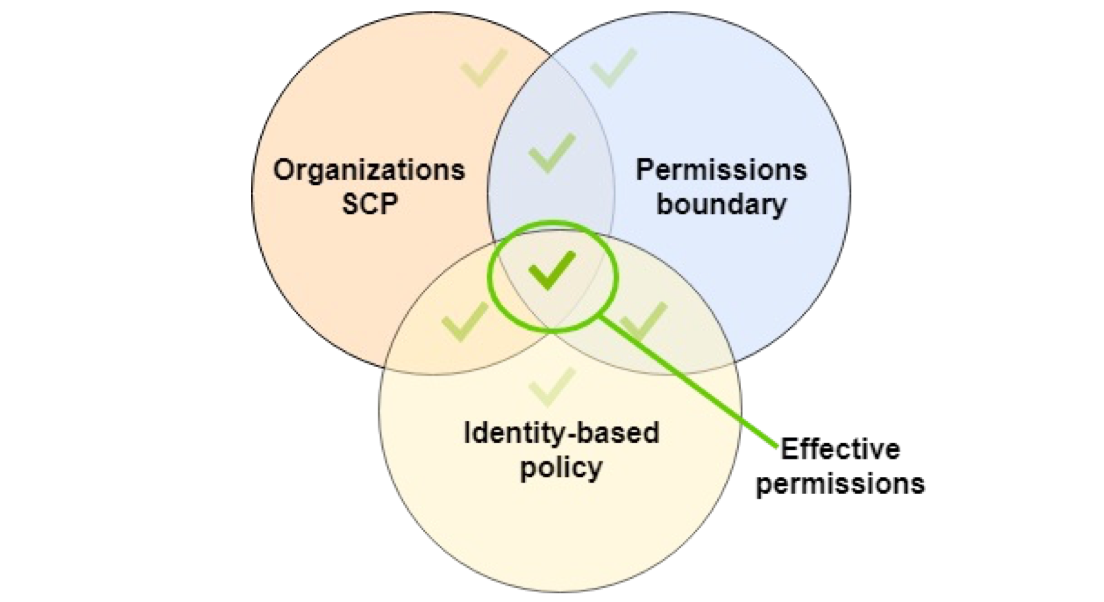
5.1. SCP
{
    "Version": "2012-10-17",
    "Statement": [
        {
            "Sid": "DenyAllOutsideSeoul",
            "Effect": "Deny",
            "Action": "*",
            "Resource": "*",
            "Condition": {
                "StringNotEquals": {
                    "aws:RequestedRegion": "ap-northeast-2"
                }
            }
        }
    ]
}- SCP
5.2. Permission Boundaries