Resolve, Resect 그리고 에러 핸들링1
then 메소드 사용하기 (catch)
const delayAdd = index => {
    return new Promise((resolve, reject) => {
        setTimeout(() => {
            if(index > 10) {
                // 정상적 X
                reject(`${index}는 10보다 클 수 없습니다`)
                return
            }
            console.log(index)
            // 정상적 로직
            resolve(index +1)
        }, 1000)
    })
}

delayAdd(2)
    .then(res => console.log(res))
.catch(err = console.log(err))- promise 생성자 함수를 호출할 때 넣는 콜백에서는, resolve, reject라는 이름의 매개변수를 사용할 수 있는데 이 두가지는 상충되는 개념이다. resolve라는 매개변수가 호출이 되면 reject 매개변수가 실행되지 않으며, reject가 실행이되면 resolve는 실행되지 않는다.
-> 서로의 매개변수만 상충되는 것이고 다른 코드는 실행이 될 수 있는 구조이다. return 키워드로 방지하면 함수를종료할 수 있다. - then , catch 메소드를 사용할 수 있는데, then메소드로 들어가는 콜백같은 경우는 resolve매개변수로 들어가고 catch 부분의 콜백은 reject 매개변수로 들어가게 된다.
async, await패턴 사용하기
const delayAdd = index => {
    return new Promise((resolve, reject) => {
        setTimeout(() => {
            if(index > 10) {
                // 정상적 X
                reject(`${index}는 10보다 클 수 없습니다`)
                return
            }
            console.log(index)
            // 정상적 로직
            resolve(index +1)
        }, 1000)
    })
}

delayAdd(2)
    .then(res => console.log(res))
    .catch(err = console.log(err))
    .finally(() => console.log('done!'))

const wrap = async () => {
   try {
    const res = await delayAdd(2)
    console.log(res)
   } catch (err) {
    err = console.log(err)
   } finally {
    console.log('done!')
   }
   }
wrap()- then⭐️
- 만약 문제가 있으면 reject이라는 매개변수가 동작할 것이고, reject이라는 매개변수가 동작하면 resolve는 실행되지 않으며 then 메소드의 콜백은 동작하지 않고 catch 메소드의 콜백만 동작한다.
- async, await
- 만약 reject이라는 메소드가 동작하게되면 await키워드가 붙어있는 함수에서 실제로 에러가 발생한 개념이고, 그러면 try 구문 안에 있는 실제로 에러가 발생한 코드를 제외한 나머지 부분은 절대 동작하지 않고 catch로 넘어가게 돼서 resect이라는 매개변수가 호출될 때 들어가는 인수를 err변수로 받아서 내부에서 사용
- finally는 resect, resolve 매개변수가 실행되는 것과 전혀 상관없이 항상 실행!!!!!
- Resolve, Resect 그리고 에러 핸들링2 강의는 다시 한 번더 보기! (이해 안되면)⭐️⭐️⭐️⭐️⭐️
## 반복문에서 비동기 처리 - 비동기 코드를 만약 매 반복마다 기다려서 실행해야 한다면, forEach가 아닌 for 반복문을 통해서 동작하자. ``` const titles = ['frozen', 'avengers', 'avatar']
// for 반복문 사용하면 순서대로~
const wrap = async () => {
for (const title of titles) {
const movies = await getMovies(title)
console.log(title, movies)
}
}
wrap()
## fetch(주소, 옵션)함수
- 네트워크를 통해서 리소스의 요청 및 응답을 처리할 수 있다
- Promise 인스턴스를 반환한다.
fetch(https://www.omdbapi.com/?apikey=7035c60c&s=avengers)
-> fetch 함수는 promise 인스턴스를 반환하기에 뒤에 .then()이라는 메소드를 사용할 수 있는데, 실제 Promise 인스턴스를 반환하는지 보기 위해 consol.log로 찍어보았다.
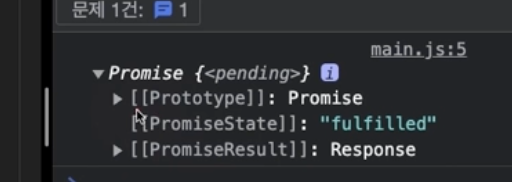
=> 출력 결과를 보듯이 promise 인스턴스가 나왔다.
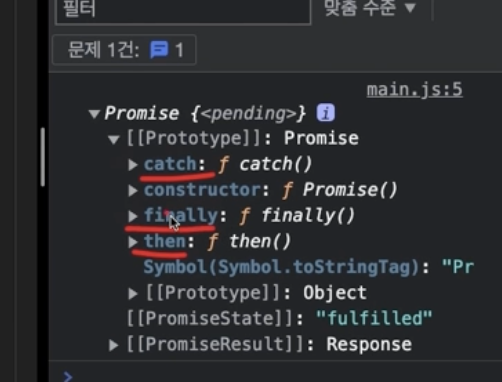
fetch(https://www.omdbapi.com/?apikey=7035c60c&s=avengers)
.then(res => console.log(res))
-> 출력 결과로 status:200도 오고, 영화정보는? Response가 있는데 이것을 열어보면 json이라는 이름으로 하나의 함수가 할당되어 있다. fetch함수로 가지고 온 응답의 결과에서 json 메소드를 호출해야, 데이처를 꺼낼 수 있다는 것이다.
.then(res => console.log(res.json()))
### async, await 패턴const wrap = async() => {
const res = await fetch(https://www.omdbapi.com/?apikey=7035c60c&s=avengers)
const json = await res.json()
console.log(json)
}
wrap()
<hr>
headers: 서버로 전송하는 요청에 대한 정보
body : 요청에 대한 데이터를 담는다(body라는 옵션에 명시하는 데이터는 항상 문자화를 시켜주어야 한다.

stringify: 인수로 들어온 js데이터를 모두 문자화
-> 서버로 전송할 땐 데이터들을 모두 문자 데이터로 바꿔서 전송해야한다. fetch(https://www.omdbapi.com/?apikey=7035c60c&s=avengers, {
method:'GET',
headers:{
'Content-Type': 'application/json'
},
body: JSON.stringify({
name: 'HEROPY',
age:85,
email:'wjdwlswn23@naver.com'
})
})
우리는 서버에서 데이터를 가져오는 것 뿐만 아닌 데이터 추가, 삭제, 수정 등을 요청할 수 있다.
개인 개발 공부, 정리용 🔗